
Building a Simple Calendar Application in Laravel: A Step-by-Step Tutorial
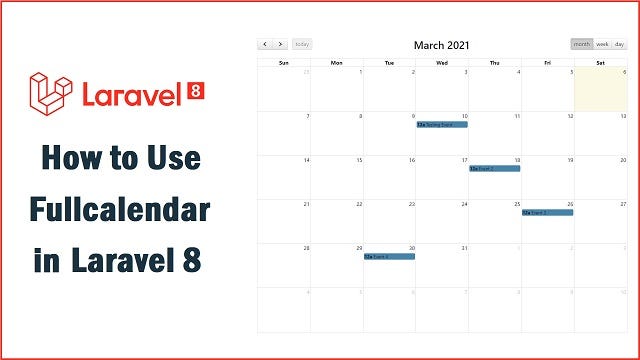
Creating a calendar in Laravel involves building a web application that displays a calendar UI and handles events and date-related operations. In this tutorial, we’ll walk through the process of building a simple calendar application step-by-step. We’ll assume you have a basic understanding of Laravel and PHP. Let’s get started:
Step 1: Set Up Laravel Project
If you haven’t already installed Laravel, start by creating a new Laravel project using Composer:
composer create-project - prefer-dist laravel/laravel calendar-app
cd calendar-app
Step 2: Create a Model and Migration
Next, create a model and migration to store the events in the database:
php artisan make:model Event -mThis command will generate the Event model and its corresponding migration file. Open the migration file located in the database/migrations directory and define the schema for the events table:
// database/migrations/xxxx_xx_xx_create_events_table.php

use Illuminate\Database\Migrations\Migration;
use Illuminate\Database\Schema\Blueprint;
use Illuminate\Support\Facades\Schema;

class CreateEventsTable extends Migration
{
    public function up()
    {
        Schema::create('events', function (Blueprint $table) {
            $table->id();
            $table->string('title');
            $table->dateTime('start_date');
            $table->dateTime('end_date');
            $table->timestamps();
        });
    }

    public function down()
    {
        Schema::dropIfExists('events');
    }
}
Run the migration to create the events table:
php artisan migrate
Step 3: Set Up Routes and Controller
Create a new controller to handle the calendar-related functionality:
php artisan make:controller CalendarControllerIn the CalendarController, define methods for displaying the calendar view and handling event-related actions:
// app/Http/Controllers/CalendarController.php

namespace App\Http\Controllers;

use Illuminate\Http\Request;
use App\Models\Event;

class CalendarController extends Controller
{
    public function index()
    {
        return view('calendar');
    }

    // Add methods for handling events (e.g., create, edit, delete) here.
}
Step 4: Create the Calendar
View Create a new Blade view file to display the calendar UI:
mkdir resources/views/calendar
touch resources/views/calendar/index.blade.php
In index.blade.php, you can use any frontend framework or a custom solution to create the calendar UI. For simplicity, we'll use the FullCalendar library, which is a popular JavaScript library for displaying interactive calendars. Include the required CSS and JavaScript files and create a container for the calendar:
<!-- resources/views/calendar/index.blade.php -->

@extends('layouts.app')

@section('content')
<div id="calendar"></div>
@endsection

@section('scripts')
<!-- Include FullCalendar CSS and JS files -->
<link href="https://cdnjs.cloudflare.com/ajax/libs/fullcalendar/3.10.2/fullcalendar.min.css" rel="stylesheet">
<script src="https://cdnjs.cloudflare.com/ajax/libs/moment.js/2.29.1/moment.min.js"></script>
<script src="https://cdnjs.cloudflare.com/ajax/libs/fullcalendar/3.10.2/fullcalendar.min.js"></script>
<script src="https://cdnjs.cloudflare.com/ajax/libs/fullcalendar/3.10.2/locale-all.js"></script>

<script>
  document.addEventListener('DOMContentLoaded', function() {
    var calendarEl = document.getElementById('calendar');
    var calendar = new FullCalendar.Calendar(calendarEl, {
      // Configure the calendar options here (e.g., defaultView, eventClick, etc.)

      // Events data will be fetched via AJAX in a later step
    });
    calendar.render();
  });
</script>
@endsection
Step 5: Fetch and Display Events
Modify the index method in the CalendarController to fetch events from the database and pass them to the view:
// app/Http/Controllers/CalendarController.php

// ...

class CalendarController extends Controller
{
    public function index()
    {
        $events = Event::all();
        return view('calendar.index', compact('events'));
    }

    // ...
}
Update the calendar view to load the events dynamically using AJAX:
<!-- resources/views/calendar/index.blade.php -->

@extends('layouts.app')

@section('content')
<div id="calendar"></div>
@endsection

@section('scripts')
<!-- Include FullCalendar CSS and JS files -->
<link href="https://cdnjs.cloudflare.com/ajax/libs/fullcalendar/3.10.2/fullcalendar.min.css" rel="stylesheet">
<script src="https://cdnjs.cloudflare.com/ajax/libs/moment.js/2.29.1/moment.min.js"></script>
<script src="https://cdnjs.cloudflare.com/ajax/libs/fullcalendar/3.10.2/fullcalendar.min.js"></script>
<script src="https://cdnjs.cloudflare.com/ajax/libs/fullcalendar/3.10.2/locale-all.js"></script>

<script>
  document.addEventListener('DOMContentLoaded', function() {
    var calendarEl = document.getElementById('calendar');
    var calendar = new FullCalendar.Calendar(calendarEl, {
      // Configure the calendar options here (e.g., defaultView, eventClick, etc.)
      events: {!! json_encode($events) !!}
    });
    calendar.render();
  });
</script>
@endsection
Step 6: Implement Event Actions (Optional)
If you want to allow users to create, edit, and delete events, you’ll need to implement these functionalities in the CalendarController. Here's a brief outline of how you can do that:
- Implement methods for creating, updating, and deleting events in the
CalendarController. - Use AJAX to send the event data to the server for storage and updating.
- Add appropriate routes to handle the AJAX requests.
Step 7: Configure Routes
Finally, define the routes in routes/web.php to access the calendar:
// routes/web.php

use App\Http\Controllers\CalendarController;

Route::get('/calendar', [CalendarController::class, 'index']);
// Add additional routes for event actions (create, edit, delete) if needed
Step 8: Start the Development Server
You can now start the Laravel development server to view the calendar:
php artisan serve
Visit http://127.0.0.1:8000/calendar in your browser to see the calendar with any events you have in the database.
Keep in mind that this is a basic example of creating a calendar in Laravel. Depending on your requirements, you can extend and customize the calendar application further to suit your needs. Additionally, you may want to implement authentication and authorization to control access to event-related actions.
Support me with a coffee: https://www.buymeacoffee.com/sarahdev


