
Create Your Own YouTube Video Summarizer App in Just 3 Easy Steps
Build GPT-3 powered video summarizer to identify the important glimpse of your favorite video

Nowadays podcasts have become a popular source of knowledge and entertainment, providing listeners with a diverse range of topics and perspectives. With the increasing availability of podcasts on YouTube, listeners now have the added option of visual characteristics to accompany their listening experience. However, podcasts are quite long, and (let’s be real) not all episodes of your favorite podcasts are equally excellent, and certainly, not all parts of an episode may be of interest to you. This makes it difficult to select which episode to watch or which part of an episode to focus on. With this in mind, I’ve developed a YouTube summarizer that prepares a summary of your favorite podcasts, allowing you to get a glimpse of the episode before committing to a full listen.
In this post, we’ll go through the step-by-step process to build a summarizer that can save you time and improve your podcast listening experience. You will find the entire code in this Deepnote notebook. At the end of this post, I’ll share a few killer ideas that you can build easily with GPT-3 models.
Before starting, I’d like to thank David Shapiro for his inspiring video and code snippet.
Overview
Now, let’s get into it. We have three major steps in our workflow:
- Download the YouTube transcript.
- Summarize the transcript part-by-part with OpenAI.
- Rewrite those parts with OpenAI.
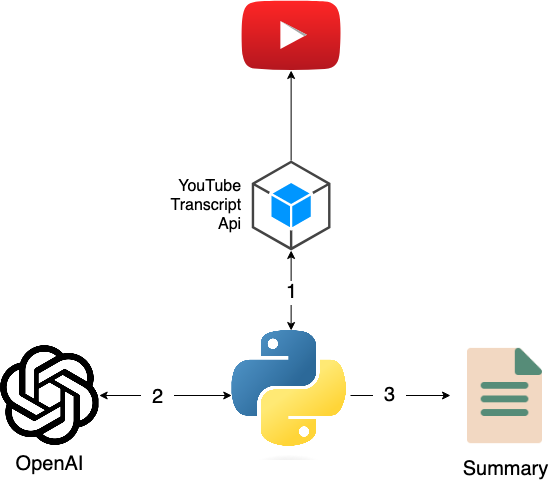
Tools and libraries that we are going to use:
- Davinci: OpenAI’s Davinci language model is one of the most advanced language models available. It allows developers to perform a variety of language processing tasks, such as translation, text summarization, and question-answering.
- Deepnote: Deepnote is a cloud-based integrated development environment for collaborative data analysis. It is tailored for analysts, engineers, and marketers to efficiently understand their data. We are going to use Deepnote as our development platform.
The entire code can be found in this Deepnote Notebook.
Setting up OpenAI Account
OpenAI is currently in beta mode, and you can use the pre-trained models for free with limited usage. For our application, that will be enough. If you want to train and configure the models and build a custom model, it will cost you a little.
Create an account in OpenAI. Once your account is ready, create your API key from here.
Building the YouTube summarizer
To summarize a YouTube video, we have to have the full transcript of the video first. Thankfully there is a Python library youtube-transcript-api. This library can extract the full transcript of any YouTube video (if available). The only thing you need is the video ID, which is available on the URL (e.g., https://www.youtube.com/watch?v=xxxxxxxx).
Here is the code snippet that downloads the video transcript.
Once the transcript is there, the rest can be done with OpenAI. I’ve already written the process in a separate blog post, take a look.
Essentially, we’ll utilize the text-davinci-003 language model, which is a state-of-the-art language model developed by OpenAI. We will pass the video transcript into the prompt parameter of the Completion API. We want the summary to be about 500 words. That’s why we pass max_tokens=500. Tokens are the building blocks for natural language processing tasks, and in OpenAI, 1 token ~= 4 chars in English.
Podcasts can be lengthy. Some are even 4–5 hours long. For such long videos, the summarization process may require the following two-step processing:
- Split the transcript into chunks and generate a summary of each chunk.
- Combining those chunk summaries into one big summary.
Finally, here is the main function that takes a YouTube URL and summarizes the video utilizing the above functions.
Where to go from here?
Try it yourself with your favorite YouTube video. The code is available in the Deepnote notebook. Summarization is just one way to use the vast capabilities of OpenAI. You can fine-tune the OpenAI models and build products or services. Here are 5 ideas for you:
- Code Reviewer: Review code to find security vulnerabilities or check code quality.
- Tutor for any subject: Build an app that can teach a certain topic.
- Copywriter: Generate high-quality copy for marketing campaigns or social media posts.
- Idea Bank: Ideation for your next blog post or brainstorming new ideas.
- Quiz Master: Build a question generator on a specific topic to prepare you for big tests.
If you have any questions or comments, feel free to write in the comments section.
Thanks for reading! If you like the article, make sure to clap (up to 50!), and let’s connect on LinkedIn and follow me on Medium to stay updated with my new articles.
Support me at no extra cost by joining Medium via this referral link.


