
Create Your Own Layout Component in React
A guide on how to create basic layout components with Header, Footer, and content section.

Layout component
The layout component is a component used to share a common section across multiple pages. The layout component will have a common header and footer section.
- 1. Create App
- 2. Create Footer and Header components
- 3. Create a Layout component
- 4. Add layout to the app
1. Create App
First, create your new React app using create-react-app:
npx create-react-app my-app
cd my-app
npm start
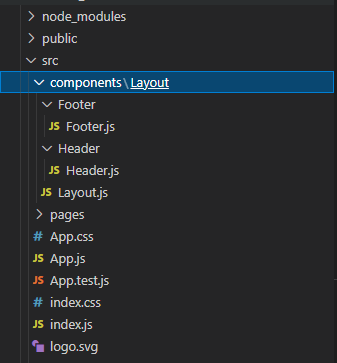
Create components and Layout folders inside the src folder.
2. Create Footer and Header components
We have Footer and Header components inside the Layout folder. Create the Header and Footer components using the below code:
src/components/Layout/Footer/Footer.js
import React from "react";
class Footer extends React.Component {
  render() {
    return(
      <footer>
        Footer
      </footer>
    );
  }
}
export default Footer;
Read more about the differences between functional components and class components in React.
src/components/Layout/Header/Header.js
import React from "react";
class Header extends React.Component {
  render() {
    return(
      <header>
        Header
      </header>
    );
  }
}
export default Header;3. Create a Layout component
Now we going to create our Layout component.
src/components/Layout/Layout.js
import React from "react"
import Header from "./Header/Header"
import Footer from "./Footer/Footer"
class Layout extends React.Component {
  render(){
    return (
      <>
        <Header />
        <main>{this.props.children}</main>
        <Footer />
      </>
    )
  }
}
export default Layout;
If a component, when used, contains child components or React nodes inside of the component (e.g., <Parent><Child /></Parent> or <Parent><span>test<span></Parent>) these React node or component instances can be accessed by using this.props.children.
4. Add layout to the app
Update your App.js and include Layout in your index.js:
src/App.js
import './App.css';
function App() {
  return (
    <div className="App">
      Hello world!
    </div>
  );
}
export default App;
src/index.js
import React from 'react';
import ReactDOM from 'react-dom';
import './index.css';
import App from './App';
import Layout from './components/Layout/Layout';
ReactDOM.render(
  <Layout>
    <App />
  </Layout>,
  document.getElementById('root')
);
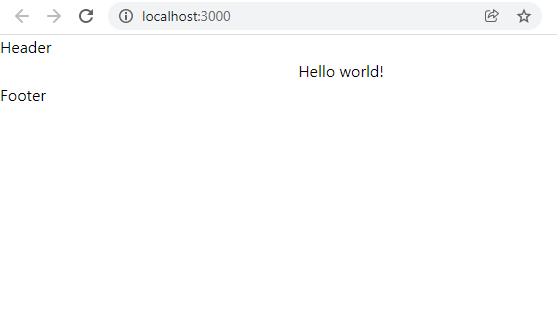
Output
This example code is available at https://github.com/balajidharma/react-basic-layout/tree/master.
StackBlitz application
We successfully created our own layout component. This is a basic React layout component, hope it will help you to understand the basic layout flow.
Also, read Multiple Layouts Components with React Router, Top Most followers profile on Medium.
💡 And if you need to quickly put together a UI then read this article:
References
Further Reading
More content at PlainEnglish.io. Sign up for our free weekly newsletter. Follow us on Twitter, LinkedIn, YouTube, and Discord. Interested in Growth Hacking? Check out Circuit.


