avatarNitin Sharma

Free AI web copilot to create summaries, insights and extended knowledge, download it at here

2196

Abstract

t part is that it will be free of charge. Simply complete the short registration form, and you’ll be ready to explore Dante AI’s universe.</p><p id="e0c8">You can also join up with your Google account.</p><h1 id="dfc3">2. Connecting Slack and Dante AI on Zapier: A Quick Demo</h1><figure id="6747"><img src="https://cdn-images-1.readmedium.com/v2/resize:fit:800/1*zSNej1U51sJNTUTQ_W7z4w.png"><figcaption>Src: Dante AI</figcaption></figure><p id="ae7e">Previously, I wrote a <a href="https://levelup.gitconnected.com/make-money-while-you-sleep-by-automating-your-entire-workflow-with-dante-ai-and-zapier-4d3551709d7a">post</a> where I introduced Zapier and how you can link Dante AI with various apps in Zapier.</p><p id="67b9">In that <a href="https://levelup.gitconnected.com/make-money-while-you-sleep-by-automating-your-entire-workflow-with-dante-ai-and-zapier-4d3551709d7a">post</a>, I provided an example of connecting Dante AI with Gmail using Zapier.</p><p id="729b">Now, in this new post, I’m focusing on connecting Slack with Dante AI to create an HR assistant chatbot.</p><p id="18d9">Let me walk you through a quick demo.</p><figure id="5b75"><img src="https://cdn-images-1.readmedium.com/v2/resize:fit:800/1*oiFNDqgnYmaH8CPOghlGIA.gif"><figcaption></figcaption></figure><p id="e398">Here, we’re creating a new “zap” (which is just a fancy way of saying an automation process) in Zapier.</p><p id="c328">If you have read my previous post, you may know that we’ll need to set up two events: one is the Trigger, and the other is the Action.</p><p id="95a9">For the Trigger event, we’re choosing a new message in a specific channel. This means every time a new message is added, it will kick off the process.</p><p id="6f1f">Next, we add prompts to Dante AI so that it can fetch answers from its database.</p><p id="5cee">Lastly, we set up another event that shows the answer (the message from Dante AI) in the specific channel on Slack.</p><p id="2232">Pretty cool, isn’t it?</p><h1 id="3255">3. Dante AI Knowledge Base Setup</h1><p id="b715">So, I’ve covered creating a Dante AI account and connecting it with Slack through Zapier.</p><p id="b59c">But you might wonder how to add your cu

Options

stomized information to Dante AI to make sure your employees get the answers they need.</p><p id="c4e9">The good news is that it’s simple.</p><figure id="f0a0"><img src="https://cdn-images-1.readmedium.com/v2/resize:fit:800/1*Re3vZ4zzDzAML499Wv-1bw.png"><figcaption></figcaption></figure><p id="125a">On Dante AI’s homepage, you’ll find an option on the left side called “New Knowledge Base”. Click on that.</p><figure id="df48"><img src="https://cdn-images-1.readmedium.com/v2/resize:fit:800/1*24LLQx6CgU08EBxK-e_eeA.png"><figcaption></figcaption></figure><p id="8549">Give your knowledge base a name, like “HR Chatbot” or anything you prefer. Then, just drag and drop your files containing your specific data and hit the “Create” button.</p><p id="aea1">That’s it — based on the name you gave, a knowledge base personalized to your needs is created.</p><p id="ac68">It’s as simple as that.</p><h1 id="c4d0">Let’s Wrap Up</h1><p id="88df">We all know that in this fast-moving world, staying ahead by 10 to 100 times is crucial, and the key to success lies in using AI tools to automate most of the time-consuming tasks.</p><p id="9288">You won’t have to dig through endless emails, scroll through chat threads, or desperately search for that one important document. That’s why I’ve written this post.</p><p id="a6bd">While we initially look at improving HR processes, Dante AI’s Slack Integration goes far beyond that. It improves communication across all parts of your business, encouraging meaningful interactions and making collaboration super-efficient.</p><p id="79a1">It’s not just about solving HR issues; it’s about changing the way your organization communicates.</p><p id="e09f">But that’s not the end of it.</p><p id="b7d8">Dante AI doesn’t limit itself to Slack. It works with MS Teams, WhatsApp, Instagram, Telegram, Discord, and more.</p><p id="470f">Insane, right?</p><p id="514c">Hope you like it.</p><p id="5e33">That’s it — thanks.</p><p id="a266">Don’t forget to <a href="https://nitinfab.beehiiv.com/subscribe">subscribe to me on Beehiiv</a> for a thrilling dive into AI, tech wizardry, money hacks, side-hustle secrets, and beyond. Your adventure awaits!</p></article></body>

Create Your Own Automated HR Assistant Chatbot With Dante AI, Slack, and Zapier Within 5 Minutes

And say goodbye to HR headaches with Dante AI’s chatbot.

Src: Dante AI

Recently, Dante has teamed up with Zapier to make life easier for everyone. It’s all about simplifying work, and we’re going to dive into one fantastic use case today.

In today’s corporate environment, we use a variety of apps to communicate with our employees. However, it often feels like a tedious game of hide-and-seek.

Important information can be hard to find, and getting quick responses can seem like a distant dream. That’s where Dante AI’s Slack Integration steps in as a game-changer for business communication.

Imagine a world where your teams can get answers instantly without needing HR to be available. With Dante AI’s Slack Integration, that’s no longer just a dream but a reality.

But you might be wondering, what is it? Well, with Dante AI, Slack, and Zapier, you can create an HR assistant chatbot that helps employees solve many of their issues.

It’s pretty amazing, right?

That’s what we’re going to explore in this post. So, let’s get started!

1. Getting Started With Dante AI

Visit Dante AI’s official website.

This is where the fun begins, and you’ll get access to a universe of AI-powered possibilities.
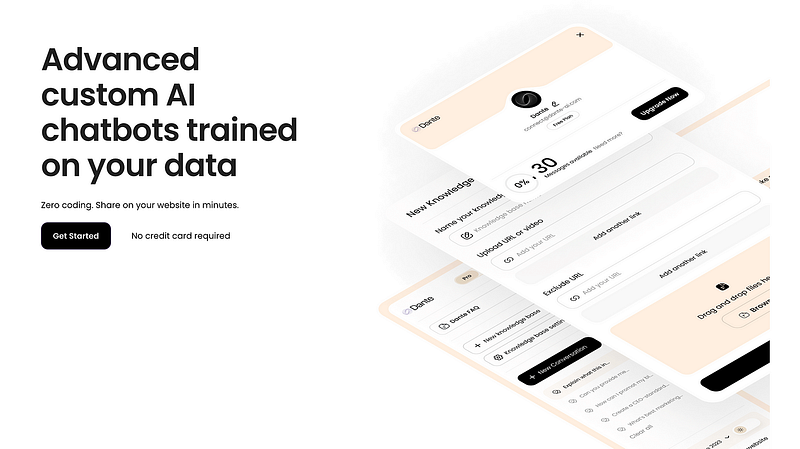
When you arrive at the Dante AI website, look for the welcoming “Get Started” button. Give it a click — this is how you gain access to all Dante AI has to offer.

If you’re new to Dante AI and don’t already have an account, don’t worry — creating one is simple.

You will be directed to create an account, and the greatest part is that it will be free of charge. Simply complete the short registration form, and you’ll be ready to explore Dante AI’s universe.

You can also join up with your Google account.

2. Connecting Slack and Dante AI on Zapier: A Quick Demo
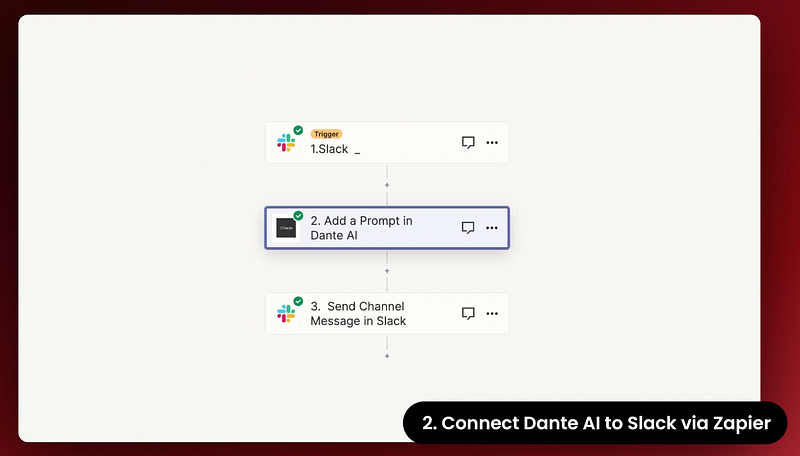
Src: Dante AI

Previously, I wrote a post where I introduced Zapier and how you can link Dante AI with various apps in Zapier.

In that post, I provided an example of connecting Dante AI with Gmail using Zapier.

Now, in this new post, I’m focusing on connecting Slack with Dante AI to create an HR assistant chatbot.

Let me walk you through a quick demo.
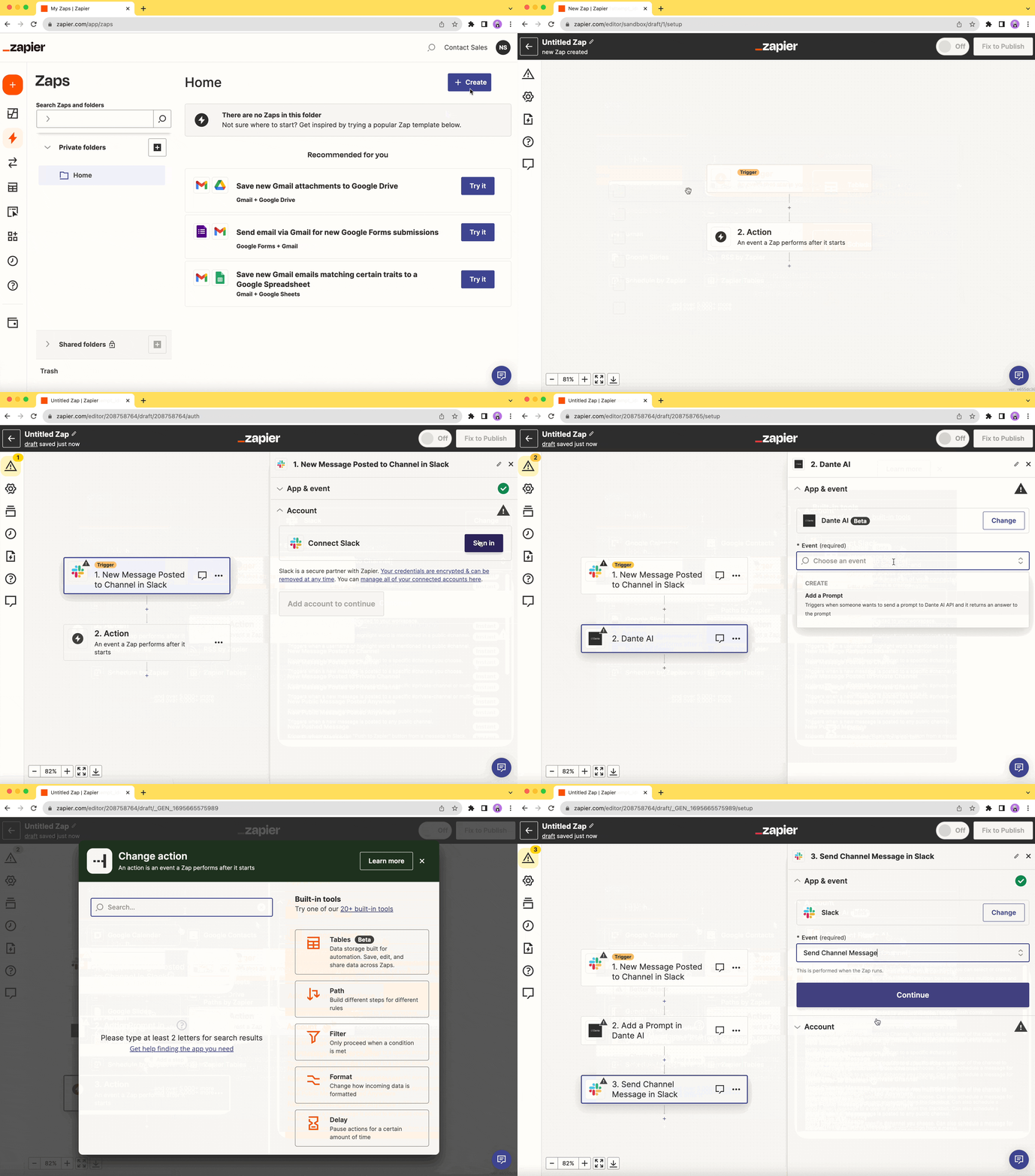
Here, we’re creating a new “zap” (which is just a fancy way of saying an automation process) in Zapier.

If you have read my previous post, you may know that we’ll need to set up two events: one is the Trigger, and the other is the Action.

For the Trigger event, we’re choosing a new message in a specific channel. This means every time a new message is added, it will kick off the process.

Next, we add prompts to Dante AI so that it can fetch answers from its database.

Lastly, we set up another event that shows the answer (the message from Dante AI) in the specific channel on Slack.

Pretty cool, isn’t it?

3. Dante AI Knowledge Base Setup

So, I’ve covered creating a Dante AI account and connecting it with Slack through Zapier.

But you might wonder how to add your customized information to Dante AI to make sure your employees get the answers they need.

The good news is that it’s simple.
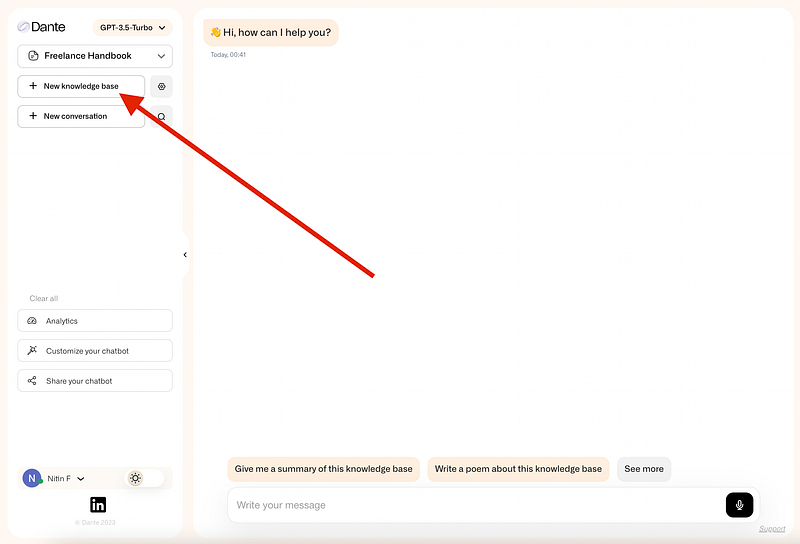
On Dante AI’s homepage, you’ll find an option on the left side called “New Knowledge Base”. Click on that.
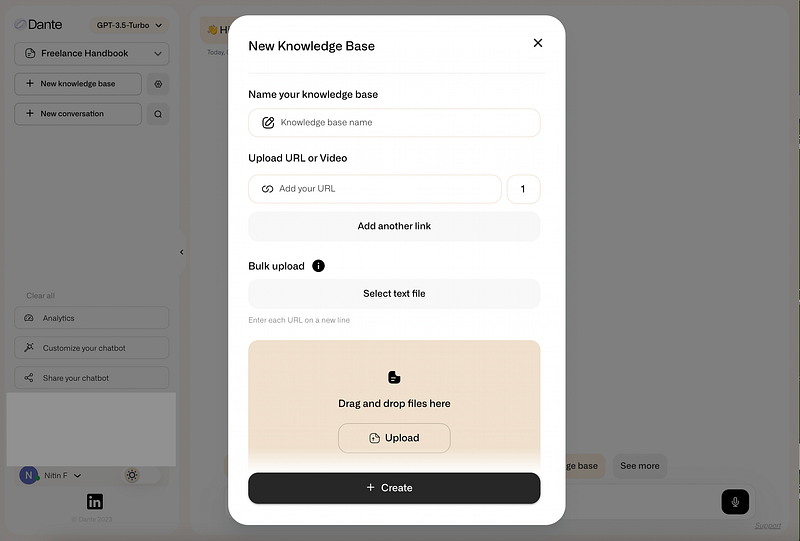
Give your knowledge base a name, like “HR Chatbot” or anything you prefer. Then, just drag and drop your files containing your specific data and hit the “Create” button.

That’s it — based on the name you gave, a knowledge base personalized to your needs is created.

It’s as simple as that.

Let’s Wrap Up

We all know that in this fast-moving world, staying ahead by 10 to 100 times is crucial, and the key to success lies in using AI tools to automate most of the time-consuming tasks.

You won’t have to dig through endless emails, scroll through chat threads, or desperately search for that one important document. That’s why I’ve written this post.

While we initially look at improving HR processes, Dante AI’s Slack Integration goes far beyond that. It improves communication across all parts of your business, encouraging meaningful interactions and making collaboration super-efficient.

It’s not just about solving HR issues; it’s about changing the way your organization communicates.

But that’s not the end of it.

Dante AI doesn’t limit itself to Slack. It works with MS Teams, WhatsApp, Instagram, Telegram, Discord, and more.

Insane, right?

Hope you like it.

That’s it — thanks.

Don’t forget to subscribe to me on Beehiiv for a thrilling dive into AI, tech wizardry, money hacks, side-hustle secrets, and beyond. Your adventure awaits!

Productivity
Artificial Intelligence
Technology
Tech
Work
Recommended from ReadMedium