How to Customize an HTML Report in Pytest
Make the report you want to make.

They say that half the work is doing something, and the other half is advertising. You would have spent hours writing unique and critical test cases to increase the reliability of the system. If you spend a little more time, then you can create a proper report for your pytest runs, customized to your need.
With this, you can broadcast the report to your manager or team member, use it for presentation or self-analysis, or even save it later for analyzing regression. This article assumes that you are slightly familiar with basic pytest concepts. If you don’t know or want to refresh your knowledge, then quickly glance over this introductory article here.
Installation
Let’s start by installing and activating the virtual environment:
$ mkdir customizing-pytest-report
$ virtualenv venv
$ source venv/bin/activate
Now install the HTML report generator.
$ sudo apt install pytest
$ pip install pytest
$ pip install pytest-html
Generating HTML report
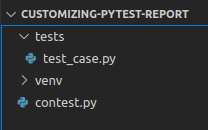
To get the output, that is, to get the pytest report:
$ pytest --html=report.html
As you see, the pytest report is a little bland. But it allows customization. We will customize the elements a section at a time.
Changing Title
We change the title in the HTML report by overwriting the pytest_html_report_title function. To change the title, just add the following in conftest.py. The function will be called before adding the title to the report.

"Custom Title" in html reportChanging Environment
Environment parameters are in dict format. We change the _metadata in pytest_configure. For simple example refer below:

Changing Summary
There prefix, summary and postfix are a list of HTML elements. To make changes to them, we add or remove elements. The pass and fail in summary, you see, are a part of the summary array.

Changing Table Headers
Cells are the list of HTML elements that are taken as header. We just have to add or remove the cells. And in the end, do a pop.
Changing Table Rows
The result of the pytest has the following information:
<TestReport ‘tests/test_case.py::test_min[input1–7]’ when=’setup’ outcome=’passed’>
To change the reports, we have to modify the output of the pytest report in pytest_runtest_makereport and to orient the result in the HTML table, we edit in pytest_html_results_table_rowuse.

Now you know the foundational knowledge to create and customize the HTML report to share and impress other people.
More content at plainenglish.io


