avatarCoucou Camille

Summary

The article discusses the creation of a simple word puzzle generator in Python, focusing on non-overlapping word placement within a grid.

Abstract

The author of the article shares their journey in developing a Python program to generate word puzzles. Initially inspired by a word search game, the author outlines the logic behind the first version of the program, which involves randomly selecting words from a list of common vocabulary and inserting them vertically or horizontally into a grid without overlap. The main program uses random sampling methods for word selection and placement, relying on helper functions to identify possible insertion points in the grid. The article also showcases sample game grids produced by the program and acknowledges areas for future improvement, such as allowing word overlaps, filling the grid with random letters, and providing a list of words to find within the puzzle. A link to a follow-up article, "Create Word Puzzles in Python — Part 2," is provided for readers interested in the continued development of the puzzle generator.

Opinions

  • The author finds personal value in creating word puzzles and sees the potential for a simple yet engaging game.
  • There is an intention to evolve the puzzle generator to more closely resemble real word puzzles by eventually allowing overlapping words.
  • The author believes in iterative development, starting with a simplified version and gradually adding complexity.
  • The author encourages reader interaction by inviting questions and comments, indicating a desire for community engagement and feedback.
  • The author shows appreciation for reader support, suggesting that positive reinforcement from the audience is important for their work.

Create Word Puzzles in Python — Part 1

Anyone who finds the picture below familiar should know the rules of the game as well: try to find the words buried in the sea of letters. And while I was playing the game, it suddenly hit me that maybe I could create the puzzles by myself.
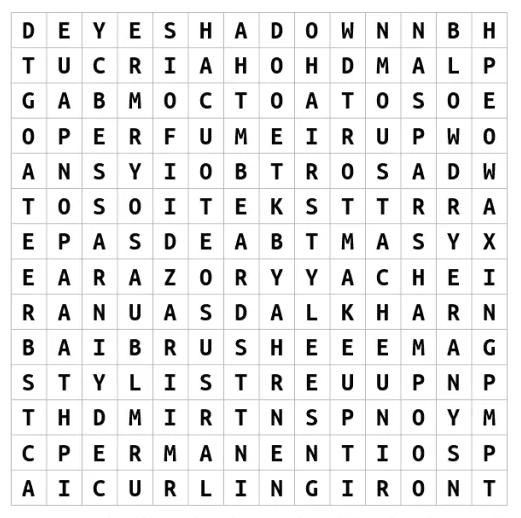
Image from thewordsearch.com

General Logic

For the first version, I am only hoping the achieve a simplified game, where I randomly add words into empty space of the game grid, i.e. a non-overlapping grid.

An outline for the algorithm:

  1. Select a random word from dictionary: in this case I am using the list of 3000 most common vocabulary obtained from online
  2. Randomly choose the insertion style: vertical or horizontal
  3. Loop through each row and column to find possible places to insert the word
  4. From result in Step 3, select a starting location (row & column) by random
  5. Repeat 1–4 until the loop count is greater than specified count

Main program

Here I am using the random sampling method random.choice(seq, k=1) extensively from selection of words to the placement of word in the game grid.

Besides that, the most important part of the algorithm is to search the grid and find possible places for insertion of the new words at each iteration, defined as helper functions.

Helper functions

In both horizontal and vertical cases, I am using a nested for loop for row and column, or column and row respectively for search the grid. Since I am only aiming for a non-overlapping version here, I just check for empty cells and return the possible starting index of empty cells for the insertion of a new word.

Game Generation

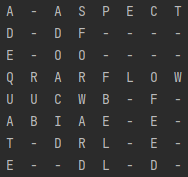
Below are some of the game grids generated:
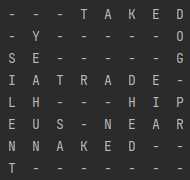
Image by Author: Sample 1
Image by Author: Sample 2

Areas for Improvement

Presented is only the first version, with a lot of areas for improvement. I will implement and update in the next article.

  1. Allow for overlapping of words like a real word puzzle does
  2. Insert random alphabets to fill the grid
  3. Present the list of words that could be found from the game grid

Updated link for Part 2:

Thanks for reading and let me know if you have any questions or comments!

If this post was helpful, please click the clap 👏 button below a few times to show your support for the author 👇

🚀Developers: Learn and grow by keeping up with what matters, JOIN FAUN.

Python
Programming
Recommended from ReadMedium