
HOW-TO-TORIAL
Create Kickin’ Kickers
A simple guide to amp up your kicks
As a new writer on this platform I was floundering around for months before I noticed we can add kickers. In fact, I didn’t know the term kicker referred to anything other than an angry toddler lashing out at my shins. My background is in childcare and education, but I digress.
I initially thought the kicker line was a category added by publication editors. Once I caught on to the feature being within an author’s control, I had to search for an instructional article to find out how. I’m kicking myself for not sharing what I learned sooner. I’ll tell you my preferred way and why I think it’s best.
Consistency in how I format my top three lines — kicker, title and subtitle — gives me a smidgeon of sanity and a sprinkle of satisfaction. In this wild world where writers are doing whatever they damn well please I need a sense of order. For me — and if the boosters decide to wake up and notice my consistently polished pieces, well I’ll kick my heels together with glee.
Three steps to kick it with the best of us
- Begin a new text line above your title.
- Type a kicker — a word or phrase describing the topic of your piece.
- Use the small ‘T’ formatting tool so your kicker looks like this:
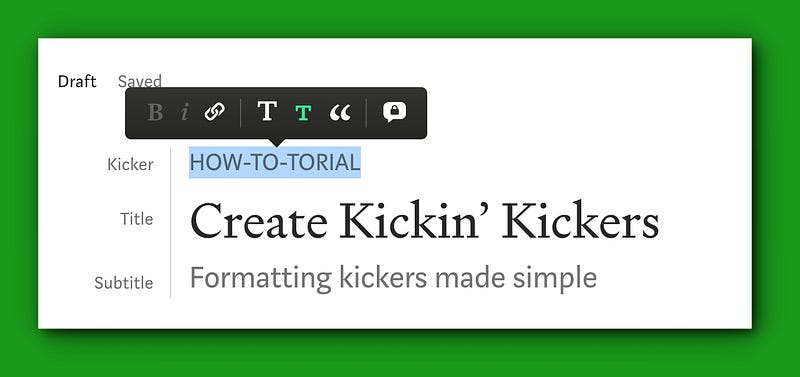
Be willing to play with the spacing and tools to get your title, subtitle and kicker to fall in line — my puns are always intended. You’ll know you’ve got it when it looks like mine. The kicker and subtitle appear neatly above and below the title in dark gray text, while the title is larger and black.
Follow this advice and the editors will be less likely to kick your writing to the curb.