
Create a Serverless Cron Job in AWS

Serverless computing is gaining momentum. It’s flexible, cost-effective and most importantly it completely relieves you managing any infrastructure. You just write code, ship it to the cloud and it runs.
One of my favorite use cases for using serverless computing is cron jobs. The main reason for it is that serverless is ideal for tasks that do not run continuously, but only periodically. If you have a service that collects data every 30 minutes from some source, it really doesn’t make any sense to have it active 24 hours a day. It should only be active while it runs it’s data collection job, the rest of the time it can be down, no one will even notice.
This is why event-driven cloud functions are ideal for the task.
In this article I will explain:
- What is a cron job
- When is it a good idea to use it
- How to implement a serverless cron job in AWS with Lambda and EventBridge
What is a cron job?
A cron job is basically a task that is intended to run in a scheduled manner. Maybe it needs to run once every 5 minutes, maybe it only needs to run once a week. The schedule that it runs on is usually defined in what is called a cron expression. The cron expression follows a convention by which you can define how often a task should repeat. It’s created very intelligently, so that you can define even the most complex timetables .For example if you want your job to run at 10:15 AM on every last Friday of every month during the years 2022, 2023, 2024, and 2025, you would define your cron expession like this:
0 15 10 ? * 6L 2022–2025
If you wanted something much simpler, like running it every 5 minutes each day indefinitely, you would write:
*/5 * * * *
As you can see from the above examples, each cron expression contains 7 (sometimes 6) fields, indicating the seconds, minutes, hours, days of the month, month, day of the week and year(s).
Traditionally, cron jobs were run on the OS level. In Linux, you would use the Crontab and in Windows you would use Scheduled Tasks.
You could also run a cron job as an application on a server, that is written in a programming language of your choice, that implements some sort of scheduling library. For a Python developer like myself, APScheduler would usually be a good choice.
Another way of running a cron job is in Kubernetes. If you already have a cluster running, this might make sense.
But, all of these solutions are either outdated, needlessly complex, or just a plain waste of resources. I think the best way to run cron jobs in 2022 (for most use cases anyway) is in a serverless manner in the cloud, and here’s why:
- No infrastructure to manage- as I mentioned, you just deploy the code, create a scheduled trigger and that’s it. The process of deploying a cron job is so easy that it literally takes you one simple tutorial (like the one I will demonstrate below) and you are good to go.
- Very cost effective- provisioning an entire ec2 instance (or any other virtual machine) , or a cluster of containers just to run cron jobs is costly. On the other hand, a combination of Lambda+EventBridge can be nearly free depending on your use case. Keep in mind that Lambda is billed by 1 million invocations, going for around $0.20 per million invocations (depending on memory allocation and duration), so if you are running your cron job a couple of times a day it’s virtually free. EventBridge events are also billed $1.00 per one million invocations, also very inexpensive.
- Highly reliable- because you are delegating your cron jobs to a major cloud provider with a very high reputation, you can rest assured that the error rates will be very low. It’s a safer bet to rely on Amazon, Google or Microsoft than on a third party library of your favorite programming language ( which by no means is to say that these libraries aren’t amazing, it’s just that these cloud giants have way more resources to maintain their tools)
- Great integration with other cloud services- since you probably already have some infrastructure already running in the cloud, your cron jobs can easily and securely communicate with other cloud services. For example, if your cron job needs to scan a database once a day, generate a report and send it to an email list you can do all this (including the data storage) with just a couple of cloud services, and it can all be done completely serverless.
When is it a good idea to use a cron job?
Before I show you how to implement a cron job on AWS, I’d like to enumerate a few great use cases for cron jobs and why serverless is the way to run them:
- data scraping and collection- if you have a service that needs to collect data from some source, unless the source is a continuous data stream, a cron job is a perfect use case. Let’s say you are checking sports scores every 30 seconds and updating some database with the latest scores.
Why use serverless- The entire process probably takes 2–3 seconds at most, meaning your service is sitting idly for the remaining 27 seconds (and wasting compute resources for nothing) until the next job is scheduled to run.
- Automated tests- Another great use case for cron jobs is running automated tests in a scheduled manner. Although you should ideally run your tests as part of your CICD pipeline before deploying to production or staging, sometimes it makes sense to run certain tests in a scheduled fashion. Perhaps you want to run load tests once a day to check if your response times are meeting a certain threshold. Or maybe you’re running hundreds of end-to-end tests that take a couple of minutes each, and it doesn’t make sense to run them in your CICD pipeline.
Why use serverless- As with data scraping, these tests will probably not be continuous, so having a continuously running server doesn’t make sense. Another good reason is because of the great integration with other cloud services, you can easily store test results in a cloud storage, or use a cloud notification service to notify a team of developers about the test results. You can also trigger other events in the cloud, based on the results of these tests.
- Daily report generation- Like I mentioned above, this is really one of the best use cases for a cron job. You need to scan a database once a day to generate a daily sales report for management and send it to a Slack channel or an email list.
Why use serverless- There is absolutely no need to dedicate any compute resources to a job that will run once or twice a day other than a FaaS (function as a service, which is just fancy jargon for serverless). Another great reason is if your database is already in the cloud (which in 2022 I’m guessing it most likely is).
How to implement a serverless cron job in AWS with Lambda and EventBridge
Alright, now that I’ve exhausted all of my persuasive skills, let me show you how to actually implement this on AWS. There are many ways to do this, and this point-and-click version I am doing in this tutorial is probably one you would want to avoid in a production environment, but it will serve it’s purpose for a simple demo. For production workloads, take a look at deplyoing cron jobs with AWS SAM.
In this demo, I will be pinging the National Weater Service API once a day to get the 14 day day weather forecast for a certain area and log the results to CloudWatch logs.
So let’s go ahead with step one and write the code for the lambda function.
In your aws console in the search bar type lambda and the select create function. You should see a screen like this:
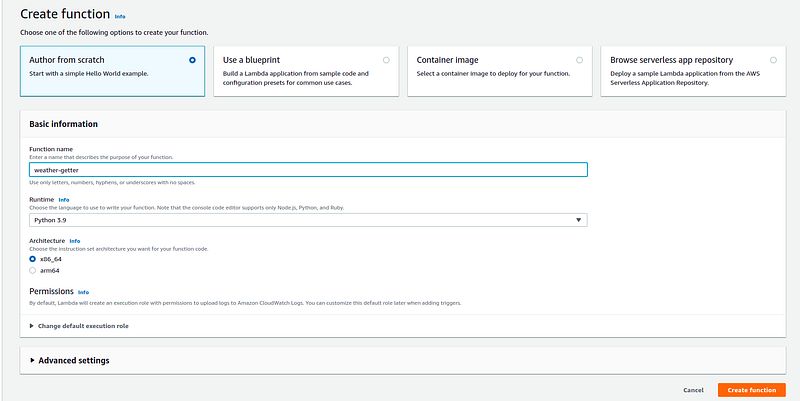
Select a name for your function and choose a runtime. I’ll use Python 3.9.
Next you should see the screen where you can write the function:
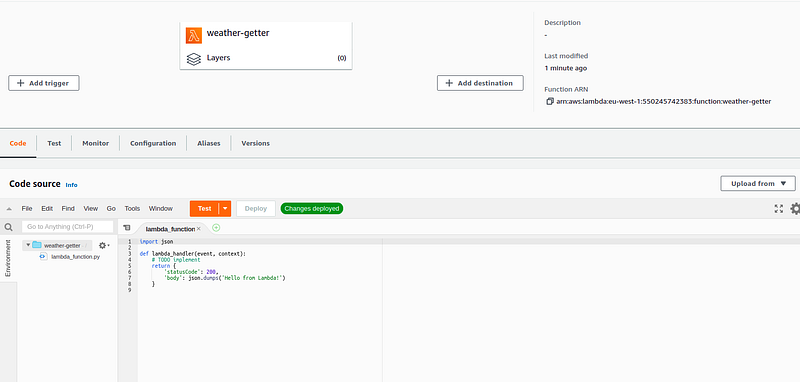
You can copy-paste this code in the lambda_function.py file and click deploy.
import json
from urllib.request import urlopen
from pprint import pprint
URL = 'https://api.weather.gov/gridpoints/TOP/31,80/forecast'def lambda_handler(event, context):
with urlopen(URL) as response:
response_content = response.read()
json_response = json.loads(response_content)
pprint(json_response)
return json_responseI’m using only the modules found in the python standard library since this isn’t a demo about lambda, so I’ll avoid confusing you with steps that aren’t concerned with creating serverless cron jobs. The code just calls the Weather API and prints the results to standard out, which is enough for CloudWatch to pick it up and store it in a log group . That’s a cool feature of Lambda, because you don’t need to install the CloudWatch agent like you would for a server running on EC2.
Now let’s add the EventBridge trigger by going to configuration->add trigger:
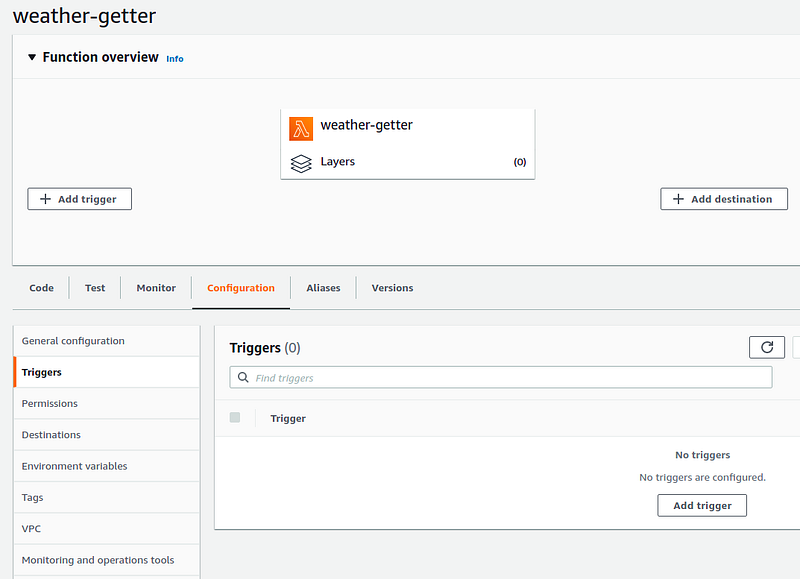
Once you’re in there all you need to do is fill in the necessary fields. I want my weather report getter to run once a day at 2pm:
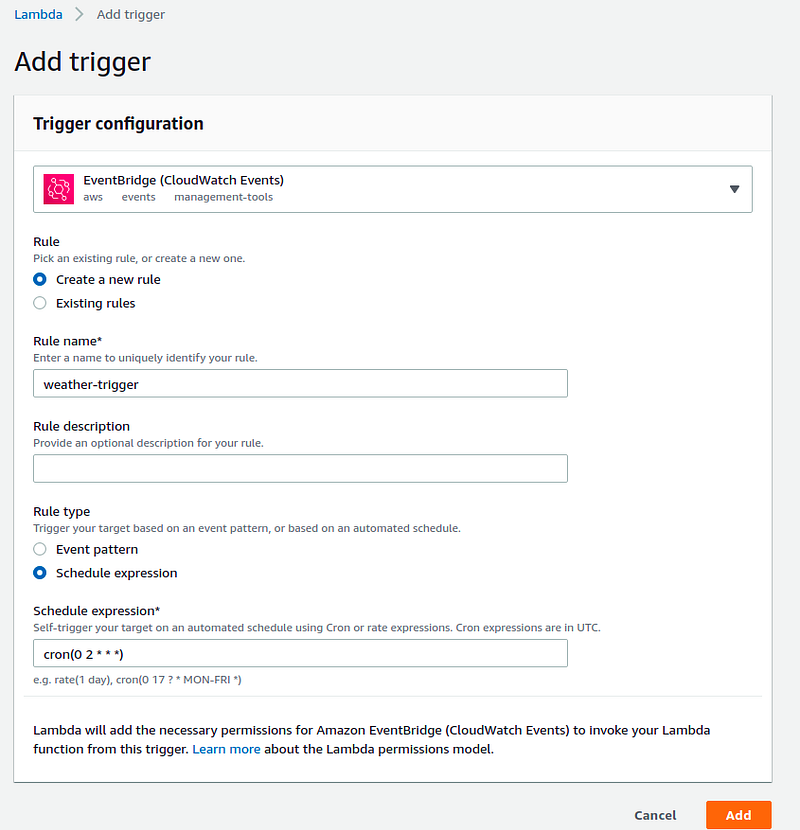
As you may know, for nearly everything you do in AWS, you need to add a role with permissions so that the services actually can talk to each other. Luckily, AWS has realized that this IAM stuff is the reason it’s users are cursing all the time, so it has decided to simplify some situations by adding the permissions automatically (as you can see from the statement at the bottom of the screenshot).
That was pretty simple, right? Now you can go to CloudWatch and check the logs:
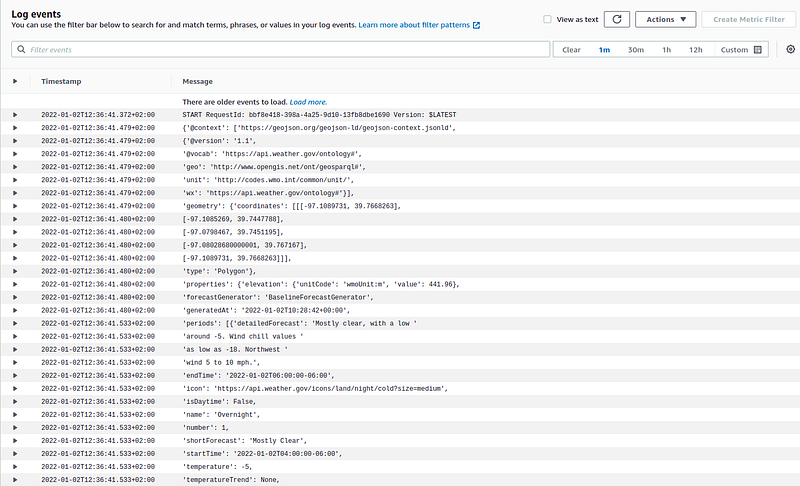
(note that I have updated my EventBridge trigger to run every minute so I can immediately see the logs and don’t actually have to wait until 2pm to finish this demo 😊)
Looks like we’re getting the weather data successfully.
Now I need to delete the function since I don’t want this demo to cost me anything:
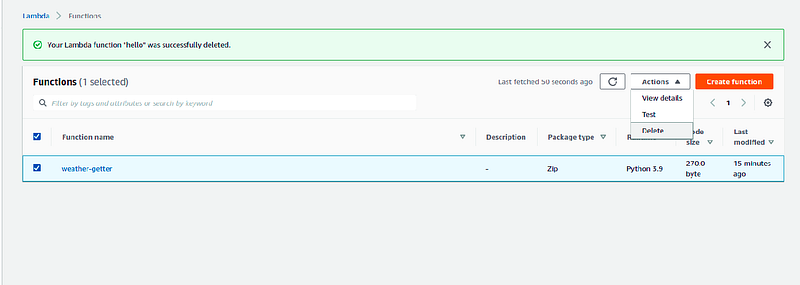
I also want to delete the EventBridge rule:
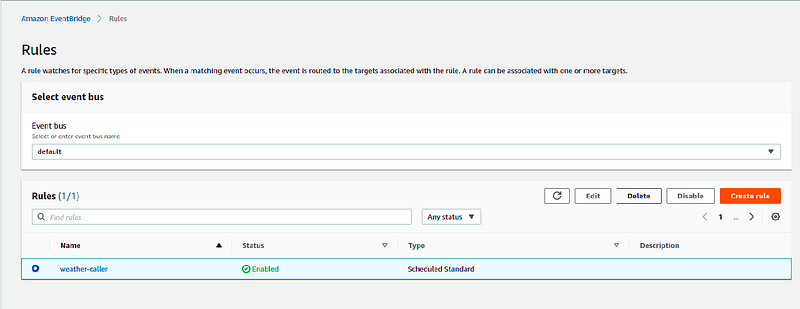
You can also delete the logs from CloudWatch if you want, but unless you were able to generate gigabytes of log data in this simple example, the cost will be unnoticeable.
I hope this simple demo was convincing enough for you to start migrating your cron jobs to a serverless environment. The benefits are numerous, and the implementation is extremely simple.
That’s all for this article.As always, if you liked it feel free to clap as much as you want :)
If I missed anything, please leave a comment.
Thanks for reading!


