
Cracking a Password With John The Ripper and Hashcat
Oops I forgot my password.. Trying Password Crackers For The First Time

Table of Contents
John The Ripper — Installation — Zip2John — Wordlist Mode (Dictionary) — Incremental Mode (Brute Force) — Mask Mode
HashCat — Installation — Straight Attack Mode (Dictionary) — — Rules — — Creating A Rule Set — Brute Force Attack Mode — — Custom Char Sets & Masks
I recently came across a password-protected zip file from over 10 years ago but I had forgotten the password that was used. I had heard about password crackers but until now never had the need to use one. So I thought I’d give it a go. I also have an NVIDIA RTX 4090 GPU that could help speed things along.
As it was over 10 years old, the password was unlikely to be long nor complex. I fumbled my way through using John The Ripper in default mode and within a couple of hours was pleasantly surprised when it managed to find a match within half a minute. Granted, it was an awful password : “pavlov123”. By now I was curious and led me to want to try different modes as well as those on Hashcat.
John the Ripper and Hashchat are both popular tools for password cracking. They are often used together for their distinct strengths.
John the Ripper: Known for its ability to identify and handle a wide range of hash formats. It can automatically detect the hash type, which is crucial for effective cracking, as different hash types require different approaches. It also excels in dealing with more complex or less common hash formats.
Hashcat: Known for its high-speed cracking capabilities, especially when using GPU acceleration. It’s optimised to perform at a faster hash rate compared to John the Ripper, particularly on GPUs. It is also highly efficient for common hash types and is designed to be straightforward for these scenarios.
Personal preference aside, both can be used as complementary tools or one instead of the other (or even one after the other) depending on the scenario. I will be doing this all on Linux, but much of it applies to Windows etc.
John The Ripper
Installing John The Ripper (Jumbo)
General Installation instructions can be found here. Since we are installing on Linux, we will build from source, though if you prefer you can download the source in a compressed archive here.
Note: For building on macOS instructions are found here. Windows users normally download a pre-built binary that is ready to run out of the box.
Install Prerequisites (your requirements may vary here depending on your system)
# Prerequisites....
# CUDA Toolkit (if not already installed)
# sudo apt-get install nvidia-cuda-toolkit

# system update
sudo apt-get update && sudo apt-get upgrade

# build dependencies
sudo apt-get -y install build-essential libssl-dev git zlib1g-dev

# recommended dependencies for Extra Formats and Performance:
sudo apt-get -y install yasm libgmp-dev libpcap-dev pkg-config libbz2-dev

# if you have an NVIDIA GPU (OpenCL support)
sudo apt-get -y install nvidia-opencl-dev

# dependencies for CPU Device for OpenCL
sudo apt-get -y install ocl-icd-opencl-dev opencl-headers pocl-opencl-icd
Next let’s clone JTR directly from its github repo so that we have the latest copy and compile it.
# change dir to /home/username/Downloads
cd ~/Downloads

# clone the repo
git clone https://github.com/openwall/john

# go into the src dir
cd ~/Downloads/john/src

# build
./configure && make -s clean && make -sj4

# install tab-completion
sudo make shell-completion

# Test (ctrl+c to end test)
cd ~/Downloads/john/run

./john --test=0
If all seems good, either let the test finish or interrupt it with CTRL+C.
Copy contents of run to its new location. You can delete the folders now from the Download folder.
# create directory ~/password-cracking/john
mkdir -p ~/password-cracking/john

# copy all contents of run to ~/password-cracking/john
cp -r ~/Downloads/john/run/* ~/password-cracking/john

# change directory to where JTR now resides
cd ~/password-cracking/john
Our password-protected ZIP file is named archive.zip and is located in ~/Desktop/archive.zip. John the Ripper (and Hashcat) don’t work directly with ZIP files. Instead, we need to extract the password hash from the ZIP file. This is where the tool zip2john that comes with JTR comes in.
Zip2John
We will use the tool zip2john to extract the hash from the zip file that is on our desktop.
# change to the JTR directory
cd ~/password-cracking/john

# extract hash from archive.zip and save to file hash.txt
./zip2john ~/Desktop/archive.zip > ~/Desktop/hash.txt
There are other tools for hash extraction from different file types. Here are a few of them:
rar2john: Extracts password hashes from RAR archives.pdf2john: Extracts password hashes from PDF files.unshadow: Combines the /etc/passwd and /etc/shadow files in Unix-like systems to extract user password hashes.ssh2john: Extracts password hashes from encrypted SSH private keys.gpg2john: Extracts password hashes from GPG private keys.bitcoin2john: Extracts password hashes from Bitcoin wallets.dmg2john: Extracts password hashes from encrypted Apple DMG files.
If you peek into hash.txt you will find that if the zip contains multiple files, you will get multiple different hashes, but they should all resolve to the same password.

Now that we have our hash of the zip file, we can start. The simplest form of command would be:
./john ~/Desktop/hash.txt
Since no hash format is specified, it will try to autodetect it.
If we know the hash type then we can specify it using --format flag. You can print a list of available hash types with the command:
./john — list=formats
Since we know it is a zip, we can use either:
./john --format=zip ~/Desktop/hash.txt which uses the CPU or
./john --format=zip-opencl ~/Desktop/hash.txt which uses the GPU
In addition, since no mode is specified it will by default run through the 3 primary modes:--single, --wordlist, --incrementalin that order, as explained here.
But what I actually do is run wordlist, incremental and mask mode independently and record how fast they are able to crack the password. We will skip single mode since it relies on information not available. Below is some more detail.
Single Mode guesses passwords based on user information like their name or other simple details. That might be available in the hash file. It’s good for finding easy passwords that people often choose, like those based on their own name or other common words. Therefore it is only if the hash file contains such information. For a detailed explanation, you can visit this Stack Exchange thread.
Wordlist Mode (aka dictionary attack) uses a list of potential passwords, often known as a wordlist or dictionary. It tries each word in the list to see if it matches the password hash it’s trying to crack. It’s effective when passwords are common words or phrases that might appear in the wordlist. This mode relies on the quality and comprehensiveness of the wordlist used, making it more useful for cracking simpler, dictionary-based passwords. John comes with a default passwords.lst list but more extensive ones can be downloaded or purchased. Another well known one is known as the RockYou wordlist, which contains a large collection of passwords exposed in past data breaches.
Incremental Mode is a brute-force attack method. It systematically tries all possible password combinations, starting from the shortest to the longest. This mode does not rely on a predefined wordlist. Instead, it generates password candidates based on character sets and length, making it effective for cracking passwords that are not simple or common words. However, this approach can be time-consuming, especially for longer and more complex passwords.
Mask Mode. There are more modes but this one is a popular one due to its speed is Mask Mode and it allows for more targeted password cracking by defining a specific pattern or structure that the potential password might follow. This mode is particularly useful when you have some knowledge about the format or characteristics of the password you’re trying to crack (i.e. length, specific chars or digits used)
Wordlist Mode
We will start with wordlist mode without any word-mangling rules.
What is word-mangling? If enabled, word-mangling will modify or “mangle” words producing other likely passwords. If enabled, all of the rules will be applied to every line in the wordlist file producing multiple candidate passwords from each source word and in effect expanding the number of words massively.
We will use 3 different wordlists:
all.lst (5,014,869 passwords),
rockyou.lst (14,344,391 passwords),
mangled.lst (40,532,651 passwords).
The commands without word-mangling rules applied would be:
./john --format=zip-opencl --wordlist=all.lst ~/Desktop/hash.txt
./john --format=zip-opencl --wordlist=rockyou.lst ~/Desktop/hash.txt
./john --format=zip-opencl --wordlist=mangled.lst ~/Desktop/hash.txt
All three cases above finished within seconds without successfully cracking the password, meaning that the password was not found in any of the lists.
Now let’s try with word-mangling rules applied.
./john --format=zip-opencl --wordlist=all.lst --rules ~/Desktop/hash.txt
./john --format=zip-opencl --wordlist=rockyou.lst --rules ~/Desktop/hash.txt
./john --format=zip-opencl --wordlist=mangled.lst --rules ~/Desktop/hash.txt
All three cases finished very quickly: 15 seconds, 19 seconds and 1 minute and 47 seconds respectively and all were able to match the password.
Any cracked passwords will be printed to the terminal and saved in the file called john.pot. This file is also used to not load password hashes that have already been cracked when you run John the next time. To retrieve the cracked passwords, run: ./john --show passwd
While cracking, you can press s key for detailed status, pressing any other key other than h, q, d, D will give a simple, shorter output. Pressing q or Ctrl-C to abort the session saving its state to a file (john.rec by default). If you press Ctrl-C for a second time before John had a chance to complete handling of your first Ctrl-C, John will abort immediately without saving. By default, the state is also saved every 10 minutes to permit for recovery in case of a crash.
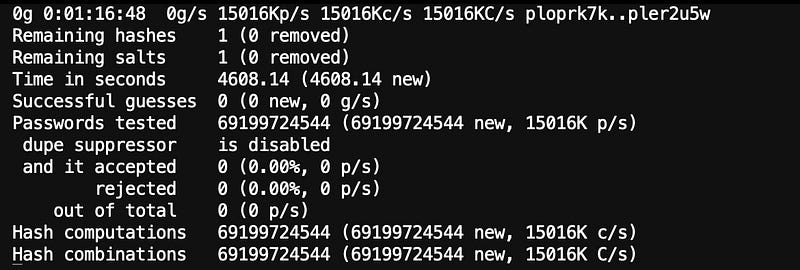
To continue an interrupted or stopped session, run:
./john --restore
Or if you named your session then you can restore with that session name, For example:
./john --session=mycrack --incremental /path/to/hashfile
you can continue the session with:
./john restore=mycrack
Incremental Mode (Brute Force)
Now let’s try Incremental Mode (aka brute force), default mode that uses the “All” character set.
./john --format=zip-opencl --incremental ~/Desktop/zip_hash.txt

This found a match in 4 hours, 32 minutes, 2 seconds.
Mask Mode
Mask Mode is also a brute force method but it is more specific and targeted with the use of masks.
Let’s pretend we know something about the password (that we know it is 9 characters long, we know it is all lowercase but for the last 3 which are digits) and make a mask to see how much it speeds things up.
If you wish to see the full documentation, but here I will just list the fundamentals.:
- A mask is made up of placeholders: Special characters in the mask that represent sets of characters, like:
?l: Lowercase letters (a-z)?u: Uppercase letters (A-Z)?d: Digits (0-9)?s: Special characters (like!@#$%)?a: All characters (includes all of the above)?b: All possible bytes (0x00 - 0xFF) - Fixed Characters: You can also include specific known characters in the mask. For example, if you know a password starts with “Pa”, you can start your mask with
Pa. - Ranges: you can specify ranges such as:
[aouei]or[a-z]syntax. Or both,[0–9abcdef]is the same as[0–9a-f].
./john --format=zip-opencl --mask=?a?l?l?l?l?l?d?d?d zip_hash.txt

Matched in 1 hour and 40 minutes.

Hashcat
Installing Hashcat
Download the latest hashcat binary package from its homepage. Extract the contents into a folder, example : ~/password-cracking/hashcat (Linux).
Alternatively you can download the source and compile it yourself:
# update linux
apt update && apt upgrade -y && apt autoremove -y && apt autoclean -y
# clone
git clone https://github.com/hashcat/hashcat.git#change dir
cd hashcat# make install
sudo make install# clean up & remove unnecessary files and dirs
rm BUILD.md BUILD_CYGWIN.md BUILD_MSYS2.md BUILD_WSL.md BUILD_macOS.md Makefile
rm -rf include src objNote that if you compile yourself the executable is just named hashcat with no extension, but in the downloaded pre-compiled package, the binary for linux is named hashcat.bin.
Next we need to use zip2john just like before and extract the hash(es) from the zip file.
# extract hash from archive.zip and save to file hash.txt
./zip2john ~/Desktop/archive.zip > ~/Desktop/hash.txt
If you peek into hash.txt you will find that if the zip contains multiple files, you will get multiple different hashes:
Unlike for John The Ripper, the data for the hash needs to be in a format so that hashcat can read it. we need to remove the extraneous data before the identifier$zip2$ and after the end identifier$/zip2$
Next we need to indentify the hash mode or format…. xxxxxxx
Straight Attack Mode (Dictionary)
Straight Attack (-a 0): This is a simple dictionary attack mode where each word from a wordlist file is used as a potential password.
./hashcat -m 13600 -a 0 hash.txt all.lst --status --status-timer 10
./hashcat -m 13600 -a 0 hash.txt rockyou.lst --status --status-timer 10
./hashcat -m 13600 -a 0 hash.txt mangled.lst --status --status-timer 10

# --status --status-timer 10 will update the status very 10 seconds.
# --status alone will update at the default interval of 30 seconds?
However, none of the above attacks were successful and finished quickly.
Let’s see if it is better if we apply rules. (hashcat equivalent of word-mangling). So how are rules used?
Rules
First let’s consider the following scenario. You have a basic password wordlist containing the words below:
apple
orange
worksux
If you wanted to try the above passwords with the pattern “123” added to the end, your list would become:
apple
apple123
orange
orange123
worksux
worksux123
If you also wanted to capitalise the first letter of the original words, the list would now become:
apple
apple123
Apple
orange
orange123
Orange
worksux
worksux123
Worksux
As you can imagine, this would become get impractical very quickly with large wordlists.
Fortunately we can express these variations using rules that modify and make variations of existing passwords just like word-mangling under John The Ripper without altering the wordlist. We just need to supply a rules file.
Here, we will cover some of the most commonly used rule functions:
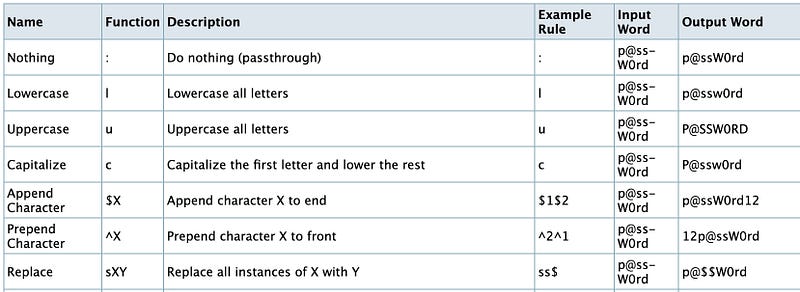
Creating A Rule Set
Create a file custom.rule, open it in an editor.
From the above table, we will enter the rules: lowercase, uppercase, and capitalize functions:
:
l
u
c
The colon entry instructs hashcat to try the original word. We’ll be including this so we can compare how many passwords were cracked using unmodified passwords from the wordlist.
To append characters to to the end of the passwords we use the following:
# append digit zero to end of password
$0
# append digit 1 to the end of password
$1
# append digit 2 to the end of password
$2
# append char Z to the end of password
$Z
To append a sequence of characters just separate them with a space:
# append characters '123' to the end of our password
$1$2$3
Examples of replacing one character by another:
# @ will replace a
sa@
# Y will replace X (uppercase)
sXY# 3 will replace e
se3Below are the rules I have decided to use.
:
# lowercase
l
# uppercase
u
# capitalise first character
c
# add '0' to the end
$0
# add '1' to the end
$1
# add '2' to the end
$2
# add '3' to the end
$3
# add '4' to the end
$4
# add '5' to the end
$5
# add '6' to the end
$6
# add '7' to the end
$7
# add '8' to the end
$8
# add '9' to the end
$9
# add '123' to the end
$1$2$3
# add '1234' to the end
$1$2$3$4
./hashcat -m 13600 -a 0 hash.txt all.lst -r custom.rule --debug-mode=1 --debug-file=matched_rule.txtThe arguments --debug-mode=1 --debug-file=matched_rule.txt together will save any rule that generated a matched password to the matched_rule.txt file which maybe useful if you wish to see which rule was used that cracked the password.
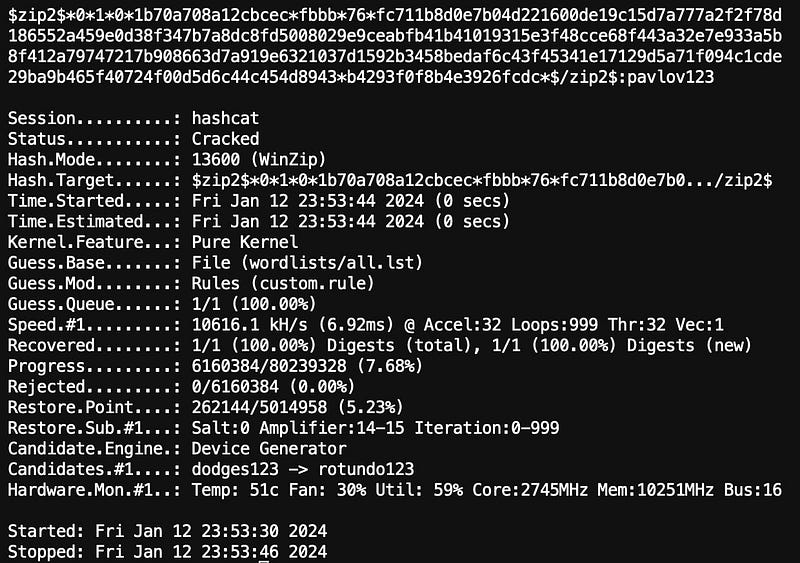
The password was matched in less than a second. The contents of the matched_rule.txt file contains: $1 $2 $3 meaning that the rule that appended ‘123’ to the end of an existing password in the wordlist produced a match. which in turn means that ‘pavlov’ is in the wordlist.
Running the same against the other two wordlists produced a match also since ‘pavlov’ also appears in those lists with the only difference being the time taken since they are larger wordlists.
all.lst: < 1secondrockyou.lst: ≈ 1 secondmangled.lst: ≈ 3 seconds
Brute Force Attack Mode
Brute-force Attack (-a 3): involves specifying the brute-force attack mode.
Let’s try it it with defaults, without defining a mask. Since I knew this one would take a while I rented
./hashcat -m 13600 -a 3 hash.txt --status --status-timer 10When run in brute-force mode (-a 3) without a specified mask, it defaults to using the following mask pattern: ?1?2?2?2?2?2?2?3?3?3?3?d?d?d?d
# ?l: Lowercase letters
# ?u: Uppercase letters
# ?d: Digits
# ?s: Special characters
# ?a: All printable ASCII characters
# ?1: ?l?d?u (lowercase letters, digits, ppercase letters0
# ?2: ?l?d (lowercase letters and digits)
# ?3: ?l?d*!$@_ (lowercase letters, digits, and specific special chars)
It starts with generating passwords of one character in length using ?1. Once all possibilities for that length are exhausted, it increases the length by one character, now using ?1?2, and continues this process. The pattern of increasing length continues as follows:
     MASK                             COMBINATIONS
[1]  ?1                             : 62
[2]  ?1?2                           : 2,232
[3]  ?1?2?2                         : 80,352
[4]  ?1?2?2?2                       : 2,892,672
[5]  ?1?2?2?2?2                     : 104,136,192
[6]  ?1?2?2?2?2?2                   : 3,748,902,912
[7]  ?1?2?2?2?2?2?2                 : 134,960,504,832
[8]  ?1?2?2?2?2?2?2?3               : 5,533,380,698,112
[9]  ?1?2?2?2?2?2?2?3?3             : 226,868,608,622,592
[10] ?1?2?2?2?2?2?2?3?3?3           : 9,301,612,953,526,272
[11] ?1?2?2?2?2?2?2?3?3?3?3         : 381,366,131,094,577,152
[12] ?1?2?2?2?2?2?2?3?3?3?3?d       : 3,813,661,310,945,771,520
[13] ?1?2?2?2?2?2?2?3?3?3?3?d?d     : 38,136,613,109,457,715,200
[14] ?1?2?2?2?2?2?2?3?3?3?3?d?d?d   : 381,366,131,094,577,152,000
[15] ?1?2?2?2?2?2?2?3?3?3?3?d?d?d?d : 3,813,661,310,945,771,520,000
As you can imagine, time required to exhaust the keyspace for each length becomes exponentially longer. For a single modern GPU, you will really start to feel the time taken once the length reaches 8 characters and higher. The screenshot below was taken 19 hours and 38 minutes into processing the ?1?2?2?2?2?2?2?3 [8. You can see from the progress that we were only 22.91% through and that there were another 2 days, 18 hours remaining. As this was merely an exercise, and I had already found my password, I wasn’t motivated enough to continue and so I decided to quit the job.
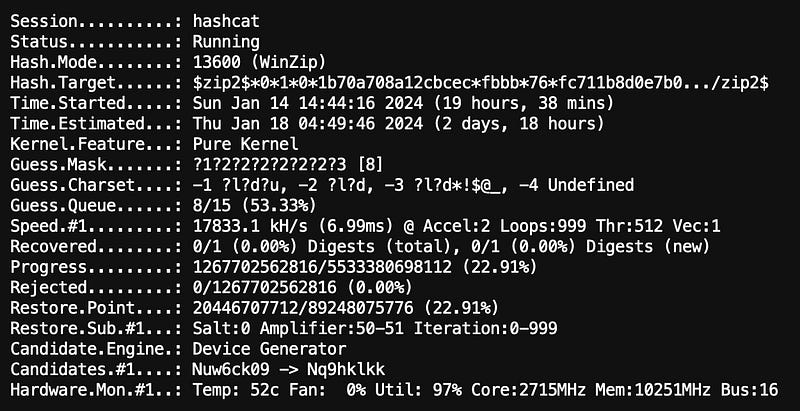
So why was this taking so long whereas John’s equivalent Incremental mode using defaults only took a few hours? A possible answer could that John employs trigraph frequencies in its cracking process to make things more efficient.
Custom Char Sets & Masks
Let’s try some custom charsets and masks. In order to use custom charset placeholders, we need to specify them in the command line. We will specify charsets 1, 2, 3 in the command line. We will keep them the same as the defaults.
./hashcat -m 13600 -a 3 zip_hash.txt \
-1 ?l?d?u \
-2 ?l?d \
-3 '?l?d*!$@_' \
?1?2?2?2?2?2?2?2?3 \
--status --status-timer 20

# note that charset for set 3 is enclosed in quotes so that the shell
# does not misinterpret the $
What will be different is that instead of using charset3 for character 8, we will use charset2. Only for the the 9th character do we use charset3.
Let’s see how long it takes.
Here are the results with mask ?1?2?2?2?2?2?2?2?3:
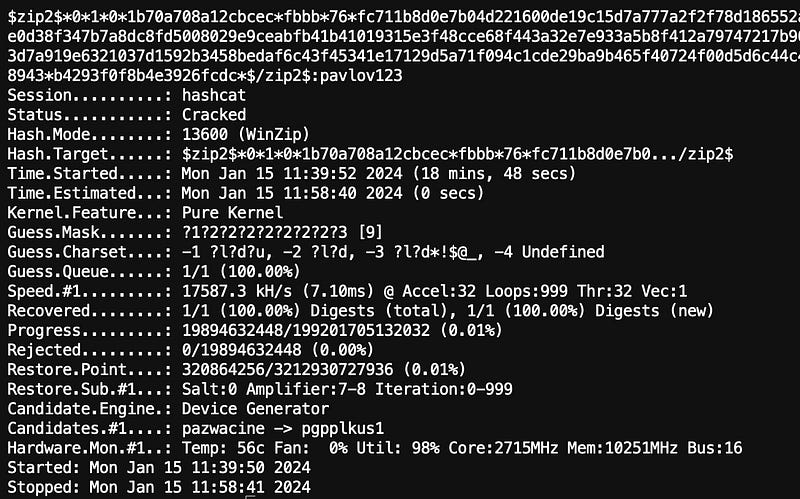
A match was found in 18 minutes, 48 seconds. However look at the progress line
Look at the Progress line. The fact that the password was cracked in 18 minutes with a progress of only 0.01% of the total combinations processed means that the match occurred very early in the combination space. The hashing power of the GPU didn’t change but because the altered mask meant that the combination space was reduced by approximately 27 trillion combinations, it might’ve just brought the correct combination closer to the beginning and so it was reached faster. But then that would be considered luck or chance since the password’s match could appear nearer the end of the combination space.
?1?2?2?2?2?2?2?3?3 : 226,868,608,622,592 Combinations
?1?2?2?2?2?2?2?2?3 : 199,201,705,132,032 Combinations

A reduction of 27,666,903,490,560 combinations.
Let’s try again but this time we will not use ?3 at all and use ?2 for all 9 characters:?2?2?2?2?2?2?2?2?2
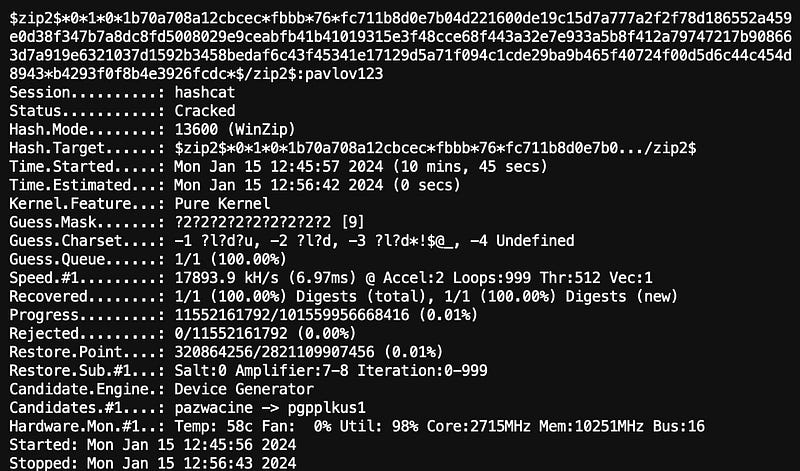
Time taken: 10 minutes, 45 seconds.
Lastly, let’s use a mask that matches the one we used for John The Ripper (that we know it is 9 characters in length, all lowercase letters, except for the last 3 which are digits):
./hashcat -m 13600 -a 3 zip_hash.txt \
?l?l?l?l?l?l?d?d?d \
--status --status-timer 20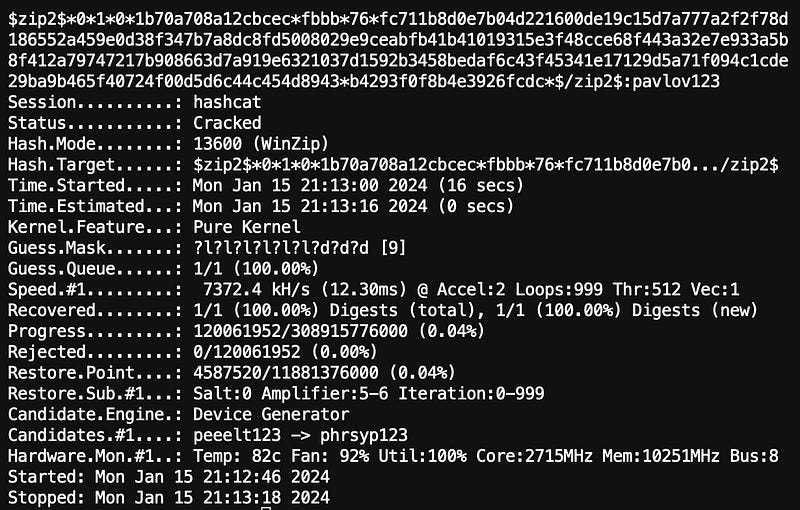
It matched in 16 seconds.
Similar to JTR, when Hashcat successfully cracks a password, it stores the result in a file called hashcat.potfile, along with the corresponding hash. You can view the cracked password by examining this file. Here's how to do it:
Conclusion
 Dictionary / Straight Mode (with word-mangling / rules applied)

╔═════════════╦═══════════╦════════════╗
║  Wordlist   ║    JTR    ║  Hashcat   ║
╠═════════════╬═══════════╬════════════╣
║ all.lst     ║ 00h00m15s ║ <00h00m01s ║
║ rockyou.lst ║ 00h00m19s ║ ≈00h00m01s ║
║ mangled.lst ║ 00h01m47s ║ 00h00m03s  ║
╚═════════════╩═══════════╩════════════╝
Incremental / Brute Force Mode

╔══════════════╦═══════════╦═══════════╗
║    Mask?     ║    JTR    ║  Hashcat  ║
╠══════════════╬═══════════╬═══════════╣
║ without mask ║ 04h32m02s ║ days..... ║
║ with mask    ║ 01h40m32s ║ 00h00m16s ║
╚══════════════╩═══════════╩═══════════╝
So in my non-very scientific tests, Hashcat is the clear winner in the modes that I tried with the one exception being brute force mode without a mask where it would run for well over a day and beyond.
There are a lot more options on how to run John and Hashcat that’s beyond the scope of this piece. However they would be worth exploring if there is motivation to do so.
And don’t use “pavlov123” for a password.
Links
https://www.stationx.net/how-to-use-john-the-ripper/ https://hashcat.net/hashcat/ https://github.com/danielmiessler/SecLists/tree/master/Passwords https://www.openwall.com/wordlists/


