
Crack SQL Interviews
The ultimate guide to SQL interviews for data science jobs.

Hello there! Welcome to my blog series: Data Engineer Things! In this series, I write about what I’ve learned in my data engineering journey and random thoughts on data and engineering. As always, opinions are my own.
SQL is one of the most essential programming languages for data analysis and data processing, and so SQL questions are always part of the interview process for data science-related jobs, such as data analysts, data scientists, and data engineers. SQL interviews are meant to evaluate candidates’ technical and problem-solving skills. Therefore, it is critical to not only write correct queries based on sample data but also consider various scenarios and edge cases as if working with real-world datasets.
I’ve helped design and conduct SQL interview questions for data science candidates, and have undergone many SQL interviews for jobs in giant technology companies and startups myself. In this blog post, I will explain the common patterns seen in SQL interview questions and provide tips on how to neatly handle them in SQL queries.
Ask Questions
To nail an SQL interview, the most important thing is to make sure that you have all the details of the given task and data sample by asking as many questions as you need. Understanding the requirements will save you time from iterating on problems later and enable you to handle edge cases well.
I noticed many candidates tend to jump right into the solution without having a good understanding of the SQL questions or the dataset. Later on, they had to repeatedly modify their queries after I pointed out problems in their solution. In the end, they wasted a lot of interview time in iteration and may not have even arrived at the right solution.
I recommend treating SQL interviews as if you are working with a business partner at work. You would want to gather all the requirements on the data request before you provide a solution.
Example
Find the top 3 employees who have the highest salary.
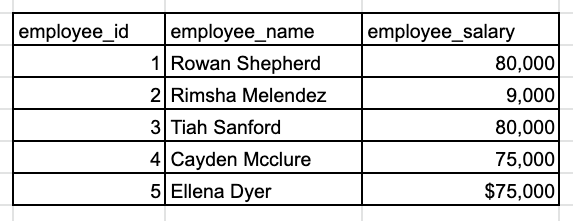
You should ask the interviewer(s) to clarify the “top 3”. Should I include exactly 3 employees in my results? How do you want me to handle ties? In addition, carefully review the sample employee data. What is the data type of the salary field? Do I need to clean the data before calculate?
Which JOIN
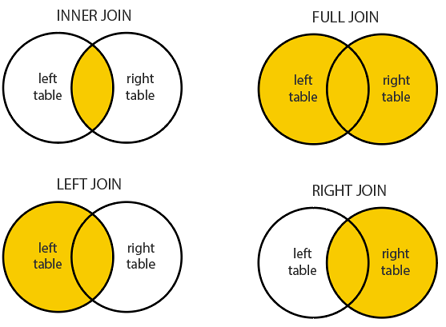
In SQL, JOIN is frequently used to combine information from multiple tables. There are four different types of JOIN, but in most cases, we only use INNER, LEFT and FULL JOIN, because the RIGHT JOIN is not very intuitive and can be easily rewritten using LEFT JOIN. In an SQL interview, you need to choose the right JOIN to use based on the specific requirement of the given question.
Example
Find the total number of classes taken by each student. (Provide student id, name and number of classes taken.)
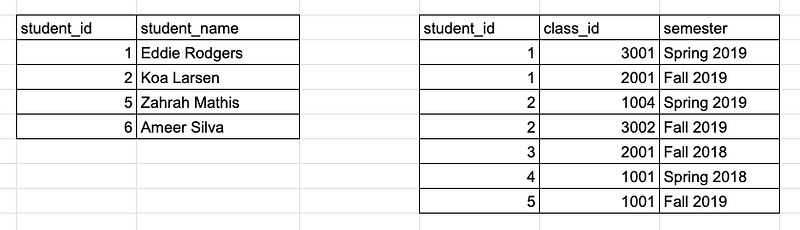
As you might have noticed, not all students appearing in theclass_history table are present in thestudent table, which might be because those students are no longer enrolled. (This is actually very typical in transactional databases, as records are often deleted once inactive.) There is also a student (student_id = 6) with no class history. Depending on whether the interviewer wants to include inactive students and students who didn’t register for any classes in the results, we need to use either LEFT JOIN or INNER JOIN or FULL OUTER JOIN to combine two tables:
WITH class_count AS (
    SELECT student_id, COUNT(*) AS num_of_class
    FROM class_history
    GROUP BY student_id
)
SELECT
    COALESCE(c.student_id, s.student_id) AS student_id,
    s.student_name,
    COALESCE(c.num_of_class, 0) AS num_of_class
FROM class_count c
-- CASE 1: include only active students who took at least 1 class
JOIN student s ON c.student_id = s.student_id
-- CASE 2: include all students who took at least 1 class
-- LEFT JOIN student s ON c.student_id = s.student_id-- CASE 3: include all students
-- FULL OUTER JOIN student s ON c.student_id = s.student_id
GROUP BY
GROUP BY is the most essential function in SQL since it is widely used for data aggregation. If you see keywords such as sum, average, minimum, or maximum in a SQL question, it is a big hint that you should probably use GROUP BY in your query. A common pitfall is mixing WHERE and HAVING when filtering data along with GROUP BY — I have seen many people make this mistake.
Example
Calculate the average required course GPA in each school year for each student and find students who are qualified for the Dean’s List (GPA ≥ 3.5) in each semester.
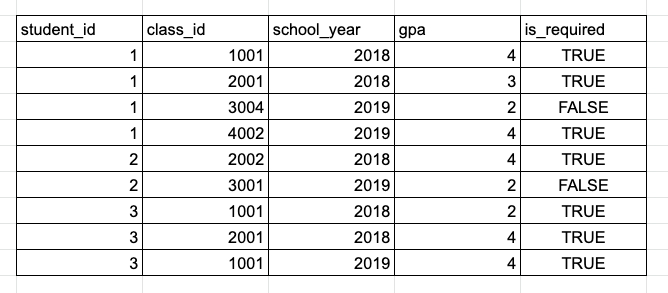
Since we consider only required courses in our GPA calculation, we need to exclude optional courses using WHERE is_required = TRUE. We need the average GPA per student per year, so we will GROUP BY both thestudent_id and theschool_year columns and take the average of thegpa column. Lastly, we only keep rows where the student has an average GPA higher than 3.5, which can be implemented using HAVING. Let’s put everything together:
SELECT
    student_id,
    school_year,
    AVG(gpa) AS avg_gpa
FROM gpa_history
WHERE is_required = TRUE
GROUP BY student_id, school_year
HAVING AVG(gpa) >= 3.5
Keep in mind that whenever GROUP BY is used in a query, you can only select group-by columns and aggregated columns because the row-level information in other columns has already been discarded.
Some people might wonder what’s the difference between WHERE and HAVING, or why we don’t just write HAVING avg_gpa >= 3.5 instead of specifying the function. I will explain more in the next section.
SQL query execution order
Most people write SQL queries from top to bottom starting from SELECT, but do you know that SELECT is one of the very last functions executed by the SQL engine? Below is the execution order of a SQL query:
- FROM, JOIN
- WHERE
- GROUP BY
- HAVING
- SELECT
- DISTINCT
- ORDER BY
- LIMIT, OFFSET
Consider the previous example again. Because we want to filter out optional courses before computing average GPAs, I used WHERE is_required = TRUE instead HAVING, because WHERE is executed before GROUP BY and HAVING. The reason I can’t write HAVING avg_gpa >= 3.5 is thatavg_gpa is defined as part of SELECT, so it cannot be referred to in steps executed before SELECT.
I recommend following the execution order when writing queries, which is helpful if you struggle with writing complicated queries.

Window functions
Window functions frequently appear in SQL interviews as well. There are five common window functions:
- RANK /DENSE_RANK /ROW_NUMBER: these assign a rank to each row by ordering specific columns. If any partition columns are given, rows are ranked within a partition group that it belongs to.
- LAG /LEAD: it retrieves column values from a preceding or following row based on a specified order and partition group.
In SQL interviews, it is important to understand the differences between ranking functions and know when to use LAG/LEAD.
Example
Find the top 3 employees who have the highest salary in each department.
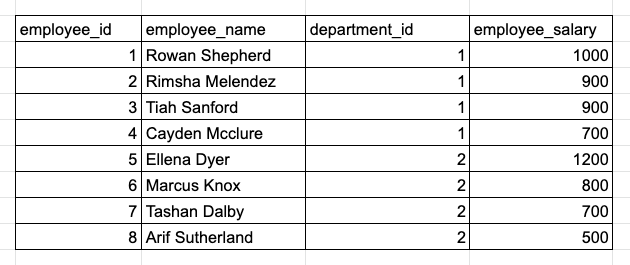
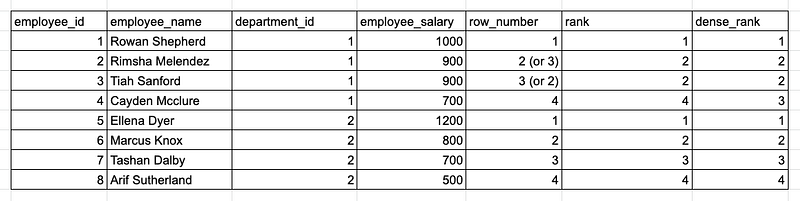
When an SQL question asks for “TOP N”, we can use either ORDER BY or ranking functions to answer the question. However, in this example, it asks to calculate “TOP N X in each Y”, which is a strong hint that we should use ranking functions because we need to rank rows within each partition group.
The query below finds exactly 3 highest-payed employees regardless of ties:
WITH T AS (
SELECT
    *,
    ROW_NUMBER() OVER (PARTITION BY department_id ORDER BY employee_salary DESC) AS rank_in_dep
FROM employee_salary)
SELECT * FROM T
WHERE rank_in_dep <= 3
-- Note: When using ROW_NUMBER, each row will have a unique rank number and ranks for tied records are assigned randomly. For exmaple, Rimsha and Tiah may be rank 2 or 3 in different query runs.Moreover, based on how ties should be handled, we could pick a different ranking function. Again, details matter!

Duplicates
Another common pitfall in SQL interviews is ignoring data duplicates. Although some columns seem to have distinct values in the sample data, candidates are expected to consider all possibilities as if they are working with a real-world dataset. For example, in theemployee_salary table from the previous example, it is possible to have employees sharing the same name.
One easy way to avoid potential problems caused by duplicates is to always use ID columns to uniquely identify distinct records.
Example
Find the total salary from all departments for each employee using the
employee_salarytable.
The right solution is to GROUP BY employee_id and calculating the total salary using SUM(employee_salary). If employee names are needed, join with an employee table at the end to retrieve employee name information.
The wrong approach is to GROUP BY employee_name.
NULL
In SQL, any predicates can result in one of the three values: true, false, and NULL, a reserved keyword for unknown or missing data values. Handling NULL datasets can be unexpectedly tricky. In an SQL interview, the interviewer might pay extra attention to whether your solution has handled NULL values. Sometimes it is obvious if a column is not nullable (ID columns, for instance) but for most other columns it is very likely there will be NULL values.
I suggest confirming whether key columns in the sample data are nullable and if so, utilize functions such as IS (NOT) NULL, IFNULL, and COALESCE to cover those edge cases.
(Want to learn more about how to deal with NULL values? Check out my guide on working with NULL in SQL.)
Communication
Last but not least — keep the communication going during SQL interviews.
I have interviewed many candidates who barely talked except when they had questions, which would be okay if they came up with the perfect solution at the end. However, it is generally a good idea to keep up communication during technical interviews. For example, you can talk about your understanding of the question and data, how you plan to approach the problem, why you use some functions versus other alternatives, and what edge cases you are considering.
TL;DR:
- Always ask questions to gather the required details first.
- Carefully choose between INNER, LEFT, and FULL JOIN.
- Use GROUP BY to aggregate data and properly use WHERE and HAVING.
- Understand the differences between the three ranking functions.
- Know when to use LAG/LEAD window functions.
- If you struggle with creating complicated queries, try following the SQL execution order.
- Consider potential data problems such as duplicates and NULL values.
- Communicate your thought process with the interviewers.
To help you understand how to use these strategies in an actual SQL interview, I will walk you through a sample SQL interview question from end to end in the video below:
I hope you find this guide helpful in preparing for your next data science interview. If you have any questions regarding SQL, feel free to leave a comment. Good luck!
Want to learn more about Data Engineering? Check out other articles from Data Engineer Things:


