
Covid 19-Projections with Knime, Jupyter and Tableau
Make projections for covid 19 for the next 30 days by combining KNIME for data integration, jupyter to fit models and Tableau to create visualizations.

While the USA is already in the midst of the third covid19 wave, Austria has just declared the second lockdown.
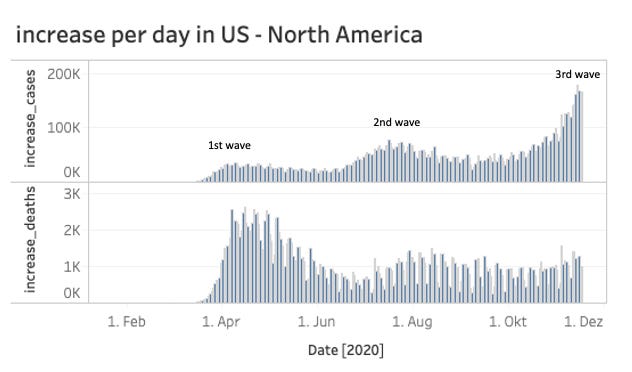
The increase of cases in Europe has risen sharply in recent weeks and the big question remains there: It’s mid-November now. How long will this second wave last and will the situation have calmed until Christmas?
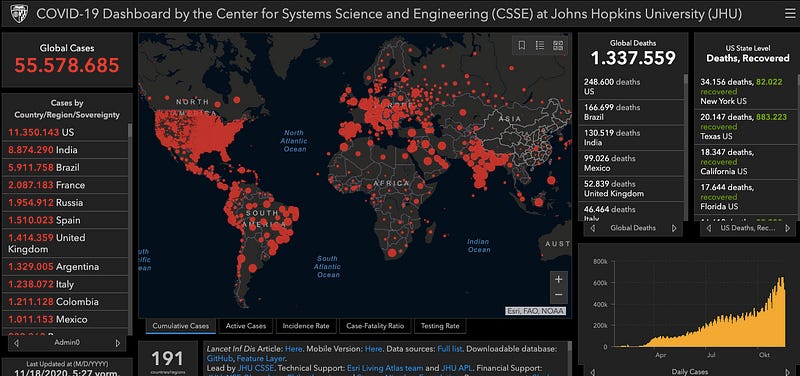
To answer this question we will use, on the one side the official covid19 data of the Johns Hopkins Institute which is the source of this well known dashboard and on the other hand, three on my opinion of the best data-science tool available for free:

KNIME + jupyter Notebooks + Tableau Public
And of course we will need also some math’s to calculate the projected values.
Let’s start!
We will divide our task in four parts:
1.) Search for appropriate data source 2.) ETL: load and transform data for proper use 3.) Calculation of the projections for the next 30 days 4.) Visualization of the cases and projections for every country and continent
1. Data source
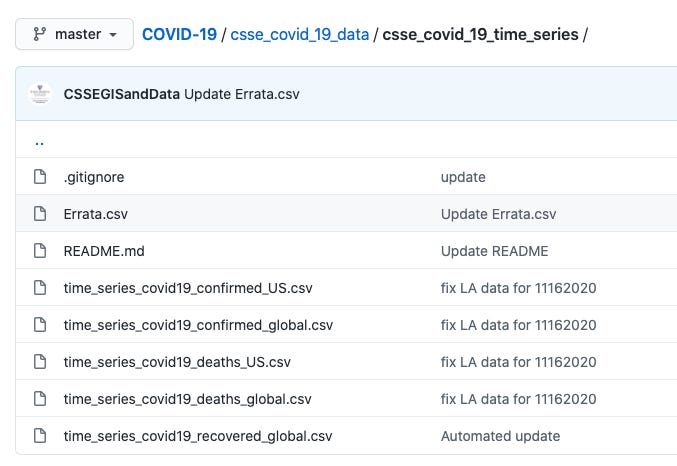
For the data source we will use the official data provided by the Johns Hopkins Institute. They have a github-site with the raw-data here which provides different files. For our analysis we will use the time series files “confirmed global” and “deaths global” (see picture below).
2. ETL
There are different tools and ways to load and transform data. But in my 18 years of experience in the Data Science- and BI Reporting world I found that one point is still key: to provide fast valuable results.
With KNIME you you will achieve this result. First because it’s a visual programming framework which helps you to focus on the problem instead on the software. Second because it’s scalable with plugins for R, Python, Tableau, Weka and many many more. And third: it’s open source :-)
Let’s load the csv-files of the github-Site from the Johns Hopkins Institute in knime with a csv_reader node and transpose the data. Then we join the two new structured tables (cases and deaths) together.
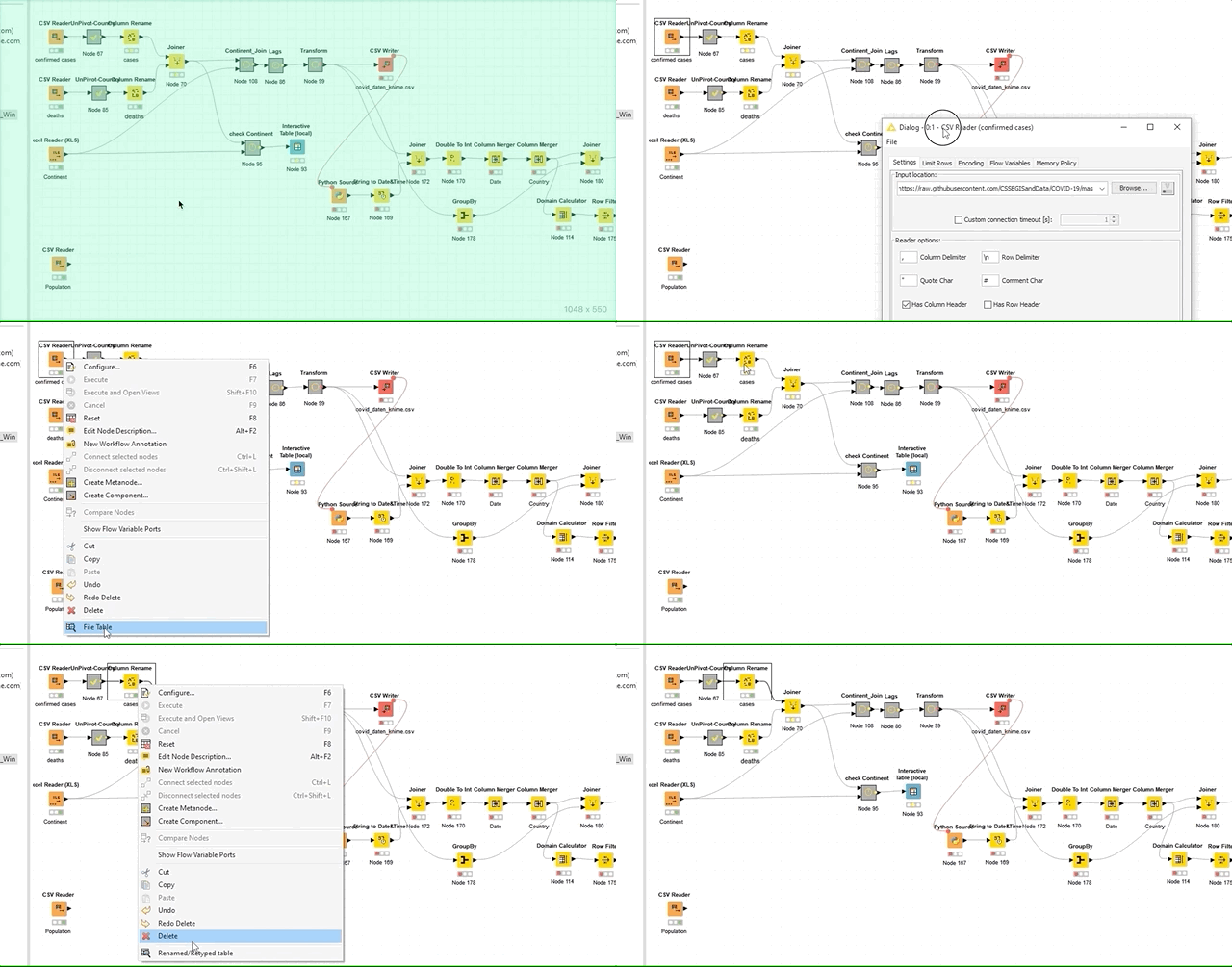
Since we want to show the stats and projections not just for every country but also for every continent, we will join this new dataset with a self made table enriched with the continent information for every country. Finally, we write out this new table as csv-file.
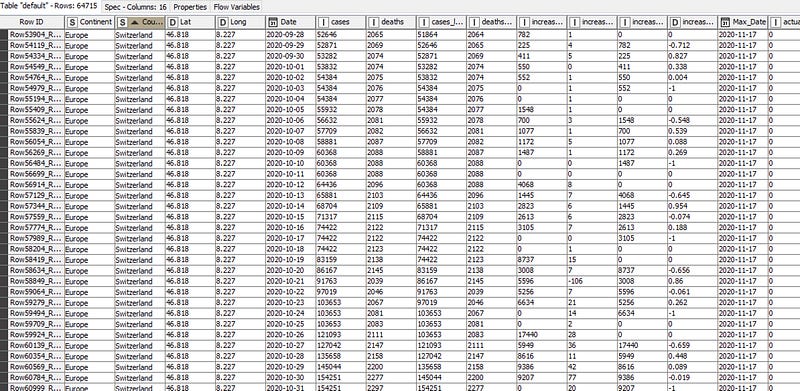
Now it comes the magic: we will use the Jupyter-Code in KNIME. There is here a quick introduction how to connect the two tools. (more about in the next section)
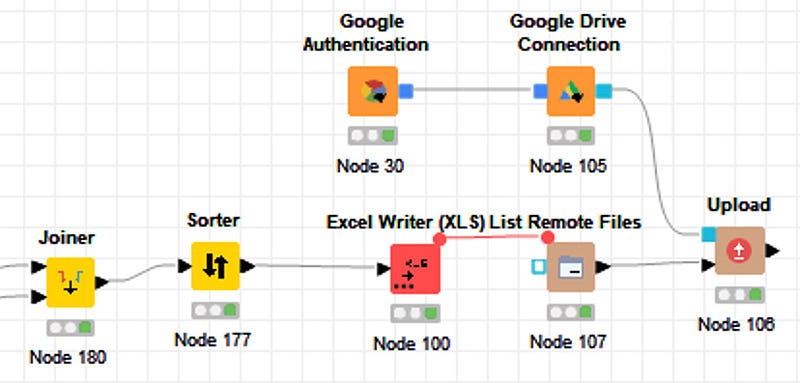
At the end we upload the data to our private Google Drive. This is necessary since we need to upload the data directly into Tableau Public. A refresh of the data in Tableau Public is only possible if the imported Excel-File is located on the Google Drive. KNIME provides an easy solution with dedicated nodes here as well. You don’t have to create any key’s or API’s. Just use your Google login and go.
The KNIME-workflow is available on the KNIME-hub .
3. Calculation of the projections
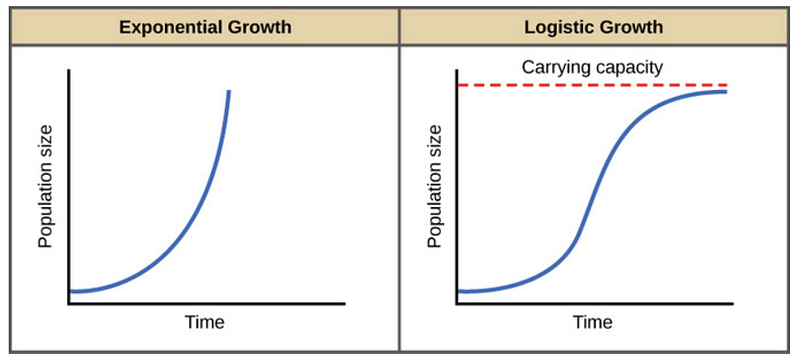
KNIME is my first tool when it comes for ETL and has quite a lot of nodes to perform machine learning models and also a good Deep Learning integration. (the Nodes are theses colored squared icons. They allow you to perform different operations like load data, sort, filter etc.) But in my case I just want to perform the fit of a logistic model and Jupyter seems to have with the package scipy and curve_fit the best solutions available. The logistic population growth model is the best choice to fit also a virus spread. In 1838 the Belgian mathematician Pierre François Verhulst introduced the logistic equation, which is a kind of generalization of the equation for exponential growth but with a maximum value for the population (K).
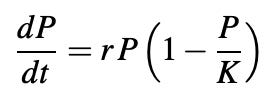
When the population P(t) is small compared to the parameter K, then P/K is nearly zero and we get the approximate equation:
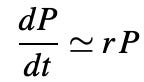
whose solution is:
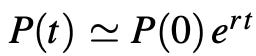
i.e. exponential growth. The growth rate decreases as P(t) gets closer to K.
Finally, we get after rearrangement the equation:
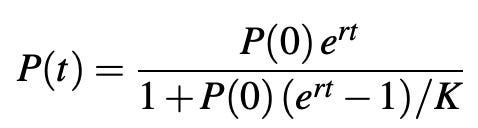
The total population increases progressively from P(0) at time t = 0 to the limit K.
Let’s implement this formula in Jupyter with python. To fit the logistic model to the data we will use the scipy package with curve_fit.
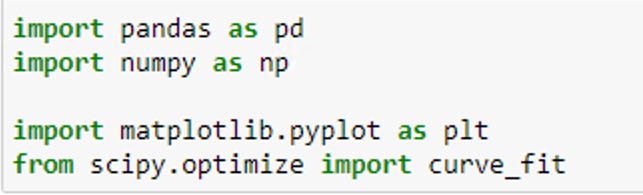
To fit the model we take into account just the cases of the last 45 days (Update of Dec 5th: 90 days seems to give more accurate results). The reason behind this filter is that we want just to fit the last wave of the spread. Otherwise our assumption of the logistic model will not be correct and the model will not fit. With the parameters found we will be able to project the cases for the next 30 days.
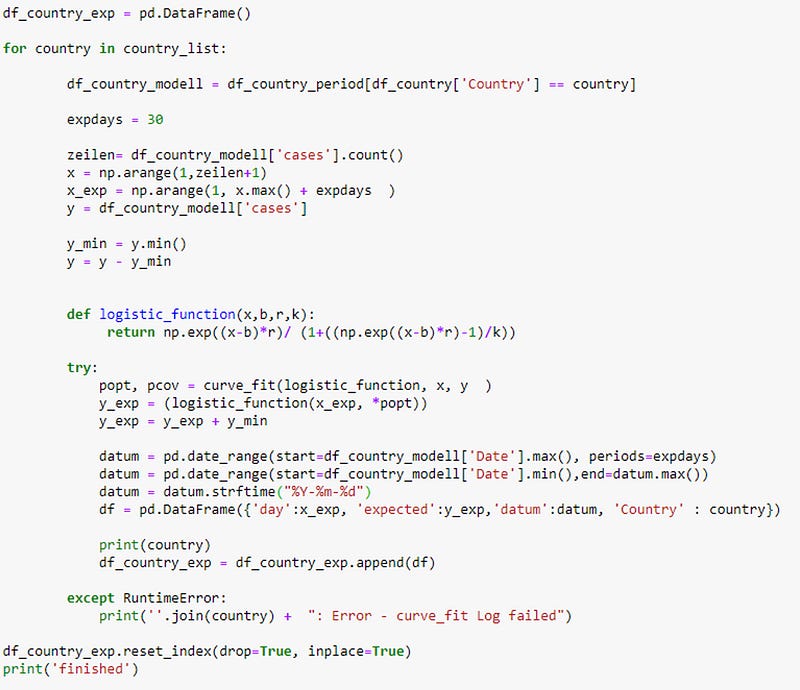
The code is available on my github-site here.
So first we load the covid-data from the Johns Hopkins Institute in KNIME. Then we restructure, join the data and write it out as csv-file. To load the csv-file in Jupyter and fit the data we need a Python Source node. In this node we call the desired Jupyter notebook.
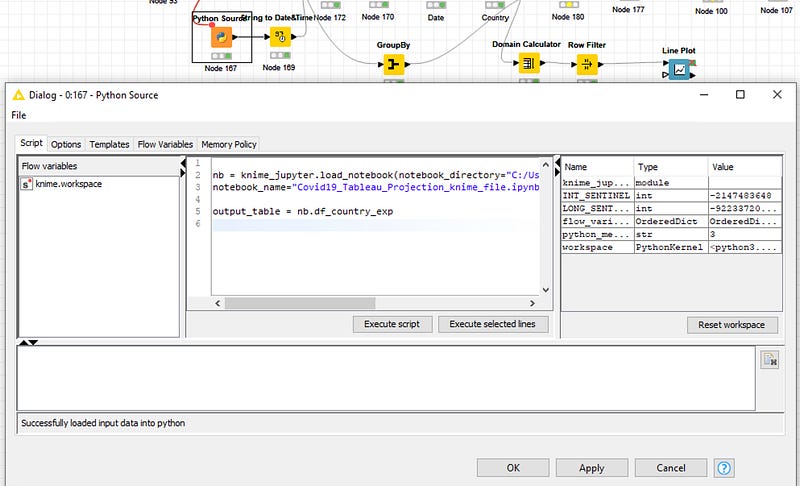
The following video demonstrate how to implement this step. You don’t need to have a Jupyter Server running to run the Jupyter notebook in KNIME.
4. Visualization
The last step is the visualization of the cases and the projections for every country and continent. To accomplish this we upload the data as Excel-File from KNIME to our Google Drive. In Tableau Public we load than the data as Google Sheet file.
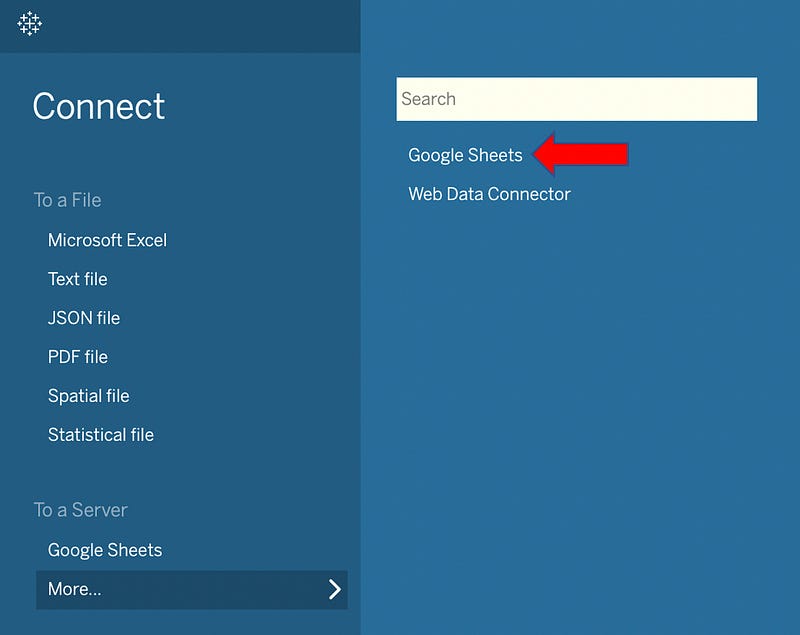
Finally in Tableau Public we create our desired Dashboard. And the best part of it: we are able to refresh the data every time without using a Tableau-Server.
The Tableau Dashboard is published with the actual data nearly every day on my Tableau-Public site here
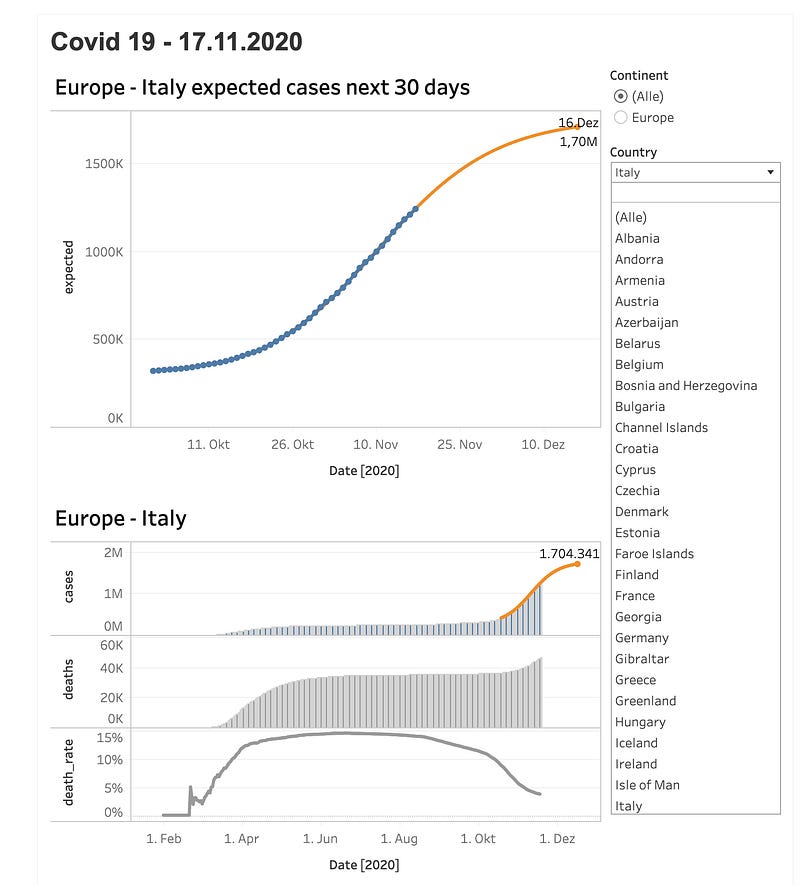
Answer of the initial question
At the start of the article, the question was: “How long will this second wave last and will the situation have calmed by Christmas?” -> The answer for Europe is — if our model is right — yes!
Do bear in mind that in both the US and in Iran a third wave is already in progress. So we are still a long way from this situation being over.
Meanwhile: Stay safe, stay healthy, stay well!
Thanks for reading! Please feel free to share your thoughts or reading tips in the comments.
Don’t miss the sequel of this article: Loglet Analysis -revisiting Covid 19 Projections
Material for this project: knime-workflow: knime-hub Jupyter-Code: github Tableau-Dashboard: Tableau-Public


