avatarTracyrenee

Free AI web copilot to create summaries, insights and extended knowledge, download it at here

5674

Abstract

ath to carry out this operation:-</p><figure id="4fe1"><img src="https://cdn-images-1.readmedium.com/v2/resize:fit:800/0*Q3xQgXQRlZH1eRQO"><figcaption></figcaption></figure><p id="6920">The code below uses numpy to normalise a vector:-</p><figure id="ad15"><img src="https://cdn-images-1.readmedium.com/v2/resize:fit:800/0*EukcPb1L6wxHN1ou"><figcaption></figcaption></figure><p id="2851">In mathematics the dot product, or scalar product, is an algebraic equation that takes two vectors of equal length and returns a single number.</p><p id="a1d2">The code below shows two says to find the dot product of two vectors:-</p><figure id="c7f7"><img src="https://cdn-images-1.readmedium.com/v2/resize:fit:800/0*hUHG4VV-0VzhViwX"><figcaption></figcaption></figure><p id="2674">The code below shows how to find the angle of two vectors, expressed in radians:-</p><figure id="43aa"><img src="https://cdn-images-1.readmedium.com/v2/resize:fit:800/0*j0DD75hmPetD_88d"><figcaption></figcaption></figure><p id="5209">The code below shows how to find the angle of two vectors, expressed in degrees:-</p><figure id="090f"><img src="https://cdn-images-1.readmedium.com/v2/resize:fit:800/0*8asUB5RiauguDTJB"><figcaption></figcaption></figure><p id="f21d">If two vectors intersect at 90 degrees, they are said to the orthogonal. The code below determines whether two vectors are orthogonal:-</p><figure id="7d4d"><img src="https://cdn-images-1.readmedium.com/v2/resize:fit:800/0*aIILZAAPWv4wNkGm"><figcaption></figcaption></figure><p id="7244">The projection of a vector on a plane is its orthogonal projection on that plane. The rejection of a vector from a plane is its orthogonal projection on a straight line, which is orthogonal to that plane.</p><p id="d916">The code below illustrates how to code vector projections:-</p><figure id="1c77"><img src="https://cdn-images-1.readmedium.com/v2/resize:fit:800/0*QczUejsxc2x9wXTI"><figcaption></figcaption></figure><p id="8953">The code below illustrates how to compute a vector onto a plane:-</p><figure id="b74f"><img src="https://cdn-images-1.readmedium.com/v2/resize:fit:800/0*r_MsbWLM7cVCFYVA"><figcaption></figcaption></figure><p id="b967">A cross product is the product of two vectors.</p><p id="e2a8">The code below uses numpy to compute the cross product of two vectors:-</p><figure id="8b23"><img src="https://cdn-images-1.readmedium.com/v2/resize:fit:800/0*iWjbMnycm8Busc45"><figcaption></figcaption></figure><p id="8ded">In the code below, the two vectors form a parallelogram. The numpy library is used to find the cross product of those two vectors. The cross project is then computed to find the area of the parallelogram:-</p><figure id="94ae"><img src="https://cdn-images-1.readmedium.com/v2/resize:fit:800/0*_AE6Go61EscCCW-V"><figcaption></figcaption></figure><p id="4d07">A triangle is merely a parallelogram halved. The code below uses the previous code to halving the area of the parallelogram to calculate the area of a triangle:-</p><figure id="3354"><img src="https://cdn-images-1.readmedium.com/v2/resize:fit:800/0*lOSFEYikz9D-mZ7z"><figcaption></figcaption></figure><p id="e180">The code below illustrates how to find the intersection of two vectors:-</p><figure id="ab31"><img src="https://cdn-images-1.readmedium.com/v2/resize:fit:800/0*gVKfKhKmAAAusk7c"><figcaption></figcaption></figure><p id="1837">The code below shows how to plot a plane on a graph:-</p><figure id="cf83"><img src="https://cdn-images-1.readmedium.com/v2/resize:fit:800/0*elz2KFAXbUkBTN-0"><figcaption></figcaption></figure><p id="79bf">The code below shows how to find out if two vectors are parallel and if they are also equal:-</p><figure id="1a64"><img src="https://cdn-images-1.readmedium.com/v2/resize:fit:800/0*HyRfxLU_t1Ji-DWM"><figcaption></figcaption></figure><p id="f25d">The code below draws planes using the Gaussian elimination method:-</p><figure id="b6ad"><img src="https://cdn-images-1.readmedium.com/v2/resize:fit:800/0*dCDjhO-08M-6Z2VC"><figcaption></figcaption></figure><p id="43b1">In mathematics, Gaussian elimination, also known as low reduction, is an algorithm for solving systems, is an algorithm for solving systems of linear equations. It consists of a sequence of operations performed on the corresponding matrix of coefficients. This method can be used to compute the rank of a matrix, the determinant of a matrix, and the inverse of an invertible matrix.</p><p id="a328">The code below is an example of how to code the Gaussian elimination method using numpy. This method takes into account there are two equations that need to be computed:-</p><figure id="34aa"><img src="https://cdn-images-1.readmedium.com/v2/resize:fit:800/0*w1kiUm402aEp_2W1"><figcaption></figcaption></figure><p id="7833">The code below is another way to code the Gaussian elimination method with three equations:-</p><figure id="438a"><img src="https://cdn-images-1.readmedium.com/v2/resize:fit:800/0*InteoqRuKmnXmhu1"><figcaption></figcaption></figure><p id="d0e0">Scipy is an open source library that has been built on top of numpy and can be imported into the Python programming language. It is used in mathematics, scientific computing, engineering and technical computing.</p><p id="9893">The code below is an illustration of how to solve two equations using both numpy and scipy:-</p><figure id="d6f9"><img src="https://cdn-images-1.readmedium.com/v2/resize:fit:800/0*rw9IU18wqFSbJ0z8"><figcaption></figcaption></figure><p id="740c">The code below illustrates another way to solve two equations using numpy and scipy:-</p><figure id="2657"><img src="https://cdn-images-1.readmedium.com/v2/resize:fit:800/0*RiCs0EoU_JBjvXdg"><figcapti

Options

on></figcaption></figure><p id="715c">The code below gives insight on how to solve a system of four equations using numpy and scipy:-</p><figure id="c630"><img src="https://cdn-images-1.readmedium.com/v2/resize:fit:800/0*t-OSMKRhnZBZ9FCT"><figcaption></figcaption></figure><p id="d840">The next section of the linear algebra course was working with vectors. The assert function was used to check if the solution to the equation was what was expected. The next part of the code was to use a for loop to add characters to the initial vector. And finally, a for loop was used to convert the equation, which was listed in metres, to feet:-</p><figure id="32bb"><img src="https://cdn-images-1.readmedium.com/v2/resize:fit:800/0*AaI-rsf6Bu79IJr9"><figcaption></figcaption></figure><p id="666d">The Python dot product is also known as the scalar product in algebraic operation, which takes two equal length sequences and returns a single number.</p><p id="bf0b">The next piece of code is an example of how to find the dot product of two vectors using numpy.</p><p id="fa85">The second piece of code is an example of how to find the dot product without the aid of numpy:-</p><figure id="30f0"><img src="https://cdn-images-1.readmedium.com/v2/resize:fit:800/0*-IjLlb7mco6fl_TX"><figcaption></figcaption></figure><p id="b620">The code below is an example of using a for loop to multiply each cell in a matrix by 5:-</p><figure id="af68"><img src="https://cdn-images-1.readmedium.com/v2/resize:fit:800/0*Q_6coUoPycdOQ8dY"><figcaption></figcaption></figure><p id="123e">The code below is an exercise in printing the numbers of each row in a matrix using a for loop and and putting the contents in a string:-</p><figure id="8d69"><img src="https://cdn-images-1.readmedium.com/v2/resize:fit:800/0*ERI8UCe5gQXmdUlE"><figcaption></figcaption></figure><p id="590d">The code below is an example of using a for loop to add two matrices together:-</p><figure id="fa14"><img src="https://cdn-images-1.readmedium.com/v2/resize:fit:800/0*y4VSDIntv6rHRY7S"><figcaption></figcaption></figure><p id="a392">The code below is an example of how numpy simplifies the process of adding two matrices together:-</p><figure id="a531"><img src="https://cdn-images-1.readmedium.com/v2/resize:fit:800/0*kFj3DUh0cofjIzs9"><figcaption></figcaption></figure><p id="23ee">The code below is an example of how to multiply two matrices together using for loops:-</p><figure id="0985"><img src="https://cdn-images-1.readmedium.com/v2/resize:fit:800/0*msA7k0cgC4jb_LOd"><figcaption></figcaption></figure><p id="42ba">The code below are two easy ways to multiply two matrices together using numpy:-</p><figure id="caac"><img src="https://cdn-images-1.readmedium.com/v2/resize:fit:800/0*neL0rSN-7fqupAhx"><figcaption></figcaption></figure><p id="d27f">The code below is an example of how to transpose a matrix using for loops:-</p><figure id="26ff"><img src="https://cdn-images-1.readmedium.com/v2/resize:fit:800/0*TuPDIROG9bsI3Jyg"><figcaption></figcaption></figure><p id="9bd0">The code below is another method to transpose a matrix.</p><p id="4c2f">The pieces of code below are examples of how to transpose a matrix using numpy’s transpose() function, which is sometimes simply written as T:-</p><figure id="1a06"><img src="https://cdn-images-1.readmedium.com/v2/resize:fit:800/0*dgR76_o-CHnV-_o_"><figcaption></figcaption></figure><p id="07ef">An identity matrix is a matrix of zero elements except the main diagonal element is set to one.</p><p id="24d2">The code below is an example of how to create an identity matrix from scratch using for loops.</p><p id="5ac5">The second piece of code is an example of how to use numpy to create an identity matrix:-</p><figure id="7b50"><img src="https://cdn-images-1.readmedium.com/v2/resize:fit:800/0*t4uwkJ5r6Birx_l4"><figcaption></figcaption></figure><p id="c890">The code below is an example of multiplying an identity matrix to another matrix using for loops:-</p><figure id="d924"><img src="https://cdn-images-1.readmedium.com/v2/resize:fit:800/0*1ZMYuRDsqcg6aMeZ"><figcaption></figcaption></figure><p id="98a3">The code below are two examples of how to multiply an identity matrix with another matrix using numpy’s dot() and matmul() functions:-</p><figure id="805b"><img src="https://cdn-images-1.readmedium.com/v2/resize:fit:800/0*tW2NLCbkKOknPQko"><figcaption></figcaption></figure><p id="329e">Inverting matrices can be very complicated, so the course tutors only gave instructions on how to invert a scalar and a two dimensional matrix with only two columns.</p><p id="3c34">The code below gives instructions on how to invert a scalar.</p><p id="ad99">The second piece of code gives instructions on how to invert a matrix using numpy:-</p><figure id="e9b4"><img src="https://cdn-images-1.readmedium.com/v2/resize:fit:800/0*68M7szwHPjusbmI0"><figcaption></figcaption></figure><p id="2a15">The code above is a reflection of the course work that I undertook to complete the linear algebra course. I was unable to use much of the code presented in the course because it was written primarily in the form of functions, which I don’t program in a lot. The code was also written in straightforward Python, without the benefit of libraries, such as numpy, scipy and math.</p><p id="7336">I hope the reader gains some benefit from my course review.</p><p id="700d">The code for my coursework can be found in my personal GitHub account, the link being here:- <a href="https://github.com/TracyRenee61/Udacity-Course/blob/main/Udacity_Linear_Algebra.ipynb">Udacity-Course/Udacity_Linear_Algebra.ipynb at main · TracyRenee61/Udacity-Course (github.com)</a></p></article></body>

Course Review: Udacity’s Linear Algebra Course with Python
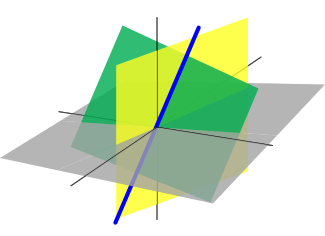
In an effort to improve my Python programming skills, I enrolled in a free on-line Linear Algebra course with Udemy. Linear algebra is said to be the foundation of machine learning, so I wanted to pick up this skill. The course was intended to be a refresher for those individuals who had already studied this branch of mathematics. I had never studied linear algebra, but studied algebra and calculus about forty years ago, so I hoped I would not have too much difficulty learning this new skill.

Since this is a course review, I will begin by giving feedback on what I thought of the course. The course began by stating a lot of complex equations and giving assignments based on those equations. The course tutors preferred to use functions that were based on the Python programming language without the benefit of any libraries. I do not write a lot of functions, even though they are useful in other programs as well, preferring to write the code with the operation embedded in it. In addition, the programs that the course tutors wrote were, in my opinion, were so complex that I preferred to write my own program. In many instances I had to search the internet ways to write the algorithms for the assignment, which were in every case different from the code the course tutors had written.

The course did not take advantage of the Python libraries that were written specifically to solve linear algebra problems. I understand the reason for this was to teach the student not to rely on libraries when coding. I believe that in theory a person should be able to write code without the assistance of libraries and perhaps that was one of the intentions of this course.

Despite the problems I encountered in Udacity’s linear algebra course, I endeavoured to complete the coursework and answer all of the questions to the best of my ability. The examples below are the solutions that I came up with to answer the questions that were presented in the course.

I wrote the code in Google Colab, which is a free online Jupyter Notebook. Although libraries were not intended to be used on this course, they were preinstalled into the program on the few occasions that I used them. The only drawback that I can see about Google Colab is the fact there is not an undo function, so care must be taken not to overwrite any valuable code. Another problem I have found is the fact that if I am working on a program in two separate computers, there will be occasions when the code does not save, so it is important to ensure that the code is saved in each location, and checked to ensure it has been updated in each location the program has been moved to.

With regard to Google Colab, I had heard that there are other online Jupyter Notebooks, such as jupyter.org or Saturn Cloud, but I have been sticking with Google Colab because I am able to save documents that I have written in my Google Drive.

The Linear Algebra course started out easy enough, just discussing the basics. To begin with, there are a few concepts that need to be covered.

A scalar is an element of a field that is used to define vector space. In linear algebra, real numbers are called scalars and relate to vectors in a vector space through the operation of scalar multiplication, in which a vector can be multiplied by a scalar to produce another vector.

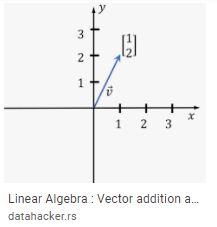
A vector is a quantity or phenomenon that has two independent properties: magnitude and direction.
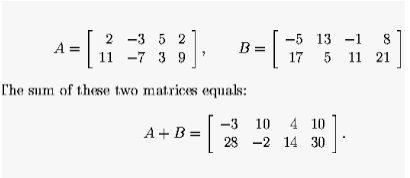
A matrix is a rectangular array of numbers, symbols, or expressions, arranged in rows and columns. Matrices can be used to compactly write and work with multiple linear equations, that is, a system of linear equations.
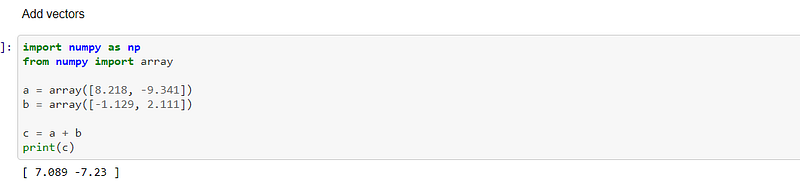
The code below gives instructions on how to create two arrays, a and b, and add them together to create a third array, c:-
The code below gives instructions on how to create two arrays, a and b, and then subtract them to form a third array, c:-

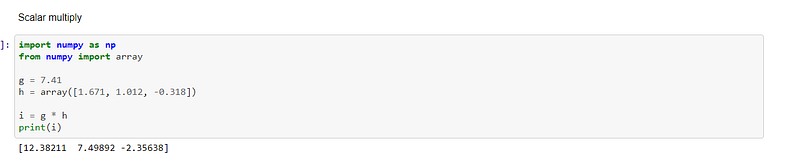
The code below give instructions on how to define a scalar and multiply it with a vector that has been created, to form a second vector:-
The math library is the most basic math module that is available in Python. It covers basic mathematical options, such as sum, exponential modulus, etcetera. This library is not useful when carrying out complex mathematical operations, such as multiplication of matrices. The calculations performed whilst using the math module are usually much slower.

The code below gives instructions on how to create a function that will find the magnitude of a vector and normalise it. I used the libraries of numpy and math to carry out this operation:-
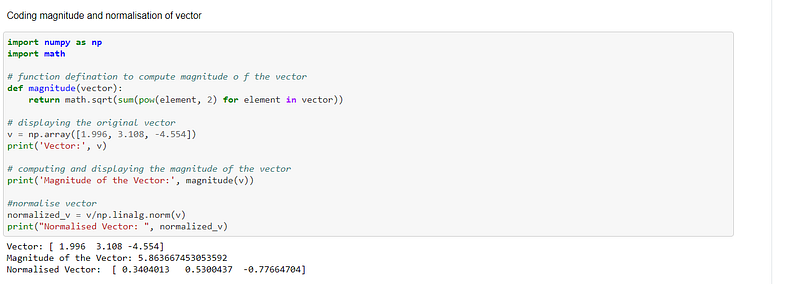
The code below uses numpy to normalise a vector:-

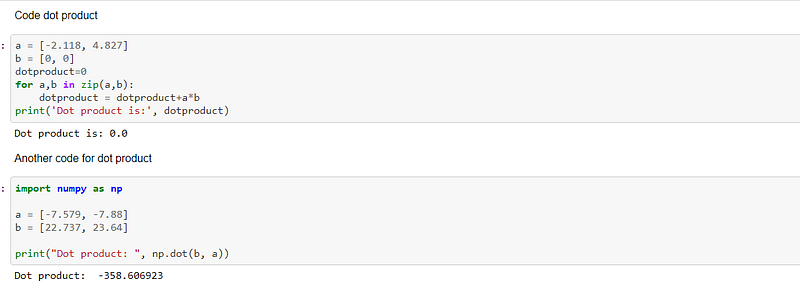
In mathematics the dot product, or scalar product, is an algebraic equation that takes two vectors of equal length and returns a single number.

The code below shows two says to find the dot product of two vectors:-
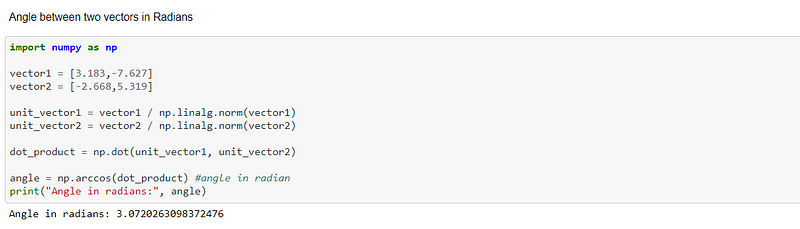
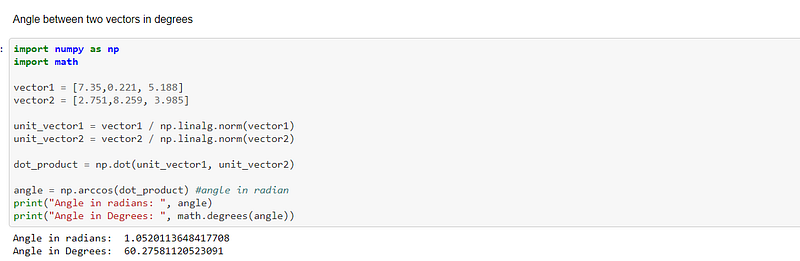
The code below shows how to find the angle of two vectors, expressed in radians:-
The code below shows how to find the angle of two vectors, expressed in degrees:-
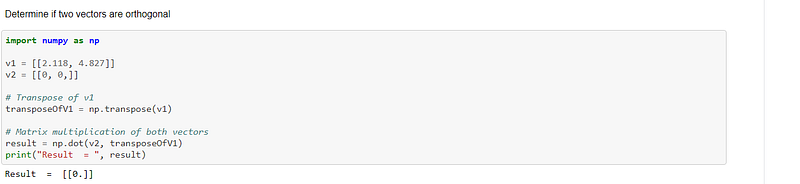
If two vectors intersect at 90 degrees, they are said to the orthogonal. The code below determines whether two vectors are orthogonal:-
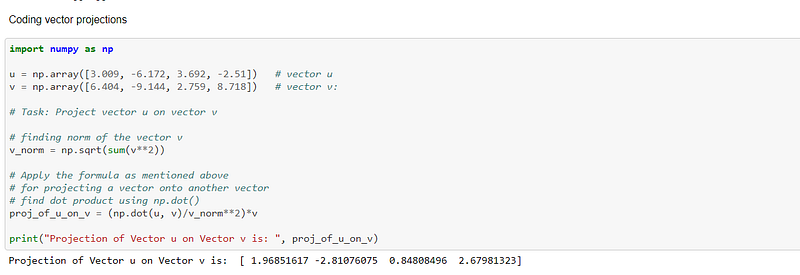
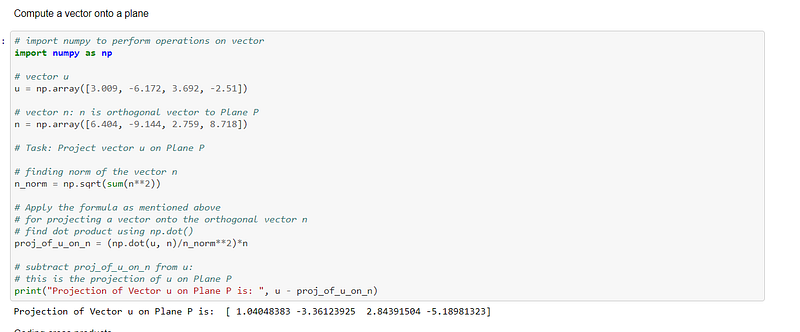
The projection of a vector on a plane is its orthogonal projection on that plane. The rejection of a vector from a plane is its orthogonal projection on a straight line, which is orthogonal to that plane.

The code below illustrates how to code vector projections:-
The code below illustrates how to compute a vector onto a plane:-
A cross product is the product of two vectors.

The code below uses numpy to compute the cross product of two vectors:-

In the code below, the two vectors form a parallelogram. The numpy library is used to find the cross product of those two vectors. The cross project is then computed to find the area of the parallelogram:-
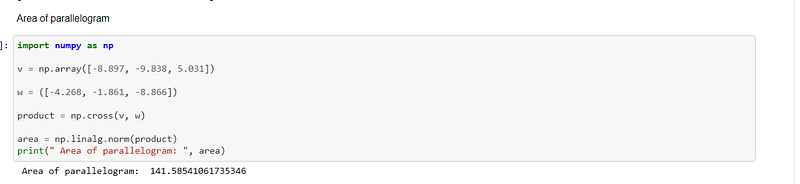
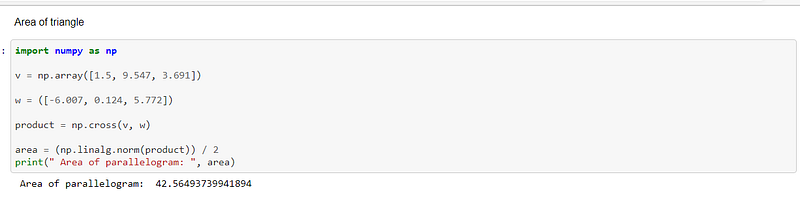
A triangle is merely a parallelogram halved. The code below uses the previous code to halving the area of the parallelogram to calculate the area of a triangle:-
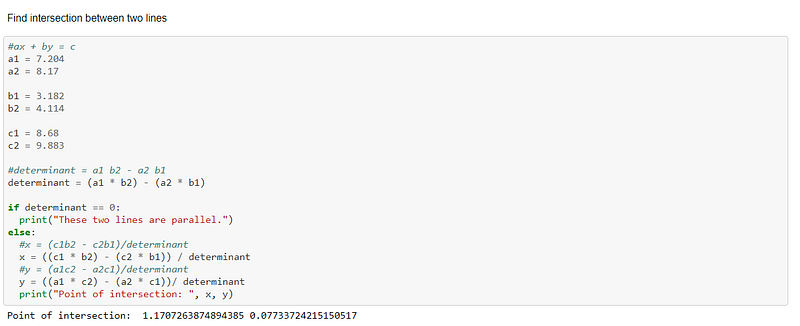
The code below illustrates how to find the intersection of two vectors:-
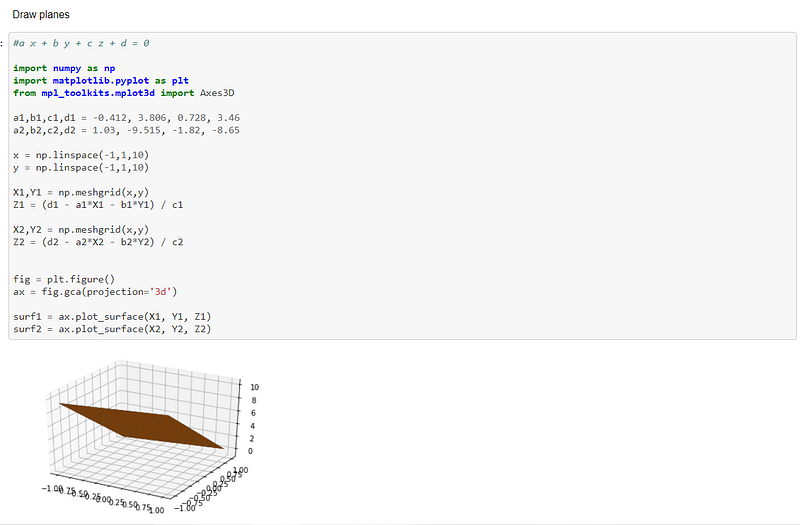
The code below shows how to plot a plane on a graph:-
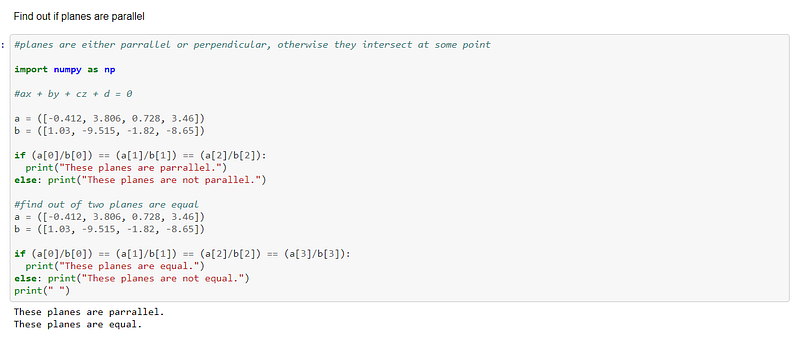
The code below shows how to find out if two vectors are parallel and if they are also equal:-
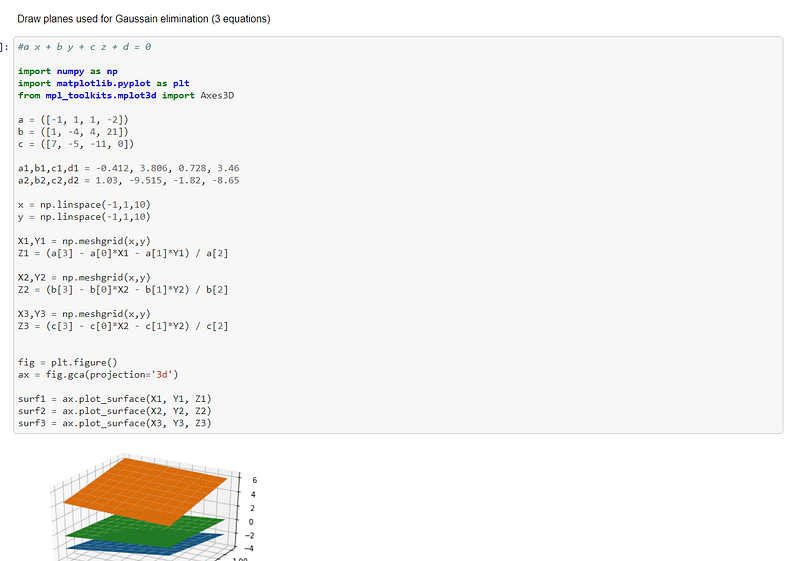
The code below draws planes using the Gaussian elimination method:-
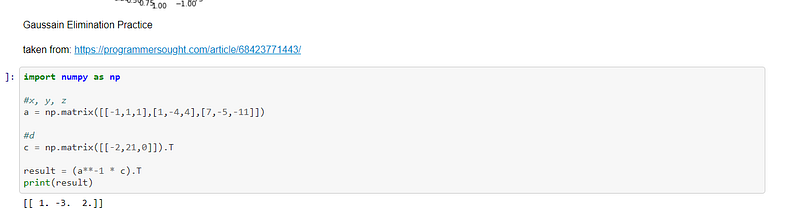
In mathematics, Gaussian elimination, also known as low reduction, is an algorithm for solving systems, is an algorithm for solving systems of linear equations. It consists of a sequence of operations performed on the corresponding matrix of coefficients. This method can be used to compute the rank of a matrix, the determinant of a matrix, and the inverse of an invertible matrix.

The code below is an example of how to code the Gaussian elimination method using numpy. This method takes into account there are two equations that need to be computed:-
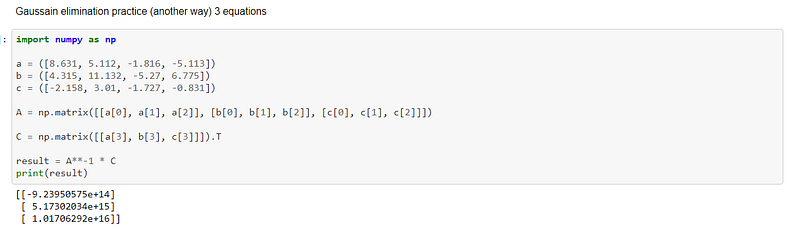
The code below is another way to code the Gaussian elimination method with three equations:-
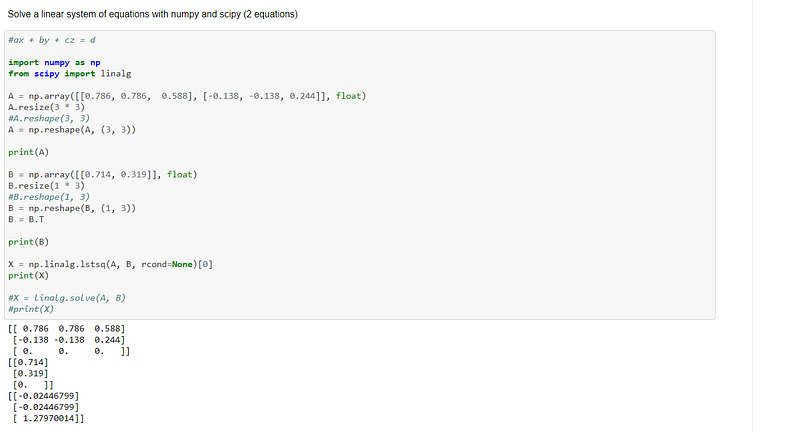
Scipy is an open source library that has been built on top of numpy and can be imported into the Python programming language. It is used in mathematics, scientific computing, engineering and technical computing.

The code below is an illustration of how to solve two equations using both numpy and scipy:-
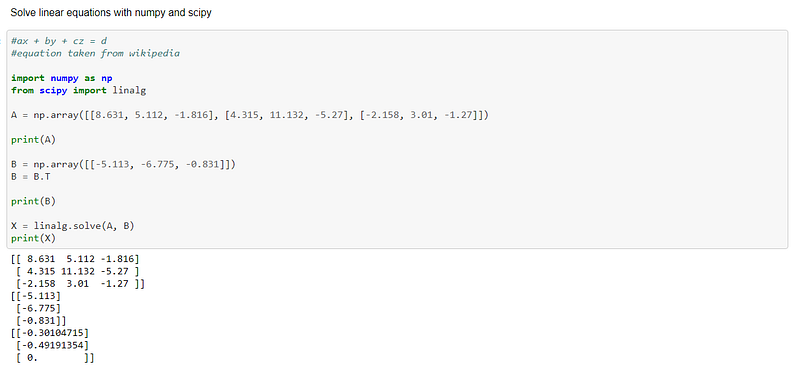
The code below illustrates another way to solve two equations using numpy and scipy:-
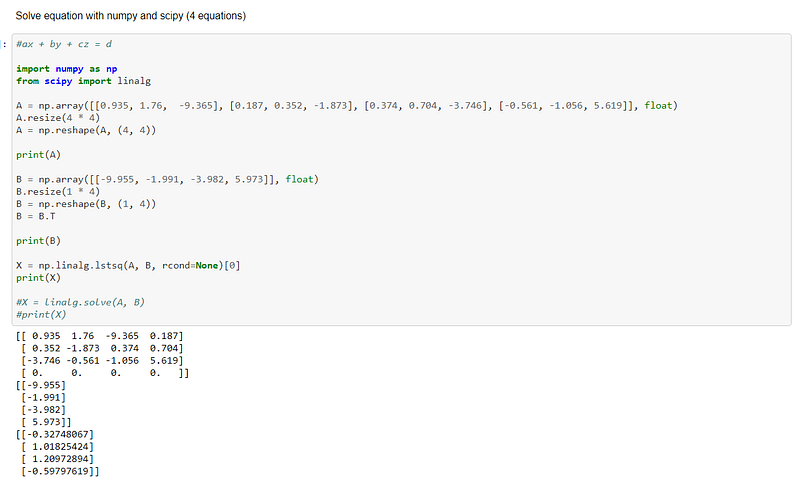
The code below gives insight on how to solve a system of four equations using numpy and scipy:-
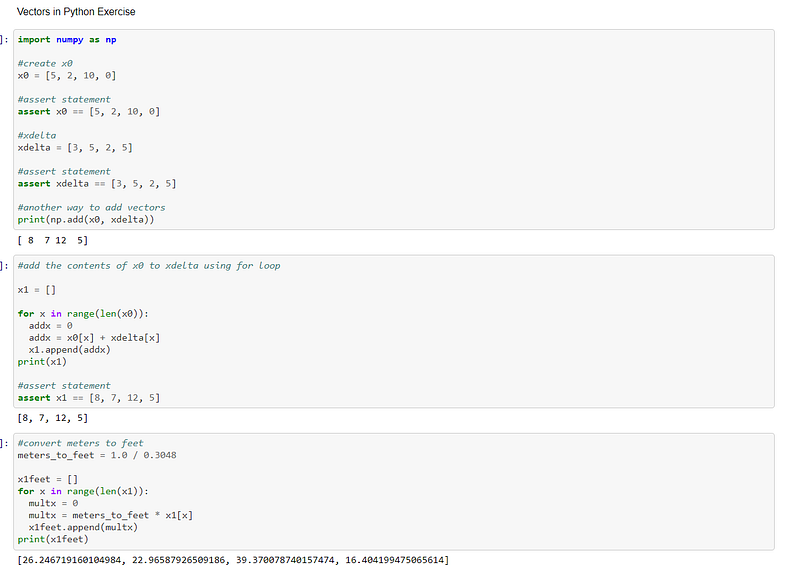
The next section of the linear algebra course was working with vectors. The assert function was used to check if the solution to the equation was what was expected. The next part of the code was to use a for loop to add characters to the initial vector. And finally, a for loop was used to convert the equation, which was listed in metres, to feet:-
The Python dot product is also known as the scalar product in algebraic operation, which takes two equal length sequences and returns a single number.

The next piece of code is an example of how to find the dot product of two vectors using numpy.

The second piece of code is an example of how to find the dot product without the aid of numpy:-
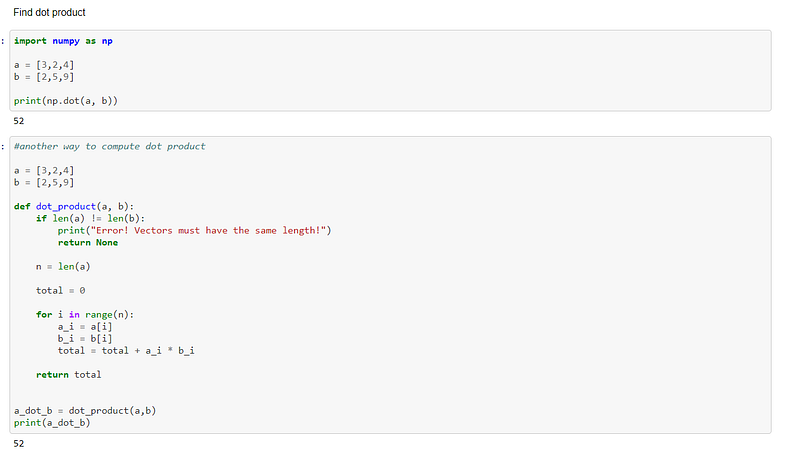
The code below is an example of using a for loop to multiply each cell in a matrix by 5:-
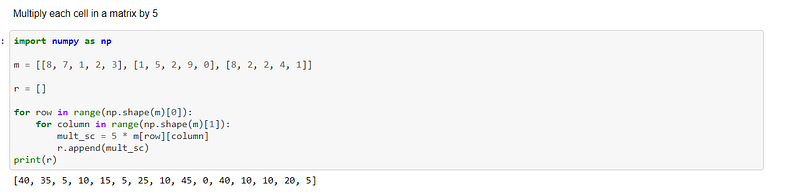
The code below is an exercise in printing the numbers of each row in a matrix using a for loop and and putting the contents in a string:-
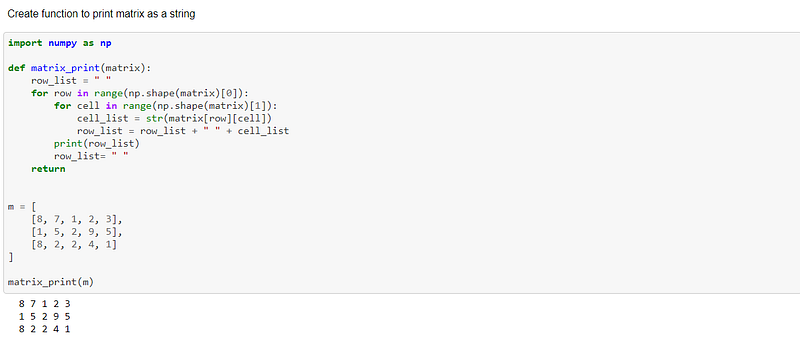
The code below is an example of using a for loop to add two matrices together:-
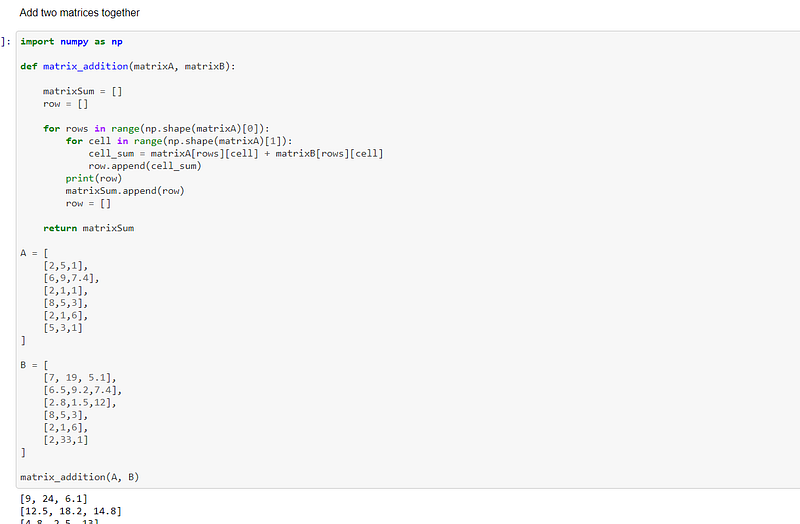
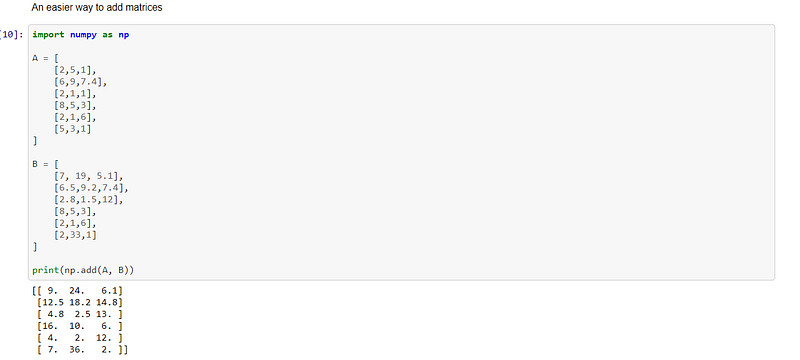
The code below is an example of how numpy simplifies the process of adding two matrices together:-
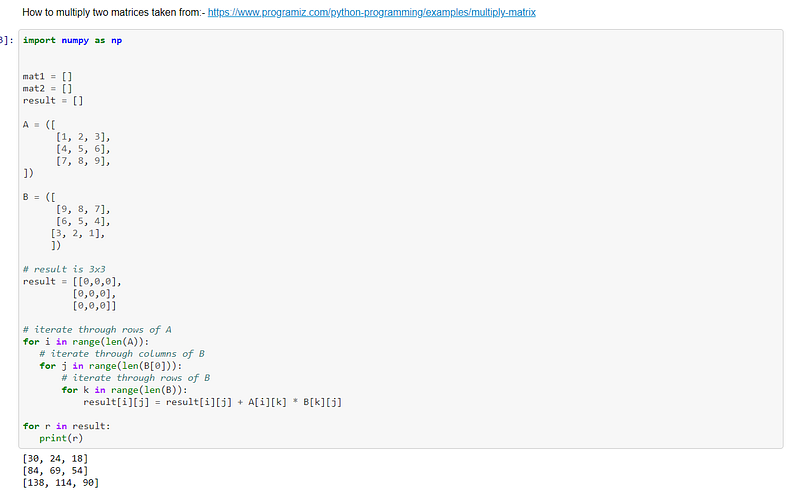
The code below is an example of how to multiply two matrices together using for loops:-
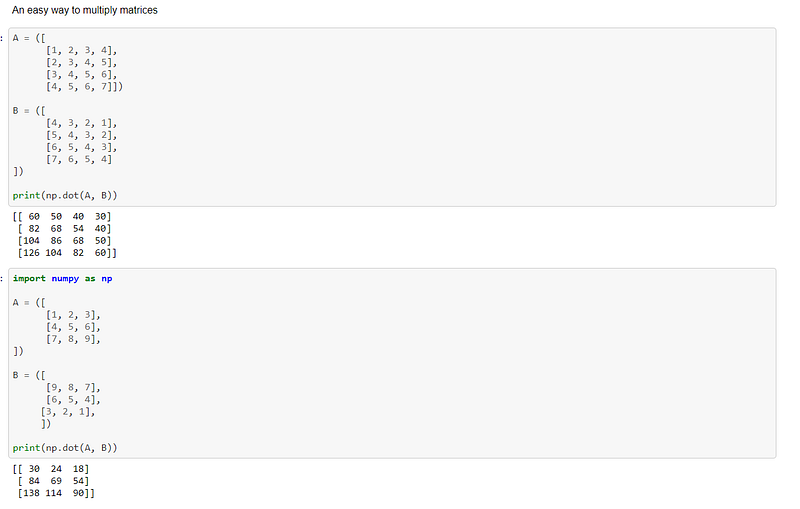
The code below are two easy ways to multiply two matrices together using numpy:-
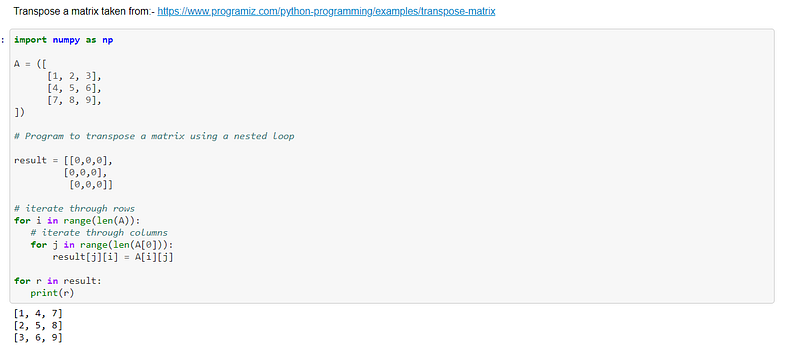
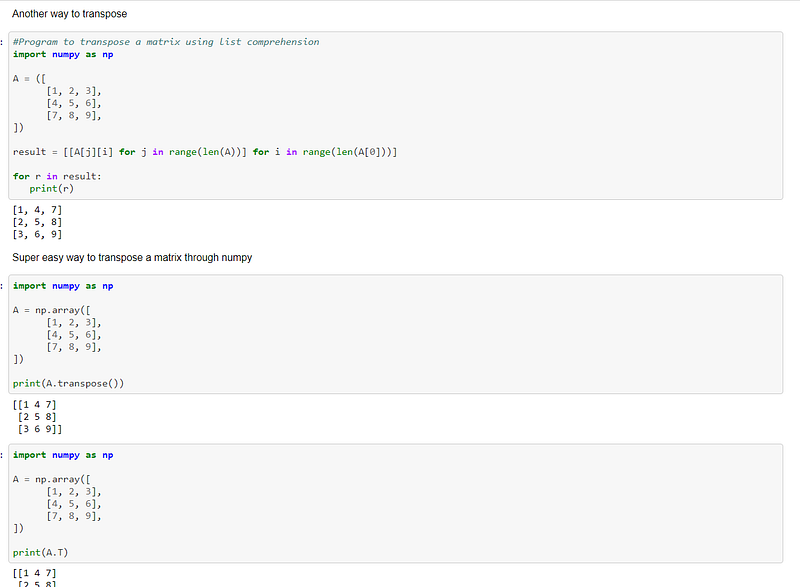
The code below is an example of how to transpose a matrix using for loops:-
The code below is another method to transpose a matrix.

The pieces of code below are examples of how to transpose a matrix using numpy’s transpose() function, which is sometimes simply written as T:-
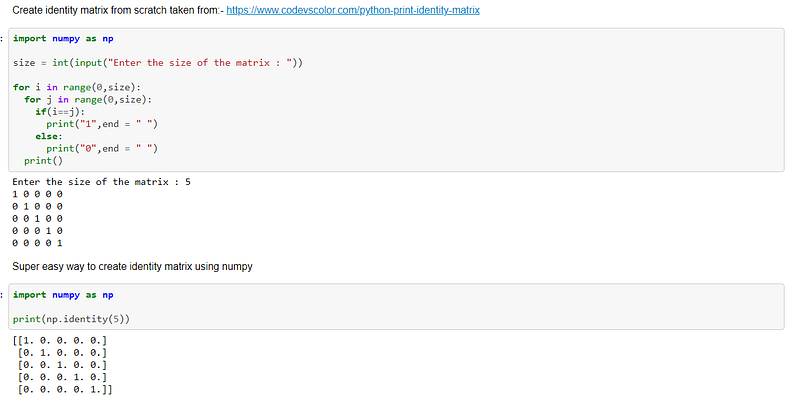
An identity matrix is a matrix of zero elements except the main diagonal element is set to one.

The code below is an example of how to create an identity matrix from scratch using for loops.

The second piece of code is an example of how to use numpy to create an identity matrix:-
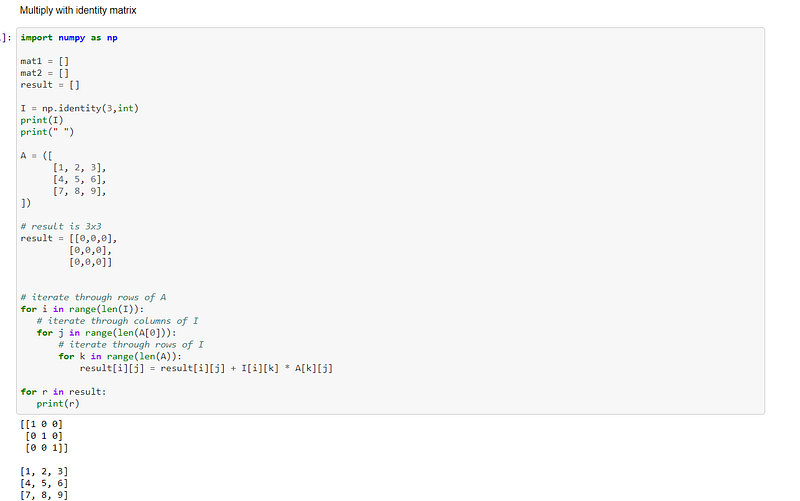
The code below is an example of multiplying an identity matrix to another matrix using for loops:-
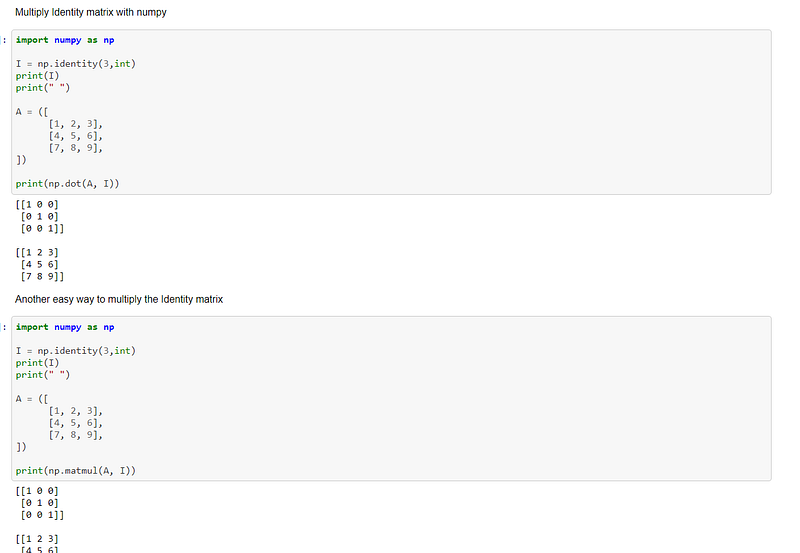
The code below are two examples of how to multiply an identity matrix with another matrix using numpy’s dot() and matmul() functions:-
Inverting matrices can be very complicated, so the course tutors only gave instructions on how to invert a scalar and a two dimensional matrix with only two columns.

The code below gives instructions on how to invert a scalar.

The second piece of code gives instructions on how to invert a matrix using numpy:-
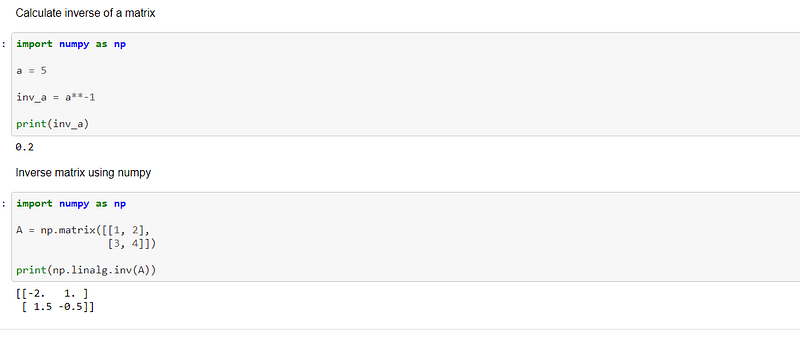
The code above is a reflection of the course work that I undertook to complete the linear algebra course. I was unable to use much of the code presented in the course because it was written primarily in the form of functions, which I don’t program in a lot. The code was also written in straightforward Python, without the benefit of libraries, such as numpy, scipy and math.

I hope the reader gains some benefit from my course review.

The code for my coursework can be found in my personal GitHub account, the link being here:- Udacity-Course/Udacity_Linear_Algebra.ipynb at main · TracyRenee61/Udacity-Course (github.com)

Udacity
Python
Linear Algebra
Data Science
Numpy
Recommended from ReadMedium