

Cost effective way of running spark in AWS EMR
Using transient clusters
Problem statement
Running spark in EMR can help in analyzing big datasets in a very little time, but when it comes to cost it’s definitely not cheap. It starts becoming very expensive as we get billed by number of nodes & depending upon machine types * duration till it was running. I definitely love the fact amazon can provision these EMR clusters with 100s of nodes in the matter of minutes but can I still use it in a cost effective so that I can get the better value out of it ?
Use case
Let’s take an example where twice a day I get a drop of this huge dataset (in CSV format) which I need to process using spark (running it in EMR) in 1 hour each. In order to meet my SLA I would need an EMR cluster with at least 10 core nodes + 1 master node with m4.2xlarge configuration. Now let’s do a cost calculation with this configuration for a month:
11 → m4.2xlarge nodes → Utilized 100% → Monthly cost = $4605.75This is HUGE, is there a way to can just turn on these clusters when I need and shutdown once we are done with the processing ? Yes, you can and we are going to see how to do that
Transient cluster (through UI)
AWS came up with the concept of transient cluster using which you can build them on demand basis and shutdown once the spark job is complete. In order to that through AWS console, do the following:
- Go to “EMR” service in AWS console and click on “Create Cluster”
- In the “Step type” select “Spark application” and click on “Configure”
- Make sure to enter the required properties like class name, jar file of the spark application along with job arguments as highlighted in the image below:
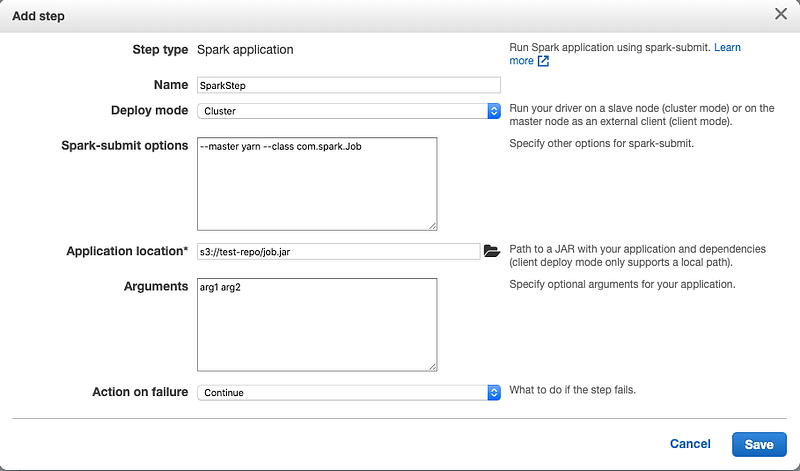
- Once you click on “Save”, make sure to select “Auto-terminate cluster after the last step is completed” checkbox before proceeding to next step
So this will take care of running the spark application once the cluster is up and terminating it at the end of the job step execution.
Transient cluster (through CFN)
Transient clusters can be built in a standard and easier way using CFN templates, for better flexibility we have customized the template to accept following parameters:
- KeyPair → Key Pair Name
- Name → Name of the cluster
- CoreNodesCount → Number of core nodes
- CoreNodesEc2Type → Ec2 type for core nodes
- MasterNodeEc2Type → Ec2 type for master node
- vpc → VPC ID
- subnet → Private subnet
- EmrVersion → EMR release version
- SparkArgs → Spark submit command. Sample: spark-submit, — deploy-mode,cluster, — master,yarn, — class,com.spark.Job,s3://test-repo/job.jar,arg1,arg2
You can download the template and the associated “delete.sh” script file, which takes care of terminating the cluster. On a side note: This is just a starter template so in case if you get any errors while provisioning you can either fix it by yourself or reach out to me for help :)
Note:
EMR clusters built through CFN templates will not terminate automatically after successful execution of spark job. So we are manually terminating them by running a shell script “delete.sh” (through another job step) which takes care of deleting the cluster. Refer to CFN yaml file for more details
How to automate it?
The whole flow can be automated using the below architecture:
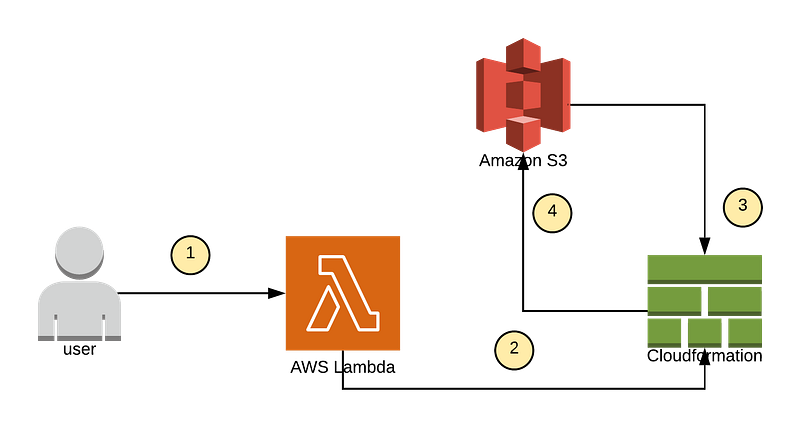
Here is the flow:
- The end user or a front end application will call the lambda function with the following parameters once you receive a dataset drop for the dataset arrives: Spark Jar location → s3://test-repo/job.jar , Arguments (dataset path) → s3://dataset/1.csv
- Lambda function will trigger a stack creation through cloud formation template (mentioned above) with appropriate parameters
- Once EMR is bootstrapped the job step will download “job.jar”, run the job and then terminate it at the end of the execution
Cost analysis before moving into transient cluster:
11 → m4.2xlarge nodes → Utilized 100% → Monthly cost = $4605.75Cost analysis after moving into transient cluster:
Assuming we get 2 drops of datasets a day and each dataset processing takes 1 hour each, here is the new cost:
AWS doesn’t charge you for the time that’s taken to provision these EMR servers.
11 → m4.2xlarge nodes → Utilized 2 Hours/Day → Monthly cost = $348.92We have reduced the bill by 75% this is BIG WIN. If you have a big fleet of EMR’s this approach can reduce your bill drastically.
Thanks for reading it, feel free to post your comments and if you find this article useful leave a clap.


