g on that endpoint, so we receive a “can’t find” error (correctly).</p></blockquote><p id="0108">CoreDNS’ documentation uses dig instead of nslookup…. your preference:</p><div id="5bc7"><pre>dig @localhost -<span class="hljs-selector-tag">p</span> <span class="hljs-number">1053</span> <span class="hljs-selector-tag">a</span> orderer<span class="hljs-selector-class">.example</span>.com</pre></div><h2 id="4ac4">Container-Optimized OS (COS)</h2><p id="1ed6">If you have a container and you’d like to run it on Google Cloud Platform, Kubernetes is a good, default choice. In this case, I’m going to run CoreDNS on a COS instance in the same project as my Kubernetes cluster.</p><p id="e149">To make life straightforward, after provisioning a COS instance, I’m going to run the CoreDNS command manually. COS provides a read-writable filesystem on <code>/tmp</code> which is why I chose this directory previously.</p><p id="f24f">Before running the container, let’s copy the CoreDNS configuration files to the instance:</p><div id="0c35"><pre>PROJECT=<span class="hljs-string">[[YOUR-PROJECT]]</span>
INSTANCE=<span class="hljs-string">[[YOUR-INSTANCE]]</span></pre></div><div id="cb51"><pre><span class="hljs-keyword">for</span> FILE <span class="hljs-keyword">in</span> Corefile example.org example.com
<span class="hljs-keyword">do</span>
gcloud compute scp
<span class="hljs-variable">{FILE}</span> \
<span class="hljs-variable">{INSTANCE}</span>:/tmp
--project=<span class="hljs-variable">{PROJECT}</span>
<span class="hljs-keyword">done</span></pre></div><blockquote id="0036"><p><b>NB</b> COS uses systemd-resolved and COS defaults to <code>DNSStubListener=udp</code> . To run CoreDNS you’ll need to disable this which you can do (temporarily) with <code>sudo systemctl stop systemd-resolved</code>.</p></blockquote><p id="283c">Then <code>gcloud compute ssh</code> and run the Docker command as before but (1) change the local directory to <code>/tmp</code> and (2) change the DNS port to its default (<code>53</code>):</p><div id="fdd8"><pre>docker <span class="hljs-keyword">run</span><span class="language-bash"> \
--interactive \
--<span class="hljs-built_in">tty</span> \
--publish=53:53/tcp \
--publish=53:53/udp \
--volume=/tmp:/tmp \
coredns/coredns \
-conf /tmp/Corefile \
-dns.port 53</span></pre></div><blockquote id="8225"><p><b>Issue #1</b>: I would prefer to not open firewall ports unncessarily. However, I’ve been unable to connect to the CoreDNS instance from the Kubernetes cluster using its internal IP. Investigating. The CoreDNS’ instance’s internal IP is available:</p></blockquote><div id="abc7"><pre><span class="hljs-attribute">DNS</span>=(
gcloud compute instances describe <span class="hljs-variable">{INSTANCE}</span> \
<span class="hljs-attribute">--project</span>=<span class="hljs-variable">{PROJECT}</span>
<span class="hljs-attribute">--format</span>=<span class="hljs-string">"value(networkInterfaces[0].networkIP)"</span>
) && echo <span class="hljs-variable">{DNS}</span></pre></div><p id="03dc">The public IP (which works) is available:</p><div id="1f2f"><pre><span class="hljs-attribute">DNS</span>=(
gcloud compute instances describe <span class="hljs-variable">{INSTANCE}</span> \
<span class="hljs-attribute">--project</span>=<span class="hljs-variable">{PROJECT}</span>
<span class="hljs-attribute">--format</span>=<span class="hljs-string">"value(networkInterfaces[0].accessConfigs[0].natIP)"</span>
) && echo <span class="hljs-variable">{DNS}</span></pre></div><p id="82c1">For the public IP, you’ll need to punch a hole in the firewall. I’ll leave this to your discretion; this opens <i>the instance’s ports to the internet</i>:</p><div id="e3d2"><pre>gcloud compute instances<span class="hljs-built_in"> add-tags </span>{INSTANCE}
--tags=coredns
--project={PROJECT}</pre></div><div id="925e"><pre>gcloud compute firewall-rules create temp-test-coredns \
<span class="hljs-attribute">--action</span>=ALLOW \
<span class="hljs-attribute">--rules</span>=tcp:53,udp:53 \
<span class="hljs-attribute">--target-tags</span>=coredns \
<span class="hljs-attribute">--project</span>=<span class="hljs-variable">{PROJECT}</span></pre></div><p id="d997">And then, from another instance in the cluster:</p><div id="4467"><pre><span class="hljs-attribute">nslookup</span> orderer.example.com <span class="hljs-variable">{DNS}</span></pre></div><div id="bb7c"><pre><span class="hljs-attribute">Server</span>: <span class="hljs-number">10.138.0.5</span>
<span class="hljs-attribute">Address</span>: <span class="hljs-number">10.138.0.5</span>#<span class="hljs-number">53</span></pre></div><div id="4ed4"><pre>orderer<span class="hljs-selector-class">.example</span><span class="hljs-selector-class">.com</span> canonical name = x-hyperledger-fabric-orderer.</pre></div><p id="822e">Or, in my case, because I’m running from another COS instance:</p><div id="041e"><pre>docker <span class="hljs-built_in">run</span> \
<span class="hljs-attribute">--net</span>=host \
busybox \
nslookup orderer.example.com <span class="hljs-variable">{DNS}</span></pre></div><div id="3aba"><pre><span class="hljs-attribute">Server</span>: <span class="hljs-number">10.138.0.5</span>
<span class="hljs-attribute">Address</span>: <span class="hljs-number">10.138.0.5:53</span></pre></div><div id="af99"><pre>orderer<span class="hljs-selector-class
Options
">.example</span><span class="hljs-selector-class">.com</span> canonical name = x-hyperledger-fabric-orderer</pre></div><div id="6af3"><pre>*** Can'<span class="hljs-built_in">t</span> <span class="hljs-built_in">find</span> orderer.example.c<span class="hljs-symbol">om:</span> No answer</pre></div><blockquote id="4ea2"><p><b>NB</b> busybox’s nslookup has slightly different behavior. It reports the correct alias but confirms it’s unable to find <code>orderer.example.com</code> (rather than <code>x-hyperledger-fabric-orderer</code>).</p></blockquote><h2 id="26e7">Kubernetes</h2><p id="0dfe">All working well to this point, let’s revise Kubernetes’ kube-dns configuration by applying a ConfigMap that defines the DNS server:</p>
<figure id="a267">
<div>
<div>
<iframe class="gist-iframe" src="/gist/DazWilkin/e8713036a1577ead8d555f8ac6ec81da.js" allowfullscreen="" frameborder="0" height="undefined" width="undefined">
</div>
</div>
</figure></iframe></div></div></figure><blockquote id="c216"><p><b>NB</b> You must replace <code>${DNS}</code> with its value. The result must be enclosed in quotes. The manifest explicitly references the <code>kube-system</code> namespace.</p></blockquote><p id="7351">Then:</p><div id="b74c"><pre>kubectl apply <span class="hljs-comment">--filename=kube-dns.yaml</span>
<span class="hljs-built_in">Warning</span>: kubectl apply should be used <span class="hljs-keyword">on</span> resource created <span class="hljs-keyword">by</span> either kubectl <span class="hljs-keyword">create</span> <span class="hljs-comment">--save-config or kubectl apply</span>
configmap/kube-dns configured</pre></div><blockquote id="3744"><p><b>NB</b> Ignore the “Warning”.</p></blockquote><figure id="7409"><img src="https://cdn-images-1.readmedium.com/v2/resize:fit:800/1*dBDOX0N3rFtiEmCgfvOWIA.png"><figcaption>Kubernetes Console showing system objects</figcaption></figure><p id="a841">And, let’s test it!</p><h2 id="e25d">Testing</h2><blockquote id="9bf5"><p><b>Issues #2</b>: My attempt to resolve <code>orderer.example.com</code> to the Kubernetes Service name is not working. I do not know why. Investigating.</p></blockquote><p id="783f">This (<code>CNAME</code>) does not work:</p>
<figure id="f27d">
<div>
<div>
<iframe class="gist-iframe" src="/gist/DazWilkin/2cda1cb0ec871430612342d86ce7c4ad.js" allowfullscreen="" frameborder="0" height="undefined" width="undefined">
</div>
</div>
</figure></iframe></div></div></figure><p id="f21c">Instead, I determined the Service’s IP address and reconfigured the CoreDNS <code>example.com</code> file to <code>A</code>(lias) to that:</p><div id="9e9a"><pre><span class="hljs-attribute">ORDERER</span>=$(\
<iframe class="gist-iframe" src="/gist/DazWilkin/83d28361e00034e9804a5ff57aabd613.js" allowfullscreen="" frameborder="0" height="undefined" width="undefined">
</div>
</div>
</figure></iframe></div></div></figure><blockquote id="e099"><p><b>NB</b> You must replace <code>${ORDERER}</code> with its value.</p></blockquote><p id="0701">Now, from a Pod within the cluster, <code>nslookup</code> will resolve <code>orderer.example.com</code>:</p><div id="8e29"><pre>kubectl <span class="hljs-built_in">run</span> test \
<span class="hljs-comment">--namespace=${NAMESPACE} </span>
<span class="hljs-comment">--image=busybox </span>
<span class="hljs-comment">--stdin </span>
<span class="hljs-comment">--tty</span>
If you don't see a command prompt, <span class="hljs-keyword">try</span> pressing enter.
/ <span class="hljs-comment"># nslookup orderer.example.com</span>
Name: orderer.example.com
Address <span class="hljs-number">1</span>: <span class="hljs-number">10.27</span><span class="hljs-number">.253</span><span class="hljs-number">.203</span> x-hyperledger-fabric-orderer.ytterbium.svc.cluster.<span class="hljs-keyword">local</span>
/ <span class="hljs-comment">#</span></pre></div><p id="bcb5">Bam!</p><h2 id="a902">Outstanding Issues</h2><ul><li>Why am I unable to use internal IPs?</li><li>How (!) can I write the example.com to resolve to <code>CNAME</code> (or <code>SRV</code>?)?</li></ul><h2 id="4498">Conclusion</h2><p id="88f3">It’s (much easier than I made it look) to run your own DNS service using CoreDNS.</p><p id="f88a">If you wish to complement a Kubernetes cluster’s kube-dns with a DNS service that you control that’s easy too.</p><p id="1313">While I achieved my goal and and am now able to test my Fabric on Helm deployment with the Pods able to resolve <code>orderer.example.com</code> to Kubernetes Service names (and prove a debugging point), the journey was longer than I would have liked :-)</p><p id="e361">That’s all!</p></article></body>
CoreDNS
Adventures in Kubernetes
“For Want of a Nail”
I have a — let’s not go there — need to alias a Kubernetes Service to a fully-qualified domain name. The hack to get this done took me on a learning opportunity with CoreDNS. CoreDNS is an alternative to kube-dns (link).
Problem
I need to temporarily alias [release-name]-[chart-name]-orderer to orderer.example.com to progress (resolve!?) a Helm Chart for Hyperledger Fabric on Kubernetes.
One Solution?
Success is defined to be that, when Pods call orderer.example.com, the name is resolved to the aforementioned Service. It is possible to configure the cluster’s kube-dns with so-called “stub domains” (configured with a ConfigMap) such that, DNS requests for (in this case) *.example.com are resolved by a DNS service that I control. One based on CoreDNS.
CoreDNS
Let’s test it locally.
I’m going to retain CoreDNS’s example of example.org (dot-org) as a known-working configuration and will add my ownexample.com (dot-com):
NB The magic happens in line #13 where orderer is aliased to [[RELEASE-NAME]]-[[CHART-NAME]]-orderer. Do not forget the terminating “.”. I will replace RELEASE-NAME and CHART-NAME with actual values.
We need a configuration file for CoreDNS too. By default this is called Corefile:
NB this defines 2 DNS domains (example.com and example.org). Both comprise a pipeline of plugins beginning with file. The value after file is a parameter and references the above e.g. example.com file.
NB The double-publish on port 1053 is because DNS uses both TCP and UDP. I’m assuming the above files are in the current (${PWD}) directory. This directory is mapped to /tmp in the container. The container will find Corefile in this directory and it references example.org and example.com that should be in the same (/tmp) directory.
orderer.example.com canonical name = x-hyperledger-fabric-orderer.
** server can'tfind x-hyperledger-fabric-orderer: REFUSED
NB This is correctly wrong ;-) CoreDNS has aliased orderer.example.com to x-hyperledger-fabric-orderer. That’s correct. There is currently nothing on that endpoint, so we receive a “can’t find” error (correctly).
CoreDNS’ documentation uses dig instead of nslookup…. your preference:
dig @localhost -p1053a orderer.example.com
Container-Optimized OS (COS)
If you have a container and you’d like to run it on Google Cloud Platform, Kubernetes is a good, default choice. In this case, I’m going to run CoreDNS on a COS instance in the same project as my Kubernetes cluster.
To make life straightforward, after provisioning a COS instance, I’m going to run the CoreDNS command manually. COS provides a read-writable filesystem on /tmp which is why I chose this directory previously.
Before running the container, let’s copy the CoreDNS configuration files to the instance:
for FILE in Corefile example.org example.com
do
gcloud compute scp \
${FILE} \
${INSTANCE}:/tmp \
--project=${PROJECT}done
NB COS uses systemd-resolved and COS defaults to DNSStubListener=udp . To run CoreDNS you’ll need to disable this which you can do (temporarily) with sudo systemctl stop systemd-resolved.
Then gcloud compute ssh and run the Docker command as before but (1) change the local directory to /tmp and (2) change the DNS port to its default (53):
Issue #1: I would prefer to not open firewall ports unncessarily. However, I’ve been unable to connect to the CoreDNS instance from the Kubernetes cluster using its internal IP. Investigating. The CoreDNS’ instance’s internal IP is available:
orderer.example.com canonical name = x-hyperledger-fabric-orderer.
Or, in my case, because I’m running from another COS instance:
docker run \
--net=host \
busybox \
nslookup orderer.example.com ${DNS}
Server: 10.138.0.5Address: 10.138.0.5:53
orderer.example.com canonical name = x-hyperledger-fabric-orderer
*** Can'tfind orderer.example.com: No answer
NB busybox’s nslookup has slightly different behavior. It reports the correct alias but confirms it’s unable to find orderer.example.com (rather than x-hyperledger-fabric-orderer).
Kubernetes
All working well to this point, let’s revise Kubernetes’ kube-dns configuration by applying a ConfigMap that defines the DNS server:
NB You must replace ${DNS} with its value. The result must be enclosed in quotes. The manifest explicitly references the kube-system namespace.
Then:
kubectl apply --filename=kube-dns.yamlWarning: kubectl apply should be used on resource created by either kubectl create--save-config or kubectl apply
configmap/kube-dns configured
NB Ignore the “Warning”.
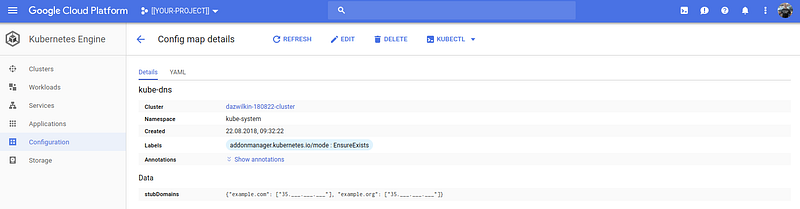
Kubernetes Console showing system objects
And, let’s test it!
Testing
Issues #2: My attempt to resolve orderer.example.com to the Kubernetes Service name is not working. I do not know why. Investigating.
This (CNAME) does not work:
Instead, I determined the Service’s IP address and reconfigured the CoreDNS example.com file to A(lias) to that:
Now, from a Pod within the cluster, nslookup will resolve orderer.example.com:
kubectl run test \
--namespace=${NAMESPACE} \--image=busybox \--stdin \--tty
If you don't see a command prompt, try pressing enter.
/ # nslookup orderer.example.com
Name: orderer.example.com
Address 1: 10.27.253.203 x-hyperledger-fabric-orderer.ytterbium.svc.cluster.local
/ #
Bam!
Outstanding Issues
Why am I unable to use internal IPs?
How (!) can I write the example.com to resolve to CNAME (or SRV?)?
Conclusion
It’s (much easier than I made it look) to run your own DNS service using CoreDNS.
If you wish to complement a Kubernetes cluster’s kube-dns with a DNS service that you control that’s easy too.
While I achieved my goal and and am now able to test my Fabric on Helm deployment with the Pods able to resolve orderer.example.com to Kubernetes Service names (and prove a debugging point), the journey was longer than I would have liked :-)