
Copy AI Review: Is it as good as a human writer?

This is my Copy AI review. I personally tested this AI writing software and I’m going to share my honest opinion about my experience. A lot of people wonder if it’s everything others say it is.
It’s had a ton of positive reviews online but, is it really the real deal?
Copy AI is a writing assistant tool that helps you write faster, write longer content, and write more easily. It’s a great tool to guard against writer’s block and it can also save you money, save time, and make you more money!
I put it to the test and this is how it went…
Testing Copy AI for 30 days
I did it. I tested Copy AI for 30 days.
My goal was really put it through a full course. I’m a writer. I’m a blogger. I use content in my day-to-day work and so, I thought if I test this AI writer, I’ll have a better grasp on if it’s worth it enough to invest and use it consistently for the long term.
So, I did.
But, I got stuck.
I got stuck on this:
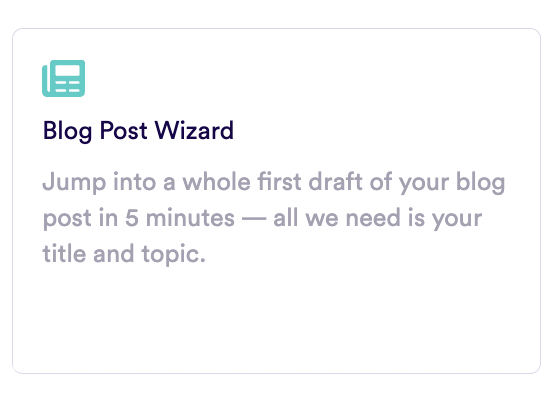
The Blog Post Wizard.
This wizard takes you through a step-by-step of creating a full blog post. I used this dozens of times to create content as long as 2,500 words.
It only takes a few minutes to do, believe it or not.
This is my favorite feature of Copy AI.
They say it takes 5 minutes to write your blog post with it but, honestly, I’ve never taken any longer than 2–3 minutes.
I can use this thing over and over again to write high-quality blog posts for my blog.
It helps me stay on top of my content plan and it’s helped me maintain over 10K views per month on my personal blog (an uptick from an average of around 3K views/month which it has been stuck at for a while).
How does the Blog Post Wizard work?
Here’s how it goes…

Step 1: Setup the wizard
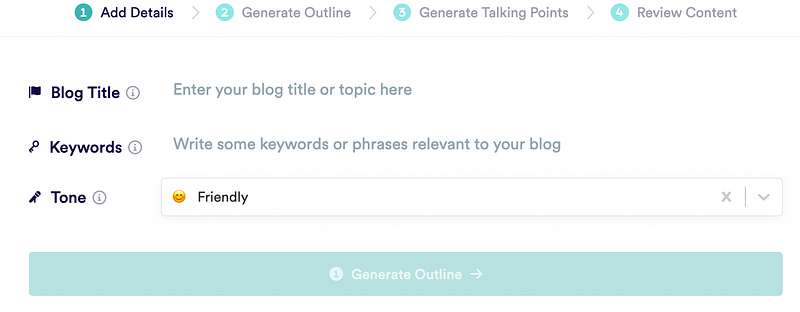
You enter the blog title you have in mind, keywords you want to rank for and include in the content and the kind of tone you want for your post (friendly, casual, etc.)
Then, click Generate Outline.
Step 2: Refine your outline
The outline will be spit out for you from Copy AI. From there, you can refine it as you wish. If you like everything they put together, just move onto the next step.
If not, make changes, add and delete what you’d like and then move on.
Step 3: Generate talking points
Your talking points are an extension of the outline.
These are quick bullets about what’s included in each section throughout the outline.
Same as #2, go through this part, make changes as you wish, when done, move onto step 4.
Step 4: Review the content
Do your final review and then click to generate your blog post. You’re done!
Copy AI pricing
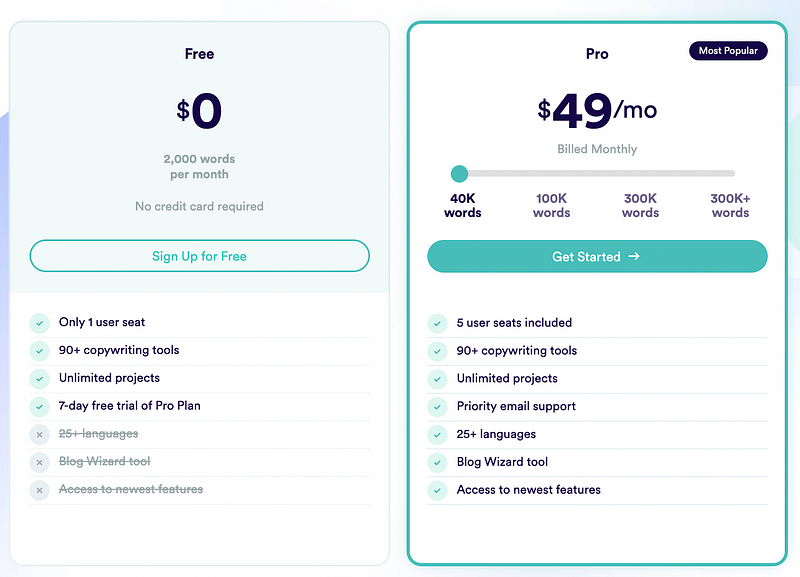
There’s a free plan and a paid plan.
If you don’t plan on creating more than 2,000 words a month then you can go for the free plan.
I want to note that the free plan does not include the blog post wizard.
For up to 40,000 words per month, go with the paid plan at $49/month. You can also go for 100,000 words per month at $99/month or go with a higher plan.
The paid plan gets you:
- Up to 5 user seats
- 40,000 words
- Unlimited projects
- 90+ copywriting tools
- Priority email support
- Blog post wizard
After my first full month of Copy AI at 40,000 words/month, I ran out of words!
So, if you’re planning on writing a ton like me, I’d go for a higher-tier plan.
What can you use Copy AI for?
Blog posts, as I outlined above.
Also:
- Emails
- Website copy
- Instagram captions
- Customer testimonials
- Social media bio
- Sales page copy
- Case studies
- YouTube video description
- And, more
Who is Copy AI for?
Copy AI is for marketers, advertisers, bloggers, writers, business owners, and anybody else who has a need for creating content consistently.
Is Copy AI worth it?
Yes, Copy AI is worth it.
You can sign up for free and test out Copy AI free in their trial. Then, when you’re ready, upgrading to a paid account is super easy.
Click here to start your trial of Copy AI.
Note: Affiliate links are in this article.


