
Google BigQuery and Cool things you can do with It
What is BigQuery?
BigQuery is google’s offering for enterprise, fully-managed, serverless, cloud data warehouse. Use BigQuery high performance modified SQL queries on massive datasets. It integrates with other Google Cloud APIs services such as storage, Data Studio (visualization, pivot table). Even use SQL and BigQuery datasets to train machine learning models.
“BigQuery is a fully managed, massive scale, low cost enterprise data warehouse on top of Google’s compute storage and network infrastructure” — Google Developer. It replaces traditional data warehousing (DW), replacing major enterprise business intelligence and data warehousing (BI/DW) needs. Run familiar SQL queries optimized for massive public and private datasets.
Because BigQuery is fully managed, you just have to bring your analyst and data scientist to BigQuery. BigQuery even has data for you to analyze. — Uniqtech team
Fully managed means we don’t have to provision or manage our own clusters.
Traditional queries can take hours to run on traditional DW infrastructure. BigQuery allows any end user to be apart of the data science effort at their company. Users can self service datasets without a DBA. Run adhoc queries, aggregate queries across extremely large datasets.
BigQuery is pretty much great for any data you can fit in tables.
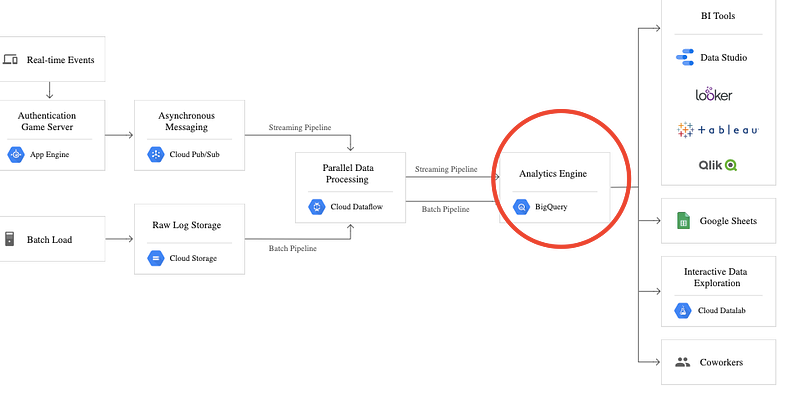
BigQuery capabilities allow business users to derive insights fast. Because of these advantages BigQuery sits on the Big Data Analytics layer of a data tech stack.
See the image below: where BigQuery sits in the tech stack. Source: BigQuery landing page at Google
BigQuery is extremely fast, and can process terabytes of data in seconds and petabytes of data in minutes. Data analysts and data scientists can connect it with Google Cloud services, and run BigQuery, Business Analytics, and Machine Learning queries, even AutoML using SQL. The web interface and API connections should make BigQuery much easier to configure and use than other Big Data analytics tools.
See below for a really helpful video explaining BigQuery in 5 minutes.
Though it does not replace all aspects of data warehousing. For example, it is in cloud storage only. It is also not optimized for capturing changes as the transactions happen.
In terms of cost and time resources, the resources are scaled dynamically. Resources surge when you run costly queries. But you pay cost of storage and query separately, and can choose from a pay per use or fixed rate plans.
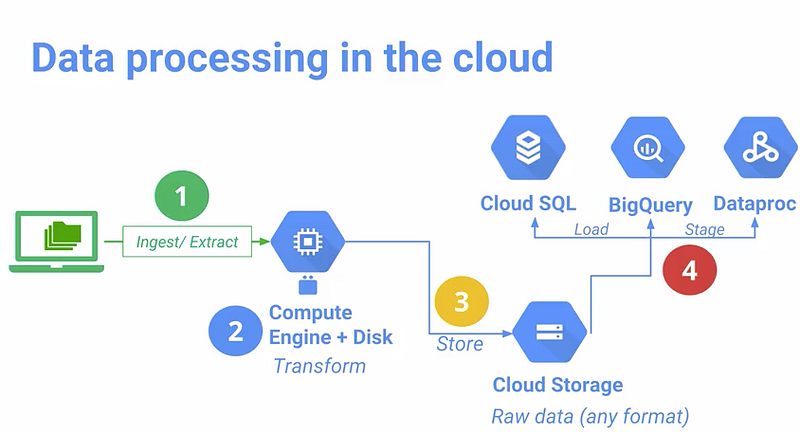
Where does bigquery fit in the google cloud platform? Answer: analytics of big data, structured table data using SQL. Perfect for data analysts and data scientists.
Cool Datasets available on BigQuery
To get started, click on any public or private datasets (you will have to import your own data) and click on Preview to view the data. Click compose query to write any SQL statements.
- Github Repos (analyze company, stack data, language usage, developer productivity)
- Reddit and subreddits (text analysis, natural language processing)
- Hacker News posts and comments! (text analysis, pagerank, relevance analysis, natural language processing). See link below for database, table structure.
- London Bikeshares
- and several more high potential datasets
Check out the structure of dataset and tables in public dataset, how they are organized. Originally seen on Kaggle. https://ml.learn-to-code.co/skillView.html?skill=vixd5O4D0hmmKJD7LbGY
Here are two amazing Kaggle Kernels notebooks talking about using BigQuery:
You can use Neo4j with BigQuery. Using Cypher query language to query graph data.
Analyzing BigQuery Data with Google Cloud Datalab — Hosted Jupyter Notebooks in the Cloud
Google offers its own on the cloud data notebooks in Google Cloud Datalab (basically a Jupyter Notebook in the cloud). Google wants you to host your data in the cloud and “bring your compute to the data” — run command line analysis and notebook analysis on your hosted data.
Did you know that you can host your data and make it public as a hosted .csv file? Essentially you made this dataset publicly available for analysis and API calls. By the way, you can host this csv using dropbox too. Available with premium plans.
The above tutorial video explains how to turn BigQuery data into dataframes in Jupyter Notebook. Hint: to_dataframe() function.
More Cool Things You Can Do with BigQuery
- Did you know BigQuery can estimate query size before executing?
- Did you know you can use BigQuery to analyze Blockchain smart contract data? There’s also Ethereum and Dogecoin data.
- Too cheap to pay a penny? Kaggle Kernel allows you to consume TB of BigQuery data for free every month.
- Google partners with Coursera to certify BigQuery data engineers
- BigQuery can access, load data, visualize data with Web UI OR command-line tool OR BigQuery RESTful API.
BigQuery Best Practice
BigQuery best practice according to Google BigQuery Docs
Best practice guidelines help you control costs, optimizing query performance, and optimizing storage.
Limiting Query Size and Saving Cost in BigQuery
Kaggle Kernel example below to set limit on BigQuery cost, size.
Geographics Data Modeling
Data and data analysis results can be piped into (just a few clicks in the browser) DataStudio’s graphical interface, and obtain complex data visualizations. The build-in geospatial tool, automatically graph COVID-19 geo datasets on country level or county level if data is available.
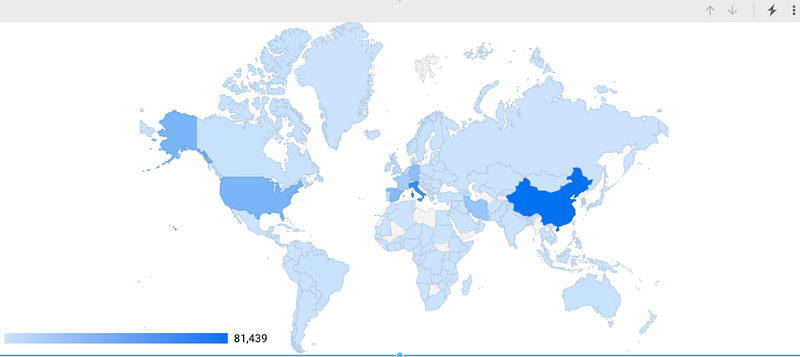
This is a simple geo proof-of-concept we built on the Johns Hopkins COVID-19 dataset back in March. DataStudio handled the geo boundaries perfectly, we just had to supply the country name to plug and play. Took a minute. Amazing! Esri, backbone of sophisticated COVID-19 geo data dashboards, takes longer to setup and has a steeper learning curve, though it is a leader of the field.
BigQuery ML (BQML) — Machine Learning on BigQuery
It’s possible to do machine learning on BigQuery, with just a few lines of SQL. Check out our new article : Machine Learning Using SQL?! — BigQuery BQML https://uniqtech.medium.com/machine-learning-using-sql-bigquery-bqml-aa9b5fcc4f7c
More Best Practices
- When run cloud SQL against big data, always use LIMIT to limit the number of rows returned. Be mindful, Google Cloud Platform (GCP) may still charge you for the entire dataset. Essentially all data is queried but only a portion of it is returned.
- Kaggle has a BigQuery helper module that helps you manage usage quota called bq_helper and it works on Kaggle Kernels only (Kaggle’s version of a python notebook).
- BigQuery landing page at Google https://cloud.google.com/bigquery/
- BigQuery configuration guidelines — https://cloud.google.com/bigquery/docs/bigqueryml-intro
- BigQuery vs Postgres performance Thanks to our reader for this recommendation.
- Term of service governs that Google services including Bigquery cannot be used for crypto mining activities.


