
Cookbook for solving common problems in building GPT/LLM apps
Large language models (LLMs) like GPT have sparked another round of innovations in the technology sector. Many entrepreneurs and product people are trying to incorporate these LLMs into their products or build brand-new products. However, building AI applications backed by LLMs is definitely not as straightforward as chatting with ChatGPT. You might encounter many problems during the process and I will address some of the biggest issues while productizing GPT/LLMs and implementing your LLM-backed app.
In this article, I will discuss some common issues that you may encounter while developing products with large language models and the potential solutions that I found through research. The issues include intra-conversation/short-term memory management for chatbots, long-term memory with vector databases (chunking, embedding, retrieval for question answering) for question answering/semantic search, output formatting to save tokens, caching LLM responses for scaling, and deploying LLMs locally on-premise. This would be a long and slightly more technical article as it addresses some practical issues for implementation. Sit tight and let’s dive in!
(Note: this article assumes you have a basic understanding of how ChatGPT and language models work. If you need a refresher, you can read: How ChatGPT really works, explained for non-technical people)
How to manage intra-conversation/short-term memory
Since ChatGPT debuted in the world as a chatbot, this natural interaction format is getting another spring. Many companies and hobbyists are trying to build their own chatbots based on the GPT API. But the first problem they might encounter is that they have to manage the intra-conversation memory, i.e. the conversation history/short-term context between the user and the LLM during a single conversation session because the GPT API does not keep a stateful memory of the entire conversation.
The first natural solution that may come to mind is: “Okay, then I’ll just save every message in a variable and send it back to the API every time.” This solution is called buffering which means saving and returning the previous messages. But as the conversation gets longer it is impossible to return all the messages due to the context limit of the LLM (e.g. GPT-3.5 has a 3000-token limit). The way to improve this method is buffer window memory which is similar to ChatGPT — you just discard any messages before the context window size, either by the number of messages or by tokens [1]. But this solution may have a disadvantage because you may lose the earliest info during the conversation.
example_prompt_with_context = """
You're a helpful assistant. You will help the user complete their request.
The following is a conversation between you and the user.

{conversation_context}

User: Explain ChatGPT to me.
AI:
"""
The second solution would be summarization which is to summarize the messages and attach the summary as context for the conversation. For example, you can send a separate prompt to the LLM to summarize the previous messages during every turn, or after a fixed number of turns. You can also incrementally summarize the messages by appending a summary of only the new messages to the previously summarized parts. Summarization can be used together with a buffer by attaching a summary and the previous K message buffers to a new conversation message.
You can also consider using other data structures to save important information during a conversation instead of keeping track of the conversation itself. For example, you can use entity memory by creating a dictionary of the entities and what they’re doing. Entities are the people, objects, places, events, etc. that appeared during the conversation. You can use a separate prompt to ask the LLM to extract relevant data for you during the conversation. Similarly, you may also build up a knowledge graph memory, creating a knowledge graph of the entities, their attributes, and their relationships [1].
entity_memory_example = {'entities': {'Luna': 'Luna is eating her breakfast in the kitchen.',
'Fiona': 'Fiona sees Luna in the kitsch and is starting a conversation with Luna.'}}
knowldge_graph_example:
Luna - (eats breakfast in) → Kitchen
Fiona - (starts conversation with) → LunaIn addition to the previous solutions, you can also use a vector store/database to save the entire conversation and query the top_k most relevant messages as context to be sent to the LLM. But this method may lose the sequential order of conversation interactions and thus lose some information. Vector databases may work better for other use cases — long-term memory between conversations or document question answering. If you’re unfamiliar with vector databases, don’t worry, in the next section, we will go into vector databases in more detail.
While these methods may seem overwhelming and difficult to implement, there are tools that provide abstractions around these memory management methods. LangChain is a leader in this field and provides easy-to-use Python and JavaScript libraries.
Long-term memory with vector databases
If you want to save information for the long-term across multiple conversations or use a large amount of existing data as the source of truth for document question answering, you should probably resort to vector databases. In this section, I will cover the basic process of how to use vector databases with LLMs, how to prepare data to store in the vector database (chunking strategies), embedding methods, different vector databases available, strategies for information retrieval, how to improve the retrieval quality for question answering, and how to improve retrieval speed for scalability.
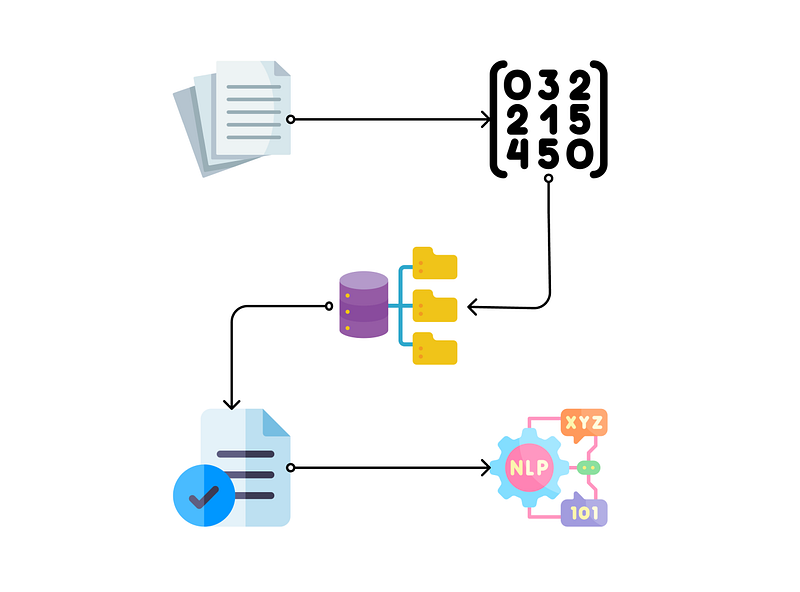
Let’s start with a high-level overview of the process of integrating LLMs and vector databases:
- Chunking: breaking down long documents into smaller chunks that can be stored and retrieved later.
- Embedding: converting those chunks into high-dimensional vector embeddings (numerical representations) [2]. This vector format allows efficient query during retrieval for calculating similarities between chunks.
- Storing to vector database: the embeddings can be stored in vector databases which have efficient data storage, high scalability, and high performance during query [3].
- Retrieving relevant chunks: when a user asks a question, we retrieve the most relevant chunks from the database by calculating the similarity between the query and chunks to help the LLM answer the question.
- Sending to LLM in prompts: we stuff the retrieved chunks into the prompt template to be sent to the LLM, allowing it to have a source of truth/context for answering the user’s question.
Although traditional databases can also get the work done, we use vector databases primarily for their efficiency in retrieving the relevant chunks to feed to the LLM. It’s recommended to have a copy of your data in a traditional database when you really need the ground truth and use a vector database when you need to perform efficient queries.
(For a bare-minimal implementation of this process with llama-index, you can read: A step-by-step guide to building a chatbot based on your own documents with GPT)
How to choose the best chunking strategy
The first step in the process is chunking your long documents into smaller pieces. There are many different strategies for chunking, but there are some rules of thumb that can help you decide which works for you:
- Fit the context window of your LLM. Since LLMs often have a context window limit on the prompt length, you should limit your chunks to a size smaller than that, so you can send it together with the user’s prompt as context to the LLM.
- Consider the type of questions users ask [4]. If your users ask specific questions that don’t need high-level context or information spanning multiple sentences, shorter chunks at the sentence level may work better because they embed more specific meanings but leaves out context; if your users ask high-level questions that need more context, longer chunks at the document level may work better because the embeddings would capture the meanings and relationships of the ideas in the document.
- Match the query length and complexity. Similar to the previous point, if your users ask short questions, it is easier to match smaller chunks in the database; but if your users ask long, complex questions, it may be a better idea to have longer chunks to match.
- Consider the coherence and flow of information. If your original documents use coherent, long paragraphs to explain a single idea, you should probably not break it up to break the idea; if your document contains multiple connected ideas, you should also consider chunking them together to capture their relationships; on the other hand, if your documents are simple and have distinct ideas, you can have them in separate chunks.
Based on the previous rules of thumb, you can choose one of the following chunking methods that are most appropriate for your use case:
- Fixed-size by tokens. You can split your documents by a fixed token size, calculated from tokenizers like HuggingFace tokenizer [5] or tiktoken from OpenAI [6]. It’s simple but doesn’t consider the information flow.
- Split by sentence. You can use regular expression or NLP libraries like NLTK or SpaCy to split documents by sentence. It works well if sentences are not too long.
- Overlapping chunking. Using fixed-size chunking, but overlapping a small portion of the chunks to prevent splitting important info across chunks.
- Recursive chunking. Split a document into smaller ones in a hierarchical and iterative manner until certain criteria (e.g. number of tokens) are reached.
- Chunk by document format. Split a document based on its innate structure, for example by HTML tags in HTML, or by headings in Markdown. It considers information flow/structure but may not work well for long sections or documents without clear structures.
(Most of the chunking methods described here are supported by LangChain, but if you need to do more complex chunking with your own format, you may need to implement them yourself.)
Your chunking strategy may also influence how you embed your documents. In the next part, we will quickly go over the different ways to embed your document.
How to embed your documents
After we successfully break down our documents into smaller chunks, we should embed them into high-dimensional vector embeddings (i.e. numerical representations that capture semantic meanings). You also have many choices when it comes to embedding your documents:
- Flair [7]. Contextualized embeddings, but slow.
- SpaCy [8]. Pre-trained embeddings based on transformers like BERT, faster.
- fastText [9]. Pre-trained on webcrawl and Wikipedia. Can handle out-of-vocabulary words.
- SentenceTransformers [10]. Sentence-embeddings based on BERT.
- Commercial APIs: OpenAI’s Ada [11], Amazon SageMaker[12], Hugging Face Embeddings [13], etc.
For shorter texts, Flair, fastText, and sentence transformers could work well. LLM-based embeddings like OpenAI’s Ada or BERT-based models could work well for both short and long texts. If you’re using longer chunks and would like to retain the relationship between sentences, you should probably consider LLM-based embeddings. It’s not one-size-fits-all and you should consider the size of the document, the type of text, and the desired accuracy.
Which vector databases are available
Now you have converted all your documents into embeddings, it’s time to store them in a vector database for retrieval later. Vector databases are designed to store multi-dimensional data in an optimized format, which allows very efficient retrieval and processing of high-dimensional data compared to traditional databases.
Thanks to the popularity of LLMs and LLM-backed applications, vector databases are well-funded and you have many choices to choose from:
- Pinecone [14]. Fully-managed vector database with a lot of developer-friendly documentation.
- Milvus [15]. One of the earliest open-source vector databases.
- Weaviate [16]. Another open-source vector database.
- Chroma [17]. Another open-source vector database under Apache 2.0 license with Python and JavaScript support.
- Qdrant [18]. Managed vector database with convenient APIs.
Depending on your project’s complexity and your security and scalability requirements, you can choose to self-host a vector database or use a managed service.
Different ways to retrieve chunks
When users send a query, you will need to retrieve the most relevant chunks from the vector database. Most vector databases retrieve the chunks using a K-Nearest Neighbors (KNN) algorithm to find the k most similar chunks to the query by calculating the similarity metric between the chunks and the user’s query (using Euclidean distance, cosine similarity, or dot product similarity). (But recently, the former head of AI from Tesla Andrej Karpathy argues that SVM may work better than KNN with some increased computational cost [19])
In an ideal world, you only need the chunk that is most relevant to the user’s query, but in reality, that’s far from the case. Although the vector databases can retrieve the most similar chunks, there is no guarantee that the first chunk is just enough to answer the question. Therefore, you’ll need to employ different strategies to retrieve the chunks and put them into the prompt. Here are some methods that LangChain supports [20].
The simplest method is called stuffing, where you simply stuff all the relevant chunks into the prompt as context. Although it only requires one call to the LLM, it’s limited by the context window limit of the LLM so you may not be able to stuff everything in there. This method can work well if your use case is centered around querying a specific idea in a small piece of text (like a customer support chatbot).
Another method is called map-reduce, in which you retrieve the top most relevant chunks, query each chunk with the prompt, and then ask the LLM to combine all the responses. For example, if you’re looking for a summary of a long book, you retrieve each chapter and summarize them separately, then summarize the summaries of each chapter for the summary of the whole book. This method is suitable for summarization or high-level question answering, but some information might be lost during the final combination process.
The third method is called refine, in which you generate an answer based on the first retrieved chunk then iteratively pass the response and following chunks one by one to refine the answer. This is a sequential process of improving the answer quality. This is most useful when the query needs to combine the information from multiple pieces of data, but it may be affected by the order of chunks to be passed into the prompt.
The last is map rerank, in which you generate an answer for each retrieved chunk with a certainty score, then you rank the certainty score to pick the answer with the highest certainty. This is most useful for queries that can be answered with a single chunk of documents, but it cannot answer high-level questions across multiple documents.
Strategies for improving retrieval quality
While the most common practice is to retrieve the chunks by comparing the similarity between the user’s original query with the chunks, sometimes it may not produce the optimal outcome because the question and answer may not have similar words. In particular, when your users are using a very different set of vocabulary to ask questions about the documents (which is very typical for customer support or user-facing applications), the chunks retrieved from the vector database may not answer your users' questions.
To solve this problem, we can try to improve the quality of retrieval by generating a “fake answer” (or hypothetical answer) with LLM first without any context and then comparing the embeddings of the “fake answer” to the chunks during the retrieval process. This clever process is called Hypothetical Document Embeddings (HyDE) and is used in the “Ask My PDF” tool [21][22].
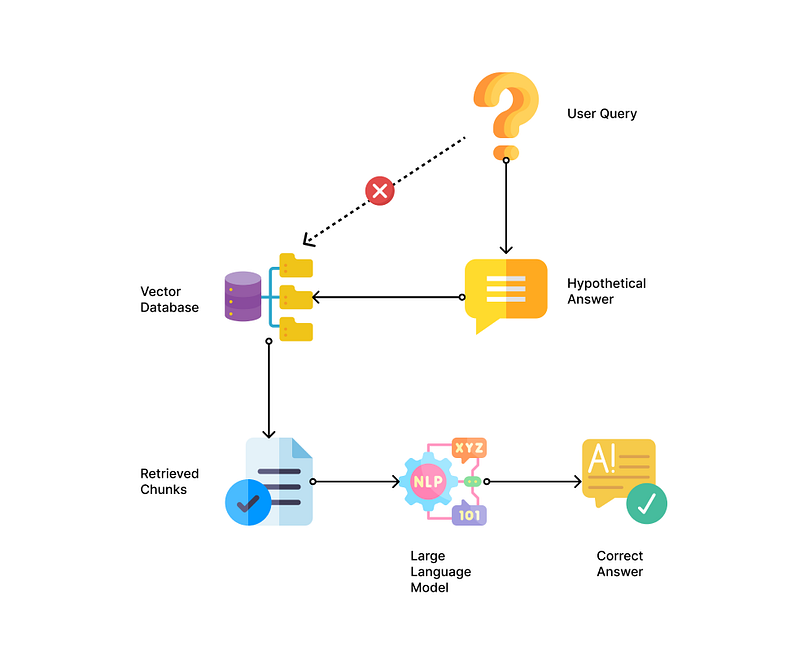
To further improve this method, you can pass in a summary of the first chunk of the document when generating the hypothetical answer and then query the vector database with the hypothetical answer.
These strategies are found to significantly improve the quality of retrieval and answers from the traditional retrieval process for tasks like web search, question answering, fact verification, etc [21].
How to format outputs to save tokens and increase controllability
Controllability may be an important factor when you’re trying to integrate LLMs into your product. Due to the probabilistic nature of transformer-based LLMs, they may output different response formats between different calls.
In this case, you might want them to return responses in a structured format. For example, you can specify in the system role parameter that it should always respond in a particular format. But different formats may use more tokens than others.
Nikas Praninskas did an interesting experiment to compare different data formats for the most token-efficient output [23]:
- Minimized JSON. More efficient than regular JSON, but it’s difficult to force LLM to output in minimized JSON.
- YAML or TOML. Good for nested or recursive datasets, saving 25 to 50% than JSON. A good starting point for experimentation.
- CSV. Good for uniform flat data. Very inefficient for nested or recursive data.
Caching LLM responses for scaling
If you are building an application that could potentially serve hundreds of thousands or millions of users, you might worry about scalability, efficiency, and cost. Traditionally, non-LLM-backed application servers might use something like Redis, an in-memory key-value store, to cache the application data. This kind of caching can significantly improve the performance of applications by reducing the number of requests to the backend database.
When it comes to LLM, the idea could be similar, but the implementation could be a little bit different. If we send every user request directly to the LLM API, it might very quickly reach a rate limit or consume your tokens quickly. But oftentimes, many of the user requests could be asking about the same thing, though their exact phrasing might be different. Therefore, we can use a cache for the responses and route similar requests to the cache to get a response before we attempt to ask the LLM to save request token expense, enhance performance, and improve scalability and availability.
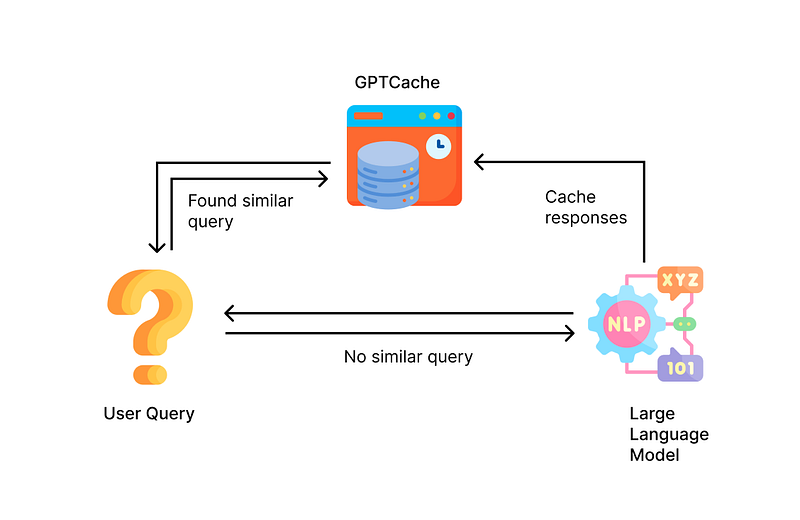
A new library called GPTCache attempts to build such a cache specifically for LLM applications. Because it’s not efficient to do exact matches like traditional caching systems, the GPTCache uses embeddings of queries to compare the similarity between queries (just like what a vector database does) for determining which response should be retrieved from the cached storage and which ones should be sent to the LLM [24]. This library is developed by the same company that developed the vector database Milvus.
To draw an analogy, LLM is like traditional SQL databases, and GPTCache is like Redis storage.
Deploy an LLM locally as an alternative to GPT API
The GPT API from OpenAI has many limitations: it has a rate limit, location limit, and output censorship, and your data must go to their server for processing. Deploying an LLM locally on-premise can help companies bypass those limitations, get greater control over the data being processed, and ensure that sensitive data stays within their own servers and is not sent to third-party providers.
Luckily, the amazing open-source community has been working on open-source alternatives to GPT that can be hosted locally on-premise. Some of them even have commercial licenses, which means it’s totally okay for companies to monetize them and base their business on these LLMs.
Here are some commercially-licensed open-source LLMs that can be deployed locally:
- Dolly V2 [25]. Developed by Databricks with instruction data from their employees, based on the EleutherAI Pythia model. Apache License 2.0.
- GPT4All-J [26]. Developed by Nomic AI, based on GPT-J using LoRA finetuning. One-click installer available. Apache License 2.0 (Note: their V2 version is Apache Licensed based on GPT-J, but the V1 is GPL-licensed based on LLaMA)
- Cerebras-GPT [27]. A series of models based on GPT-3 style architecture. Apache License 2.0.
- Flan family from Google [28], including Flan-T5 and Flan-UL2.
- StableLM [34]. By StabilityAI, the company behind Stable Diffusion. CCBY-SA-4.0 License. (Added Apr 20, 2023)
Non-commercially licensed LLMs, which can be used for personal projects:
- Alpaca [29]. Developed by Stanford based on LLaMA for instruction-following.
- Vicuna [30]. Developed based on LLaMA and ShareGPT conversations.
- GPT4All V1 [26]. Developed based on LLaMA. GPL-licensed.
- BELLE [31]. Chinese large language model based on BLOOMZ and LLaMA.
- ChatRWKV [32]. Based on RWKV (RNN) language model for both Chinese and English.
- ChatGLM [33]. Developed by Tsinghua University for Chinese and English dialogues.
While these LLMs are of smaller size than GPT and have fewer capabilities, they are enough to complete many tasks like simple chats, straightforward document question answering, and summarization. As time goes on, I believe these open-source LLMs will evolve to gain more capabilities.
Conclusion
Congrats on making it to the end! Building AI applications with LLMs can definitely offer a lot of potential for innovation and there will be difficulties and issues on the road to productization and implementation. I hope this article can help you clear up some of the problems you might face while developing your product backed by LLMs. Stay informed and happy building!
(If you’re looking to understand and build your own autonomous agents like AutoGPT, you can A comprehensive and hands-on guide to autonomous agents with GPT)
References & Links:
[1] Memory — 🦜🔗 LangChain 0.0.142. https://python.langchain.com/en/latest/modules/memory.html. Accessed 18 Apr. 2023.
[2] Word Embeddings in NLP: A Complete Guide. https://www.turing.com/kb/guide-on-word-embeddings-in-nlp. Accessed 18 Apr. 2023.
[3] “What Is a Vector Database?” Pinecone, https://www.pinecone.io/learn/vector-database/. Accessed 18 Apr. 2023.
[4] “Chunking Strategies for LLM Applications.” Pinecone, https://www.pinecone.io/learn/chunking-strategies/. Accessed 18 Apr. 2023.
[5] Tokenizers. https://huggingface.co/docs/tokenizers/index. Accessed 18 Apr. 2023.
[6] Tiktoken. OpenAI. https://github.com/openai/tiktoken. Accessed 18 Apr. 2023.
[7] Flair. Flair. https://github.com/flairNLP/flair/blob/master/resources/docs/embeddings/FLAIR_EMBEDDINGS.md. Accessed 18 Apr. 2023.
[8] SpaCy · Industrial-Strength Natural Language Processing in Python. https://spacy.io/. Accessed 18 Apr. 2023.
[9] FastText. https://fasttext.cc/index.html. Accessed 18 Apr. 2023.
[10] SentenceTransformers Documentation — Sentence-Transformers Documentation. https://www.sbert.net/. Accessed 18 Apr. 2023.
[11] OpenAI API. https://platform.openai.com. Accessed 18 Apr. 2023.
[12] Encoder Embeddings for Object2Vec — Amazon SageMaker. https://docs.aws.amazon.com/sagemaker/latest/dg/object2vec-encoder-embeddings.html. Accessed 18 Apr. 2023.
[13] Getting Started With Embeddings. https://huggingface.co/blog/getting-started-with-embeddings. Accessed 18 Apr. 2023.
[14] Pinecone, https://www.pinecone.io/. Accessed 18 Apr. 2023.
[15] Milvus. https://github.com/milvus-io/milvus. Accessed 18 Apr. 2023.
[16] Weaviate. https://github.com/weaviate/weaviate. Accessed 18 Apr. 2023.
[17] Chroma. https://github.com/chroma-core/chroma. Accessed 18 Apr. 2023.
[18] Qdrant — Vector Search Engine. https://qdrant.tech/. Accessed 18 Apr. 2023.
[19] kNN vs. SVM. Karpathy, Andrej. https://github.com/karpathy/randomfun/blob/master/knn_vs_svm.ipynb. Accessed 18 Apr. 2023.
[20] Index-Related Chains | 🦜️🔗 LangChain. https://docs.langchain.com/docs/components/chains/index_related_chains. Accessed 18 Apr. 2023.
[21] Gao, Luyu, et al. Precise Zero-Shot Dense Retrieval without Relevance Labels. arXiv, 20 Dec. 2022. arXiv.org, https://doi.org/10.48550/arXiv.2212.10496.
[22] Ask my PDF. mobarski. https://github.com/mobarski/ask-my-pdf. Accessed 18 Apr. 2023.
[23] Efficient Data Formats for GPT — Nikas Praninskas. https://nikas.praninskas.com/ai/2023/04/05/efficient-gpt-data-formats/. Accessed 18 Apr. 2023.
[24] GPTCache. Zilliz Tech. https://github.com/zilliztech/GPTCache. Accessed 18 Apr. 2023.
[25] Databricks/Dolly-v2–12b · Hugging Face. https://huggingface.co/databricks/dolly-v2-12b. Accessed 18 Apr. 2023.
[26] GPT4All-Chat. Nomic AI. https://github.com/nomic-ai/gpt4all-chat. Accessed 18 Apr. 2023.
[27] Dey, Nolan. “Cerebras-GPT: A Family of Open, Compute-Efficient, Large Language Models.” Cerebras, 28 Mar. 2023, https://www.cerebras.net/blog/cerebras-gpt-a-family-of-open-compute-efficient-large-language-models/.
[28] Google/Flan-T5-Xxl · Hugging Face. 13 Mar. 2023, https://huggingface.co/google/flan-t5-xxl.
[29] Stanford CRFM. https://crfm.stanford.edu/2023/03/13/alpaca.html. Accessed 19 Apr. 2023.
[30] Vicuna: An Open-Source Chatbot Impressing GPT-4 with 90%* ChatGPT Quality, https://vicuna.lmsys.org/. Accessed 19 Apr. 2023.
[31] BELLE. https://github.com/LianjiaTech/BELLE. Accessed 19 Apr. 2023.
[32] ChatRWKV. https://github.com/BlinkDL/ChatRWKV. Accessed 19 Apr. 2023.
[33] ChatGLM. https://github.com/THUDM/ChatGLM-6B. Accessed 19 Apr. 2023.
[34] StableLM. https://github.com/Stability-AI/StableLM. Accessed 20 Apr. 2023.


