avatarDerek Mortensen

Free AI web copilot to create summaries, insights and extended knowledge, download it at here

3861

Abstract

reen"</span>, <span class="hljs-comment">"id"</span>: <span class="hljs-number">3</span>, <span class="hljs-comment">"key"</span>: <span class="hljs-comment">"done"</span>, <span class="hljs-comment">"name"</span>: <span class="hljs-comment">"Done"</span>, } }, <span class="hljs-comment">"summary"</span>: <span class="hljs-comment">"Recovered data collection Defraglar $MFT problem"</span> }, <span class="hljs-comment">"id"</span>: <span class="hljs-comment">"11861"</span>, <span class="hljs-comment">"key"</span>: <span class="hljs-comment">"CAE-160"</span>, }, { <span class="hljs-comment">"fields"</span>: { ... more issues], <span class="hljs-comment">"maxResults"</span>: <span class="hljs-number">5</span>, <span class="hljs-comment">"startAt"</span>: <span class="hljs-number">0</span>, <span class="hljs-comment">"total"</span>: <span class="hljs-number">160</span> }</pre></div><h1 id="039c">A not-so-good solution</h1><p id="74c4">One option would be to write some code that goes in and looks for a specific field but then you have to call this function for each nested field that you’re interested in and <code>.apply</code> it to a new column in the DataFrame.</p><p id="3141">First, we would extract the objects inside the <code>fields</code> key up to columns:</p><div id="cefc"><pre>df = ( df[<span class="hljs-string">"fields"</span>] .apply(pd.Series) .merge(df, <span class="hljs-attribute">left_index</span>=<span class="hljs-literal">True</span>, right_index = <span class="hljs-literal">True</span>) )</pre></div><figure id="3922"><img src="https://cdn-images-1.readmedium.com/v2/resize:fit:800/1*775NEhoyBKMIbITswJ_aOw.png"><figcaption></figcaption></figure><p id="3bd2">Now we have the summary, but issue type, status, and status category are still buried in nested objects. Here’s a way to extract the issue type name.</p><div id="4980"><pre># Extract the issue <span class="hljs-keyword">type</span> <span class="hljs-type">name</span> <span class="hljs-keyword">to</span> a <span class="hljs-built_in">new</span> <span class="hljs-keyword">column</span> <span class="hljs-keyword">called</span> "issue_type"</pre></div><div id="a8b6"><pre>df_issue_type = ( df<span class="hljs-selector-attr">[<span class="hljs-string">"issuetype"</span>]</span> <span class="hljs-selector-class">.apply</span>(pd.Series) <span class="hljs-selector-class">.rename</span>(<span class="hljs-attribute">columns</span>={<span class="hljs-string">"name"</span>: <span class="hljs-string">"issue_type_name"</span>})[<span class="hljs-string">"issue_type_name"</span>] )</pre></div><div id="d437"><pre><span class="hljs-attribute">df</span> <span class="hljs-operator">=</span> df.assign(issue_type_name <span class="hljs-operator">=</span> df_issue_type)</pre></div><figure id="8fa1"><img src="https://cdn-images-1.readmedium.com/v2/resize:fit:800/1*a_2bNWZEt90anq_DRPh0Tg.png"><figcaption></figcaption></figure><p id="51c7">We could move this code into a function that took in the <code>parent object name</code>, <code>key that we are looking for</code>and <code>new column name</code> but would still need to call this for each field that we want. Not ideal.</p><h1 id="df2f">A built-in solution, .json_normalize to the rescue</h1><p id="bdd7">Thanks to the folks at pandas we can use the built-in <code>.json_normalize</code> function. From the pandas documentation:</p><blockquote id="70b5"><p>Normalize[s] semi-structured JSON data into a flat table.</p></blockquote><p id="e4a6">All that code above turns into 3 lines.</p><ul><li>Identify the fields we care about using <code>.</code> notation for nested objects.</li><li>Pass our list of issues to <code>.json_normalize</code></li><li>Filter the columns</li></ul><div id=

Options

"cdaf"><pre><span class="hljs-attr">FIELDS</span> = [<span class="hljs-string">"key"</span>, <span class="hljs-string">"fields.summary"</span>, <span class="hljs-string">"fields.issuetype.name"</span>, <span class="hljs-string">"fields.status.name"</span>, <span class="hljs-string">"fields.status.statusCategory.name"</span>]</pre></div><div id="ed1d"><pre><span class="hljs-attribute">df</span> <span class="hljs-operator">=</span> pd.json_normalize(results[<span class="hljs-string">"issues"</span>])</pre></div><div id="d467"><pre><span class="hljs-built_in">df</span>[FIELDS]</pre></div><figure id="09ee"><img src="https://cdn-images-1.readmedium.com/v2/resize:fit:800/1*hgGD_c9EdA0ierFczf-_lQ.png"><figcaption></figcaption></figure><h1 id="5579">Some extras</h1><h2 id="c4cc">Record Path</h2><p id="640e">Instead of passing in the list of issues with <code>results["issues"]</code> we can use the <code>record_path</code> argument and specify the path to the issue list in the JSON object.</p><div id="6038"><pre># Use record_path <span class="hljs-keyword">instead</span> <span class="hljs-keyword">of</span> <span class="hljs-keyword">passing</span> the list contained <span class="hljs-keyword">in</span> results["issues"]</pre></div><div id="a30f"><pre>pd.json_normalize(results, <span class="hljs-attribute">record_path</span>=<span class="hljs-string">"issues"</span>)[FIELDS]</pre></div><h2 id="0143">Custom Separator</h2><p id="5aba">To separate column names with something other than the default <code>.</code> use the <code>sep</code>argument.</p><div id="f911"><pre># Separate <span class="hljs-keyword">level</span> prefixes <span class="hljs-keyword">with</span> a "-" <span class="hljs-keyword">instead</span> <span class="hljs-keyword">of</span> the <span class="hljs-keyword">default</span> "."</pre></div><div id="d0ed"><pre><span class="hljs-attr">FIELDS</span> = [<span class="hljs-string">"key"</span>, <span class="hljs-string">"fields-summary"</span>, <span class="hljs-string">"fields-issuetype-name"</span>, <span class="hljs-string">"fields-status-name"</span>, <span class="hljs-string">"fields-status-statusCategory-name"</span>]</pre></div><div id="00b5"><pre>pd<span class="hljs-selector-class">.json_normalize</span>(results<span class="hljs-selector-attr">[<span class="hljs-string">"issues"</span>]</span>, sep = <span class="hljs-string">"-"</span>)<span class="hljs-selector-attr">[FIELDS]</span></pre></div><h2 id="e1c7">Control Recursion</h2><p id="65ff">If you don’t want to dig all the way down into each sub-object use the <code>max_level</code> argument. In this case, since the <a href="http://statuscategory.name">statusCategory.name</a> field was at the 4th level in the JSON object it won't be included in the resulting DataFrame.</p><div id="7468"><pre><span class="hljs-comment"># Only recurse down to the second level</span> pd.json_normalize(results, <span class="hljs-attribute">record_path</span>=<span class="hljs-string">"issues"</span>, max_level = 2)</pre></div><h1 id="c435">References</h1><ul><li>Sample code is available here: <a href="https://gist.github.com/dmort-ca/73719647d2fbe50cb0c695d38e8d5ee6">https://gist.github.com/dmort-ca/73719647d2fbe50cb0c695d38e8d5ee6</a></li><li>For more info on using the Jira API see here— <a href="https://levelup.gitconnected.com/jira-api-with-python-and-pandas-c1226fd41219">https://levelup.gitconnected.com/jira-api-with-python-and-pandas-c1226fd41219</a></li><li>Thanks to <a href="http://jumble.expium.com/">http://jumble.expium.com/</a> for making a sample Jira data generator.</li><li>Pandas .json_normalize documentation is available here: <a href="https://pandas.pydata.org/pandas-docs/stable/reference/api/pandas.json_normalize.html">https://pandas.pydata.org/pandas-docs/stable/reference/api/pandas.json_normalize.html</a></li></ul></article></body>

Converting nested JSON structures to Pandas DataFrames

The Problem

APIs and document databases sometimes return nested JSON objects and you’re trying to promote some of those nested keys into column headers but loading the data into pandas gives you something like this:

df = pd.DataFrame.from_records(results["issues"], columns=["key", "fields"])
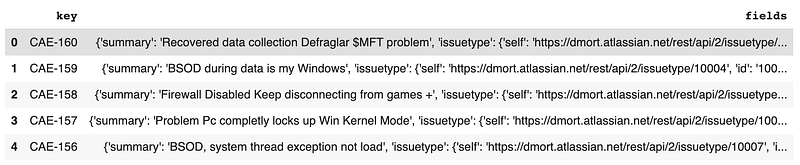
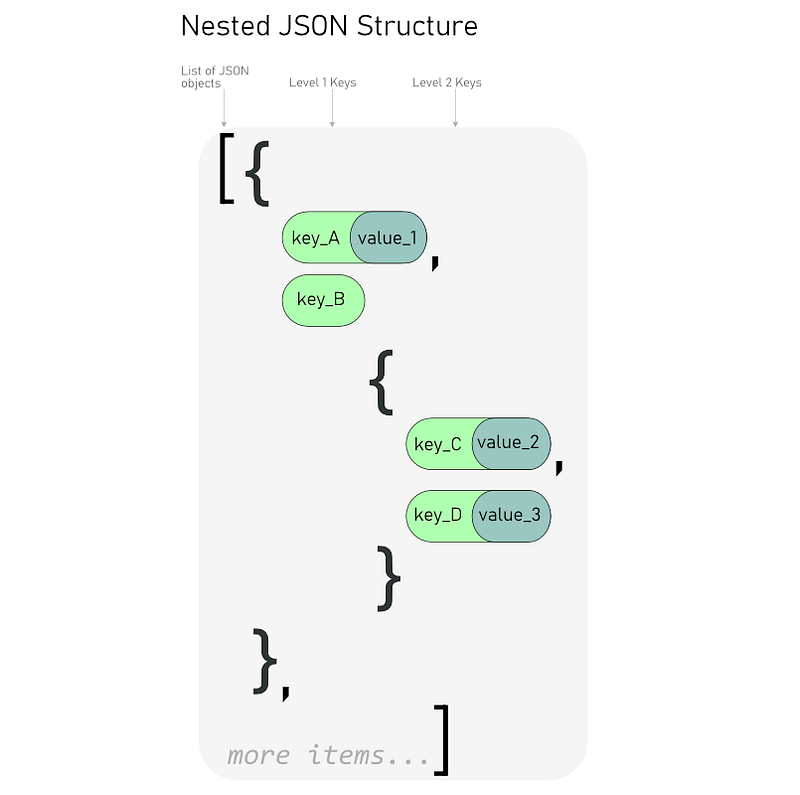
The problem is that the API returned a nested JSON structure and the keys that we care about are at different levels in the object.
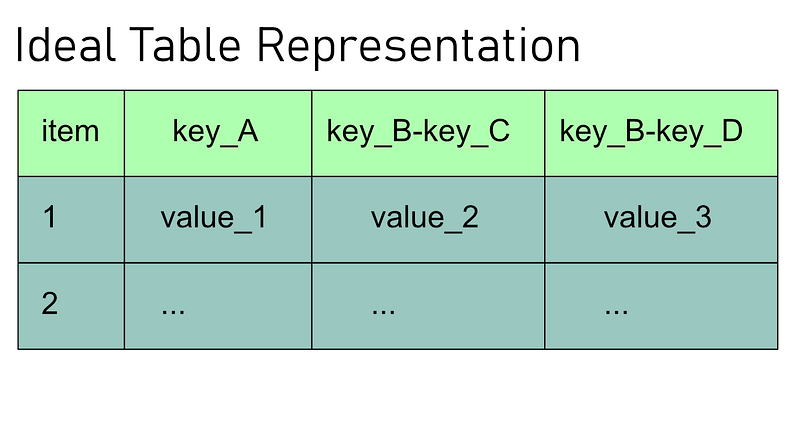
What we want is this:
An example

We’re going to use data returned from the Jira API as an example. The Jira API often includes metadata about fields. Let’s say these are the fields we care about

  • key: Within the list of issue records this is a top-level JSON key so no problem pulling it into its own column.
  • summary: This is at the second level, inside the “fields” object.
  • status name: What we care about is the name of the status but it also includes fields for the status description, status id, etc. This is at the 3rd level.
  • issuetype: Again, what we care about here is the name not any of the metadata.
  • statusCategory name: This is actually a sub-object included in the status field for each issue returned by the API. What we care about is the name of the statusCategory, which is at the 4th nested level.

Example of data returned by the Jira API. Note that the fields we want to extract (bolded) are at 4 different levels in the JSON structure inside the issues list.

{
  "expand": "schema,names",
  "issues": [
    {
      "fields": {
        "issuetype": {
          "avatarId": 10300,
          "description": "",
          "id": "10005",
          "name": "New Feature",
          "subtask": False
        },
        "status": {
          "description": "A resolution has been taken, and it is awaiting verification by reporter. From here issues are either reopened, or are closed.",
          "id": "5",
          "name": "Resolved",
          "statusCategory": {
            "colorName": "green",
            "id": 3,
            "key": "done",
            "name": "Done",
          }
        },
        "summary": "Recovered data collection Defraglar $MFT problem"
      },
      "id": "11861",
      "key": "CAE-160",
    },
    {
      "fields": { 
... more issues],
  "maxResults": 5,
  "startAt": 0,
  "total": 160
}

A not-so-good solution

One option would be to write some code that goes in and looks for a specific field but then you have to call this function for each nested field that you’re interested in and .apply it to a new column in the DataFrame.

First, we would extract the objects inside the fields key up to columns:

df = (
    df["fields"]
    .apply(pd.Series)
    .merge(df, left_index=True, right_index = True)
)

Now we have the summary, but issue type, status, and status category are still buried in nested objects. Here’s a way to extract the issue type name.

# Extract the issue type name to a new column called "issue_type"
df_issue_type = (
    df["issuetype"]
    .apply(pd.Series)
    .rename(columns={"name": "issue_type_name"})["issue_type_name"]
)
df = df.assign(issue_type_name = df_issue_type)

We could move this code into a function that took in the parent object name, key that we are looking forand new column name but would still need to call this for each field that we want. Not ideal.

A built-in solution, .json_normalize to the rescue

Thanks to the folks at pandas we can use the built-in .json_normalize function. From the pandas documentation:

Normalize[s] semi-structured JSON data into a flat table.

All that code above turns into 3 lines.

  • Identify the fields we care about using . notation for nested objects.
  • Pass our list of issues to .json_normalize
  • Filter the columns
FIELDS = ["key", "fields.summary", "fields.issuetype.name", "fields.status.name", "fields.status.statusCategory.name"]
df = pd.json_normalize(results["issues"])
df[FIELDS]

Some extras

Record Path

Instead of passing in the list of issues with results["issues"] we can use the record_path argument and specify the path to the issue list in the JSON object.

# Use record_path instead of passing the list contained in results["issues"]
pd.json_normalize(results, record_path="issues")[FIELDS]

Custom Separator

To separate column names with something other than the default . use the separgument.

# Separate level prefixes with a "-" instead of the default "."
FIELDS = ["key", "fields-summary", "fields-issuetype-name", "fields-status-name", "fields-status-statusCategory-name"]
pd.json_normalize(results["issues"], sep = "-")[FIELDS]

Control Recursion

If you don’t want to dig all the way down into each sub-object use the max_level argument. In this case, since the statusCategory.name field was at the 4th level in the JSON object it won't be included in the resulting DataFrame.

# Only recurse down to the second level
pd.json_normalize(results, record_path="issues", max_level = 2)

References

Python
Pandas Dataframe
Data Science
Data Wrangling
Json
Recommended from ReadMedium
