st, I know I found the experience complex and difficult to master at first.</p><h1 id="742b">How Coiled can make this easier for you</h1><p id="5873">As a cloud-based service designed for data scientists, <a href="http://coiled.io/">Coiled</a> needed to be able to convert conda and pip environments into Docker images to run correctly. The <a href="https://docs.coiled.io/user_guide/software_environment_creation.html"><co<b>de>coiled.create_software_environment()command</co<b></a> converts a <code><b>environment.yml</b></code> (conda) or a <b>requirements.txt</b> (pip) file into a Docker image, which is then distributed to all Dask workers to ensure consistent dependencies across your Coiled cluster.</p><p id="d078">Below are two code snippets: one for conda and one for pip:</p><div id="878d"><pre><span class="hljs-comment"># using conda .yml files</span>
import coiled
coiled.create_software_environment(
<span class="hljs-attribute">name</span>=<span class="hljs-string">'my-env'</span>,
<span class="hljs-attribute">conda</span>=<span class="hljs-string">'<path/to/environment.yml>'</span>
)</pre></div><div id="769e"><pre><span class="hljs-meta"># using pip .txt files</span>
<span class="hljs-keyword">import</span> coiled</pre></div><div id="31d0"><pre>coiled.create_software_environment(
<span class="hljs-attribute">name</span>=<span class="hljs-string">'my-env'</span>,
<span class="hljs-attribute">pip</span>=<span class="hljs-string">'<path/to/requirements.txt>'</span>
)</pre></div><p id="bcad">In the spirit of community and open-source development, Coiled engineers did not tuck this functionality away but have made it a general-purpose tool. This means you can hook up Coiled to your own Docker registry (like DockerHub) to create a conda/pip-to-Docker build service. You can then use the Docker images created using Coiled anywhere you like.</p><h1 id="2c4d">How to Connect Coiled to your Docker Container Registry</h1><p id="4555">By default, Coiled stores the software environments you create in the container registry of the cloud service you are running on: either AWS, GCP, or Azure. <b><i>You can change this setting within the “Account” tab of your Coiled Cloud dashboard to have your software environments saved as Docker images to your Docker Hub.</i></b></p><figure id="da59"><img src="https://cdn-images-1.readmedium.com/v2/resize:fit:800/1*5Y-Vyq6AriQKBClUBZvbvg.jpeg"><figcaption></figcaption></figure><p id="a012">Any registry that supports the Docker Re
Options
gistry API V2 should work. Read more details in <a href="https://docs.coiled.io/user_guide/backends.html">the “Backends” page of our docs</a>.</p><p id="c655"><i>Please note: using registries other than Docker Hub is an experimental feature under active development. Please reach out if you would like to discuss your use case at <a href="mailto:[email protected]">[email protected]</a> or via the <a href="https://join.slack.com/t/coiled-users/shared_invite/zt-hx1fnr7k-In~Q8ui3XkQfvQon0yN5WQ">Coiled Community Slack channel</a>.</i></p><p id="9599">And I’ll sneak in a bonus hint here: creating software environments does not actually require you to spin up a Cluster. This means you can use your conda/pip-to-Docker pipeline without burning <i>any</i> of your Coiled credits.</p><h1 id="57f5">The Value of Inventing Nothing</h1><p id="7d1c">This is what I love about the Python ecosystem. Functionalities that are integral to a product can be opened up for broader, public use. It follows the counterintuitive Principle of Minimum Creativity that Matt Rocklin has often proclaimed about the open-source library Dask: <b>“Invent nothing.”</b></p><p id="530a">This mantra may seem counterintuitive but actually holds a simple lesson: instead of trying to reinvent the wheel, create products that integrate with the tools that people are already using, thereby adding an extra brick to the rich ecosystem that already exists.</p><p id="ea08">I hope you found this post helpful! <a href="https://twitter.com/richardpelgrim">Follow me on Twitter</a> for daily data science content.</p><p id="be7f">Or came say hi at my blog: <a href="https://crunchcrunchhuman.com/">CrunchCrunchHuman</a>:</p><div id="752c" class="link-block">
<a href="https://crunchcrunchhuman.com/2021/12/22/kaggle-xgboost-distributed-cloud/">
<div>
<div>
<h2>Train XGBoost on 20GB data in 20 seconds</h2>
<div><h3>If you're looking for ways to train XGBoost models faster or on datasets larger than your machine's memory, here's a…</h3></div>
<div><p>crunchcrunchhuman.com</p></div>
</div>
<div>
<div style="background-image: url(https://miro.readmedium.com/v2/resize:fit:320/0*0w0A32Ba6VJnrx7K)"></div>
</div>
</div>
</a>
</div><p id="c9c8"><i>Originally published at <a href="https://coiled.io/blog/conda-pip-docker-convert/">https://coiled.io</a> on August 23, 2021.</i></p></article></body>
Converting conda/pip environments into Docker Images
Building Docker images is a necessary but challenging part of most data scientists’ workflows. One way to make this process easier is by hooking Coiled up to your own Docker registry (like DockerHub) to create a pipeline that converts your conda or pip environments into Docker images that can be used elsewhere. This post shows you how to do that using the coiled.create_software_environment() command and by setting the container registry backend in the "Account" settings your Coiled cloud dashboard.
You can also check out the video below for a step-by-step tutorial:
Disclaimer: I work at Coiled as a Data Science Evangelist Intern. Coiled is founded by Matthew Rocklin, the initial author of Dask, an open-source Python library for distributed computing.
Why you might need Docker images
Many data scientists need to convert conda and/or pip environments into Docker images, for collaboration across teams or to move local working environments to run on the cloud. Most people achieve this manually using workflows that can get increasingly elaborate (for example, have a look at this Medium post.) While this technically works, it’s not always accessible to everyone. As a novice Data Scientist, I know I found the experience complex and difficult to master at first.
How Coiled can make this easier for you
As a cloud-based service designed for data scientists, Coiled needed to be able to convert conda and pip environments into Docker images to run correctly. The de>coiled.create_software_environment()command converts a environment.yml (conda) or a requirements.txt (pip) file into a Docker image, which is then distributed to all Dask workers to ensure consistent dependencies across your Coiled cluster.
Below are two code snippets: one for conda and one for pip:
In the spirit of community and open-source development, Coiled engineers did not tuck this functionality away but have made it a general-purpose tool. This means you can hook up Coiled to your own Docker registry (like DockerHub) to create a conda/pip-to-Docker build service. You can then use the Docker images created using Coiled anywhere you like.
How to Connect Coiled to your Docker Container Registry
By default, Coiled stores the software environments you create in the container registry of the cloud service you are running on: either AWS, GCP, or Azure. You can change this setting within the “Account” tab of your Coiled Cloud dashboard to have your software environments saved as Docker images to your Docker Hub.
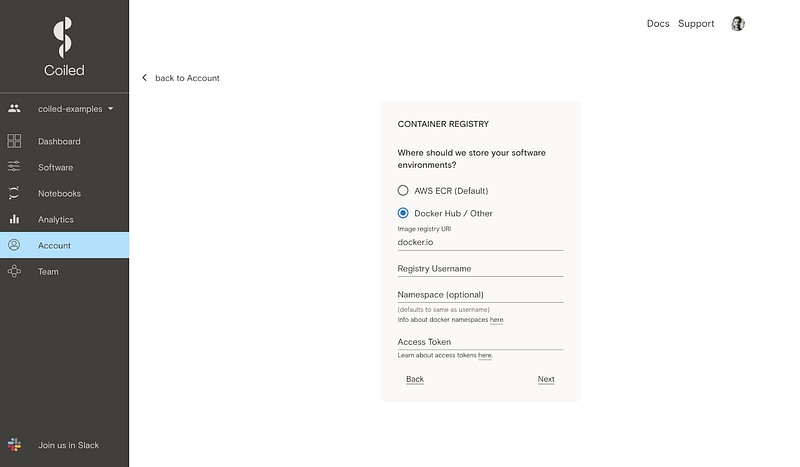
Please note: using registries other than Docker Hub is an experimental feature under active development. Please reach out if you would like to discuss your use case at [email protected] or via the Coiled Community Slack channel.
And I’ll sneak in a bonus hint here: creating software environments does not actually require you to spin up a Cluster. This means you can use your conda/pip-to-Docker pipeline without burning any of your Coiled credits.
The Value of Inventing Nothing
This is what I love about the Python ecosystem. Functionalities that are integral to a product can be opened up for broader, public use. It follows the counterintuitive Principle of Minimum Creativity that Matt Rocklin has often proclaimed about the open-source library Dask: “Invent nothing.”
This mantra may seem counterintuitive but actually holds a simple lesson: instead of trying to reinvent the wheel, create products that integrate with the tools that people are already using, thereby adding an extra brick to the rich ecosystem that already exists.
I hope you found this post helpful! Follow me on Twitter for daily data science content.