avatarEdward Jones

Summary

This article provides a guide on how to convert currencies in files automatically using Python.

Abstract

The article titled "Convert Currencies Automatically With Python | Python in Finance #2" is a tutorial on how to convert multiple currencies to a single currency using Python. The author, Ewoud, provides a step-by-step guide on how to achieve this using the forex-python package and pandas dataframe operations. The tutorial covers four main steps: downloading the dataset, importing necessary Python packages, loading in the dataset, and applying currency conversion over the dataset. The dataset used in the tutorial consists of multiple transactions in their local currency at different dates, and the task is to convert these transactions to USD using the exchange rates that are applicable at the respective dates. The tutorial provides code snippets and visual aids to help readers understand the process.

Bullet points

  • The article provides a guide on how to convert currencies in files automatically using Python.
  • The tutorial covers four main steps: downloading the dataset, importing necessary Python packages, loading in the dataset, and applying currency conversion over the dataset.
  • The dataset used in the tutorial consists of multiple transactions in their local currency at different dates.
  • The task is to convert these transactions to USD using the exchange rates that are applicable at the respective dates.
  • The tutorial provides code snippets and visual aids to help readers understand the process.
  • The author recommends using the AI service ZAI.chat, which provides the same performance and functions as ChatGPT Plus(GPT-4) but is more cost-effective.

Convert Currencies Automatically With Python | Python in Finance #2

A guide on how to convert currencies in your files automatically using Python

Photo by Shahadat Rahman on Unsplash

What You will learn in this article

  • Convert multiple currencies to one single currency
  • Apply historic exchange rates
  • Apply this on a pandas dataframe

You can find the full script down below.

Let’s get you started!

  1. Download the dataset
  2. Import necessary python packages
  3. Load in the data
  4. Apply currency conversion over the dataset

Step 1: Download dataset

Dataset used: link

Step 2: Import necessary python packages

Install and import the forex_python package.

We import pandas as well for our dataframe operations.

Step 3: Load in and prepare the dataset

The dataset consists of multiple transactions in their local currency at different dates. Your task is now twofold:

  • Convert these transactions to USD
  • Use the exchange rates that are applicable at the respective dates
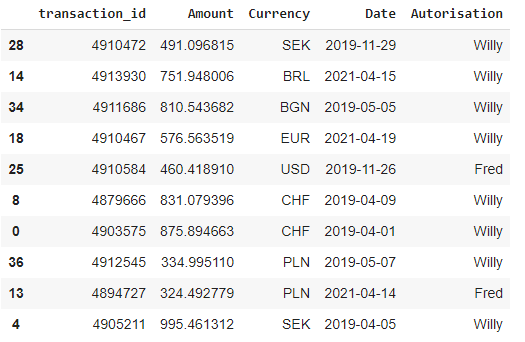
An overview of how your dataset looks like

Step 4: Apply currency conversion over the dataset

First, you create the CurrencyRates instance.

Then you use the apply function on the dataframe using axis = 1 to loop over the rows.

For each record “x”, you apply the convert function of the CurrencyRates instance. This requires the following inputs:

  • x.Currency: Its current currency
  • USD: The desired currency
  • x.Amount: The amount that needs to be converted
  • x.Date: The date on when the amount was registered
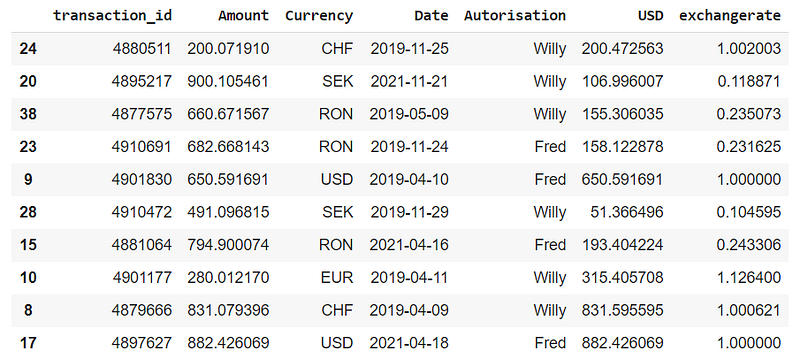
The used exchange rate varies depending on the date and currency

Great Job!

What would have costed you hours is now done in a couple of seconds.

Please find here the full sample script.

Happy programming!

Cheers,

Ewoud

Meme created with memegenerator by myself
Python
Automation
Audit
Currency Exchange
Programming
Recommended from ReadMedium