avatarCoucou Camille

Free AI web copilot to create summaries, insights and extended knowledge, download it at here

4822

Abstract

<span class="hljs-number">50</span> >>> second: <span class="hljs-number">24</span> >>> microsecond: <span class="hljs-number">545047</span></pre></div><p id="c890">Now, to convert the datetime objects to different string format using method <code>.strftime(format)</code> :</p><h2 id="ed9d">Example 1: DD/MM/YYYY, HH:MM:SS</h2><figure id="c2ea"><img src="https://cdn-images-1.readmedium.com/v2/resize:fit:800/1*lxNoG556THB3jzGhdVi16Q.png"><figcaption>Image by Author</figcaption></figure><h2 id="3f46">Example 2: DD MMM, YYYY for the date part</h2><figure id="d10e"><img src="https://cdn-images-1.readmedium.com/v2/resize:fit:800/1*4dP22TkzakDS0zwGu0W2nQ.png"><figcaption>Image by Author</figcaption></figure><p id="3d2c">Here I am using <code>%b</code> for the<b> abbreviated (3-letter) month name.</b></p><h2 id="3eb0">Example 3: Full name of the month, and time on 12-hour clock with AM/PM</h2><figure id="e632"><img src="https://cdn-images-1.readmedium.com/v2/resize:fit:800/1*aSUraTxK34WIK4za_DsfjQ.png"><figcaption>Image by Author</figcaption></figure><p id="bdef">Change <code>%b</code> to <code>%B</code> for the full month. For the time representation, <code>%H</code> is the hour number for<b> 24-hour clock</b>, and <code>%I</code> for <b>12-hour clock</b>, both with <b>zero padding</b>, so it prints “04:50:24” instead of “4:50:24”.</p><h2 id="9071">Example 4: Month and Hour without Zero Padding</h2><figure id="8b87"><img src="https://cdn-images-1.readmedium.com/v2/resize:fit:800/1*n9EkXi-tq33zLGnsWCXjbg.png"><figcaption>Image by Author</figcaption></figure><p id="1b3e">There are a lot more options that covered in the examples above, the <b>full format code list</b> as follows:</p><figure id="544d"><img src="https://cdn-images-1.readmedium.com/v2/resize:fit:800/1*tktkR_P_s4PjfmRYXd-5Yw.png"><figcaption>Image by Author</figcaption></figure><p id="a5da">Text version for easier copy & paste:</p> <figure id="2c8e"> <div> <div>

            <iframe class="gist-iframe" src="/gist/coucou-camille/488a852614a7647f9912e9480de398e5.js" allowfullscreen="" frameborder="0" height="undefined" width="undefined">
          </div>
        </div>
    </figure></iframe></div></div></figure><p id="bd49"><b>Important note:</b></p><p id="dd98">For the representations <b>without zero padding</b>, Windows has the code prefixed by <b>“#”</b>, however if you are using <b>Linux</b>, remember to replace<b> “#” </b>by <b>“-”</b>, so for example, the corresponding format for time string “8:9:3” in Windows is <b><i>“%#H:%#M:%#S”</i></b> but for Linux is <b><i>“%-H:%-M:%-S”</i></b>.</p><h1 id="8b90">Converting Strings to Datetime</h1><p id="ebcd">The conversion from strings to datetime works exactly the opposite as the other way round. Using <code>strptime()</code> method under <code>datetime</code> class, with a specific string and its format representation, you are able to get the equivalent <code>datetime</code> object.</p><p id="5d9c">Syntax: <code>datetime.strptime(date_string, format)</code> , <code>format</code> follows the same representations as the code list above, such as <i>“%d/%m/%Y, %H:%M:%S”.</i></p><h2 id="be6e">Example:</h2><div id="1155"><pre><span class="hljs-keyword">from</span> datetime <span class="hljs-keyword">import</span> datetime</pre></div><div id="ef7d"><pre><span class="hljs-keyword">print</span>(datetime.strptime(<span class="hljs-string">"18/07/2022, 16:50:24"</span>, <span class="hljs-string">"%d/%m/%Y, %H:%M:%S"</span>))</pre></div><div id="9a9b"><pre><span class="hljs-meta prompt_">&gt;&gt;&gt;</span> <span class="language-python"><span class="hljs-number">2022</span>-07-<span class="hljs-number">18</span> <span class="hljs-number">16</span>:<span class="hljs-number">50</span>:<span class="hljs-number">24</span></span></pre></div><div id="8dda"><pre><span class="hljs-keyword">print</span>(datetime.strptime(<span class="hljs-string">"18 Jul, 2022, 16:50:24"</span>, <span class="hljs-string">"%d %b, %Y, %H:%M:%S"</span>))</pre></div><div id="0376"><pre><span class="hljs-meta prompt_">&gt;&gt;&gt;</span> <span class="language-python"><span class="hljs-number">2022</span>-07-<span class="hljs-number">18</span> <span class="hljs-number">16</span>:<span class="hljs-number">50</span>:<span class="hljs-number">24</span></span></pre></div><div id="61f7"><pre><span class="hljs-keyword">print</span>(datetime.strptime(<span class="hljs-string">"18/7/22, 4:56:33.635 PM"</span>, <span class="hljs-string">"%d/%m/%y, %H:%M:%S.%f %p"</span>))</pre></div><div id="3741"><pre>&gt;&gt;&gt; <span class="hljs-number">2022-07-18</span> <span class="hljs-number">04</span>:<span class="hljs-number">56</span>:<span class="hljs-number">33.635000</span></pre></div><p id="beb6">Not

Options

e that if the provided string and format do not match, the program will throw a <b>ValueError</b>:</p><div id="ec3f"><pre><span class="hljs-keyword">print</span>(datetime.strptime(<span class="hljs-string">"18/07/2022"</span>, <span class="hljs-string">"%d/%m/%y"</span>))</pre></div><div id="41b9"><pre>>>> <span class="hljs-type">ValueError</span>: unconverted <span class="hljs-class"><span class="hljs-keyword">data</span> remains: 22</span></pre></div><p id="1be4">Here the year 2022 should be matched against the code %Y instead of %y.</p><h1 id="8be1">Datetime Object Operations</h1><p id="b228">After the conversion from string to datetime, you are able to increment/decrement the object, or compute the difference between two datetime objects:</p><h2 id="b372">Increment/Decrement</h2><div id="fe58"><pre>dt1 = datetime.strptime(<span class="hljs-string">"18/07/2022, 16:50:24"</span>, <span class="hljs-string">"%d/%m/%Y, %H:%M:%S"</span>)</pre></div><div id="6664"><pre><span class="hljs-keyword">from</span> datetime <span class="hljs-keyword">import</span> timedelta</pre></div><div id="a1f1"><pre><span class="hljs-comment"># increment by 1 hour and 5 minutes</span> dt1 + timedelta(<span class="hljs-attribute">hours</span>=1, <span class="hljs-attribute">minutes</span>=5)</pre></div><div id="3665"><pre><span class="hljs-meta prompt_">>>></span> <span class="language-python">datetime.datetime(<span class="hljs-number">2022</span>, <span class="hljs-number">7</span>, <span class="hljs-number">18</span>, <span class="hljs-number">17</span>, <span class="hljs-number">55</span>, <span class="hljs-number">24</span>)</span></pre></div><div id="9e10"><pre><span class="hljs-comment"># decrement by 2 days 12 hours and 30 seconds</span> dt1 - timedelta(<span class="hljs-attribute">days</span>=2, <span class="hljs-attribute">hours</span>=12, <span class="hljs-attribute">seconds</span>=30)</pre></div><div id="78a7"><pre><span class="hljs-attribute">datetime</span>.datetime(<span class="hljs-number">2022</span>, <span class="hljs-number">7</span>, <span class="hljs-number">16</span>, <span class="hljs-number">4</span>, <span class="hljs-number">49</span>, <span class="hljs-number">54</span>)</pre></div><h2 id="d9f8">Time Difference</h2><div id="28bb"><pre>dt1 = datetime.strptime(<span class="hljs-string">"18/07/2022, 16:50:24"</span>, <span class="hljs-string">"%d/%m/%Y, %H:%M:%S"</span>) dt2 = datetime.strptime(<span class="hljs-string">"19/07/2022, 10:36:17"</span>, <span class="hljs-string">"%d/%m/%Y, %H:%M:%S"</span>)</pre></div><div id="d437"><pre><span class="hljs-comment"># time difference</span> dt2 - dt1 >>> datetime.timedelta(<span class="hljs-attribute">seconds</span>=63953)</pre></div><div id="3ada"><pre>dt1 - dt2 >>> datetime.timedelta(<span class="hljs-attribute">days</span>=-1, <span class="hljs-attribute">seconds</span>=22447)</pre></div><div id="7e49"><pre><span class="hljs-comment"># get number of seconds between dt1 and dt2</span> <span class="hljs-params">(dt2 - dt1)</span><span class="hljs-string">.seconds</span> >>> 63953</pre></div><div id="1adf"><pre><span class="hljs-comment"># convert to minute</span> <span class="hljs-built_in">print</span>(<span class="hljs-string">f"Time difference: <span class="hljs-subst">{(dt2 - dt1).seconds / <span class="hljs-number">60.0</span>}</span> minutes"</span>) <span class="hljs-meta">>>> </span>Time difference: <span class="hljs-number">1065.8833333333334</span> minutes</pre></div><p id="c025"><b>Thanks for reading!</b> For more of my articles on Python & Cryptos, please refer to:</p><div id="d756" class="link-block"> <a href="https://readmedium.com/my-article-list-coucou-camille-c86e4e026f0c"> <div> <div> <h2>My Article List - Constantly Updating!</h2> <div><h3>Python Basics & Data Structures; Automation Using Python; Crypto Finance & Trading…</h3></div> <div><p>medium.com</p></div> </div> <div> <div style="background-image: url(https://miro.readmedium.com/v2/resize:fit:320/)"></div> </div> </div> </a> </div><p id="000e"><i>More content at <a href="https://plainenglish.io/"><b>PlainEnglish.io</b></a>. Sign up for our <a href="http://newsletter.plainenglish.io/"><b>free weekly newsletter</b></a>. Follow us on <a href="https://twitter.com/inPlainEngHQ"><b>Twitter</b></a> and <a href="https://www.linkedin.com/company/inplainenglish/"><b>LinkedIn</b></a>. Check out our <a href="https://discord.gg/GtDtUAvyhW"><b>Community Discord</b></a> and join our <a href="https://inplainenglish.pallet.com/talent/welcome"><b>Talent Collective</b></a>.</i></p></article></body>

Conversion Between String & Datetime in Python

There are many different formats of writing dates or times, for dates alone there are common formats such as 18 Jul 2022, 2022–07–18, 18/07/22. Same goes for time representations including 4:45:00 pm, 16:45 and so on. In Python there is a built-in library for representation of datetime, using which you can perform comparison or arithmetic operations (addition and deletion) on different datetimes.

Photo by Edgar Moran on Unsplash

This article is gonna introduce how to convert from datetime to strings and vice versa using built-in methods in datetime library.

Converting Datetime to Strings

As an example, let’s get the current date and time using the now() function in datetime class under datetime library.

from datetime import datetime
now = datetime.now() # current date and time
now
>>> datetime.datetime(2022, 7, 18, 16, 50, 24, 470847)

The returned result is a datetime object consisting of the current year, month, day, followed by hour, minute, second and microsecond. You are able to get the different attribute by direct access as follows:

print(f"date: {now.date}")
print(f"year: {now.year}")
print(f"month: {now.month}")
print(f"day: {now.day}")
print(f"time: {now.time}")
print(f"hour: {now.hour}")
print(f"minute: {now.minute}")
print(f"second: {now.second}")
print(f"microsecond: {now.microsecond}")
>>> date: <built-in method date of datetime.datetime object at 0x00000222767FADB0>
>>> year: 2022
>>> month: 7
>>> day: 18
>>> time: <built-in method time of datetime.datetime object at 0x00000222767FADB0>
>>> hour: 16
>>> minute: 50
>>> second: 24
>>> microsecond: 545047

Now, to convert the datetime objects to different string format using method .strftime(format) :

Example 1: DD/MM/YYYY, HH:MM:SS
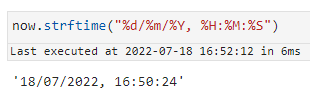
Image by Author

Example 2: DD MMM, YYYY for the date part
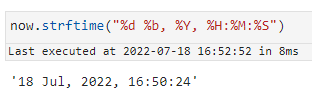
Image by Author

Here I am using %b for the abbreviated (3-letter) month name.

Example 3: Full name of the month, and time on 12-hour clock with AM/PM
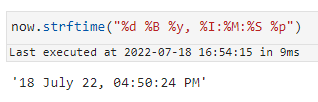
Image by Author

Change %b to %B for the full month. For the time representation, %H is the hour number for 24-hour clock, and %I for 12-hour clock, both with zero padding, so it prints “04:50:24” instead of “4:50:24”.

Example 4: Month and Hour without Zero Padding
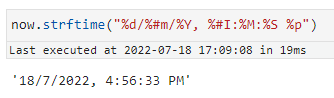
Image by Author

There are a lot more options that covered in the examples above, the full format code list as follows:
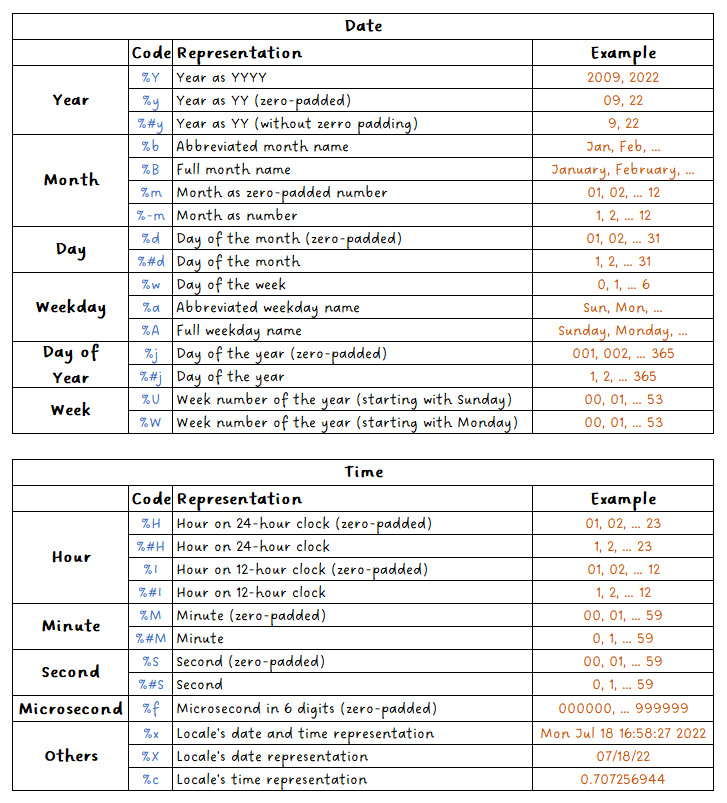
Image by Author

Text version for easier copy & paste:

Important note:

For the representations without zero padding, Windows has the code prefixed by “#”, however if you are using Linux, remember to replace “#” by “-”, so for example, the corresponding format for time string “8:9:3” in Windows is “%#H:%#M:%#S” but for Linux is “%-H:%-M:%-S”.

Converting Strings to Datetime

The conversion from strings to datetime works exactly the opposite as the other way round. Using strptime() method under datetime class, with a specific string and its format representation, you are able to get the equivalent datetime object.

Syntax: datetime.strptime(date_string, format) , format follows the same representations as the code list above, such as “%d/%m/%Y, %H:%M:%S”.

Example:

from datetime import datetime
print(datetime.strptime("18/07/2022, 16:50:24", "%d/%m/%Y, %H:%M:%S"))
>>> 2022-07-18 16:50:24
print(datetime.strptime("18 Jul, 2022, 16:50:24", "%d %b, %Y, %H:%M:%S"))
>>> 2022-07-18 16:50:24
print(datetime.strptime("18/7/22, 4:56:33.635 PM", "%d/%m/%y, %H:%M:%S.%f %p"))
>>> 2022-07-18 04:56:33.635000

Note that if the provided string and format do not match, the program will throw a ValueError:

print(datetime.strptime("18/07/2022", "%d/%m/%y"))
>>> ValueError: unconverted data remains: 22

Here the year 2022 should be matched against the code %Y instead of %y.

Datetime Object Operations

After the conversion from string to datetime, you are able to increment/decrement the object, or compute the difference between two datetime objects:

Increment/Decrement

dt1 = datetime.strptime("18/07/2022, 16:50:24", "%d/%m/%Y, %H:%M:%S")
from datetime import timedelta
# increment by 1 hour and 5 minutes
dt1 + timedelta(hours=1, minutes=5)
>>> datetime.datetime(2022, 7, 18, 17, 55, 24)
# decrement by 2 days 12 hours and 30 seconds
dt1 - timedelta(days=2, hours=12, seconds=30)
datetime.datetime(2022, 7, 16, 4, 49, 54)

Time Difference

dt1 = datetime.strptime("18/07/2022, 16:50:24", "%d/%m/%Y, %H:%M:%S")
dt2 = datetime.strptime("19/07/2022, 10:36:17", "%d/%m/%Y, %H:%M:%S")
# time difference
dt2 - dt1
>>> datetime.timedelta(seconds=63953)
dt1 - dt2
>>> datetime.timedelta(days=-1, seconds=22447)
# get number of seconds between dt1 and dt2
(dt2 - dt1).seconds
>>> 63953
# convert to minute
print(f"Time difference: {(dt2 - dt1).seconds / 60.0} minutes")
>>> Time difference: 1065.8833333333334 minutes

Thanks for reading! For more of my articles on Python & Cryptos, please refer to:

More content at PlainEnglish.io. Sign up for our free weekly newsletter. Follow us on Twitter and LinkedIn. Check out our Community Discord and join our Talent Collective.

Python
Programming
Recommended from ReadMedium