avatarVishvdeep Dasadiya

Free AI web copilot to create summaries, insights and extended knowledge, download it at here

9004

Abstract

’s message.</p><p id="5165">Entities are annotated in training examples with the entity’s name. In addition to the entity name, you can annotate an entity with synonyms, roles, or groups.</p><p id="5dca">The full possible syntax for annotating an entity is:</p><div id="8958"><pre><span class="hljs-meta">[<entity-text>]</span>{<span class="hljs-string">"entity"</span><span class="hljs-operator">:</span> <span class="hljs-string">"<entity name>"</span>, <span class="hljs-string">"role"</span><span class="hljs-operator">:</span> <span class="hljs-string">"<role name>"</span>, <span class="hljs-string">"group"</span><span class="hljs-operator">:</span> <span class="hljs-string">"<group name>"</span>, <span class="hljs-string">"value"</span><span class="hljs-operator">:</span> <span class="hljs-string">"<entity synonym>"</span>}</pre></div><h2 id="b0e0">Stories</h2><p id="2a77">Stories are composed of:</p><ul><li>Story: The story’s name. The name is arbitrary and not used in training; you can use it as a human-readable reference for the story.</li><li>Metadata: Arbitrary and optional, not used in training, you can use it to store relevant information about the story like e.g. the author.</li><li>A list of steps: The user messages and actions that make up the story.</li></ul><div id="c421"><pre><span class="hljs-attribute">stories</span><span class="hljs-punctuation">:</span> <span class="hljs-bullet">-</span> <span class="hljs-string">story: Greet the user</span> <span class="hljs-attribute">metadata</span><span class="hljs-punctuation">:</span> <span class="hljs-attribute">author</span><span class="hljs-punctuation">:</span> <span class="hljs-string">Somebody</span> <span class="hljs-attribute">key</span><span class="hljs-punctuation">:</span> <span class="hljs-string">value</span> <span class="hljs-attribute">steps</span><span class="hljs-punctuation">:</span> <span class="hljs-comment"># list of steps</span> <span class="hljs-bullet">-</span> <span class="hljs-string">intent: greet</span> <span class="hljs-bullet">-</span> <span class="hljs-string">action: utter_greet</span></pre></div><p id="67ad">Each step can be one of the following:</p><ul><li>A user message, represented by intent and entities.</li><li>An or statement, which includes two or more user messages under it.</li><li>A bot action.</li><li>A form.</li><li>A slot was set event.</li><li>A checkpoint, which connects the story to another story.</li></ul><h2 id="aad0">Rules</h2><p id="85e1">Rules are listed under the rules key and look similar to stories. A rule also has a steps key, which contains a list of the same steps as stories do. Rules can additionally contains the conversation_started and conditions keys.</p><p id="f39a">These are used to specify conditions under which the rule should apply.</p><div id="96fe"><pre><span class="hljs-attr">rules:</span> <span class="hljs-bullet">-</span> <span class="hljs-attr">rule:</span> <span class="hljs-string">Only</span> <span class="hljs-string">say</span> <span class="hljs-string">hey</span> <span class="hljs-string">when</span> <span class="hljs-string">the</span> <span class="hljs-string">user</span> <span class="hljs-string">provided</span> <span class="hljs-string">a</span> <span class="hljs-string">name</span> <span class="hljs-attr">condition:</span> <span class="hljs-bullet">-</span> <span class="hljs-attr">slot_was_set:</span> <span class="hljs-bullet">-</span> <span class="hljs-attr">user_provided_name:</span> <span class="hljs-literal">true</span> <span class="hljs-attr">steps:</span> <span class="hljs-bullet">-</span> <span class="hljs-attr">intent:</span> <span class="hljs-string">greet</span> <span class="hljs-bullet">-</span> <span class="hljs-attr">action:</span> <span class="hljs-string">utter_greet</span></pre></div><h1 id="00d9">Domain</h1><p id="3862">The domain defines the universe in which your assistant operates. It specifies the intents, entities, slots, responses, forms, and actions your bot should know about. It also defines a configuration for conversation sessions.</p><div id="8c70"><pre><span class="hljs-built_in">version</span>: <span class="hljs-string">"2.0"</span></pre></div><div id="d0c0"><pre><span class="hljs-attribute">intents</span><span class="hljs-punctuation">:</span> <span class="hljs-bullet">-</span> <span class="hljs-string">affirm</span> <span class="hljs-bullet">-</span> <span class="hljs-string">deny</span> <span class="hljs-bullet">-</span> <span class="hljs-string">greet</span> <span class="hljs-bullet">-</span> <span class="hljs-string">thankyou</span> <span class="hljs-bullet">-</span> <span class="hljs-string">goodbye</span> <span class="hljs-bullet">-</span> <span class="hljs-string">search_concerts</span> <span class="hljs-bullet">-</span> <span class="hljs-string">search_venues</span> <span class="hljs-bullet">-</span> <span class="hljs-string">compare_reviews</span> <span class="hljs-bullet">-</span> <span class="hljs-string">bot_challenge</span> <span class="hljs-bullet">-</span> <span class="hljs-string">nlu_fallback</span> <span class="hljs-bullet">-</span> <span class="hljs-string">how_to_get_started</span></pre></div><div id="41d9"><pre><span class="hljs-attribute">entities</span><span class="hljs-punctuation">:</span> <span class="hljs-bullet">-</span> <span class="hljs-string">name</span></pre></div><div id="7045"><pre><span class="hljs-attr">slots:</span> <span class="hljs-attr">concerts:</span> <span class="hljs-attr">type:</span> <span class="hljs-string">list</span> <span class="hljs-attr">influence_conversation:</span> <span class="hljs-literal">false</span> <span class="hljs-attr">venues:</span> <span class="hljs-attr">type:</span> <span class="hljs-string">list</span> <span class="hljs-attr">influence_conversation:</span> <span class="hljs-literal">false</span> <span class="hljs-attr">likes_music:</span> <span class="hljs-attr">type:</span> <span class="hljs-string">bool</span> <span class="hljs-attr">influence_conversation:</span> <span class="hljs-literal">true</span></pre></div><div id="7da5"><pre><span class="hljs-symbol">responses:</span> utter_greet: - <span class="hljs-keyword">text</span>: <span class="hljs-string">"Hey there!"</span> utter_goodbye: - <span class="hljs-keyword">text</span>: <span class="hljs-string">"Goodbye :("</span> utter_default: - <span class="hljs-keyword">text</span>: <span class="hljs-string">"Sorry, I didn't get that, can you rephrase?"</span> utter_youarewelcome: - <span class="hljs-keyword">text</span>: <span class="hljs-string">"You're very welcome."</span> utter_iamabot: - <span class="hljs-keyword">text</span>: <span class="hljs-string">"I am a bot, powered by Rasa."</span> utter_get_started: - <span class="hljs-keyword">text</span>: <span class="hljs-string">"I can help you find concerts and venues. Do you like music?"</span> utter_awesome: - <span class="hljs-keyword">text</span>: <span class="hljs-string">"Awesome! You can ask me things like "</span>Find <span class="hljs-keyword">me</span> some concerts<span class="hljs-string">" or "</span>What<span class="hljs-comment">'s a good venue""</span></pre></div><div id="4979"><pre><span class="hljs-attribute">actions</span><span class="hljs-punctuation">:</span> <span class="hljs-bullet">-</span> <span class="hljs-string">action_search_concerts</span> <span class="hljs-bullet">-</span> <span class="hljs-string">action_search_venues</span> <span class="hljs-bullet">-</span> <span class="hljs-string">action_show_concert_reviews</span> <span class="hljs-bullet">-</span> <span class="hljs-string">action_show_venue_reviews</span> <span class="hljs-bullet">-</span> <span class="hljs-string">action_set_music_preference</span></pre></div><div id="f5c0"><pre><span class="hljs-attr">session_config:</span> <span class="hljs-attr">session_expiration_time:</span> <span class="hljs-number">60</span> <span class="hljs-comment"># value in minutes</span> <span class="hljs-attr">carry_over_slots_to_new_session:</span> <span class="hljs-literal">true</span></pre></div><h2 id="3e11">Slots</h2><p id="b664">The one things we haven’t been gone though is the slots.</p><p id="b0bb">Slots are your bot’s memory. They act as key-value store which can be used to store information the user provided as well as information gather about the outside would.</p><p id="ff1f">Most of the time, you want slots to influence how the dialogue processes. There are different slot types for different behaviours.</p><p id="937f">For examples, if your user has provided their home city, you might have a text slot called home_city. If the user asks for the weather, and you don’t know their home city, you will have to ask them for it. A text slot only tells Rasa Core whether the slot has a value. The specific value of a text doesn’t make any diffe

Options

rence.</p><p id="1bdb">If the value itself is important, use a categorical or a bool slot. There are also float, and list slots. If you just want to store some data, but don’t want it to affect the flow of conversation, use an unfeaturised slot.</p><div id="1782"><pre><span class="hljs-symbol">slots:</span> <span class="hljs-symbol"> name:</span> <span class="hljs-symbol"> type:</span> text <span class="hljs-symbol"> initial_value:</span> <span class="hljs-string">"human"</span></pre></div><ul><li>Text</li><li>Boolean</li><li>Categorical</li><li>Float</li><li>List</li><li>Any</li><li>Custom Slot type</li></ul><h1 id="2f93">Model Configuration</h1><p id="3f0e">The configuration file defines the components and policies that your model will use to make predictions based on user input.</p><p id="dd40">The language and pipeline keys specify the components used by the model to make NLU predictions. The policies key defines the policies used by the model to predict the next action.</p><h2 id="e6ec">Policies</h2><p id="a7d1">your assistant uses policies to decide which action to take at each step in a conversation. There are machine-learning and rule-based policies that your assistant can use in tandem.</p><div id="f06c"><pre><span class="hljs-symbol">language:</span> <span class="hljs-meta"># your language</span> <span class="hljs-symbol">pipeline:</span> <span class="hljs-meta"># - <pipeline components></span></pre></div><div id="eeca"><pre><span class="hljs-attribute">policies</span><span class="hljs-punctuation">:</span> <span class="hljs-bullet">-</span> <span class="hljs-string">name: MemoizationPolicy</span> <span class="hljs-bullet">-</span> <span class="hljs-string">name: TEDPolicy</span> <span class="hljs-attribute">max_history</span><span class="hljs-punctuation">:</span> <span class="hljs-string">5</span> <span class="hljs-attribute">epochs</span><span class="hljs-punctuation">:</span> <span class="hljs-string">200</span> <span class="hljs-bullet">-</span> <span class="hljs-string">name: RulePolicy</span></pre></div><p id="99bd">You can customise the policies your assistant uses by specifying the policies key in your project’s config.yml There are different policies to choose from, and you can include multiple policies in a single configuration.</p><p id="61cd"><b>Policy Priority</b></p><p id="781a">In the case that two policies predict with equal confidence. For example, the Memorisation and Rule Policies might both predict with confidence 1. The priority fo the policies is considered.</p><p id="45c2">Rasa Open Source policies have default priorities that are set to ensure the expected outcome in the case of a tie. They look like this, where higher numbers have higher priority:</p><ul><li>6 — <code>RulePolicy</code></li><li>3 — <code>MemoizationPolicy</code> or <code>AugmentedMemoizationPolicy</code></li><li>1 — <code>TEDPolicy</code></li></ul><h2 id="a905">Pipeline</h2><p id="185b">You can use Rasa to build assistants in any language you want.</p><p id="8248">Your Rasa assistant can be used on training data in any language. If there are no word embeddings for your language, you can train your featurizers fro scratch with the data you provide.</p><div id="0d17"><pre>language: <span class="hljs-string">"fr"</span> <span class="hljs-comment"># your two-letter language code</span></pre></div><div id="12c7"><pre><span class="hljs-attribute">pipeline</span><span class="hljs-punctuation">:</span> <span class="hljs-bullet">-</span> <span class="hljs-string">name: WhitespaceTokenizer</span> <span class="hljs-bullet">-</span> <span class="hljs-string">name: RegexFeaturizer</span> <span class="hljs-bullet">-</span> <span class="hljs-string">name: LexicalSyntacticFeaturizer</span> <span class="hljs-bullet">-</span> <span class="hljs-string">name: CountVectorsFeaturizer</span> <span class="hljs-bullet">-</span> <span class="hljs-string">name: CountVectorsFeaturizer</span> <span class="hljs-attribute">analyzer</span><span class="hljs-punctuation">:</span> <span class="hljs-string">"char_wb"</span> <span class="hljs-attribute">min_ngram</span><span class="hljs-punctuation">:</span> <span class="hljs-string">1</span> <span class="hljs-attribute">max_ngram</span><span class="hljs-punctuation">:</span> <span class="hljs-string">4</span> <span class="hljs-bullet">-</span> <span class="hljs-string">name: DIETClassifier</span> <span class="hljs-attribute">epochs</span><span class="hljs-punctuation">:</span> <span class="hljs-string">100</span> <span class="hljs-bullet">-</span> <span class="hljs-string">name: EntitySynonymMapper</span> <span class="hljs-bullet">-</span> <span class="hljs-string">name: ResponseSelector</span> <span class="hljs-attribute">epochs</span><span class="hljs-punctuation">:</span> <span class="hljs-string">100</span></pre></div><h1 id="7ab5">Actions</h1><p id="3c12">After each user message, the model will predict an action that the assistant should perform next.</p><p id="9caa"><b>Responses</b></p><p id="43ba">A response is a message the assistant will send back to the user. This is the action you will use most often, when you want the assistant to send text, images, buttons or similar to the users.</p><p id="971e"><b>Custom Actions</b></p><p id="a737">A custom action is an action that can run any code you want. This can be used to make an API call, or to query a database for example.</p><p id="0512"><b>Forms</b></p><p id="f21a">forms are a special type of custom action, designed to handle business logic. If you have any conversation designs where you expect the assistant to ask for a specific set of information, you should use forms.</p><p id="cec8"><b>Default Actions</b></p><p id="32ae">Default actions are actions that are built into the dialogue manager by default. Most of these are automatically predicted based on certain conversation situations. You may want to customise these to personalise your assistant.</p><h2 id="97ed">Custom Actions</h2><p id="f818">A custom action can run any code you want, including API calls, database queries etc.</p><p id="1479">Any custom action that you want to use in your stories should be added into the actions section of your domain.</p><p id="6867">When the dialogue engine predicts a custom actions to be executed, it will call the action server.</p><div id="1397"><pre><span class="hljs-keyword">from</span> rasa_sdk <span class="hljs-keyword">import</span> Action <span class="hljs-keyword">from</span> rasa_sdk.events <span class="hljs-keyword">import</span> SlotSet

<span class="hljs-keyword">class</span> <span class="hljs-title class_">ActionCheckWeather</span>(<span class="hljs-title class_ inherited__">Action</span>): <span class="hljs-keyword">def</span> <span class="hljs-title function_">name</span>(<span class="hljs-params">self</span>) -> Text: <span class="hljs-keyword">return</span> <span class="hljs-string">"action_check_weather"</span>

<span class="hljs-keyword">def</span> <span class="hljs-title function_">run</span>(<span class="hljs-params">self, dispatcher: CollectingDispatcher, tracker: Tracker, domain: <span class="hljs-type">Dict</span>[Text, <span class="hljs-type">Any</span>]</span>) -> <span class="hljs-type">List</span>[<span class="hljs-type">Dict</span>[Text, <span class="hljs-type">Any</span>]]:

  dispatcher.utter_message(<span class="hljs-string">"Hello World! from custom action"</span>)      <span class="hljs-keyword">return</span> []</pre></div><p id="d059"><b>Important Links:</b></p><p id="90c5"><b>Note:</b> mentioned likes used to write this article and writing the basic knowledge that i learned form Official Rasa Development Certification.</p><ul><li><a href="https://rasa.com/showcase/">https://rasa.com/showcase/</a></li><li><a href="https://rasa.com/docs/rasa/">https://rasa.com/docs/rasa/</a></li><li><a href="https://blog.rasa.com/rasa-education-and-certification/">https://blog.rasa.com/rasa-education-and-certification/</a></li></ul><p id="54c0">Twiter Account:</p><div id="c3bc" class="link-block">
      <a href="https://twitter.com/datarishi">
        <div>
          <div>
            <h2>JavaScript is not available.</h2>
            <div><h3>Edit description</h3></div>
            <div><p>twitter.com</p></div>
          </div>
          <div>
            <div style="background-image: url(https://miro.readmedium.com/v2/resize:fit:320/0*9QU5ZQo1jFeY3AHJ)"></div>
          </div>
        </div>
      </a>
    </div><p id="a68e">Linkedin:</p><p id="bd5d"><a href="https://www.linkedin.com/in/vishvdeep-dasadiya-65770312b/">Vishvdeep Dasadiya — Associate Software Engineer — Accenture | LinkedIn</a></p><p id="d04e">GitHub:</p><p id="b38e"><a href="https://github.com/vdnew/Real-Time-Insights-from-Social-media-Data---Data-Science-Case-Study">https://github.com/vdnew/</a></p></article></body>

Conversational AI — Rasa Framework basics

Image Creadit(https://en.everybodywiki.com/Rasa_NLU)

In this blog:

  • What is Conversational AI?
  • What is Rasa NLU?
  • Official Rasa Developer Certification Topics

What is Conversational AI?

Conversational AI is a set of technologies that enable computers to understand, process, and respond to voice or text inputs in natural ways, and is typically used in conjunction with bots or intelligent virtual agents (IVAs). Done well, it helps people interact with complex systems in faster and easier ways, and helps businesses deliver personalized engagements and support at scale. — kore.ai

What is Rasa NLU?

AI assistants have to fulfil two tasks, first assistants needs to understand the input message i.e. Intent classification and entity extraction, then by giving correct responses based on the intent and entity.

The Rasa stack tackles these tasks with the natural language understanding component Rasa NLU and the dialogue management component Rasa Core. What makes NLP for contextual AI assistants. Rasa NLU provides this full customisability by processing user messages in a so called pipeline.

A pipeline defines different components which process a user message sequentially and ultimately lead to the classification of user messages into intents and the extraction of entities.

Official Rasa Development Certification

Pre-workshop Setup

Installing latest version of rasa on you respective operating system sometimes become challenging specially you are not using virtual environment and you breaking up the dependencies for your all projects, so i advise you to use anaconda virtual environment or virtualenv via pip.

Getting the latest rasa version and installing steps all are included in link.

This is the link provided as resource in Rasa Development Workshop.

Introduction to Rasa Open Source

Rasa is open source machine learning framework or automated text and voice-based conversations. Understand messages, hold conversations, and connect to messaging channels and APIs.

I am mentioning the official rasa youtube playlist link, it is one of the best conceptual explanation you can found on youtube.

Now let’s understand the project file structure.

  1. Updating the configuration:

For Frequent questions and some casual conversation, you always want your assistant to respond the same way every time type of question is asked.

Rules allow you to do exactly that. To se rules, the you need to add the Rule Policy to your policies in your configuration file.

So there are two parts you have to configure in your config.yml file, one is the policy who makes the what is the next best action for the latest input from user and another is the pipeline in order to classify and extract the intent and entity from the sentences (message).

It Include the ResponseSelector in your NLU pipeline in your configuration file. The ResponseSelector requires a featurizer and intent classifier to work, so it should come after these components in your pipeline.

2. Creating rules:

You need to write only one rule for each retrieval intent. All intents grouped under that retrieval intent will then be handled the same way. The action name starts with utter_ and ends with the retrieval intent’s name. Write rule for responding to inputs.

3. NLU Training Data:

NLU training examples for the ResponseSelector look the same as regular training examples, except that their names must refer to the retrieval intent they are grouped under.

4. Defining static responses:

You have to define some static responses for the ResponseSelector the same naming convention as retrieval intents.

5. Custom Actions:

You have to define some customer actions for the custom tasks and by custom actions you can call API or database query or run some calculations.
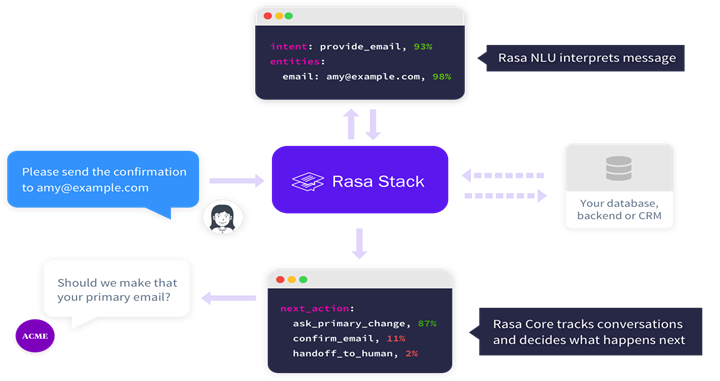
Build your custom assistant

NLU (Natural Language Understanding) is the part of Rasa Open Source that performs intent classification, entity extraction, and response retrieval.

NLU will take in a sentence such as “I am looking for some quality dinner night restaurant in down town” and return structured data like:

Rasa Open Source uses YAML as a unified and extendable way to manage all training data, including NLU data, stories and rules.

You can split the training data over any number of YAML files, and each file can contain any combination of NLU data, stories and rules. The training data parser determines the training data type using top level keys.

The domain uses the same YAML format as the training data and can also be split across multiple files or combined in one file.

NLU training data consists of example user utterances categorised by intent. Training examples can also include entities. Entities are structured pieces of information that can be extracted from a user’s message. You can also add extra information such as regular expressions and lookup tables to your training data to help the model identify intents and entities correctly.

Intent

  • Training examples grouped by user intent e.g. optionally with annotated entities.
nlu:
- intent: check_balance
  examples: |
    - What's my [credit](account) balance?
    - What's the balance on my [credit card account {"entity":"account","value":"credit"}
  • Synonyms
nlu:
- synonym: credit
  examples: |
    - credit card account
    - credit account
  • Regular expressions
nlu:
- regex: account_number
  examples: |
    - \d{10,12}
  • Lookup tables
nlu:
- lookup: banks
  examples: |
    - JPMC
    - Comerica
    - Bank of America

Entities

Entities are structured pieces of information that can be extracted from a user’s message.

Entities are annotated in training examples with the entity’s name. In addition to the entity name, you can annotate an entity with synonyms, roles, or groups.

The full possible syntax for annotating an entity is:

[<entity-text>]{"entity": "<entity name>", "role": "<role name>", "group": "<group name>", "value": "<entity synonym>"}

Stories

Stories are composed of:

  • Story: The story’s name. The name is arbitrary and not used in training; you can use it as a human-readable reference for the story.
  • Metadata: Arbitrary and optional, not used in training, you can use it to store relevant information about the story like e.g. the author.
  • A list of steps: The user messages and actions that make up the story.
stories:
- story: Greet the user
  metadata:
    author: Somebody
    key: value
  steps:
  # list of steps
  - intent: greet
  - action: utter_greet

Each step can be one of the following:

  • A user message, represented by intent and entities.
  • An or statement, which includes two or more user messages under it.
  • A bot action.
  • A form.
  • A slot was set event.
  • A checkpoint, which connects the story to another story.

Rules

Rules are listed under the rules key and look similar to stories. A rule also has a steps key, which contains a list of the same steps as stories do. Rules can additionally contains the conversation_started and conditions keys.

These are used to specify conditions under which the rule should apply.

rules:
- rule: Only say `hey` when the user provided a name
  condition:
  - slot_was_set:
    - user_provided_name: true
  steps:
  - intent: greet
  - action: utter_greet

Domain

The domain defines the universe in which your assistant operates. It specifies the intents, entities, slots, responses, forms, and actions your bot should know about. It also defines a configuration for conversation sessions.

version: "2.0"
intents:
  - affirm
  - deny
  - greet
  - thankyou
  - goodbye
  - search_concerts
  - search_venues
  - compare_reviews
  - bot_challenge
  - nlu_fallback
  - how_to_get_started
entities:
  - name
slots:
  concerts:
    type: list
    influence_conversation: false
  venues:
    type: list
    influence_conversation: false
  likes_music:
    type: bool
    influence_conversation: true
responses:
  utter_greet:
    - text: "Hey there!"
  utter_goodbye:
    - text: "Goodbye :("
  utter_default:
    - text: "Sorry, I didn't get that, can you rephrase?"
  utter_youarewelcome:
    - text: "You're very welcome."
  utter_iamabot:
    - text: "I am a bot, powered by Rasa."
  utter_get_started:
    - text: "I can help you find concerts and venues. Do you like music?"
  utter_awesome:
    - text: "Awesome! You can ask me things like \"Find me some concerts\" or \"What's a good venue\""
actions:
  - action_search_concerts
  - action_search_venues
  - action_show_concert_reviews
  - action_show_venue_reviews
  - action_set_music_preference
session_config:
  session_expiration_time: 60  # value in minutes
  carry_over_slots_to_new_session: true

Slots

The one things we haven’t been gone though is the slots.

Slots are your bot’s memory. They act as key-value store which can be used to store information the user provided as well as information gather about the outside would.

Most of the time, you want slots to influence how the dialogue processes. There are different slot types for different behaviours.

For examples, if your user has provided their home city, you might have a text slot called home_city. If the user asks for the weather, and you don’t know their home city, you will have to ask them for it. A text slot only tells Rasa Core whether the slot has a value. The specific value of a text doesn’t make any difference.

If the value itself is important, use a categorical or a bool slot. There are also float, and list slots. If you just want to store some data, but don’t want it to affect the flow of conversation, use an unfeaturised slot.

slots:
  name:
    type: text
    initial_value: "human"
  • Text
  • Boolean
  • Categorical
  • Float
  • List
  • Any
  • Custom Slot type

Model Configuration

The configuration file defines the components and policies that your model will use to make predictions based on user input.

The language and pipeline keys specify the components used by the model to make NLU predictions. The policies key defines the policies used by the model to predict the next action.

Policies

your assistant uses policies to decide which action to take at each step in a conversation. There are machine-learning and rule-based policies that your assistant can use in tandem.

language:  # your language
pipeline:
  # - <pipeline components>
policies:
  - name: MemoizationPolicy
  - name: TEDPolicy
    max_history: 5
    epochs: 200
  - name: RulePolicy

You can customise the policies your assistant uses by specifying the policies key in your project’s config.yml There are different policies to choose from, and you can include multiple policies in a single configuration.

Policy Priority

In the case that two policies predict with equal confidence. For example, the Memorisation and Rule Policies might both predict with confidence 1. The priority fo the policies is considered.

Rasa Open Source policies have default priorities that are set to ensure the expected outcome in the case of a tie. They look like this, where higher numbers have higher priority:

  • 6 — RulePolicy
  • 3 — MemoizationPolicy or AugmentedMemoizationPolicy
  • 1 — TEDPolicy

Pipeline

You can use Rasa to build assistants in any language you want.

Your Rasa assistant can be used on training data in any language. If there are no word embeddings for your language, you can train your featurizers fro scratch with the data you provide.

language: "fr"  # your two-letter language code
pipeline:
  - name: WhitespaceTokenizer
  - name: RegexFeaturizer
  - name: LexicalSyntacticFeaturizer
  - name: CountVectorsFeaturizer
  - name: CountVectorsFeaturizer
    analyzer: "char_wb"
    min_ngram: 1
    max_ngram: 4
  - name: DIETClassifier
    epochs: 100
  - name: EntitySynonymMapper
  - name: ResponseSelector
    epochs: 100

Actions

After each user message, the model will predict an action that the assistant should perform next.

Responses

A response is a message the assistant will send back to the user. This is the action you will use most often, when you want the assistant to send text, images, buttons or similar to the users.

Custom Actions

A custom action is an action that can run any code you want. This can be used to make an API call, or to query a database for example.

Forms

forms are a special type of custom action, designed to handle business logic. If you have any conversation designs where you expect the assistant to ask for a specific set of information, you should use forms.

Default Actions

Default actions are actions that are built into the dialogue manager by default. Most of these are automatically predicted based on certain conversation situations. You may want to customise these to personalise your assistant.

Custom Actions

A custom action can run any code you want, including API calls, database queries etc.

Any custom action that you want to use in your stories should be added into the actions section of your domain.

When the dialogue engine predicts a custom actions to be executed, it will call the action server.

from rasa_sdk import Action
from rasa_sdk.events import SlotSet

class ActionCheckWeather(Action):
   def name(self) -> Text:
      return "action_check_weather"

   def run(self,
           dispatcher: CollectingDispatcher,
           tracker: Tracker,
           domain: Dict[Text, Any]) -> List[Dict[Text, Any]]:

      dispatcher.utter_message("Hello World! from custom action")      return []

Important Links:

Note: mentioned likes used to write this article and writing the basic knowledge that i learned form Official Rasa Development Certification.

Twiter Account:

Linkedin:

Vishvdeep Dasadiya — Associate Software Engineer — Accenture | LinkedIn

GitHub:

https://github.com/vdnew/

Machine Learning
Python
Deep Learning
TensorFlow
Rasa
Recommended from ReadMedium