avatarSinergise

Summary

The Sentinel Hub QGIS Plugin simplifies the use of multi-temporal and multi-spectral satellite data by integrating Sentinel Hub services directly into QGIS, enabling users to visualize and download data within their projects.

Abstract

The Sentinel Hub QGIS Plugin is designed to streamline the handling of complex satellite imagery by providing a direct link to Sentinel Hub's powerful services from within the QGIS environment. This open-source plugin allows users to easily input their instance ID, select layers, define time ranges, and adjust cloud coverage settings to visualize satellite data in QGIS. It supports various coordinate reference systems and offers the flexibility to download images in different formats and resolutions. The plugin is part of a suite of tools available on Sentinel Hub's GitHub repository, emphasizing the importance of collaboration and open-source development within the QGIS community. Users can obtain their instance ID through Sentinel Hub's Configuration Utility and can register for accounts to access additional services. The integration of this plugin with QGIS is a significant advancement for users working with satellite data, particularly within the Copernicus Data Space Ecosystem.

Opinions

  • The plugin is highly beneficial for users working with satellite data, making the process less tedious and more accessible.
  • Sentinel Hub encourages community collaboration and open-source development, as evidenced by the plugin's release to the QGIS community and its potential for adaptation to other WMS data sources.
  • The developers believe in the power of community-driven innovation, as they invite users to contribute to the plugin's evolution and to utilize their other open-source tools.
  • There is a strong emphasis on user-friendliness, with the plugin being designed to integrate seamlessly into the QGIS workflow, from installation to data visualization and download.
  • Sentinel Hub values ease of access to their services, providing direct links for account registration, instance ID configuration, and detailed information through their blog post.

Control Sentinel Hub from within QGIS

Sentinel Hub QGIS Plugin

Exploiting multi-temporal and multi-spectral satellite data without the right tools can be tedious if not downright impossible work. To make life easier, we have developed the Sentinel Hub QGIS plugin which allows you to configure and harness the power of Sentinel Hub services directly in QGIS. It will help you visualise Sentinel data, either by itself, or in any other project you may be working on.

We encourage collaboration and further development, so we are releasing this component as open source to the QGIS community! The plugin can easily be reworked for other WMS data sources, especially those with a time component. Check our GitHub repository for the plugin as well as our other tools (Copernicus Browser, EO Browser and eo-learn).

Let’s take a look how to use it in QGIS!

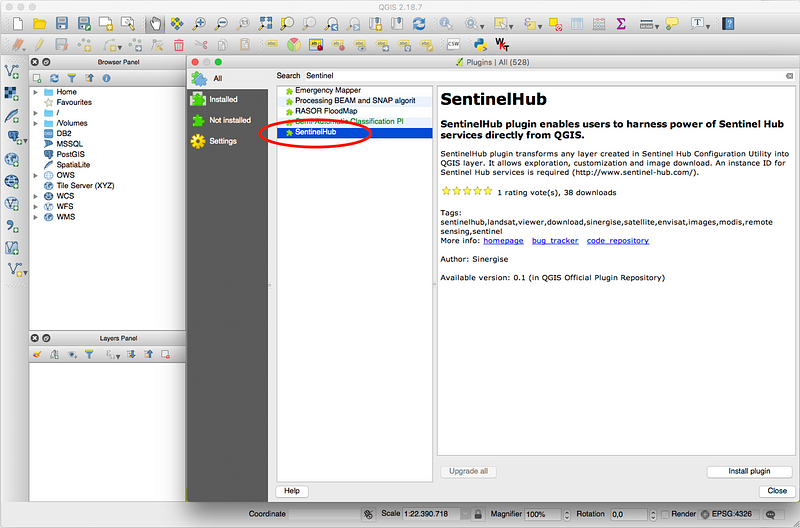
  1. To install the Sentinel Hub QGIS plugin go to “Plugins” in QGIS and choose “Manage and instal plugins.” Search for “Sentinel Hub” and click “Install”.
2. You should now be able to see the Sentinel Hub QGIS plugin icon in the toolbar. After clicking on the icon the Sentinel Hub plugin opens.
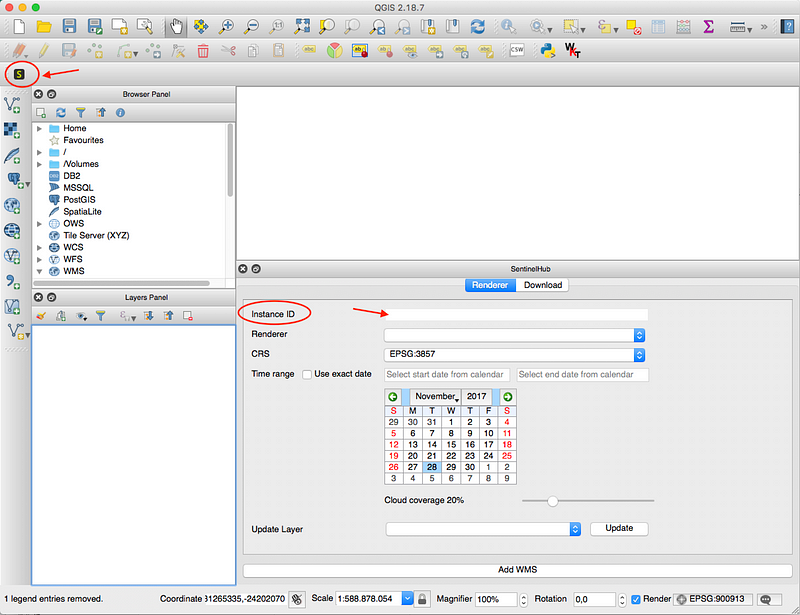
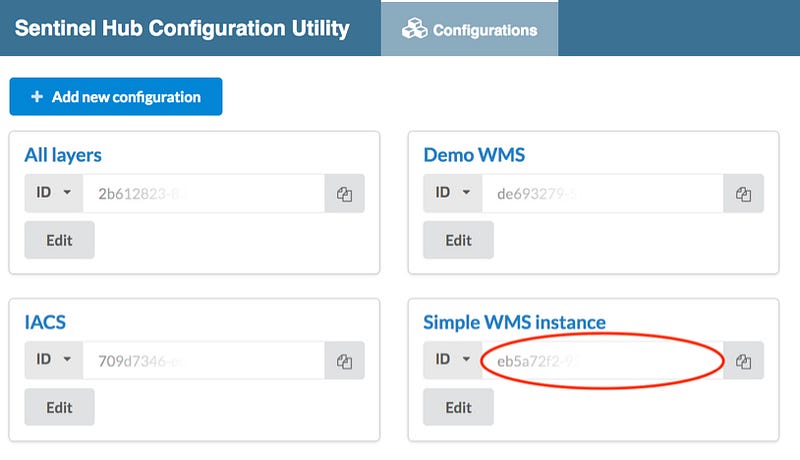
Input your instance ID which you can get in our Configuration Utility. If you don’t have an account yet, you can register for Copernicus Data Space Ecosystem account here, or apply for the Sentinel Hub trial account here, and test the rest of the Sentinel Hub services as well.
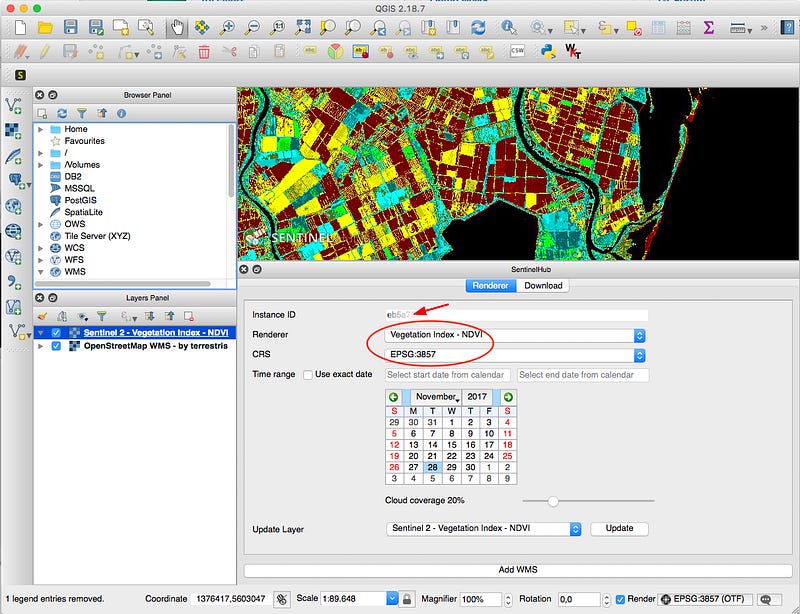
3. Afterwards you shall be able to select from the list of available layes in your instance as well as the desired coordinate reference system. Set the other parameters as well: time range or exact date, and cloud coverage. The image will show up in the QGIS window.
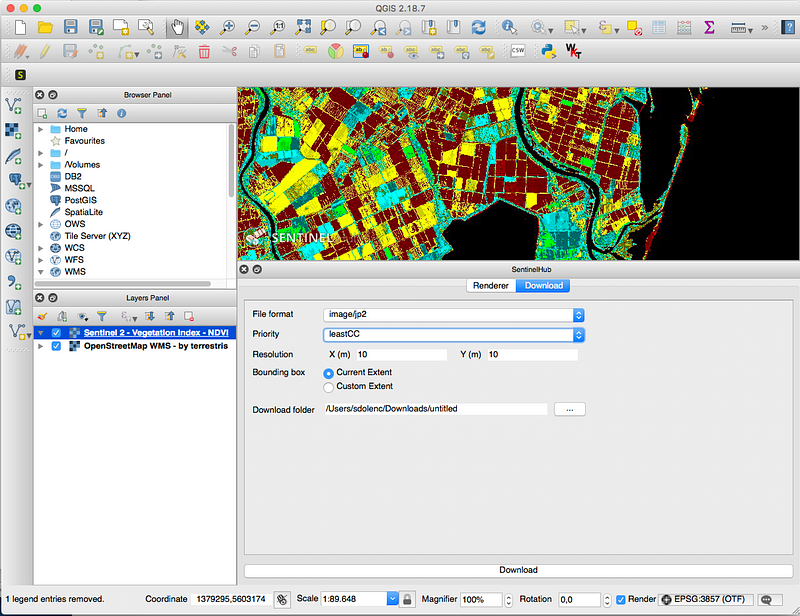
4. You can also download the image in different formats, if desired. You can download the currently visible image extents or a custom area. Here you can also override the mosaicking priority of the image (such as most recent, least cloud coverage, etc.) and the resolution.
Read also the Copernicus Data Space Ecosystem blog post with detailed information.

Sentinel Hub
Qgis
Plugins
Satellite Technology
GIS
Recommended from ReadMedium