
Context Managers In Python — It’s So Awesome That You Won’t Believe
Understanding Context Manager
In its earliest uses (documented in the 15th century), context meant “the weaving together of words in language.” This sense, now obsolete, developed logically from the word’s source in Latin, contexere “to weave or join together.” Context now most commonly refers to the environment or setting in which something (whether words or events) exists… — Merriam Webster

Introduction
It’s fair to say that in our case, Computer Science, a Context is an environment where events exist.
In linguistics, we can think of a context like going on vacation to France. In France, they speak French.
Your context in terms of communication channels has now shifted from whatever language you speak to French.
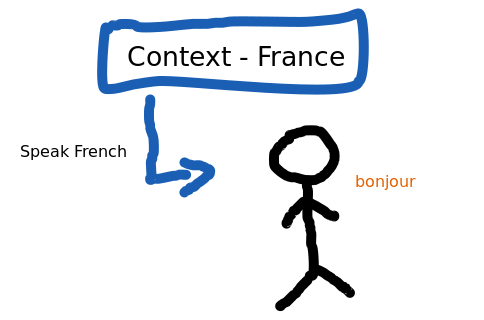
The same principle can be applied in Computer Science. We deal with different contexts from time to time and each context requires specific attention and a set of events to handle them properly.
Let’s say that you are handling a file. We know that each file has its specificity. We don’t write to a JSON file the same way we write to an Excel file for instance. These are two different contexts.
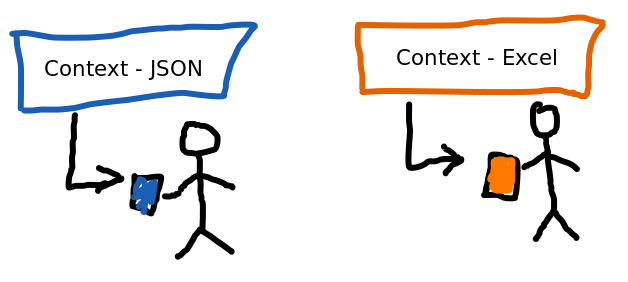
That’s what we’re going to cover in this article. We will walk through Context Managers in Python so you can better understand what it is and how you’ve been using it even though you might not have noticed.
I will show you a real-case scenario from one of my projects that is now in production where I implemented a custom Context Manager.
This is what we’re going to cover:
- From zero: Context Managers
- The
__enter__and__exit__Methods - The contextlib.py Module
- Where can you use Context Managers
- Exception handler with Context Managers
From zero: Context Managers
One of the most common use cases for Context Managers is when dealing with files.
Python gives us the with statement that is specifically designed to work with context managers.
The control of context created by the statement can be delegated by an object that will act as a “context manager” using the as clause.
# Let's open a file
with open("filename.txt", "r") as f:
    # f is the object that will act as context manager
    pass
The context manager handles the resource that we are accessing for us, in this case, our file — filename.txt.
By handle, I mean after doing what we need to do with the opened file and exiting the with statement scope, the file will be automatically closed.
If we did not have the with statement our previous code could have been written as follows:
f = open("filename.txt", "r")
try:
    pass
finally:
    # we make sure we close the file and release the resource
    f.close()
This is the previous syntax for acquiring a resource and releasing it afterward that was replaced by the with statement in PEP 310.
One of the issues with this syntax, as pointed out in PEP 310, is that it makes it difficult to manage the resource correctly since we need to explicitly close the file as we did in our example — f.close().
Another issue is the fact that the finally block will always be executed if we place the code where we acquire it inside the try block:
try:
    # 'acquire' the resource
    f = open("filename.txt", "r")
finally:
    # we make sure we close the file and release the resource
    f.close()
In case of failure to acquire the resource and we attempt to release it, it will fail, of course.
The with statement was designed to simplify some common uses of try/finally, which guarantees that some operation is performed after a block of code… — R. Luciano, Fluent Python (2022)
We can rewrite our code that uses the with statement to be more verbose if I can say like this, as follows:
file = open("filename.txt", "r")

if hasattr(file, "__enter__"):
    # the file object have a method named __enter__
    file.__enter__()

try:
    pass
finally:
    # release the resource and close the file
    file.__exit__()
Now let’s see what those two methods that we used in the previous example do in the following section.
The __enter__ and __exit__ Methods
Two important methods make the Context Manager so powerful in Python: __enter__and __exit__.
Let’s first see the __enter__ method. When we enter a context using the with statement, the first method called is the __enter__ method of the context manager object.
Python will then use the returned value of the __enter__ method to the target specified in the as clause.
Let’s create a simple class to act as our Context Manager, and let’s focus on the __enter__ method only for now:
class AuthManager:
    def __init__(self, username: str, password: str) -> None:
        self.username = username
        self.password = password

    def __enter__(self):
        return self

    def login(self):
        # let's assume that we have some logic to log user in
        pass
When we create a context manager from our AuthManager class, the method __enter__ is called and it returns an instance of our class — self:
with AuthManager(username="random", password="random") as auth:
    # let's assume that we have some logic to log user in
    auth.login()
Is worth noticing that the __enter__ method can also return any other object in special cases if we want.
We could also execute our Context Manager as we did before without using with statement:
auth = AuthManager(username="random", password="random")

if hasattr(auth, "__enter__"):
    # the file object have a method named __enter__
    auth = auth.__enter__()

try:
    pass
finally:
    # release the resource and close the authentication.
    # we will come to __exit__ soon enough
    auth.__exit__()
The other import method of Context Managers is the __exit__ method. Like we said previously the exit method allows us to ‘release’ some resource after finishing using it, let’s say.
class AuthManager:
    def __init__(self, username: str, password: str) -> None:
        self.username = username
        self.password = password

    def __enter__(self):
        return self

    def login(self):
        # let's assume that we have some logic to log user in
        pass

    def __exit__(self, exc_type, exc_value, traceback):
        # let's assume that we have some logic to log user out
        self.logout()
        # we will se why we are returning True
        return True

    def logout(self):
        # let's assume that we have some logic to log user out
        pass
The __enter__ method has three optional parameters that in case of an exception the values will be set accordingly.
We don’t call the __exit__ method the same way that we don’t call the __enter__ method. The interpreter will call for us.
If the __exit__ method returns any value other than True, whatever the exception raised within the with scope will be propagated.
You could also create an asynchronous Context Manager by simply renaming your __enter__ and __exit__ method to be __aenter__ and __exit__:
class AsyncAuthManager:
    def __init__(self, username: str, password: str) -> None:
        self.username = username
        self.password = password

    async def __aenter__(self):
        return self

    async def login(self):
        # let's assume that we have some logic to log user in
        pass

    async def __aexit__(self, exc_type, exc_value, traceback):
        # let's assume that we have some logic to log user out
        await self.logout()
        # we will se why we are returning True
        return True

    async def logout(self):
        # let's assume that we have some logic to log user out
        pass
To create an asynchronous, we use the async with statement:
async def log_user_in():
    async with AsyncAuthManager(username="random", password="random") as auth:
        # let's assume that we have some logic to log user in
        await auth.login()
We will get into more detail about exception handling later on. For now, let’s move on to the contextlib module.
The contextlib.py Module
Python offers us a module that contains utilities that we can use to simply create context managers.
Sometimes we don’t need to reinvent the wheel. Maybe we can just take advantage of what already exists and make our lives easier.
In our previous examples for — AuthManager and AsyncAuthManager — we had to manually implement the methods __enter__ and __exit__ ourselves.
But we don’t have to. The contextlib module comes with abstract classes that we could use in this situation that implement those methods for us.
We just need to use inheritance in this case. Let’s refactor our AuthManager code:
from contextlib import AbstractContextManager


class AuthManager(AbstractContextManager):
    def __init__(self, username: str, password: str) -> None:
        self.username = username
        self.password = password

    def login(self):
        # let's assume that we have some logic to log user in
        pass

    # we override this method to be able to logout
    def __exit__(self, exc_type, exc_value, traceback):
        # let's assume that we have some logic to log user out
        self.logout()
        # we will se why we are returning True
        return True

    def logout(self):
        # let's assume that we have some logic to log user out
        pass
In our example, since we need to mimic a logout call when we exit our context, we override the __exit__ method from AbstractContextManager.
The same thing goes for our AsyncAuthManager. We can take advantage of the built-in AbstractAsyncContextManager:
from contextlib import AbstractAsyncContextManager


class AsyncAuthManager(AbstractAsyncContextManager):
    def __init__(self, username: str, password: str) -> None:
        self.username = username
        self.password = password

    async def login(self):
        # let's assume that we have some logic to log user in
        pass

    # we override this method to be able to logout
    async def __aexit__(self, exc_type, exc_value, traceback):
        # let's assume that we have some logic to log user out
        await self.logout()
        # we will se why we are returning True
        return True

    async def logout(self):
        # let's assume that we have some logic to log user out
        pass
But that’s not all that we can do with the contextlib module.
We can also transform a function into a Context Manager by simply using the @contextmanager decorator (let me know in the comments section if you would like an article about this) provided by the contextlib module:
Let’s say that we want to create a database connection:
from contextlib import contextmanager


@contextmanager
def db_connection(database_url: str):
    try:
        # let's mimic a function that returns to us a connection
        db = connection(DATABASE_URL=database_url)
        yield db
    except Exception as e:
        raise
    finally:
        db.close()
One thing worth taking into consideration is that when we decorate a function to turn it into a Context Manager, it has to return a generator-iterator — yield db.
It has to yield exactly one single value that will be used in the with-statement and assigned to an object using the as clause as mentioned before:
def books():
    with db_connection("some_db_url") as db:
        # mimic a function to fecth something
        return db.query("SELECT * FROM books")
In the same way, we transformed our Context Managers previously into asynchronous managers, we can do this using a decorator:
from contextlib import asynccontextmanager


@asynccontextmanager
async def db_connection(database_url: str):
    try:
        # let's mimic a functino that returns to us a connection
        db = connection(DATABASE_URL=database_url)
        yield db
    except Exception as e:
        raise
    finally:
        db.close()
We use it with the async with statement that we covered in previous examples:
async def books():
    async with db_connection("some_db_url") as db:
        # mimic a function to fecth something
        return db.query("SELECT * FROM books")
There are a lot more fun decorators from the contextlib module that you can go over and see if they can be useful in your projects. Just to mention some:
@closing and @aclosing — call the close() method of an object for us so we don’t need to implement or call it explicitly.
class BookQuery:
    def __init__(self, database_url):
        self.database_url = database_url

    def query(self):
        # we're using the same Context Manager from previous example
        with db_connection(self.database_url) as db:
            return db.query("SELECT * FROM books")

    def close(self):
        # this method will be called before exiting the with statement
        # any logic can be implement here to clean resource or do anything else
        pass
Let’s see how we can use our BookQuery class using the @closing decorator:
from contextlib import closing

with closing(BookQuery("some-db-url") as book:
    print(book.query())
    # before exiting, Python interpreter will call our close() method
Our close() method will be called even if an expectation occurred.
If you want to dive deeper into the contextlib module, this is a great place to start: contextlib — utilities for with-statement contexts.
Where can you use Context Managers?
Speaking from personal experience, I’ve used Context Manager to manage a file processing system.
We would receive a file, process the file, save the original file somewhere in the cloud, and in case of any error do something with it.
Fundamentally, you’ll want to use it when you want to manage a resource — when you open a connection and when you close a connection:
- HTTP client to make a request — one example is the Client from HTTPX library
- File handler — like the one I just mentioned
- Database connector — like in our previous example
- Database transactions can be like the one or some transactions where you create a connection in place and ensure it’s closed before taking advantage of the __exit__ method.
- Manage Network connection — It can be socket or SFTP where you need to connect to a server
- Pretty much anything that you could think of managing the resource.
Exception handler with Context Managers
Again, speaking from my professional experience, Context Manager can be potent when handling exceptions.
I had this scenario where in case of any exception when processing a file, I needed to make sure I wrote a report and store it somewhere in the cloud.
In this case, I could have done that in two possible ways:
- Catch the exception whenever I process a file in my code and write the report when some problem occurs.
- Use the Context Manager __exit__ method
The first approach has some downsides:
- I would have to make sure I handle exceptions every time I process a file
- and also make sure I write the report everywhere I process the file and an exception happens.
Using the Context Manager and taking advantage of the __exit__ method where, in case of exception, we have all the details needed to handle it, making it easier to do all I mentioned in one place and one time only.
So it wouldn’t matter where I handle files, or who handles it later in case some colleague of mine works on the same project.
In case of an error, before exiting the context, we make sure we write a report somewhere in the cloud.
from contextlib import AbstractAsyncContextManager


# Not a real name for my manager, this is just an example
class FileProcessManager(AbstractAsyncContextManager):
    # logics needed all implement

    async def __aexit__(self, exc_type, exc_value, traceback):
        # all parameters are set by interpreter in case of error
        if exc_type:
            # do something with and write the report
            pass
        else:
            # return True to signal all good
            return True
Since the interpreter only sets the parameter's value in case of error, the right thing to do is to check if the value for any of the arguments was set — if exc_type —, if so, we write a report as explained and if not we simply return True signaling that everything went fine as expected.s
Conclusion
Context comes from linguistics, and now it has been adopted in Python as we see in this article.
Python Context Managers provide a powerful way of managing resources, keeping your code clean, and enhancing maintainability with exception handling for instance as we saw.
Python is beautiful indeed. The way it manages the context using the with statement by calling the __enter__ method when creating a new context that can return any object and not only the Context itself is amazing.
The __exit__ method itself is phenomenal for numerous reasons that we pointed out, and for me the possibility to handle exceptions that can occur and decide if we want to handle ‘silently’ or propagate to be handled elsewhere is 🤯.
We also covered the contextlib module and how it can help you streamline your code by only using a decorator such as @closing and @contextmanager.
I hope you enjoyed reading this as much as I did writing it. See you next time.
Resources used to write this article:
- The with statement — PEP 343
- Reliable Acquisition/Release Pairs — PEP 310
- Execution Context — PEP 550
contextlib— Utilitiesfor with-statement contexts- R. Luciano, Fluent Python (2022)
PlainEnglish.io 🚀
Thank you for being a part of the In Plain English community! Before you go:
- Be sure to clap and follow the writer️
- Learn how you can also write for In Plain English️
- Follow us: X | LinkedIn | YouTube | Discord | Newsletter
- Visit our other platforms: Stackademic | CoFeed | Venture


