avatarJim McAulay🍁 I'm nobody. Are you a nobody too?

Free AI web copilot to create summaries, insights and extended knowledge, download it at here

3685

Abstract

lass="hljs-number">2</span>, “<span class="hljs-number">7</span>.<span class="hljs-number">98</span>”,print,) <span class="hljs-attribute">print</span> (crazy_tuple<span class="hljs-meta"> [2])</span></pre></div><div id="b72d"><pre>the result would be <span class="hljs-meta"><span class="hljs-keyword">7</span>.98</span></pre></div><div id="fa7b"><pre><span class="hljs-attribute">crazy_tuple</span> = (“what?”, <span class="hljs-number">2</span>+<span class="hljs-number">2</span>, “$<span class="hljs-number">7</span>.<span class="hljs-number">98</span>”,print,) <span class="hljs-attribute">print</span> (crazy_tuple<span class="hljs-meta"> [3])</span></pre></div><div id="10be"><pre><span class="hljs-keyword">the</span> <span class="hljs-built_in">result</span> would be</pre></div><div id="190a"><pre><built-<span class="hljs-keyword">in</span> <span class="hljs-keyword">function</span> <span class="hljs-title">print></span></pre></div><p id="eeac">A tuple is immutable. That means you can not change the contents directly. You have to create a new copy of it.</p><h1 id="72f7">Lists</h1><p id="bbe2">A list is similar to a tuple the difference is that a list is mutable. The contents of a list can be changed in place. A list has a set of special methods which allow you to manipulate the contents. If you don’t need the functionality of a list it is often a better choice to use the simpler tuple. A common beginners mistake is to use a list when a tuple would be sufficient.</p><p id="c639">A list is created by using square brackets. []</p><p id="8fd5">Unlike a tuple the list does not require the comma for a single object however it is best practice to put it in. For both lists and tuples add the last comma. It never does any harm and if it is there you won’t have to go back and put it in when you need it.</p><div id="5656"><pre>The prefer way <span class="hljs-keyword">to</span> do <span class="hljs-keyword">it</span> <span class="hljs-keyword">is</span>:</pre></div><div id="a08a"><pre><span class="hljs-string">[1,2,3,4,5,]</span></pre></div><div id="b426"><pre><span class="hljs-attribute">rather than</span> </pre></div><div id="5880"><pre><span class="hljs-string">[1,2,3,4,5]</span></pre></div><h1 id="6179">Sets</h1><p id="788b">A set is an unordered collection of unique objects.</p><p id="6b36">Each item in a set must be unique.</p><p id="cef7">A set is formed with curly brackets.{}</p><p id="661e">Any duplicate items in a set are removed</p><p id="da8a">As with lists there are methods that can be used with sets.</p><div id="08be"><pre><span class="hljs-attribute">my_set</span> = {<span class="hljs-number">7</span>,<span class="hljs-number">23</span>,<span class="hljs-string">"A"</span>,<span class="hljs-number">12</span>, <span class="hljs-string">"B"</span>,<span class="hljs-number">7</span>,} <span class="hljs-attribute">print</span> (my_set)</pre></div><div id="d9b1"><pre>The returned <span class="hljs-keyword">set</span> could <span class="hljs-comment">be</span> {7,<span class="hljs-string">"A"</span>, 12, <span class="hljs-string">"B"</span>,23} Duplicates <span class="hljs-comment">are removed.</span> the <span class="hljs-comment">precise order is different</span> each <span class="hljs-comment">time you run the program.</span></pre></div><h1 id="e44a">Dictionaries</h1><p id="0d1f">A dictionary is an unordered, mutable, indexed collection of paired items with linked keys and values. If you have the key you can get the value and if you have the value you can get the key. like sets dictionaries are formed with curly brackets {}.</p><div id="d26e"><pre><span class="hljs-attr">Teams</span> = {<span class="hljs-strin

Options

g">'Colorado'</span>: <span class="hljs-string">'Rockies'</span>, <span class="hljs-string">'Boston'</span>: <span class="hljs-string">'Red Sox'</span>, <span class="hljs-string">'Minnesota'</span>: <span class="hljs-string">'Twins'</span>, <span class="hljs-string">'Milwaukee'</span>: <span class="hljs-string">'Brewers'</span>, <span class="hljs-string">'Seattle'</span>: <span class="hljs-string">'Mariners'</span>}</pre></div><p id="50de">As with lists and sets, dictionaries have methods that can be used to manipulate them.</p><h1 id="e356">Modules</h1><p id="2404">Python is a modular language. When you write and save a program that program is a module. When you write another program you can import your module and use any functions that you may have created in your new program. The standard library which comes with python for windows has over 250 modules containing useful functions. There are also third party modules available as well. Some of the modules we will be looking at include: <b>random </b>which provides functions for generating random numbers; <b>math</b> with some special mathematical functions and finally <b>turtle</b> which will allow us to explore a fun way to learn programing by drawing shapes on the screen with a turtle shaped cursor.</p><h1 id="9643">Functions</h1><p id="8d96">We will be creating reusable bits of code called functions.(see modules above)</p><h1 id="dc3d">Lambdas</h1><p id="bac6">Are sometimes called anonymous functions. They are mini functions sometimes found inside regular functions. A lambda is limited to a single expression.</p><h1 id="461e">Files</h1><p id="ff16">The real power of Python is its ability to work with files created outside of the python environment. Python can work with text files, email files, spreadsheets and much more. With python you can create a program that will search the web and scrape information from many sites then compile the data into useful format such as charts or graphs. You could run an email based program searching the web for emails and send targeted sales pitches for a product.</p><p id="10ea">A student in New York City created a suite of programs with Python that provided him with free meals while he was studying.</p><p id="94c1">A program scanned the web for scenic pictures in New York City that were free to download it downloaded them and created mini websites taking information from the web. It Then scanned the area around the location for restaurants and attempted to find email addresses . It then sent a standard email to the owner telling him that his site could be advertise on the website with a review written by the student in exchange for a free meal. Once he got it all up and running he did not have to pay for a single meal for 2 years while he was studying in New York.</p><p id="fba5">This is of course beyond the scope of this course but we will take a brief look at how to handle text files with python. Here’s and article that I wrote about text files.</p><div id="d0ee" class="link-block"> <a href="https://readmedium.com/file-management-with-python-351f356e322a"> <div> <div> <h2>File Management With Python</h2> <div><h3>How to create a virtual job jar</h3></div> <div><p>medium.com</p></div> </div> <div> <div style="background-image: url(https://miro.readmedium.com/v2/resize:fit:320/0*ARcQD2_7wtAy2TiX)"></div> </div> </div> </a> </div><h1 id="3ad9">Jim McAulay🍁 Says “ To exercise your right to bear arms wear a tank top.” 😜</h1><p id="9ffd">17 +2</p></article></body>

Containers in Python Lesson 2

2 to the power of ten thousand.
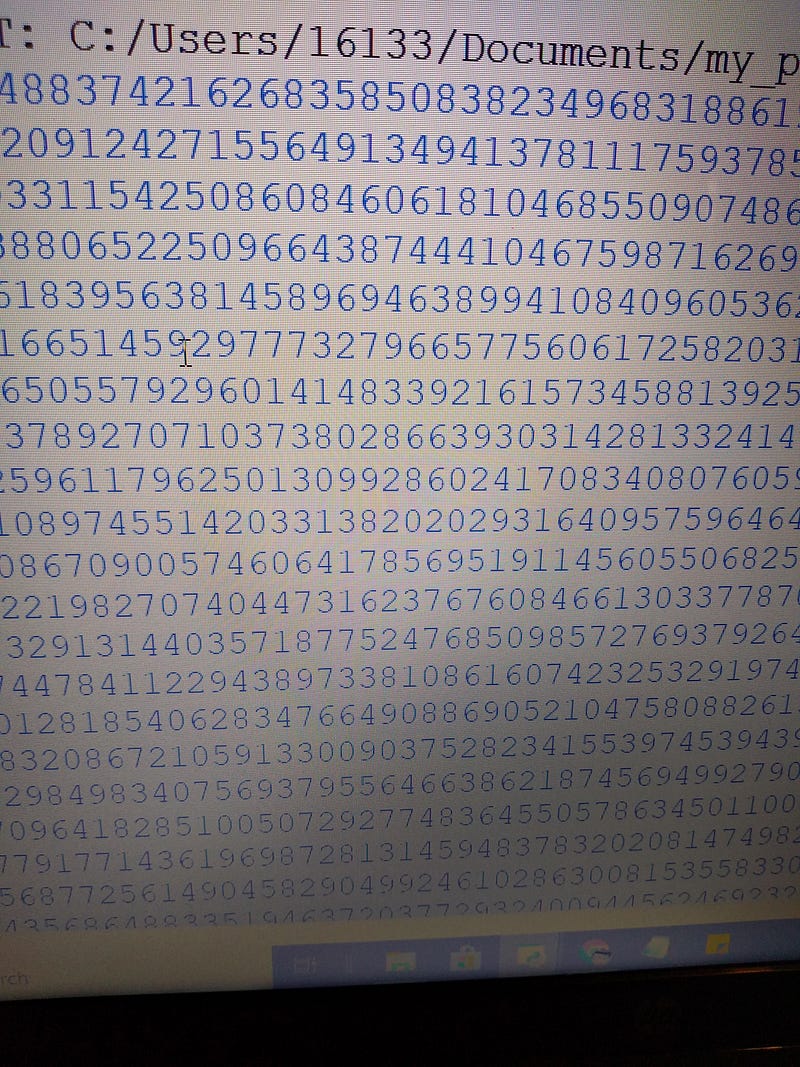
Source: screenshot my computer

Let’s review

Two weeks ago. We got to know each other a bit better went over a a few rules and procedures we got python up and running we introduce Idle talked a bit about computers and learned some basic short cuts control c for copy; control x for cut; and control v for pastes.

For those of you reading this we didn’t do any of that. I’m writing this for multiple audiences. There is the content that appears here. There is the content that may be part of the in person course. Then there is the content that I actually deliver. Let’s start over

Let’s review

Last week, or yesterday depending on your perspective. I introduce some data types:

Strings, integers,floats,expressions,boolean expressions and unicode symbols. You have had a chance to work with them in class and some of you may have played with them at home. Before we begin any thoughts or questions.

Question: With Python what is the precision limit?

Answer: Python uses unlimited precision.

Try this print two to the power ten thousand

print (2**10000)

Today we are going to introduce more data types under the heading containers. We are going to look at variables,tuples,lists,sets, dictionaries, modules, functions, lambdas, and files. Technically they are not all data types.

Variables

A variable is a user defined container to which data is assigned.

A = 7 (A gets 7)

In most other programing languages variables have to be assign a type. one type of variable will contain strings and another will contain integers. In python a variable is a variable period.

my_answer = 7
print (my_answer)
my_answer = ("what is the question?)
print (my_answer)
The result would be
7
what is the question?

First my_answer contained the integer 7 then it contained the string “what is the question?”

Tuples

A tuple is collection of objects which are ordered and immutable.

A tuple is formed with simple brackets (). However it is not the brackets that define the tuple it is the comma.

(1) This is the number 1.

(1,) This is a tuple containing the number 1.

Python is a true object oriented program everything in python is an object. Everything that exists in Python can be contained in a tuple.

(“what?”, 2+2, “$7.98”,print,)

Putting a print command in a tuple is not normal or useful. However it is an object. You can do it and the program will run without complaint.

A tuple is ordered which means that the items in the list can be referred to by their position. The first item in the list is 0.

crazy_tuple = (“what?”, 2+2, “$7.98”,print,)
print (crazy_tuple [2])
the result would be
$7.98
crazy_tuple = (“what?”, 2+2, “$7.98”,print,)
print (crazy_tuple [3])
the result would be
<built-in function print>

A tuple is immutable. That means you can not change the contents directly. You have to create a new copy of it.

Lists

A list is similar to a tuple the difference is that a list is mutable. The contents of a list can be changed in place. A list has a set of special methods which allow you to manipulate the contents. If you don’t need the functionality of a list it is often a better choice to use the simpler tuple. A common beginners mistake is to use a list when a tuple would be sufficient.

A list is created by using square brackets. []

Unlike a tuple the list does not require the comma for a single object however it is best practice to put it in. For both lists and tuples add the last comma. It never does any harm and if it is there you won’t have to go back and put it in when you need it.

The prefer way to do it is:
[1,2,3,4,5,]
rather than 
[1,2,3,4,5]

Sets

A set is an unordered collection of unique objects.

Each item in a set must be unique.

A set is formed with curly brackets.{}

Any duplicate items in a set are removed

As with lists there are methods that can be used with sets.

my_set = {7,23,"A",12, "B",7,}
print (my_set)
The returned set could be
{7,"A", 12, "B",23}
Duplicates are removed.
the precise order is different
each time you run the program.

Dictionaries

A dictionary is an unordered, mutable, indexed collection of paired items with linked keys and values. If you have the key you can get the value and if you have the value you can get the key. like sets dictionaries are formed with curly brackets {}.

Teams = {'Colorado': 'Rockies', 'Boston': 'Red Sox', 'Minnesota': 'Twins', 'Milwaukee': 'Brewers', 'Seattle': 'Mariners'}

As with lists and sets, dictionaries have methods that can be used to manipulate them.

Modules

Python is a modular language. When you write and save a program that program is a module. When you write another program you can import your module and use any functions that you may have created in your new program. The standard library which comes with python for windows has over 250 modules containing useful functions. There are also third party modules available as well. Some of the modules we will be looking at include: random which provides functions for generating random numbers; math with some special mathematical functions and finally turtle which will allow us to explore a fun way to learn programing by drawing shapes on the screen with a turtle shaped cursor.

Functions

We will be creating reusable bits of code called functions.(see modules above)

Lambdas

Are sometimes called anonymous functions. They are mini functions sometimes found inside regular functions. A lambda is limited to a single expression.

Files

The real power of Python is its ability to work with files created outside of the python environment. Python can work with text files, email files, spreadsheets and much more. With python you can create a program that will search the web and scrape information from many sites then compile the data into useful format such as charts or graphs. You could run an email based program searching the web for emails and send targeted sales pitches for a product.

A student in New York City created a suite of programs with Python that provided him with free meals while he was studying.

A program scanned the web for scenic pictures in New York City that were free to download it downloaded them and created mini websites taking information from the web. It Then scanned the area around the location for restaurants and attempted to find email addresses . It then sent a standard email to the owner telling him that his site could be advertise on the website with a review written by the student in exchange for a free meal. Once he got it all up and running he did not have to pay for a single meal for 2 years while he was studying in New York.

This is of course beyond the scope of this course but we will take a brief look at how to handle text files with python. Here’s and article that I wrote about text files.

Jim McAulay🍁 Says “ To exercise your right to bear arms wear a tank top.” 😜

17 +2

Python
Programming For Beginners
Illumination
Jim Mcaulay
Data Type
Recommended from ReadMedium