avatarBhargav Bachina

Summary

This web page provides a step-by-step guide on how to containerize a Node.js REST API and run it on Docker, with examples using a webpack and without a webpack.

Abstract

The web page offers a comprehensive guide on how to containerize a Node.js REST API using Docker. The guide is divided into two sections: one for using a webpack and the other for not using a webpack. The guide begins by instructing the reader to clone a specific GitHub repository, which contains the necessary files for the tutorial. The first section, which does not use a webpack, involves creating a Dockerfile that uses the base image node:8.11-slim. The Dockerfile copies the package.json file first and installs all the dependencies before copying other files. This is done to avoid reinstalling node_modules every time changes are made and the image is built. The guide then instructs the reader on how to build the Docker image from the Dockerfile and tag it with the name node-rest-API. The second section, which uses a webpack, involves creating a Dockerfile that copies the bundle file into the Docker filesystem and runs with node. The guide then instructs the reader on how to build the image and run the container.

Bullet points

  • The guide provides instructions on how to containerize a Node.js REST API using Docker.
  • The guide is divided into two sections: one for using a webpack and the other for not using a webpack.
  • The reader is instructed to clone a specific GitHub repository, which contains the necessary files for the tutorial.
  • The first section, which does not use a webpack, involves creating a Dockerfile that uses the base image node:8.11-slim.
  • The Dockerfile copies the package.json file first and installs all the dependencies before copying other files.
  • The guide instructs the reader on how to build the Docker image from the Dockerfile and tag it with the name node-rest-API.
  • The second section, which uses a webpack, involves creating a Dockerfile that copies the bundle file into the Docker filesystem and runs with node.
  • The guide instructs the reader on how to build the image and run the container.

How To Containerize your Node.js Rest API and run it on Docker

A step by step guide with an example

Photo by Erwan Hesry on Unsplash

I recently published an article regarding production ready nodejs rest API and this article is the extension for that. Below is the link if you want to have a look.

clone the below repo for this article.

git clone https://github.com/bbachi/prod-ready-node-rest-api.git

There are two ways to run this API on a docker without a webpack and with webpack. when we use a webpack you don't have to install node_modules since it’s part of the bundle.

Without webpack

The following is the dockerfile which runs with the base image node:8.11-slim. we are copying package.json first and install all the dependencies before we copy other files. This is because we don’t want to install node_modules every time we change anything and build the image. Docker uses cache to take the layers as long as you don’t change commands.

Build the docker image from Dockerfile with this command and tag it with the name node-rest-API. you can list the images with command docker images.

docker build -t node-rest-api .

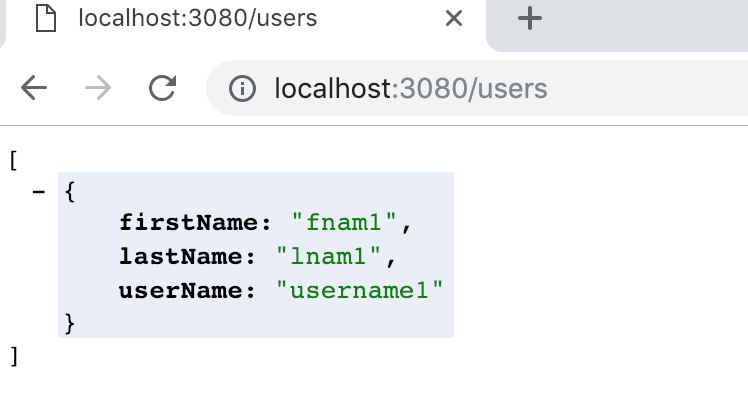
run the docker image in interactive mode with the following command and expose the port 3080 and name it nodeapi and test it in. the browser

docker run -it -p 3080:3070 --name=nodeapi node-rest-api

Interact with container

if you want to interact with your container, run the exec command where you can explore the container file system. you can edit files and execute npm commands as well.

docker exec -it nodeapi bash

container file system

With webpack

as I said earlier, we don’t have to copy node_modules and run npm install to install all the dependencies. all you need to copy the bundle file into the docker filesystem and run with node.

Run the following commands if you want to build the image and run the container.

docker build -f Dockerfile.webpack -t node-rest-api-webpack .
docker run -it -p 3090:3070 --name=nodeapiwithwebpack node-rest-api-webpack

That’s it. Thank you for reading!!

Docker
Dockerfiles
Nodejs
Containers
Web Development
Recommended from ReadMedium