
Configure NGINX to host both Backend and Frontend servers in one AWS EC2 instance and can be extendable to multiple use cases.
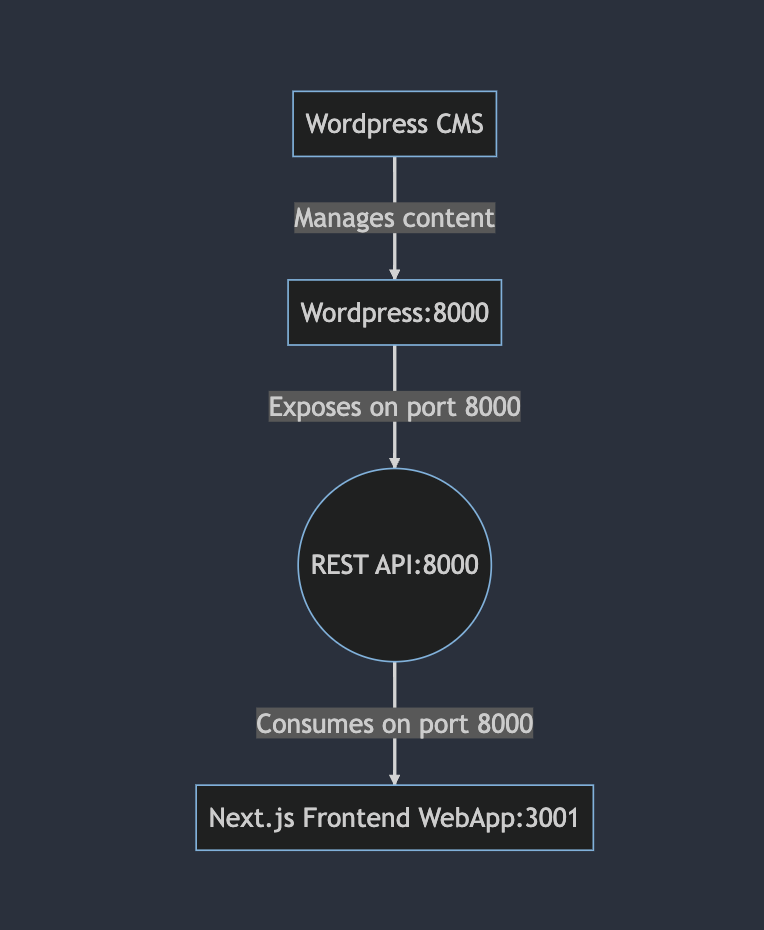
My problem: I want to build a website with Wordpress as the content management system. However, I don’t want to make use of its frontend template, instead, I will expose REST api from Wordpress and have a dedicated Frontend WebApp using Nextjs.
Below is the diagram:
Prerequisites:
- Basic knowledge of SSH into an EC2 server (or any other VPS) and Ubuntu commands, or ability to read documentation for ubuntu commands.
- I have a domain name mydomain.com
- I purchased a wildcard SSL certificate for my domain: *.mydomain.com
- I already setup SSL for my domain: *.mydomain.com
- I created manually an AWS EC2 instance.
- I have a Wordpress backend service to serve REST API at port 8000
- I also have a Wordpress CMS app running at port 8000
- I have a frontend app running at port 3001
*Please note that you’re freely to choose the port number.
I choose to use Nginx as a reverse proxy server to configure the domain.
Now, let’s jump into the main objective of this blog post.
Step 0:
- Navigate to `/etc/nginx/sites-enabled/` and edit
defaultfile usingsudo vim default - Better to backup it first by the command
mv default defaultbk
Step 1: Configure Nextjs Frontend webapp at port 3001
#Nextjs FE app: remove www to avoid canonnical issue
server {
       listen 80;
       listen 443 ssl;

       # Certificate
       ssl_certificate /etc/nginx/ssl/STAR_mydomain.crt;

       # Private Key
       ssl_certificate_key /etc/nginx/ssl/STAR_mydomain.key;

       server_name http://mydomain.com www.mydomain.com;
       return 301 https://mydomain.com$request_uri;
}

#Nextjs FE app: force ssl for mydomain.com (main domain)
server {
        listen 80;
        server_name http://mydomain.com mydomain.com www.mydomain.com;
        return 301 https://mydomain.com$request_uri;
}

#Nextjs FE app: point main domain (Frontend) to port 3001 of Nextjs
server {
       listen 443 ssl;
       listen [::]:443 ssl;

       server_name mydomain.com;
       # Certificate
       ssl_certificate /etc/nginx/ssl/STAR_mydomain.crt;

       # Private Key
       ssl_certificate_key /etc/nginx/ssl/STAR_mydomain.key;
       location / {
               proxy_pass http://localhost:3001;
               proxy_set_header Host $host;
               proxy_set_header X-Real-IP $remote_addr;
               proxy_set_header X-Forwarded-For $proxy_add_x_forwarded_for;
               proxy_set_header X-Forwarded-Proto $scheme;
       }
}
Step 2: configure the REST API:
#REST API: force ssl for api.mydomain.com (wordpress backend)
server {
        listen 80;
        server_name api.mydomain.com;
        return 301 https://api.mydomain.com$request_uri;
}

#REST API: point api.mydomain.com to port 8000
server {
        listen 443 ssl;
        listen [::]:443 ssl;

        server_name api.mydomain.com http://api.mydomain.com;
        # Certificate
        ssl_certificate /etc/nginx/ssl/STAR_mydomain.crt;

        # Private Key
        ssl_certificate_key /etc/nginx/ssl/STAR_mydomain.key;
        location / {
               proxy_pass http://localhost:8000;
        }
}
Step 3: configure the CMS
#CMS: force ssl for cms.mydomain.com (wordpress cms)
server {
        listen 80;
        server_name cms.mydomain.com http://cms.mydomain.com;
        return 301 https://cms.mydomain.com$request_uri;
}

#CMS: point cms.mydomain.com to port 8000
server {
        listen 443 ssl;
        listen [::]:443 ssl;

        server_name cms.mydomain.com;
        # Certificate
        ssl_certificate /etc/nginx/ssl/STAR_mydomain.crt;

        # Private Key
        ssl_certificate_key /etc/nginx/ssl/STAR_mydomain.key;
        location / {
               proxy_pass http://localhost:8000;
               proxy_set_header Host $http_host;
               proxy_set_header X-Real-IP $remote_addr;
               proxy_set_header X-Forwarded-For $proxy_add_x_forwarded_for;
               proxy_set_header X-Forwarded-Proto $scheme;
        }
}
Full configuration
#Nextjs FE app: remove www to avoid canonnical issue
server {
       listen 80;
       listen 443 ssl;

       # Certificate
       ssl_certificate /etc/nginx/ssl/STAR_mydomain.crt;

       # Private Key
       ssl_certificate_key /etc/nginx/ssl/STAR_mydomain.key;

       server_name http://mydomain.com www.mydomain.com;
       return 301 https://mydomain.com$request_uri;
}

#Nextjs FE app: force ssl for mydomain.com (main domain)
server {
        listen 80;
        server_name http://mydomain.com mydomain.com www.mydomain.com;
        return 301 https://mydomain.com$request_uri;
}

#Nextjs FE app: point main domain (Frontend) to port 3001 of Nextjs
server {
       listen 443 ssl;
       listen [::]:443 ssl;

       server_name mydomain.com;
       # Certificate
       ssl_certificate /etc/nginx/ssl/STAR_mydomain.crt;

       # Private Key
       ssl_certificate_key /etc/nginx/ssl/STAR_mydomain.key;
       location / {
               proxy_pass http://localhost:3001;
               proxy_set_header Host $host;
               proxy_set_header X-Real-IP $remote_addr;
               proxy_set_header X-Forwarded-For $proxy_add_x_forwarded_for;
               proxy_set_header X-Forwarded-Proto $scheme;
       }
}

#REST API: force ssl for api.mydomain.com (wordpress backend)
server {
        listen 80;
        server_name api.mydomain.com;
        return 301 https://api.mydomain.com$request_uri;
}

#REST API: point api.mydomain.com to port 8000
server {
        listen 443 ssl;
        listen [::]:443 ssl;

        server_name api.mydomain.com http://api.mydomain.com;
        # Certificate
        ssl_certificate /etc/nginx/ssl/STAR_mydomain.crt;

        # Private Key
        ssl_certificate_key /etc/nginx/ssl/STAR_mydomain.key;
        location / {
               proxy_pass http://localhost:8000;
        }
}

#CMS: force ssl for cms.mydomain.com (wordpress cms)
server {
        listen 80;
        server_name cms.mydomain.com http://cms.mydomain.com;
        return 301 https://cms.mydomain.com$request_uri;
}

#CMS: point cms.mydomain.com to port 8000
server {
        listen 443 ssl;
        listen [::]:443 ssl;

        server_name cms.mydomain.com;
        # Certificate
        ssl_certificate /etc/nginx/ssl/STAR_mydomain.crt;

        # Private Key
        ssl_certificate_key /etc/nginx/ssl/STAR_mydomain.key;
        location / {
               proxy_pass http://localhost:8000;
               proxy_set_header Host $http_host;
               proxy_set_header X-Real-IP $remote_addr;
               proxy_set_header X-Forwarded-For $proxy_add_x_forwarded_for;
               proxy_set_header X-Forwarded-Proto $scheme;
        }
}
Last step:
- Reload and restart Nginx with
sudo systemctl reload nginxandsudo systemctl restart nginx
I hope this helps not only by the configuration but the overall understand for your own use cases.
Please leave the comment if you need any support.


