
Conditional Properties and Resources in CloudFormation Templates
ACM.197 handling optional properties, resources, and conditions
Part of my series on Automating Cybersecurity Metrics. The Code.
Free Content on Jobs in Cybersecurity | Sign up for the Email List
I just wanted to pull this information out into a separate post because I often find it challenging in CloudFormation and forget how I did things the time before. Now I and anyone else who needs it has a reference for myself or anyone else who finds conditional elements in CloudFormation to be a bit tricky.
There are cases where you have conditional elements such as properties or resources and it’s not always easy to deal with them. The implementation depends, in part, on how the underlying resource handles null values (or AWS::NoValue passed into a CloudFormation property).
AWS::NoValue removes the corresponding resource property when specified as a return value in the
Fn::Ifintrinsic function.
Optional Properties in CloudFormation Templates
Sometimes there’s a property for an object that you only want to optionally set. You can use AWS::NoValue to optionally set that property depending on whether a condition is met.
Example:

The conditions are defined separately in an AWS CloudFormation template as explained here:
Optional Resources in Templates
However, in a recent post, where I optionally tried to set the property for a logging bucket with the AWS::NoValue property, CloudFormation decided that if no bucket was passed, instead of disabling the service access logging for an S3 bucket, it should instead set the value to the bucket itself.
I initially tried to do something like this:
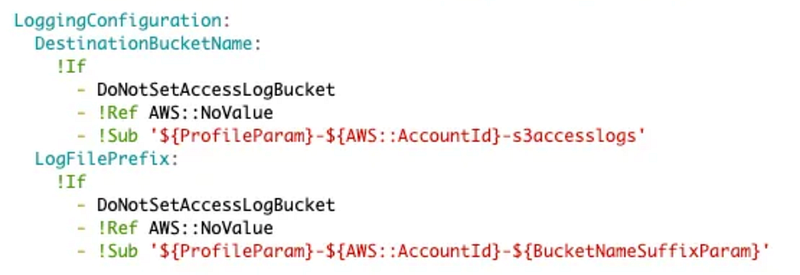
That resulted in a DestinationBucketName of the bucket itself in the case where DestinationBucketName is true. That’s not what I wanted, nor did I in any way specify that in my CloudFormation template. I find that result a bit odd.
I tried setting the LoggingConfiguration property to AWS::NoValue if the DoNotSetAccessLogBucket was true. At the time of this writing, that did not work either. I got an error.
So the only alternative I could think of was to create two conditions and two resources. I deploy one bucket if DoNoSetAccessLogBucket is true. I deploy the other bucket if SetAccessLogBucket is true. That’s not ideal as we are duplicating and have to maintain two sets of bucket code with similar properties. But it was the only way I could get this to work.
Pseudocode:
Conditions:
 DoNotSetLogBucket: [condition logic]
 SetLogBucket: [condition logic]

Resources:
 BucketWithLogs:
  Type: S3Bucket
  Condition: SetLogBucket
  ...

 BucketWithoutLogs
   Type:S3Bucket
   Condition: DoNotSetLogBucket
   ...
I keep thinking I just made a mistake and I’m going to go back and test it again. It seems like the property set to AWS::NoValue should work, but perhaps it doesn’t because it’s not a property with a single value. It is a property with sub values.
In any case, the code above does what I wanted it to do. That’s not an ideal solution because we are creating repetitive code unnecessarily if the property worked as expected. That behavior is forcing me to break the dry principle and I’ll have to maintain two sets of essentially the same code with one property exception.
Optional Conditions in Policy Documents
The condition section of an AWS CloudFormation which optionally deploys elements using if and AWS::NoValue is not to be confused with a condition in an AWS policy which only allows an action based on a value in a request.
Sometimes you want to conditionally add a policy condition using a CloudFormation template. (Confusing, I know.)
For example, I need to conditionally add a condition in an bucket policy if the CloudTrail arn is provided in the next post. Specifically, I cannot add the condition to the policy prior to creating the CloudTrail log because it doesn’t exist yet. I first need to create the CloudTrail and then add the condition. However, I need to add the bucket policy before I create CloudTrail or it will fail to have access to the bucket to log the CloudTrail events.
So what I want to do is create logic like this in my policy (pseudocode):
parameter: CloudTrailArn
    default: ""

condition: CloudTrailArnExists
    true if CloudTrailArn is not ""

Policy
   Condition:
     If CloudTrailArnExists, add the source condition
     Otherwise, no condition
Unfortunately, I don’t think the above is going to work. If I recall correctly I used this construct in my KMS policy and I had to add a value for the condition in that case. By the way this also demonstrates how you can use a !Sub in a Policy Document.
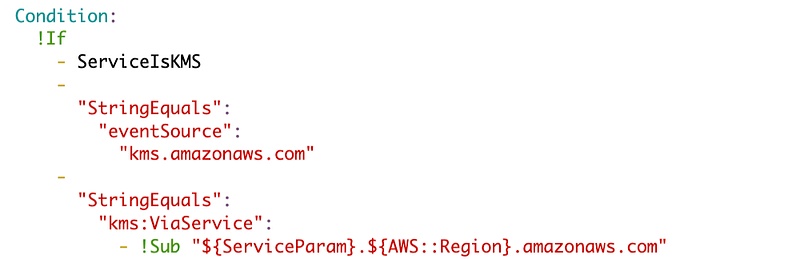
However, what we may be able to do in this case, is add * for the source ARN, create the CloudTrail, and then re-deploy our bucket policy with the ARN.
Condition:
  !If
    - CloudTrailArnExists
    -  [condition with the CloudTrailARN]
    -  [Condition with *]
We’re going to have some duplicative code in that case so what I really want to do is use an if and set the value to the CloudTrailARN in the condition if it exists, otherwise set the value to *. Can we do that?
In the last post our condition looks like this:
Condition:
      StringEquals:
        'aws:SourceArn': '[CloudTrail ARN]'
So it seems like we should be able to write our code this way:
Condition:
      StringEquals:
        'aws:SourceArn':
           - !If CloudTrailArnExists
           - !Ref CloudTrailArn
           - '*'
Now although that would likely work, I didn’t actually have to use it. Instead, I created a parameter for the CloudTrailArn and set it to * by default (allow any source ARN). I’ll update to the specific CloudTrail Arn after creating the trail.
JSON to Yaml
By the way, I found this other nifty tool along the way while writing this post which I expect will come in handy. I wouldn’t put anything sensitive here and definitely need to test and inspect the code it produces, but this online too converts JSON to Yaml. I’m sure you can find local tools as well if you don’t want to paste your code into a third-party site.
A lot of the policy examples on the AWS website are in JSON and converting them to yaml — especially with conditions — can be tricky. A tool like the above can help.
If I run across other issues with conditional elements in policies and how to solve that problem, I may add to this post in the future.
Follow for updates.
Teri Radichel | © 2nd Sight Lab 2023
The best way to support this blog is to sign up for the email list and clap for stories you like. That also helps me determine what stories people like and what to write about more often. Other ways to follow and support are listed below. Thank you!
About Teri Radichel:
~~~~~~~~~~~~~~~~~~~~
Author: Cybersecurity for Executives in the Age of Cloud
Presentations: Presentations by Teri Radichel
Recognition: SANS Difference Makers Award, AWS Security Hero, IANS Faculty
Certifications: SANS
Education: BA Business, Master of Software Engineering, Master of Infosec
Company: Cloud Penetration Tests, Assessments, Training ~ 2nd Sight Lab
Like this story? Use the options below to help me write more!
~~~~~~~~~~~~~~~~~~~~~~~~~~~~~~~~~~~~~~~~~~~~~~~~~~~~~~~~~~~~~
❤️ Clap
❤️ Referrals
❤️ Medium: Teri Radichel
❤️ Email List: Teri Radichel
❤️ Twitter: @teriradichel
❤️ Mastodon: @[email protected]
❤️ Facebook: 2nd Sight Lab
❤️ YouTube: @2ndsightlab
❤️ Buy a Book: Teri Radichel on Amazon
❤️ Request a penetration test, assessment, or training
via LinkedIn: Teri Radichel
❤️ Schedule a consulting call with me through IANS ResearchMy Cybersecurity Book: Cybersecurity for Executives in the Age of Cloud



