
Sync, Async, Go!
Concurrency — Chapter 2: The Swift Way to Do Everything at Once (Without Freaking Out)
Demystify the concept of concurrency in Swift, making it as digestible as your favorite snack.
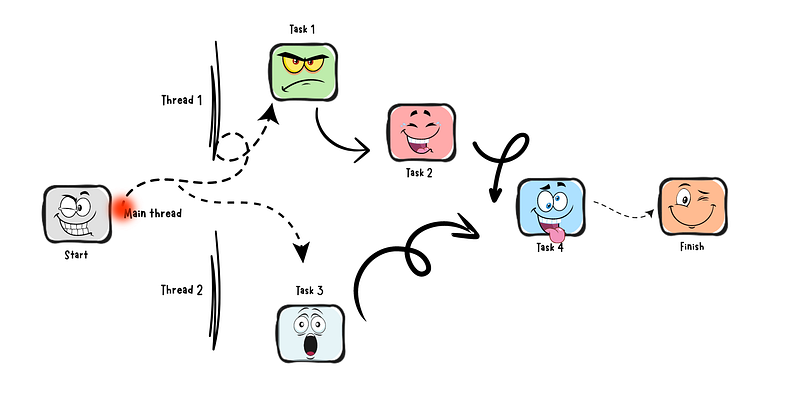
Table of contents:
- Welcome Introduction to Swift’s concurrent programming.
- What we will target here Journey from basics to advanced concurrency.
- What are multiple tasks? Multitasking and threads in Swift.
- Code example Practical concurrency examples in Swift. ∘ Task ∘ Actor ∘ Cancellation ∘ Pause
Welcome
Beyond the boundaries of your user’s device, the URLSession is built to access network resources, but it is a time-consuming task.
Whether you need to upload data or answer a chat message, time is of the essence. You could use this time for other productive tasks.
When you start to have that kind of concern, you will target concurrency.
The idea of concurrency can be boiled down to a simple concept
managing to perform multiple tasks at the same time.
What we will target in those series
This tutorial, crafted with my approach and expertise, ensures you grasp concurrency’s fundamentals and practical aspects.
- Chapter 1: Diving Into the Deep: URLSession Basics
- Chapter 2: Concurrency: The Swift Way to Do Everything at Once (Without Freaking Out) (YOU ARE HERE) Demystify the concept of concurrency in Swift, making it as digestible as your favorite snack.
- Chapter 3: Concurrency, Continued: More Ways to Juggle Tasks in Swift
- Chapter 4: Main Thread Shenanigans: How to Safely Perform a Circus Act
- Chapter 5: Customizing URLSession: Making it Your Own
- Chapter 6: Data Fetch Quest: URLSession’s Hidden Treasures
- Chapter 7: The Great Fetch: A Network Adventure
- Chapter 8: Wrapping Up Part 1: A Swift Conclusion
- Chapter 9: Setting the Stage: Download Data with Swagger
- Chapter 10: Fast Lanes & Secret Caches: Mastering Priorities and Cache Policies
- Chapter 11: Downloading Music Like a Rockstar
- Chapter 12: Error Handling: Turning Oops into Opportunities
- Chapter 13: Picture This: Downloading Images with Ease (and a Bit of Fun)
- Chapter 14: The Progress Bar Saga: A Tale of Anticipation
- Chapter 15: The Art of Grouping Requests: Networking Symphony
- Chapter 16: Network Speeds: The Tortoise, The Hare, and Your App
- Chapter 17: Pause, Resume, Cancel: The Control Freak’s Guide to Downloads
- Chapter 18: The Grand Finale: Concluding the Download Data Saga
But it’s not over — after we finish those series, we can start to think about concurrency itself — but we will have a basic understanding of it.
And at the end, let’s focus on how memory management works really deeply when you play with concurrency.

What are multiple tasks?
Try to think like that:
When you are coding, the instructions you write are a single execution path.
You may have an intricate web of objects interacting, but if you trace the execution route, you’ll find that it extends linearly.
… At least from the beginning…
That way, when you use the debugger and set a breakpoint, you experience the step-by-step navigation through your code.
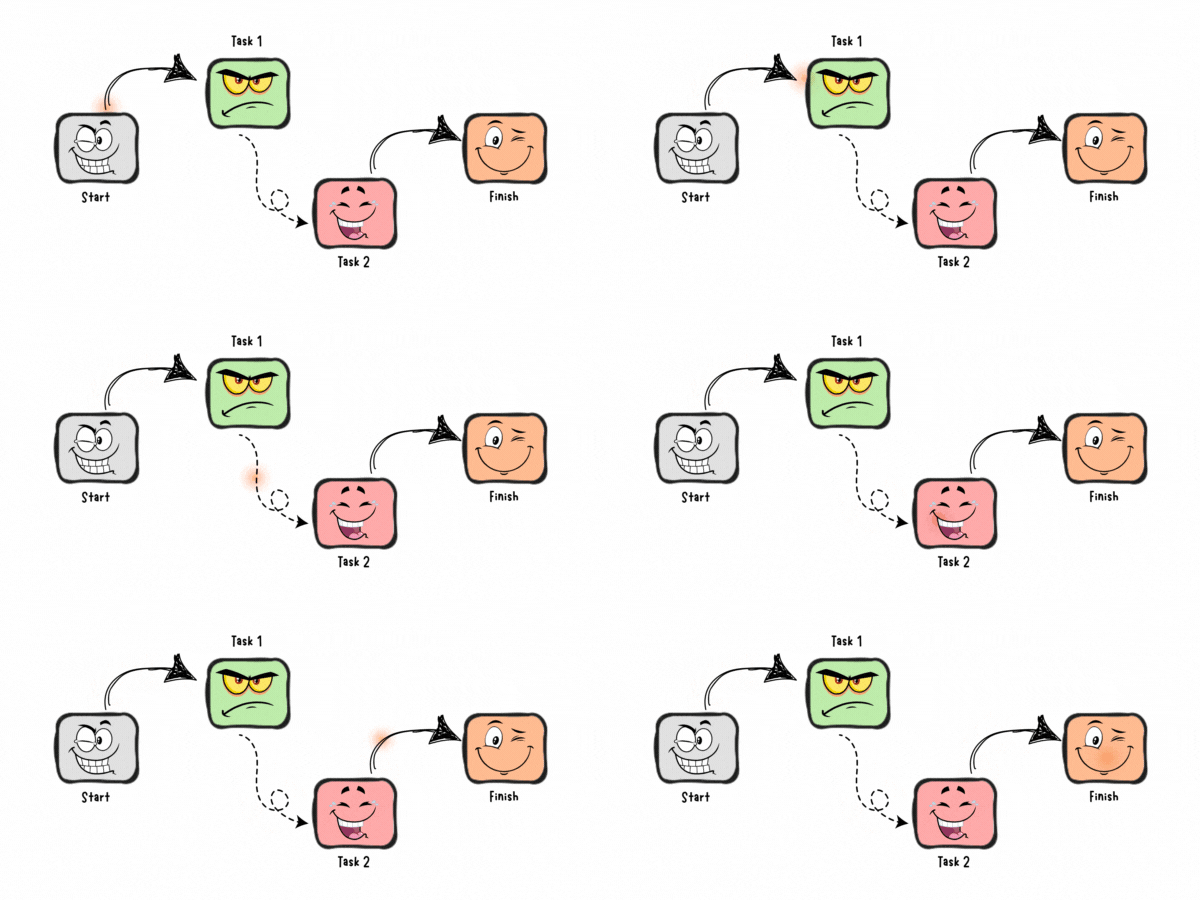
Consider this execution path as a thread.
All your coding happens on what’s known as the Main thread. This is where your code takes life and manages the user interface.
The more threads you code into your application, the greater the number of execution paths. In other words, you get to multitask. One thread could be busy processing user input, while another could download files from the network.
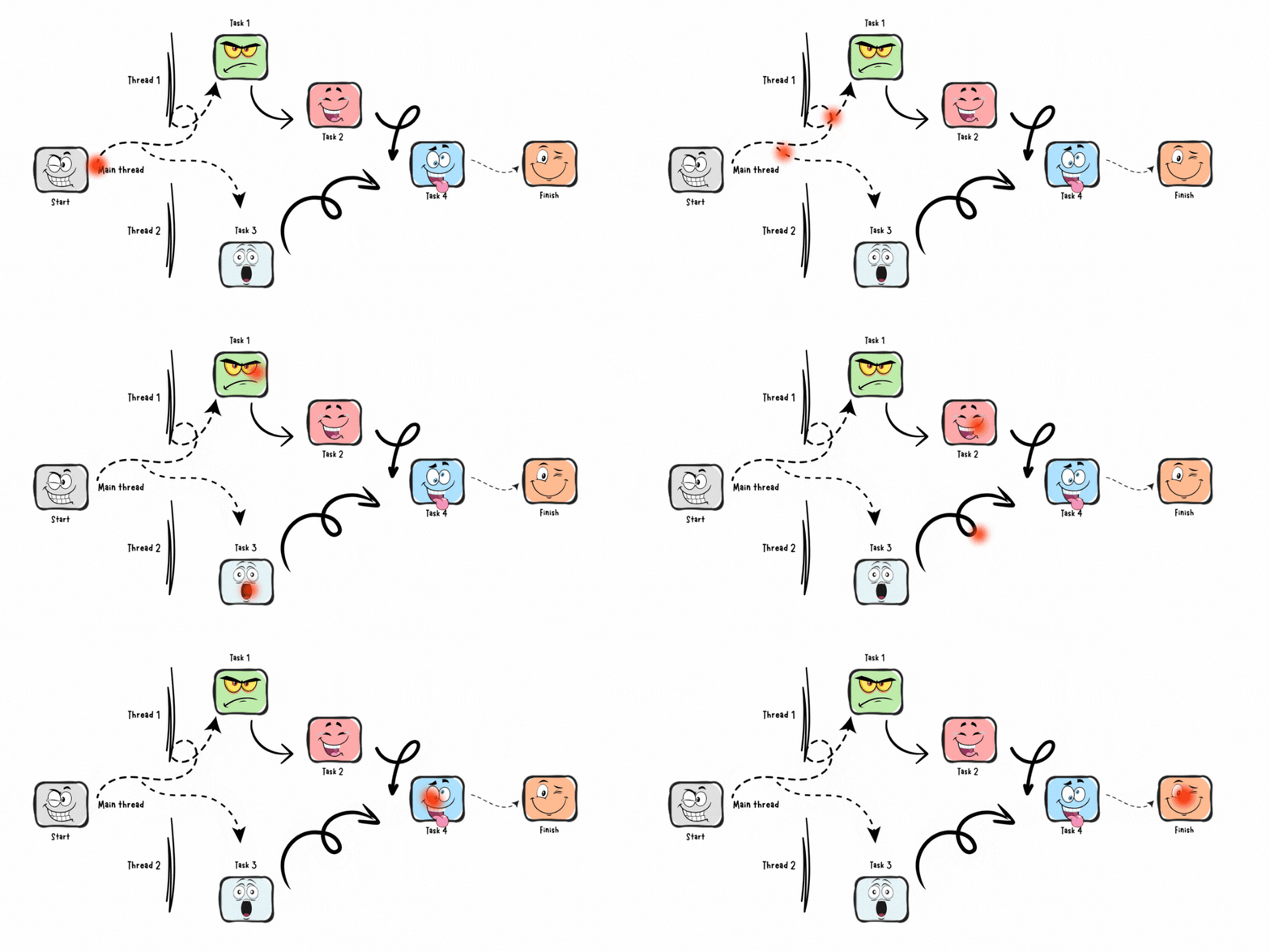
The Swift approach to concurrency is designed specifically to help you navigate this complex landscape without having a meltdown.
It’s like a stress-relieving support system, tirelessly working in the background while you revel in your development process.
But how does it really work? Let’s dive in.
Code example
… open the playground first….
if you are an iOS developer, you know what that means - if not, watch this:
Task
Your first task involves setting up an unstructured Task. This is basically an object that will help bundle up a discrete piece of work that you want to execute concurrently.
Punch in this code to set the ball rolling:
Task {
  print("Starting some work on a task.")
}

print("Performing tasks on the main actor (main thread).")
What you will get in the results? Probably something like that:
"Starting some work on a task."
"Performing tasks on the main actor (main thread)."
Don’t be surprised when the order of prints looks like it was not a different thread execution — the reason is simple — there are no big tasks to do in the new Thread at the moment.
Here’s the blueprint of Tasks in Swift:
Wait a little bit. I can write here a lot, but it is easier if you watch something in action — like that:
Coming back to our code, the Task piece paints the picture with a trailing closure.
This closure contains all the work to be carried out. A message is printed inside the task, and another message is printed outside the task simultaneously.
Take note, the external print is done on the main actor, or the main thread in the language of Swift concurrency.
But wait a minute, what exactly is an actor?
Actor
Like always, you can take a look at some YouTube videos like that one:
You can always watch it latter, lets elaborate a lite bit on Actor
Actors are akin to classes, acting as a reference type.
There’s a twist, though. Unlike classes, actors only allow one task at a time to tap into their mutable state, providing a safe environment for interactive tasks on the same actor instance.
Then we have the distinct MainActor. This globally unique actor performs tasks exclusively on the main thread.
We’re going to revisit our example from earlier, this time revamping the code a little bit:
Task {
  print("The first part is initiated.")

  let result = (1...40000).reduce(0, +)
  print("The second part is completed: 1 + 2 + 3 ... 40000= \(result)")
}

print("The last part is set in motion.")
Go ahead, run your new code. Surprised by the results? Or maybe this is what you anticipated.
"The first part is initiated."
"The last part is set in motion."
"This is second: 1 + 2 + 3 ... 40000 = 800020000"
Welcome to the pretty unpredictable world of concurrent programming.
The sequence of your operations hinges on a bunch of factors such as your device’s processing speed, the intensity of your task, or even the whims of your operating system’s scheduler.
Cancellation
Need to put a halt to a task in progress? This bit of code has got you covered:
let duty = Task {
  print("Step one.")

  let total = (1...100000).reduce(0, +)
  try Task.checkCancellation()
  print("Step two: Sum of 1 to 100000 = \(total)")
}

print("Final step.")
duty.cancel()
The result:
"Step one."
"Final step."
Here, we define a Task with some duties to handle and tuck it into the distinctive duty variable. Following this, we summon the cancel() method on the task, effectively cancelling it.
Critical to note is our newcomer, the statement try Task.checkCancellation().
What it does is check a boolean flag, Task.isCancelled, and if true, tosses an error to stop the task in its tracks.
In this case, cancellation ensues, so the last print statement nestled inside your task never sees the light of day.
The key lesson here? A smidgen more elbow grease. You’ll need to include a checkCancellation() to guide your code about when and how to deal with task cancellations.
Pause
What if you wish to pause a task and let some time slide by before picking up where you left off?
Consider a scenario where you’d want a view in your app to show up for a few seconds before it’s dismissed — like a simply botton popup wiht some results sayin -”saved” or “error: …”
In that case, here’s how you can achieve it:
Task {
  print("Kicking off the task.")
  try await Task.sleep(nanoseconds: 3_000_000_000)
  print("Wrapping up the task.")
}
Result is obvious— you will need just to wait.
But we a two new terms in our code:
try — spotlighting that our sleep function could potentially fail
await — which signifies that the sleep operation runs asynchronously and can be paused and resumed at a later point.
Up until now, all these exercises played out in the comfy arena of your playground.
But what if this task’s duties need to be handed over to a function? Here’s a sample alteration:
func initiateTask() async throws {
  print("Task initiation in progress.")
  try await Task.sleep(nanoseconds: 2_000_000_000)
  print("Task completion.")
}

Task {
  try await initiateTask()
}
There’s a hiccup. Functions that harbor the potential of throwing an error need to be flagged with throws.
Another roadblock — the lack of concurrency support in your present function, while the sleep call needs and awaits it.
Solution?
Slip in async right before throws in your function like this:
func initiateTask() async throws { ... }
Once done, you can asynchronously enlist your function and call it into action.
There you have it. You’ve now received a dose of Swift’s concurrency features and seen how to engage with URLSession.
Wait… we didn’t use
URLSessionyet… :D
There is no problem because now you have all of the resorts to be able to do it — I will give you an example code of how you can use URLSession:
func fetchJSON() async throws -> [MyObject] {
  let url = URL(string: "https://api/testObject")!
  let (data, _) = try await URLSession.shared.data(from: url)

  return try JSONDecoder().decode(MyObject.self, from: data).data
}

Task {
  do {
    let objects = try await fetchJSON()
    for (index, obj) in objects.enumerated() {
       //Do Something
    }
  } catch {
    print(error)
  }
}
That’s it—now you're fetching some data from your custom URL.
I didn’t put the correct link because I have my local server, which retrieves my data. You can use any open API to test it—just Google it.
But I’m sure you understand the code better when you know how each of those classes works: Task , try , await async , throws
We'll progress further with Swift's using modern concurrency features in the next chapter.
Stay tuned!