Compose Multiplatform VS. Flutter
Hi! I’m Artem, Senior Mobile Developer at Newsoft with 8 years of mobile development experience working with Android and Flutter.
Today we’ll have a look at Compose Multiplatform for cross-platform development and compare it to another famous framework from Google — Flutter. But first of all, a brief overview of each technology for those who might not be familiar with them.
Flutter is a framework from Google for cross-platform development, the stable version was released in 2018. It supports development for iOS, Android, Web, Windows, Linux, and Mac. Also, it uses Dart as the programming language, which is also Google’s internal development (more on that later).
Compose Multiplatform is also a framework for cross-platform development. While the UI framework is developed by Google, the programming language, Kotlin, as well as the cross-platform part (KMP) are developed by JetBrains. It supports such platforms as Android, iOS (Alpha), Windows, MacOS, Linux, and Web (Experimental).
Let’s try to compare the various aspects of these two so different but so similar technologies, and select the winner in each category. Ratings and categories will be subjective and not at all scientific but it should be interesting. Also, let’s focus on the mobile development because this format is the most common.
Let’s go!
1 Setup
There are well-written setup guides for both Flutter and Compose Multiplatform. For each of these technologies, the main IDE is Android Studio. For Flutter, the Flutter Plugin must be installed. For iOS — xcode. I had no problems in either case. However, the guide for Compose Multiplatform states that the latest version of xcode may not work and you will have to install one of the older versions. In my case, I had no problems with xcode 15.
It’s a draw here:
Flutter — 1 Compose Multiplatform — 1
2 Framework architecture
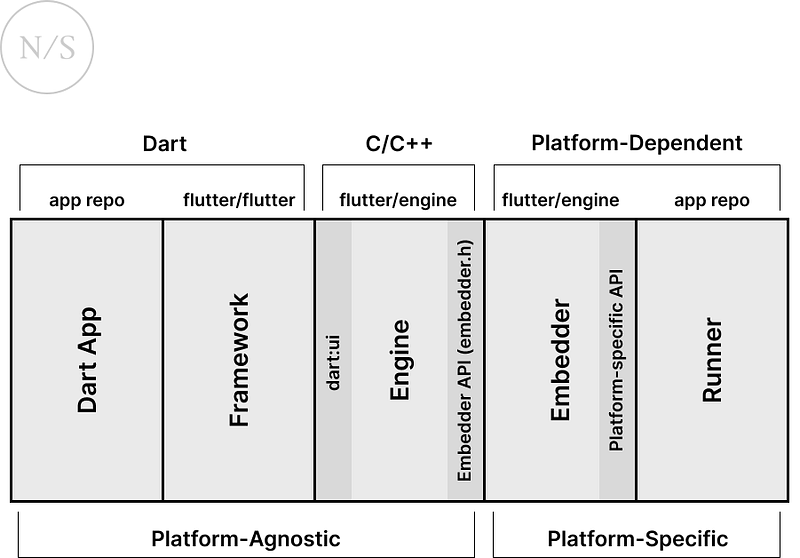
Flutter
The core of Flutter is Engine, developed in C/C++. It’s responsible for drawing graphics (Impeller for iOS and in Preview for Android, Skia for other platforms), I/O operations, Dart runtime, compile toolchain, and others.
Flutter Engine is packaged into the application along with Dart code, and increases the size (about 3–4 MB for Android and 10 MB for iOS). The release version uses AOT compilation. Debug version uses Dart VM, which allows hot reload and debugger operation. The debug version uses JIT compilation.
Compose Multiplatform
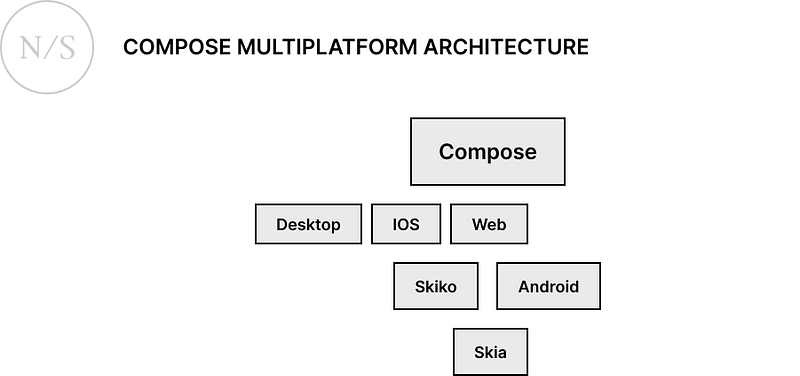
Compose Multiplatform is based on Google’s Jetpack Compose and JetBrains’ KMP.
The main difference from the usual Compose is additional KMP-targets and corresponding changes. Because of those differences, it’s possible not only to write cross-platform Kotlin code but also use Compose UI on different platforms.
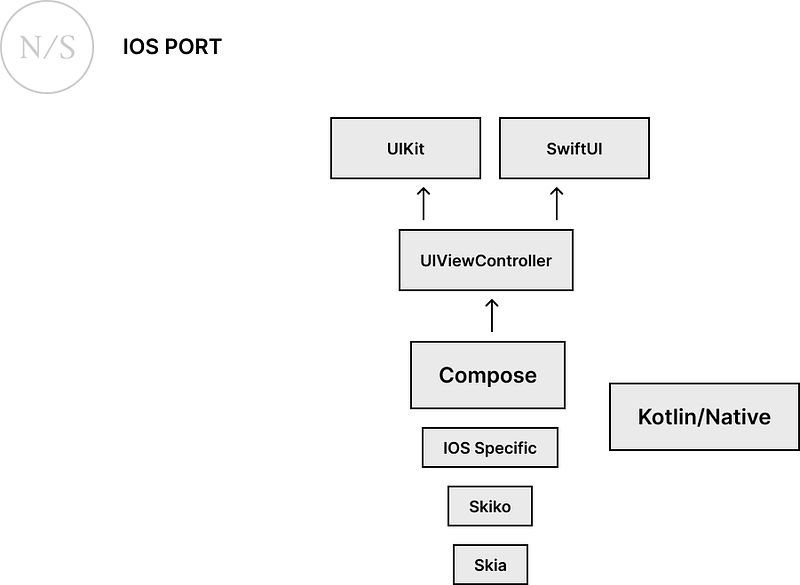
Compose Multiplatform, like Flutter, uses Skia for rendering on Android, and Skiko for other platforms (Skia for Kotlin).
Conclusion:
A few points should be noted:
What both frameworks have in common, Flutter and Compose Multiplatform don’t use platform-native widgets under the hood like React Native. In each case, the framework independently draws all components from scratch using Skia or analogues. I consider it a plus.
The architecture itself is worth considering in terms of affecting application development directly. Everything is simple with Flutter, we write the code in Dart, it works on any supported platform. If necessary, we write platform-specific code, connect it to Dart through a channel, or use plugins prepared by the community.
With Compose Multiplatform, things are a bit more complicated. Here we use Kotlin Multiplatform. For someone hearing about Compose Multiplatform for the first time, it may be misleading that it’s a magical technology that allows you to simply rebuild your Android app on Compose and it will run smoothly on iOS.
But it’s not entirely true, and there are a number of limitations that you will have to work with.
In addition to changes to the project structure, you will also need to review your code and dependencies. Code that depends on Android or Java packages will only work if you leave it as android-specific, and it’s not exactly what we want from a cross-platform application.
The same restrictions apply to third-party libraries. More about libraries later on.
In this category, I prefer Flutter. The current situation with Compose Multiplatform isn’t ideal and can be difficult for beginners.
Flutter — 2 Compose Multiplatform — 1
3 Third-party libraries
Flutter
For Flutter, there is a great site pub.dev with lots of libraries (packages) for Flutter and Dart. Here we can see the popular packages recommended by the Flutter team, there is also a convenient search. Moreover, the Flutter community is quite active and you can find libraries for any need.
Additionally, there are official packages from Google for Firebase integration.
Compose Multiplatform
A significant number of libraries from Google will not work (if not all), so you will have to use third-party libraries for almost everything, just like in the good old days. For example, compose navigation, view model, or room are not supported. But at the same time, many popular libraries can be used with Multiplatform, such as Koin, Kodein, Realm, and SQLDelight.
Moreover, there’re KMP-compatible libraries for navigation and MVVM/MVI. The problem is that a large number of libraries written for Android or Java will not work due to the limitations mentioned in the “architecture” section. Of course, if you are writing a project from scratch, and not converting an existing one, then the problem will not be so noticeable, and you’ll be able to immediately select matching libraries. There is nothing like pub.dev but there is a good page on github with a list of libraries that work with KMP.
Victory for Flutter.
Flutter — 3 Compose Multiplatform — 1
4 Programming language
Flutter: Dart
Dart is Google’s internal development, which is supposed to be an alternative to JavaScript. The first version didn’t have strong typing. Modern Dart has an optional strong typing system and null safety support. It has support for object-oriented and functional programming.
In 2023, the Dart 3 update was released, adding the interface class, base class, final class, and sealed class modifiers. For asynchronous programming, there is an async / await mechanism. For reactive programming, there are Streams and the rxdart library. In general, the language is not bad, similar to Java, but with some features. It isn’t as laconic as Kotlin, has more bloated syntax, and doesn’t have such a small but important feature as data classes.
An example of a simple class and nullability (this class doesn’t have an implementation of equals, hashCode, and toString, for this you need to use libraries, for example this one or this one):
abstract interface class Named {
  String get name;
}

final class Person implements Named {
  final String firstName;
  final String lastName;

  Person({required this.firstName, required this.lastName});

  @override
  String get name => '$firstName $lastName';
}

void checkPersonName() {
  Person? person = Person(firstName: 'Tobey', lastName: 'Maguire');
  debugPrint(person.name);
  person = null;
  debugPrint(person?.name);
}
Compose Multiplatform: Kotlin
Kotlin is developed by JetBrains, at the beginning the language was supposed to be an alternative to Java. Currently, Kotlin is the main programming language for Android, it can be compiled not only to JVM bytecode but also to native binaries or JavaScript. It supports strong typing, null safety, has support for object-oriented and functional programming, as well as interop with Java and Objective-C. For asynchronous programming, there is a mechanism of coroutines. For reactive — Flow.
Kotlin has a lot of nice syntactic sugar and very laconic syntax.
Let’s have a look at the example of Kotlin code that does almost the same thing as the Dart code. Here, we also have a data class, which means that equals, hashCode, and toString are generated automatically.
interface Named {
         val name: String
     }

     data class Person(val firstName: String, val lastName: String) : Named {
         override val name: String
             get() = "$firstName $lastName"
     }

     fun checkPersonName() {
         var person: Person? = Person(firstName = "Tobey", lastName = "Maguire")
         println(person?.name)
         person = null
         println(person?.name);
     }
Conclusion:
Both languages are quite convenient, easy to learn, and have various modern features.
But relying on my personal experience, programming in Kotlin is more pleasant than in Dart. Dart provides tools to write clean code, has support for asynchronous and reactive programming out of the box, but some solutions look strange to me, and the syntax is sometimes clumsy compared to Kotlin.
Flutter — 3 Compose Multiplatform — 2
5 UI Framework
Both frameworks follow the Declarative UI paradigms. Of course, there are many nuances and differences, and you can easily write a separate article about them. Here, let’s take a look at the basic building blocks that we will use to build our UI, it will give us a rough idea of working with frameworks in general.
For Flutter it is a widget, for Compose — composable function.
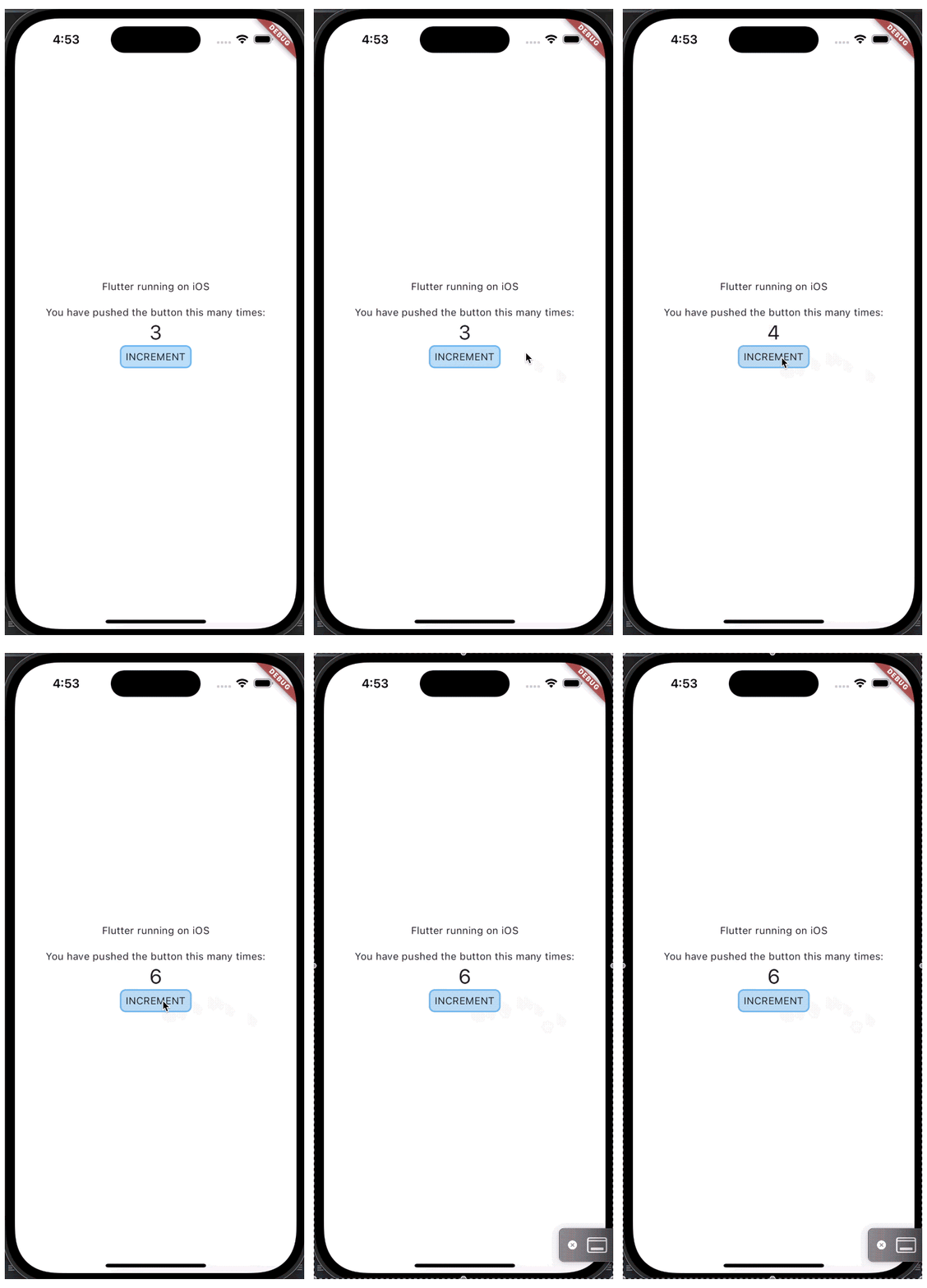
Let’s try to implement a simple widget that will have several text fields and an internal state that can be changed by clicking a button.
Flutter Stateful Widget
Flutter distinguishes between Stateless and Stateful widgets as separate classes. In case of a Stateful widget, you need to implement two classes, the widget itself and the State class:
class CounterWidget extends StatefulWidget {
  final Color backgroundColor;
  final Color borderColor;

  const CounterWidget({
    super.key,
    required this.backgroundColor,
    required this.borderColor,
  });

  @override
  State<CounterWidget> createState() => _CounterWidgetState();
}
class _CounterWidgetState extends State<CounterWidget> {
int _counter = 0;
@override
Widget build(BuildContext context) {
return Column(
mainAxisAlignment: MainAxisAlignment.center,
children: <Widget>[
const Padding(
padding: EdgeInsets.only(bottom: 16),
child: Text('Flutter running on iOS'),
),
const Text(
'You have pushed the button this many times:',
),
Text(
'$_counter',
style: Theme.of(context).textTheme.headlineMedium,
),
InkWell(
customBorder: RoundedRectangleBorder(
borderRadius: BorderRadius.circular(8),
),
onTap: () {
setState(() {
_counter++;
});
},
child: Ink(
width: 100,
height: 32,
decoration: BoxDecoration(
color: widget.backgroundColor,
border: Border.all(color: widget.borderColor, width: 2.0),
borderRadius: BorderRadius.circular(8)),
child: const Center(child: Text('INCREMENT')),
),
)
],
);
}
}A few things to mention:
Parameters can be passed through the constructor to the State class but it’s not necessary and the fields of the Widget class can be accessed through the widget field.
Also, when you’re working with UI, widgets are used for many basic things.
Want to add padding? You need the Padding widget. Want to make something clickable? Wrap in InkWell + Ink (this combination gives a ripple effect) or GestureDetector. BoxDecoration is used to add a border with rounded edges. The counter value itself lies in the CounterWidgetState class, we can change it using the setState method. This will change the state itself and call the build method again.
Result:
Composable functions
Compose Multiplatform also distinguishes between the concepts of stateful and stateless. In both cases, we use a function annotated with @Composable. The only difference is whether we remember the state using the remember function or not.
@Composable
    fun Counter(backgroundColor: Color, borderColor: Color) {
        var counter by remember { mutableStateOf(0) }

        Column(
            modifier = Modifier.fillMaxSize(),
            horizontalAlignment = Alignment.CenterHorizontally,
            verticalArrangement = Arrangement.Center,
        ) {
            Text(
                modifier = Modifier.padding(bottom = 16.dp),
                text = "Compose Multiplatform running on iOS"
            )
            Text(
                text = "You have pushed the button this many times:"
            )
            Text(
                "$counter", style = MaterialTheme.typography.h4
            )
            val shape = RoundedCornerShape(8.dp)

            Box(contentAlignment = Alignment.Center,
                modifier = Modifier.size(width = 120.dp, height = 32.dp)
                    .border(width = 2.0.dp, color = borderColor, shape = shape)
                    .background(color = backgroundColor, shape = shape)
                    .clip(shape = shape)
                    .clickable {
                        counter++
                    }
            ) {
                Text("INCREMENT")
            }
        }
    }
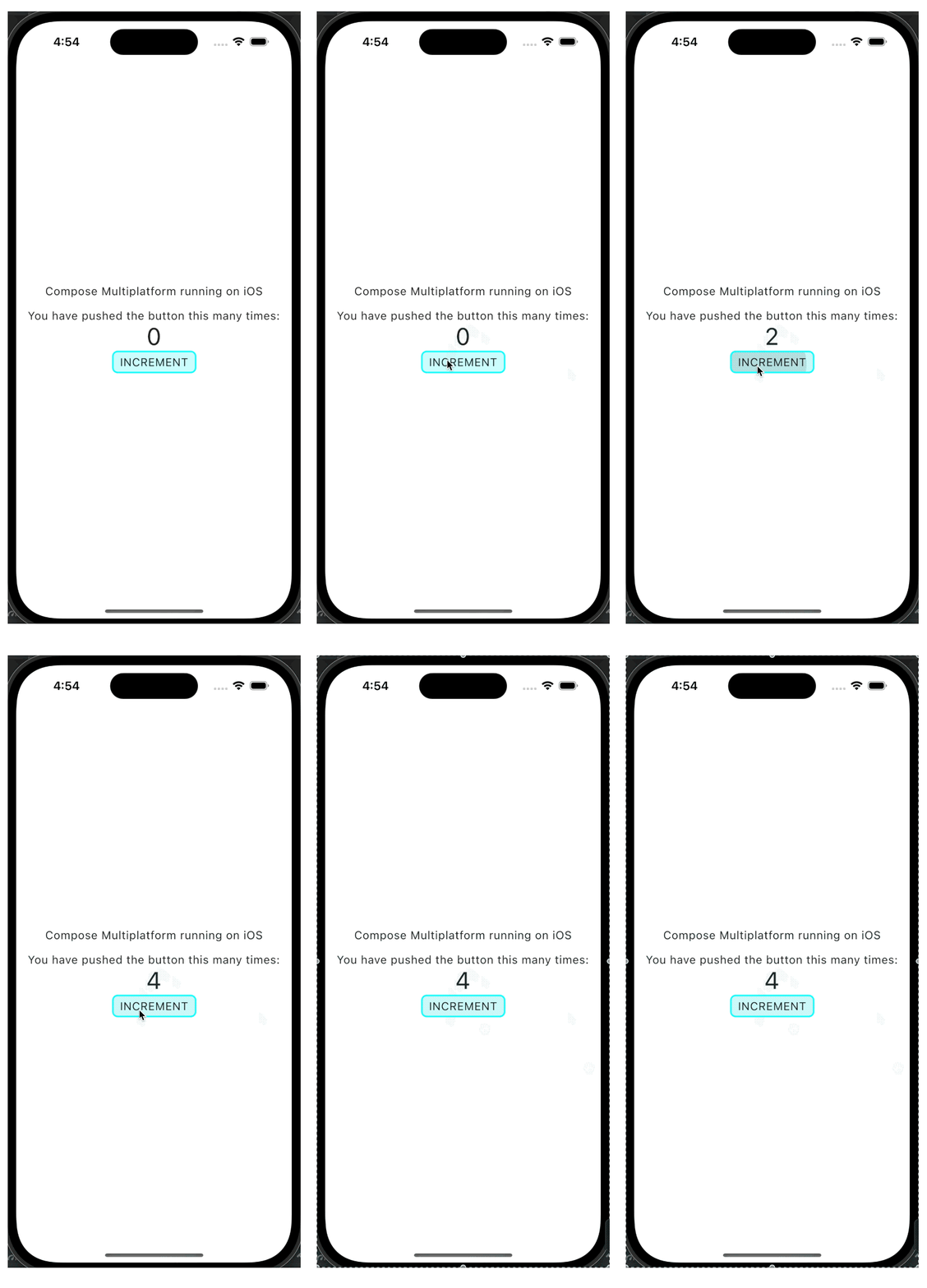
This code implements the same widget as the Flutter code. There are several key differences.
We are working with one Composable function, and to make it stateful, all we need is a string.
var counter by remember { mutableStateOf(0) }Next, we work with the counter as a normal field, update the value, and the corresponding part of the UI is redrawn. Only immutable objects should be remembered, modification of a mutable object will not lead to recomposition. The widget structure is very similar to what we had with Flutter but in this case some things are achieved with modifiers rather than individual widgets. Note Modifier.padding, Modifier.clickable. The border is also implemented using Modifier.border.
Result:
Conclusion:
Although the implementation code differs significantly, both frameworks share a similar philosophy. And yes, you have to write more code on Flutter but the reason is partly not in the framework itself but in the Dart language.
Both are easy to use, modern declarative UI frameworks, it’s a tie.
Flutter — 4 Compose Multiplatform — 3
6 Communication with the platform
When it comes to cross-platform development, sooner or later you will have to deal with the need to somehow communicate with the platform’s native API. Let’s see what Compose Multiplatform and Flutter provide for this.
Flutter
Flutter has a platform channels mechanism that allows you to exchange primitive data types with native code (Swift or Kotlin in our case).
The mechanism works asynchronously in order not to block the UI.
Add a channel to Flutter:
const platform = MethodChannel('samples.flutter.dev/platform');

Future<void> _getPlatform() async {
  final platformName = await platform.invokeMethod<String>('getPlatform') ?? '';
  setState(() {
    _platformName = platformName;
  });
}
Android:
class MainActivity: FlutterActivity() {
    override fun configureFlutterEngine(flutterEngine: FlutterEngine) {
        super.configureFlutterEngine(flutterEngine)
        MethodChannel(
            flutterEngine.dartExecutor.binaryMessenger,
            "samples.flutter.dev/platform"
        ).setMethodCallHandler { call, result ->
            if (call.method == "getPlatform") {
                result.success(getPlatform())
            } else {
                result.notImplemented()
            }
        }
    }

    private fun getPlatform(): String {
        return "Android ${android.os.Build.VERSION.SDK_INT}"
    }
}
iOS:
@UIApplicationMain
@objc class AppDelegate: FlutterAppDelegate {
  override func application(
    _ application: UIApplication,
    didFinishLaunchingWithOptions launchOptions: [UIApplication.LaunchOptionsKey: Any]?
  ) -> Bool {

  let controller : FlutterViewController = window?.rootViewController as! FlutterViewController

      let platformChannel = FlutterMethodChannel(name: "samples.flutter.dev/platform",
                                                binaryMessenger: controller.binaryMessenger)
      platformChannel.setMethodCallHandler({
        (call: FlutterMethodCall, result: @escaping FlutterResult) -> Void in
          guard call.method == "getPlatform" else {
              result(FlutterMethodNotImplemented)
              return
            }
            self.getPlatform(result: result)
      })

    GeneratedPluginRegistrant.register(with: self)
    return super.application(application, didFinishLaunchingWithOptions: launchOptions)
  }

  private func getPlatform(result: FlutterResult) {
    let platform = UIDevice.current.systemName + " " + UIDevice.current.systemVersion
      result(platform)
  }
}
The mechanism is simple, it does its job but as we can see, you have to write code in three different languages.
Also, Flutter provides the ability to embed native iOS and Android views. It also works the other way around, and it’s possible to embed Flutter into existing native iOS and Android projects.
It is worth noting that for many cases where you need to work with native code or native widgets, there’re already official or unofficial libraries created.
For example, a Flutter widget for working with Google maps or a library for working with local notifications.
Compose Multiplatform
The main advantage here is that you can communicate with the native API using Kotlin. KMP provides an expect / actual mechanism that is easy to use.
For example, we create an expect class in the common module:
// KMP Class Definition
expect class Platform() {
    val name: String
}
Actual class in the iOS module that uses the iOS API:
// iOS
actual class Platform actual constructor() {
    actual val name: String =
        UIDevice.currentDevice.systemName() + " " + UIDevice.currentDevice.systemVersion
}
Actual class in the Android module that uses the Android API:
// Android
actual class Platform actual constructor() {
    actual val name: String = "Android ${android.os.Build.VERSION.SDK_INT}"
}
That’s it, now we can use the Platform class as a normal class, the specific implementation will be automatically selected depending on the platform.
There is also interop with objective-C.
Regarding the use of Compose widgets together with native widgets, the situation is as follows.
Android — most of the widgets in Jetpack Compose and Compose Multiplatform are identical. Everything is simple here, you only need to modify the places with android-specific code. For example, you can use the moko library to access resources.
Compose Multiplatform is also compatible with UIKit and SwiftUI.
Conclusion:
Compose wins, thanks to the power of Kotlin Multiplatform, we can communicate with native API using one programming language.
Flutter — 4 Compose Multiplatform — 4
7 Tooling
Flutter
Working with UI
There is no preview feature, so we change the code and we look at the emulator. This problem is partially compensated by the fact that Flutter has a fast and well-functioning hot reload. We change our widget, save the file, and the changes are reflected on the emulator straight away.
Profiling
There is a pretty handy tool, Flutter Dev Tools. It shows the UI structure, network calls, and application performance. Also, it runs in the browser, so that’s also a plus, because if you want to use VS Code instead of AS, you can easily do so.
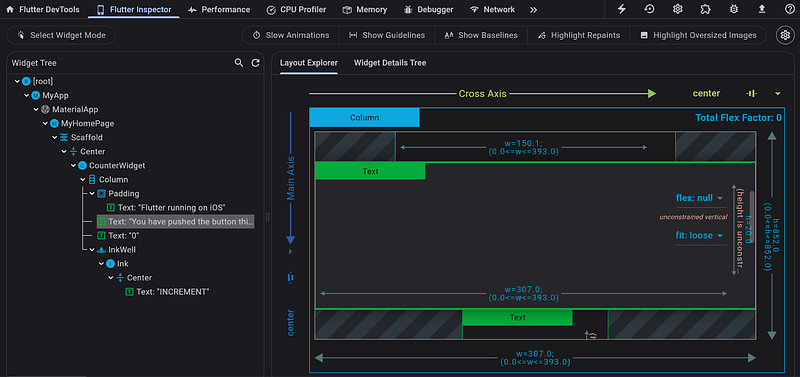
Debugger
It exists, it works. The only thing that it works awful. It takes an age to connect, crashes, jumps to random lines, or stops at previously deleted breakpoints. If your application works well, after connecting the debugger it may simply freeze or crash.
It’s often easier to add as many logs as possible than to connect a debugger.
Compose Multiplatform
Working with UI
Jetpack Compose has a very cool feature — the @Preview annotation. It allows you to immediately see how the widget looks like on different screens in the IDE.
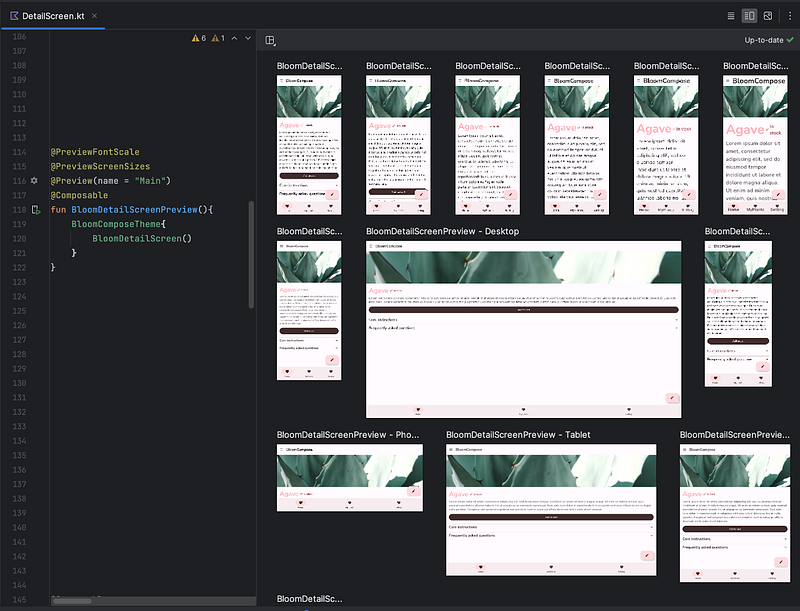
The thing is that the @Preview does’t work with Compose Multiplatform, and it can be added only to composable functions in the Android module. In theory, you can have composable functions in the common module, and add simple wrappers with the annotation @Preview in the Android module, but even with this approach there is an issue at the moment.
Maybe a hot reload will help?
Well, no. On Android it kind of works but in fact you still have to restart the activity. On iOS there is no such possibility and you have to reassemble and restart the application every time.
The debugger works on iOS and Android but I haven’t tested it on a large project.
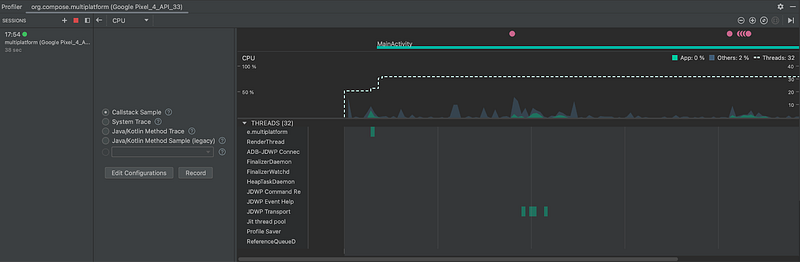
On Android, the profiler works in Android Studio.
xcode instruments should work on iOS. I couldn’t connect it but everything worked out at the presentation.
Conclusion:
For now, developing on Flutter is a bit more convenient but eventually this may change in favor of Compose Multiplatform.
Flutter — 5 Compose Multiplatform — 4
8 Maturity
Flutter 1.0 appeared back in 2018. During this time, both frameworks have stabilized and got new features, and now they can be recommended for use in large production applications. There are success stories on this page. Also, a large community that will always help with problems and questions and a large number of third-party libraries.
I enjoyed using Compose Multiplatform because I like Compose and Kotlin. But I must admit that it’s too raw for mobile cross-platform development and developers openly talk about it.
Here is a screenshot from the May 2023 presentation:
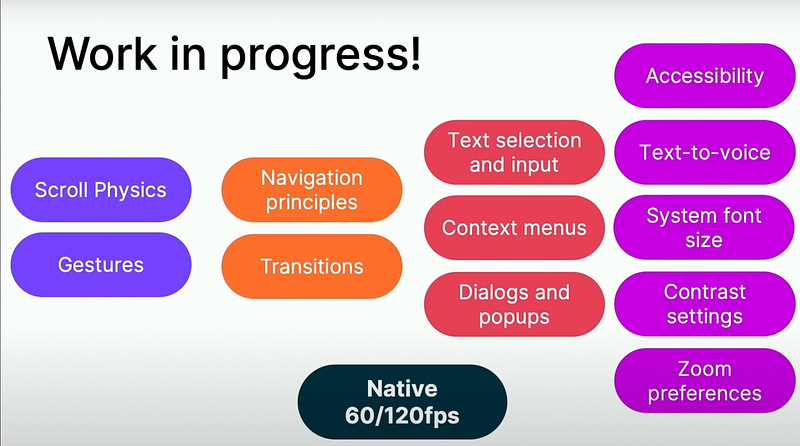
Here we have a point for Flutter.
Flutter — 6 Compose Multiplatform — 4
9 Final result
Flutter — 6 Compose Multiplatform — 4
Flutter has its flaws but it’s a mature and ready-to-use technology that you can confidently select for mobile cross-platform development.
Compose Multiplatform — is a very promising technology, and Google is already working on Compose Multiplatform support for Jetpack. In a few years, Compose Multiplatform may become a strong competitor to Flutter, which is surprising as they both are partially or fully developed by Google. Maybe, there will be a newcomer in the graveyard of Google products.
But now, I would use Compose Multiplatform only for experiments or pet projects.


