
Components-constructors: the power of ng-content in Angular
Content projection is one of the basic features in Angular with good official documentation. Almost everyone knows about it but nevertheless many developers avoid ng-content in their daily job choosing more complex ways and making the developer experience worse.
In this article, I would like to show several typical cases of using ng-content when developing reusable components and explain the benefits of this approach.

Basic terms
Here are basic terms about ng-content to refresh all the features before reading this article. If you are ace in it, you can just skip this chapter. If you have not seen ng-content before, I would like to recommend you start with official documentation.
So, we can write <ng-content></ng-content> in a template of our component. All the passed content will be projected in this place.
If we want to pass content, we just need to put it into the tag of our component.
All the content will be projected and inserted into DOM in the same order.
We can have several ng-contents in one template and choose between them with select attribute. It takes any CSS selector: element name, class, attribute and etc.
In this case, it will render all buttons in the first ng-content and all the rest will be in default ng-content without select.
There will be no ng-content tag in real DOM, we cannot set a CSS class on it or bind Angular directive. This is just a placeholder for our content. The content cannot be rerendered from the inside. For example, if you hide ng-content tag under the container with *ngIf and show it again, it will project the exact same content without rendering a new one.
There is also ngProjectAs attribute for projecting pieces of content but we’ll not use it in this article.
An interesting task
I don’t want to show simple examples of ng-content like button content with an icon or label for a text field.
I would like to consider a more complex sample that covers both primitive and unobvious examples of ng-content usage. So, we’ll train to define such cases intuitively.
What we have
We want to make a gallery component for showing images, their titles (or without them), with an option to navigate between images and optional support of custom actions.
This is an example of simple usage: the component just shows an image and zoom slider.

This is a full setup: the developer wants to support image rotating and pagination, wants to show images titles and adds “like” and “remove” actions.
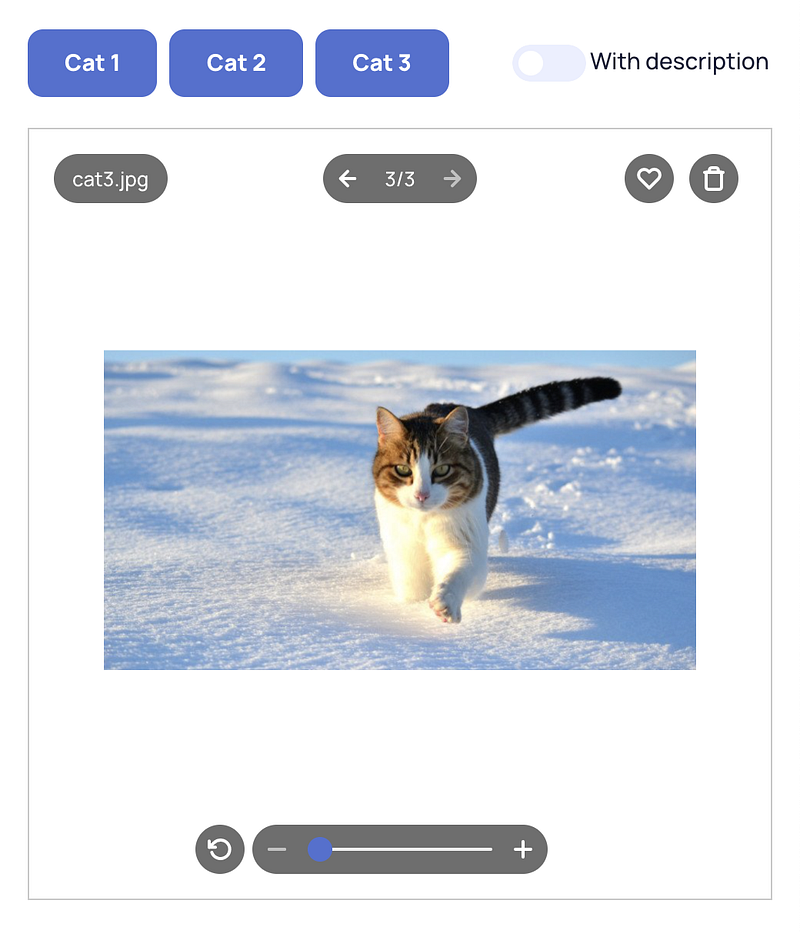
Hold on for a second and think about how would you like to solve such a task in a real app? What API would your component have?
An interface trap
One of the first solutions that can come to mind is creating an Angular @Input with an interface. It seems like a basic case: we may have one or several images, every image has its own title and maybe it will have some additional information later. Let’s declare Image interface and our component will work with an array of such Images.
And the component:
So, now we can show the pagination counter according to array length. If the title is not empty, we will show it. If we need to add some additional information (for example, height and width of picture), we can always expand our interface and modify our template to show other data.
We also need to support actions and here we can use an interface with the source or link of the icon, title for accessibility and a callback that will be called when someone clicks an action.
So, now we can add actions and handle clicks on them from the outside. It seems to be working.
But do you see any disadvantages or potential problems in this approach?
In my view, the main disadvantage of this solution is that now we are prisoners of our interfaces. My experience of developing reusable components says that there is no sense in attempts to calculate all possible use cases for a component (there will be always something else). It is better to give developers components as flexible as possible. Interfaces add some restrictions in this case. Let’s take a look at a couple of samples:
Not all images are available at the moment
Someone wants to open a gallery component for a photo in a big folder with photos. The developer has information that there are five thousand photos in the folder but exact names and sources will be loaded lazily when they are needed. So, how we can use our component in this case?
Well, technically, we can pass an array with two dozen of real images and five thousand stubs. Then we add an @Output that emits image changing to let developers understand when they need to request the next bunch of images to update an array. Otherwise, we can addtotalAmount component @Input with a number to show it on the counter.
This example shows some mishmash in our component usage: our data has implicit shape, there is no clear understanding of what and who controls the index of the active image. Moreover, we need to redesign a part of the component for such a small request by the component’s user.
Optional action
Now we want to add a new action for editing the color of the image but it should work only for SVGs.
For example, we can always show the button and check every user’s click on it. If it is an SVG, we edit color. If it is not, we do nothing. But this way we actually sacrifice UX because it would be better to disable the button beforehand or do not show it at all.
An action knows nothing about the active image in the current implementation. To do that we need to subscribe some way on changing the image and then rebuild our actions array at a high-level component. Or we can add additional handlers into an interface that will be called on image changing returning boolean as an answer to “Is this action disabled for the current image?”.
This request is a bit more complex but anyway we need to think a lot about all pros and cons of each solution and redesign our reusable component a bit in both cases.
And what do we need to do now?
So, someone can say that it is the normal flow of modern development: we made a solution for our requirements, requirements were changed later and we updated our component. But every such change will make a component more complicated and both its usage and support will become harder every day.
There is also an alternative way. We can make our component more flexible in advance to allow component users to implement all their ideas without additional reworks and to prevent big costs on the support of giant component that tries to solve every particular case separately. ng-content can help a lot in such cases.
Components-constructors
Let’s get back to the start. Now we’ll try to implement our component again with fewer restrictions and just with the usage of basic features of ng-content in Angular.
First of all, we should be able to show a current image. It is just ng-content itself that we can put into the component and justify to center with CSS.
By the way, we get one more benefit from the new solution. Now developers can show any content they want: they can show an image, they can add a label to it, they can open a PDF document or a video from YouTube in an iframe without any limits.
Now we can show one image. And how should we organize working with an array? So, we should not. The component does not need to know that we work with some arrays in our application. The component gets content from the outside and just shows it.
Pagination element is also not a problem for us. We can delegate showing counter to developers who use our component and allow them to handle image switching in a convenient form for them.
We just need to add one more ng-content into the template to hold a place for pagination in our layout.
If a developer wants to add pagination in preview, they just need to add it into its content:
By the way, nowpreview-pagination is responsible for showing numbers in a format “i/n” and it emits index changing. There can be an alternative way: we can make this component with ng-content too to let developers show numbers in a format they want and we can emit relative index changing -1 or +1. Something like that:
But in my opinion, such an approach does not give us important benefits. It is like we try to simplify an already trivial component. That is why I would prefer to keep the first option. This sample illustrates well that content projection is just one of many ways to solve a problem. You can always find the most appropriate way for you and your current case.
I do not provide a slider for zooming and a button for rotating as separated components into content for the same reason. I provide developers two boolean @Inputs instead that turn on and off these features. The preview component is responsible for both zooming and rotating images (that is what it is for) and there is nothing we can pass or handle from the outside.
On the other side, we have a badge with title and buttons with custom actions that are the right candidates to be content. So, the preview component becomes a set of cells for various ng-content and some elements implementing its own logic:
And developers get a constructor that allows building a solution for any case:
Here you can find StackBlitz with the implementation of the whole component and its details.
What we’ve got and why it’s cool
We have got an interesting component built with the power of ng-content that can easily adapt to many unexpected cases. Both problems that I described above cannot be called “problems” here at all: if we want to work with big numbers of images, we should just pass another number into pagination. If we want to show actions according to some condition, we can use the usual *ngIf directive. Moreover, developers can do it intuitively and they do not need to ask the component developers how to do it and waste their time for every new case.
The component works with any content and it opens many new opportunities. For example, we can show usual HTML + CSS loader (preview-loading in the StackBlitz sample) while the main content is not ready. Or if there are several types of files with preview and several types that cannot be shown, we can show some fallback content with information about it and a download button. In addition, developers can also replace default preview details with their own. For example, they can make their own implementation of pagination and use it instead of ours. All they need is to follow the right selector.
There is also one more sudden benefit for our bundle size. If we develop a big component-constructor, we can provide every detail in its own module. In our sample, there can be preview-title, preview-action, preview-pagination and preview-loading modules. If a developer needs pagination, they can import its module and use it. If they don’t, the module is not imported anywhere and it will be tree-shaken by Angular on the build stage. So, component-constructor has only those details in a bundle that it needs in the current case.
Finally
Every time I have a thought to add an interface only for one component, I start to see many restrictions that I add to the component at its early stage. I understand that this decision will hit me one day when it will be too late to redesign the component. But Angular always provides many alternative ways to solve the problem that can fit more to the task. And ng-content often can be a possible solution.
In this case, we don’t need to spend a lot of time and resources either in the component development or in its integration into the applications. Nevertheless, we get much more flexible and, in my view, a more beautiful solution. Developers see a powerful tool for implementing any of their ideas instead of a narrow solution for a particular case that they need to fulfill with their data and that should be modified after extra communications with every unusual request.
Thank you for reading this article!
Follow me on Twitter to see more tips & tricks about modern Angular.
Subscribe to our Angular Wave blog and me personally on Medium not to miss new posts!


