
Complete Google Search Operators Guide
Ever wished you could find exactly what you’re looking for on Google, without endless scrolling? Enter Google Search Operators — your secret weapon for mastering search results.
This comprehensive guide will equip you with the knowledge to navigate the world of search operators, from the basics to advanced techniques. We’ll explore how to use these powerful tools to find specific information, uncover hidden gems, and even analyze your competitors.
Whether you’re a seasoned SEO professional or just starting your digital journey, this guide will empower you to harness the full potential of Google Search. Let’s dive in!
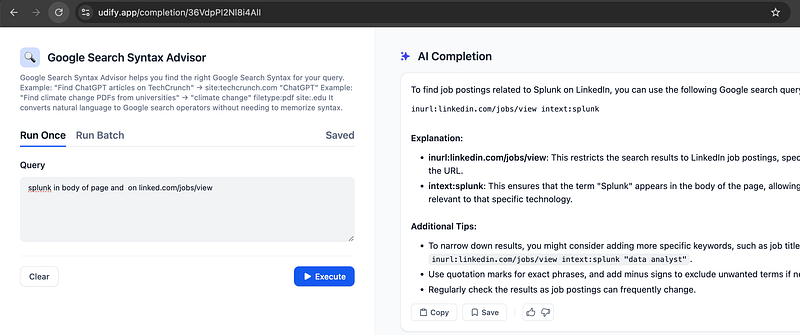
Want to skip the reading? Our new https://udify.app/completion/36VdpPI2Nl8i4AlI can generate the perfect query for you.
Basic Search Operators
1. Quotation Marks (“ “)
Purpose: Search for an exact phrase or sequence of words
Example: "digital marketing strategies"
- Returns only pages containing those exact words in that exact order
- Useful for finding specific product models, quotes, or exact phrases
- Excludes variations and synonyms
2. Minus Sign (-)
Purpose: Excludes specific words or phrases from search results
Example: SEO techniques -backlinks
- Shows results about SEO techniques but omits pages containing “backlinks”
- Must be placed directly before the word to exclude (no space)
- Can use multiple minus signs:
SEO California -Los -Angeles -LA
3. Asterisk (*)
Purpose: Acts as a wildcard placeholder for any word or phrase
Example: most important SEO *
- Could return: “most important SEO techniques”, “most important SEO strategies”, etc.
- Useful for finding variations of phrases or when you can’t remember exact wording
4. Double Dots (..)
Purpose: Specify a numeric range
Example: Samsung phone $300..$500
- Searches for Samsung phones within that price range
- Works with years, prices, measurements
5. OR / | Operator
Purpose: Search for pages containing either term
Example: workout yoga OR pilates
- Returns results about either yoga or pilates workouts
- The pipe symbol (|) works the same way
- Can combine with parentheses:
(yoga | pilates) workout routine
Advanced Search Operators
1. site:
Purpose: Restrict search to specific website or domain
Examples:
site:nytimes.com COVID-19(articles about COVID-19 from NY Times)site:edu machine learning(academic content about machine learning)
Use cases:
- Find content on specific websites
- Audit indexed pages
- Research competitors’ content
2. filetype:
Purpose: Search for specific file types
Examples:
SEO guide filetype:pdfmarketing strategy filetype:ppt
Common filetypes:
- pdf (documents)
- doc/docx (Word documents)
- ppt/pptx (PowerPoint presentations)
- xls/xlsx (Excel spreadsheets)
3. intitle: / allintitle:
Purpose: Search for pages with specific words in their title
Examples:
intitle:SEO guide(pages with "SEO" in title)allintitle:best SEO practices 2024(all words must be in title)
Difference:
- intitle: matches any word
- allintitle: requires all words
4. inurl: / allinurl:
Purpose: Find pages with specific words in their URL
Examples:
inurl:SEO(pages with "SEO" in URL)allinurl:SEO guide tutorial(all words must be in URL)
Use cases:
- Find relevant landing pages
- Discover competitor content structures
- Research URL patterns
5. AROUND(X)
Purpose: Find words within X words of each other
Example: SEO AROUND(3) strategy
- Finds pages where “SEO” and “strategy” are within 3 words of each other
- Useful for finding specific phrases or relationships between terms
6. related:
Purpose: Find similar websites
Example: related:amazon.com
- Shows sites similar to the specified domain
- Useful for competitor research
- Reveals how Google categorizes websites
Content-Specific Operators
1. define:
Purpose: Get definition of a term
Example: define:SEO
- Shows dictionary definition
- Often includes etymology and usage examples
2. cache:
Purpose: View Google’s cached version of a page
Example: cache:website.com
- Shows last saved version of the page
- Useful when site is down or changed
3. weather:
Purpose: Get weather information
Example: weather:London
- Shows current conditions and forecast
- Works with cities and regions
4. stocks:
Purpose: Get stock information
Example: stocks:AAPL
- Shows current stock price and trends
- Works with company names or ticker symbols
Practical Applications
Finding Competitors
allintitle:"SEO services" -site:mycompany.com
related:competitor.com
site:competitor.com "case study"
Content Research
"keyword" filetype:pdf site:edu
intitle:"industry statistics" 2024
"topic" AROUND(5) "research"
Technical SEO Audits
site:domain.com -inurl:https
site:domain.com inurl:tag
site:domain.com "duplicate content"
Backlink Opportunities
"write for us" + "your industry"
"guest post" + "your topic"
inurl:resources "your industry"
Best Practices
- Combine operators for more precise results
- Use quotation marks for exact matches
- Start broad, then narrow results
- Test different combinations
- Remember that some operators may be deprecated over time
Common Issues and Solutions
- Too many results: Add more specific operators
- No results: Remove operators one by one
- Inconsistent results: Try different operator combinations
- Deprecated operators: Check Google’s current documentation
Recently Deprecated Operators
- link:
- inanchor:
- allinanchor:
- info:
- daterange:
- phonebook:
Remember that Google regularly updates its search operators, so some may become deprecated while new ones may be added.


