
Complete CI/CD Gitlab pipeline for serveless Laravel Application on AWS API Gateway.
In this story we will try together to make new challenge : a complete CI/CD Gitlab pipeline for Serverless Laravel API on AWS.
The pipeline should build Laravel application dependencies using composer tool, save artifacts, test Unit and features tests and finally deploy the Laravel App to AWS.
As first step we will build together a Dockerfile for Laravel Container that will execute pipelines Jobs. I choose most optimized image based on ubuntu20.04 and contain only necessary tools for laravel and of course the aws cli. Below the Dockerfile I used in my pipeline:
FROM ubuntu:20.04

ARG DEBIAN_FRONTEND=noninteractive
ENV TZ=Etc/UTC

# Install dependencies
RUN apt update
RUN apt install -y software-properties-common
RUN add-apt-repository -y ppa:ondrej/php
RUN apt update
RUN apt install -y php8.2\
    php8.2-cli\
    php8.2-common\
    php8.2-fpm\
    php8.2-mysql\
    php8.2-zip\
    php8.2-gd\
    php8.2-mbstring\
    php8.2-curl\
    php8.2-xml\
    php8.2-bcmath\
    php8.2-pdo

# Install php-fpm
RUN apt install -y php8.2-cli

# Install composer
RUN apt install -y curl
RUN curl -sS https://getcomposer.org/installer | php -- --install-dir=/usr/local/bin --filename=composer

# Install nodejs
RUN apt install -y ca-certificates gnupg
RUN mkdir -p /etc/apt/keyrings
RUN curl -fsSL https://deb.nodesource.com/gpgkey/nodesource-repo.gpg.key | gpg --dearmor -o /etc/apt/keyrings/nodesource.gpg
ENV NODE_MAJOR 20
RUN echo "deb [signed-by=/etc/apt/keyrings/nodesource.gpg] https://deb.nodesource.com/node_$NODE_MAJOR.x nodistro main" | tee /etc/apt/sources.list.d/nodesource.list
RUN apt update
RUN apt install -y nodejs
RUN npm install -g serverless


WORKDIR /var/www
In the last instruction of Dockerfile, I installed the serveless npm package that we will used to deploy to AWS.
Please now see my story https://readmedium.com/d018bc7e27b1 to help you to build new Laravel application and to install Laravel serveless package using npm and Bref using composer. When this is done, a file serveless.yml will be generated at the root of your Laravel Project.
I add some code to this file :
service: laravel-app

provider:
    name: aws
    # The AWS region in which to deploy (us-east-1 is the default)
    region: eu-west-x
    # The stage of the application, e.g. dev, production, staging… ('dev' is the default)
    stage: dev
    runtime: provided.al2
    stackName: app-stack


package:
    # Directories to exclude from deployment
    patterns:
        - '!node_modules/**'
        - '!public/storage'
        - '!resources/assets/**'
        - '!storage/**'
        - '!tests/**'

functions:
    # This function runs the Laravel website/API
    web:
        handler: public/index.php
        environment:
            APP_NAME: CHATI-BACKEND
            APP_DEBUG: true
            LOG_CHANNEL: stderr
            SESSION_DRIVER: array
            CACHE_DRIVER: array
            DB_CONNECTION: mysql
            DB_HOST: ${env:DB_HOST}
            DB_PORT: ${env:DB_PORT}
            DB_DATABASE: ${env:DB_DATABASE}
            DB_USERNAME: ${env:DB_USERNAME}
            DB_PASSWORD: ${env:DB_PASSWORD}

        description: ''
        timeout: 28 # in seconds (API Gateway has a timeout of 29 seconds)
        layers:
            - ${bref:layer.php-82-fpm}
        events:
            - httpApi: '*'
useDotenv: true
plugins:
    # We need to include the Bref plugin
 - ./vendor/bref/bref
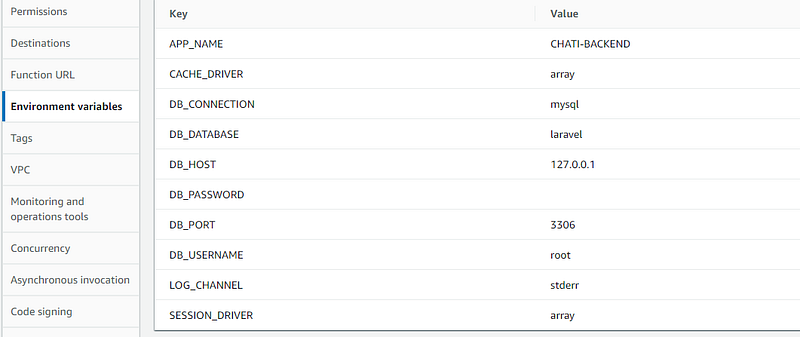
useDotenv:true : I added this instruction to use Laravel .env file to set Lambda function environment variables.
In fact i added two .env files: .env.dev and .env.prod. Serveless plugin will search first for .env file with the same name as stage variable used.
If stage variable used is dev then .env.dev variables are used when i set for example DB_HOST: ${env:DB_HOST}. that mean DB_HOST lambda env variable will be the same as DB_HOST in .env.dev.
if stage variable in deployment is prod then DB_HOST will get DB_HOST value of .env.prod.
For the Gitlab pipelines I will :
run build-dev and test-dev for every commit on feature branchs
run build-dev and deploy-dev on each commit to develop branch
and finally run prod-dev et deploy-prod on each commit to master branch.
stages:
  - build
  - test
  - deploy

image: laravel-image:1.0

cache:
    key:
      files:
        - composer.json
    paths:
      - vendor/

build-dev:
  stage : build
  before_script:
    - php --version
    - composer --version
  script :
    - composer install --ignore-platform-req=ext-curl
  artifacts:
    paths:
      - vendor
  rules:
    - if: '$CI_COMMIT_BRANCH == "master"'
      when: never
    - when: on_success
  tags:
    - chati

build-prod:
  stage : build
  before_script:
    - php --version
    - composer --version
  script :
    - composer install --ignore-platform-req=ext-curl  --no-dev
  artifacts:
    paths:
      - vendor
  rules:
    - if: '$CI_COMMIT_BRANCH == "master"'
  tags:
    - chati


test-dev:
  stage: test
  dependencies:
      - build-dev
  script:
      - cp .env.dev .env
      - php artisan key:generate
      - php artisan optimize
      - php artisan test
  rules:
    - if: '$CI_COMMIT_BRANCH == "master"'
      when: never
    - if: '$CI_COMMIT_BRANCH == "develop"'
      when: never
    - when: on_success
  tags:
   - chati


deploy-dev:
  stage: deploy
  script:
    - php artisan optimize
    - sls deploy --stage dev
  tags:
    - chati
  rules:
     - if: '$CI_COMMIT_BRANCH == "develop"'


.deploy-prod:
  stage: deploy
  script:
    - php artisan optimize
    - sls deploy --stage prod
  rules:
     - if: '$CI_COMMIT_BRANCH == "master"'
  tags:
    - chati
The difference between deploy-dev and deploy-prod is the stage variable ( — stage) used in deployment. This variable when changed from dev to prod will create different cloudformations stacks on aws for each environments and then two differents AWS APIs. Also a Specific Laravel env config will be used for each environment. In deploy-dev, .env.dev config file will be used and for deploy-prod, .env.prod config file will be used.
Last thing, I used a cache for Composer dependencies to speed up build job.
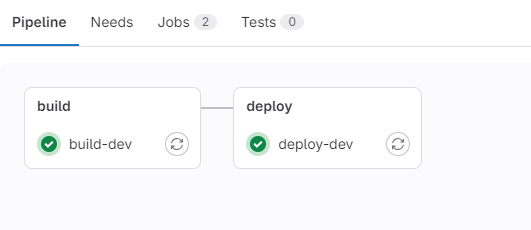
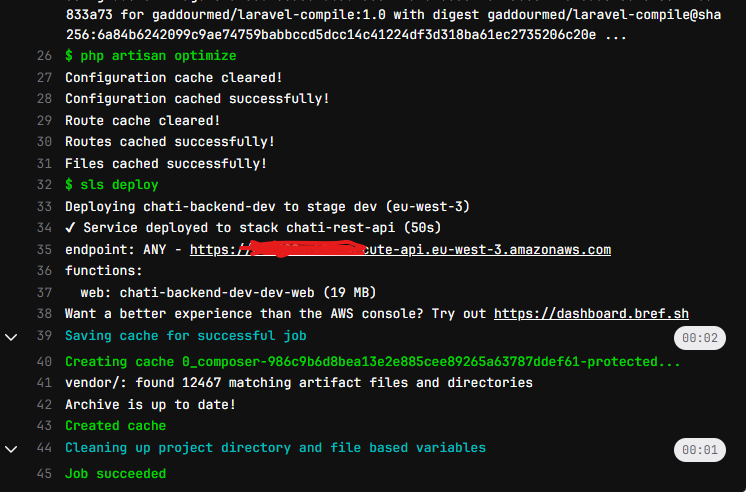
When deploy-dev job is runned with success, I will get my Laravel Application deployed in dev environment with all necessary aws ressources (API app, Lambda application , cloudwatch logs etc …). I will get also the URL for my api.
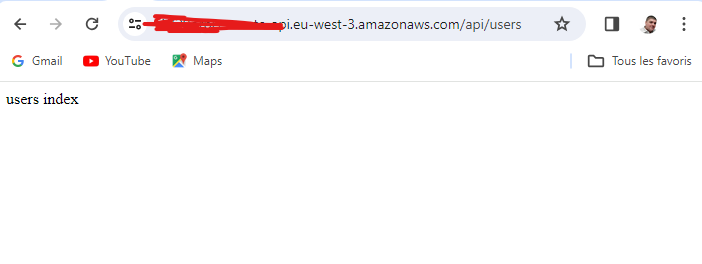
And when i open API Url in browser :
That is all, and welcome for comments.