
Comparing floating-point numbers with easycheck
easycheck can help you compare floats in assertion-like situations
Comparing floating-point numbers in Python is simpler than you may think. This is thanks to the math module, but not only. This topic has been recently very nicely described by David Amos in his Towards Data Science article, so if you’re interested in the basics, please read it first.
In this article, I will show you how to compare floating-point numbers in assertion-like situations. One should not use the assert statement in production code, as all assertions can be silenced when calling a Python script, which is done vie the -O optimization flag. So, it’s risky to use asserts in your production code, especially when they are responsible for important checks. Such an application can behave unexpectedly.
I emphasized “production” above. This is because you can use assert during development, when you check various conditions in your code. You need to remember, however, not to run such code with the optimization flag. Remember to now rely on them later, once you’re done with development.
What if you want to use assertions in your production code? If not assert, then what?
Fortunately, there are alternatives, and here we will discuss one of them: the easycheck package. It offers what we could call assert-like functions. These are functions that allow for checking a condition (or several conditions) and throwing an exception (or issuing a warning) if a condition is violated; when a condition is met, nothing happens.
Do you see the resemblance with the assert statement? Indeed, easycheck behaves in a similar way, but offers far richer functionality.
In this article, we will talk about easycheck in one context: comparing floating-point numbers. Before doing that, we need to discuss the very basics of comparing floating-point numbers. The main Python tool for this is the math.isclose() function from the standard library. Learning how it works will provide us with the background for analyzing easycheck’s offer.
What’s the fuss with comparing floats?
On one hand,
All fine. On the other hand,
Not fine at all!
These are common issues, and I could provide more similar examples when floating-point numbers behave in such an unexpected way. But that’s not the purpose of this article. You can see more examples and quite detailed explanations in a nice article by David Amos.
The most common — and in most situations the best — solution is to use the standard-library math.isclose() function. It allows for comparing two floating-point numbers using relative tolerance for the difference (rel_tol, with the default of rel_tol=1e-09) or absolute tolerance for the difference (abs_tol, with the default of abs_tol=0.0). This is the simplest use case:
Above, I used the default settings of the function, meaning comparing the two numbers with the relative tolerance of 1e-09 and without absolute tolerance (as it’s set to 0 by default). In other words, the two numbers are considered relatively not close when
abs(x — y)/min(x, y) > rel_tolOtherwise, they are considered relatively close. Of course, we have to consider this closeness in the context of the provided tolerance. Two numbers can be close in the context of one tolerance and not close in the context of another tolerance.
Note that close does not have to mean not different and not close does not mean different. It’s just words, and how we interpret the numbers depends on us. In essence, however, this function does not enable you to state whether or not two numbers are the same or not. As the name suggests, it enables you to analyze how close two numbers are.
To learn more, read the documentation of Python’s math module, and the above-mentioned article by David Amos.
Comparing floats with easycheck
The math.isclose() function returns a Boolean value that informs whether or not two numbers are close given the tolerance, whether relative or absolute, or both. Thus, it will meet your needs when you want to answer the question: are the two numbers close or not?
When you want to do it in assertion-like contexts, however, math.isclose() cannot be applied directly. You can do it using an if-else block in which you raise an exception when the condition is not met. But you can do it using a dedicated tool, because this is exactly the situation the easycheck package was designed for.
By assertion-like contexts I understand situations in which a condition is to be checked, and when it’s not met, an exception is raised; when it is, nothing happens. This is what assert works like. With easycheck, you can issue a warning instead, but you can also do much more. So, while offering what assert offers, easycheck actually provides more:
- The
assertstatement should not be used in production code because all its instances in the code can be silenced by the optimization flag (-O) when running the program. In some situations, this is a good thing, soeasycheckwill soon get a similar functionality. - The
assertstatement enables you to raiseAssertionErroronly, with an optional message. Witheasycheck, you can raise any exception you want and issue any warning you want. - As the bare-bones tool,
assertis quicker.
Instead of using easycheck, you can use an if-block or a series of if-blocks. easycheck, however, is more elegant and offers far richer functionality. In addition, if-blocks are used for a variety of purposes, unlike easycheck. Thus, when you see an if-block, you must read it to see what’s its purpose. When you see an assert statement or a call to an easycheck function, you immediately know it’s validation code.
To compare floating-point numbers, we can use the easycheck.check_if_isclose() function. Its name, as you can see, is similar to that of math.isclose(), so it’s easy to remember. Its API is also almost the same as that of math.isclose(). I wrote “almost the same” only because it has a couple of additional (we discuss them below). The point is that in terms of comparing numbers, the two functions work in exactly the same way, as easycheck.check_if_isclose() is a direct wrapper around math.isclose().
Therefore, from a mathematical point of view, the two functions work in the very same way. The difference is in how they behave:
math.isclose()returns a Boolean values:Trueif the numbers are close enough andFalseotherwise.easycheck.check_if_isclose()does nothing when the two numbers are close enough. When they are not, it either raises an error or issues a warning, depending on what you requested. You can use an optional message.
The next section analyzes this function in detail.
easycheck.check_if_isclose() in action
This is the function’s signature:
Here,
xandy, both being positional-only arguments, are the two arguments passed tomath.isclose()(asaandb).handle_withis a typicaleasycheckargument, used in all its checking functions. It sets the exception class to be used when the condition is not met. In this function, it defaults toNotCloseEnoughError, an exception class defined ineasycheck. If you need to catch and handle this exception, you have to import it from the package.messageis, of course, the message to be used with the exception. You can customize it in any way you want. The default value isNone, which for this function actually means that the message will be"The two float numbers are not close enough". If you do not want to use any message, usemessage="".rel_tolandabs_tolare the very same arguments as those used inmath.isclose(). They have the same names, default values, and behavior, and they are directly passed tomath.isclose().
So, if you already know how to use math.isclose()—and you should if you want to use easycheck.check_if_isclose()—then you already know how the latter compares numbers. Note one minor difference: calling math.isclose(), you can use keywords arguments a and b while the easycheck function uses positional-only arguments for them. Thus, remember to remove a and b argument names in case you have used them for the isclose() function.
So, the only additional customization that you can do is the easycheck-specific arguments, that is, handle_with and message, though in fact you may simply leave them. The default error may work just fine, and its name conveys everything you need: NotCloseEnoughError. You can, of course, use any other exception, also a custom one.
It’s time to see the function in action. I am sure that if you know how to use math.isclose() and used it a couple of times, you will have no problems with understanding what’s going on in the examples below.
Note: Do remember that if the condition is met, nothing happens, and you will see this for several checks.
The above calls to easycheck.check_if_isclose() changes neither handle_with not message. Let’s see what we can do with them:
Spent a couple of minutes analyzing the above snippets, and decide yourself whether or not easycheck.check_if_isclose() is easy to use.
Comparing floats in unit testing with easycheck
Since unit testing is an assertion-based environment, you can use easycheck.check_if_isclose() in unit tests, e.g., in pytest and doctest. However, easycheck comes with an alias of easycheck.check_if_isclose(), dedicated to testing: easycheck.assert_if_isclose(). As an alias, it’s used in exactly the same way as easycheck.check_if_isclose(). The script below presents an example of a typical pytest file:
Surely, there is no nothing special in this code. It’s a similar check as before, but while before it was done in the code context, here it’s done in the unit-testing context.
If you run the test file, you will see that the test will fails:
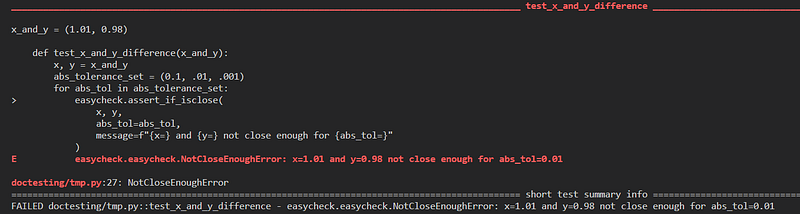
easycheck.assert_if_isclose() in pytest: Output of a failed test. Image by author.Conclusion
Floats are relatively easy to compare, but only when you know how. In most situations, math.isclose() will be the preferred method. It’s a simple function that I consider rather straightforward to use, and I hope you agree with me.
In some situations, however, easycheck.check_if_isclose() or its unit-testing alias, easycheck.assert_if_isclose(), will suit better your needs. For example, you may prefer to use the former in production code.
easycheck is an external package, so you need to install it. It’s available from PyPi, so you can install it using pip:
If you decide to use easycheck, you will get a module that you can use not only to compare two floating-point numbers, but to perform various sorts of checks. But this is a story I will tell some other time…
Thanks for reading! Leave comments what you think about comparing floats, math.isclose(), and easycheck.check_if_isclose(). Maybe you know another tool that can be specifically helpful for comparing floats, in these or different scenarios?
Resources
- David Amos (2022). The Right Way to Compare Floats in Python, Towards Data Science
- The repository of the
easycheck package - Documentation of the
math module - Kozak M. (2022). Should we use custom exceptions in Python? Towards Data Science
pytest's web page- Documentation of the
doctest module
Acknowledgments
Thanks to David Amos for the nice article about comparing floats. Without it, I would have to make this article far longer and thus less focused on what it’s about: using easycheck to compare floats.


