
Compare OpenAI models & Mistral MoE with One Line of Code!
Thousands of companies have already integrated OpenAI models into their products. However, many are also considering open-source models as potential alternatives. To facilitate this, here’s a simple and stable one-line code solution to adapt your experiments for comparing OpenAI models with open-source Large Language Models (LLMs).
For instance, the Mistral Mixture of Experts (MoE) model was released a week ago and has demonstrated impressive performance, despite its smaller size. In academic benchmarks, it appears to be on par with GPT-3.5
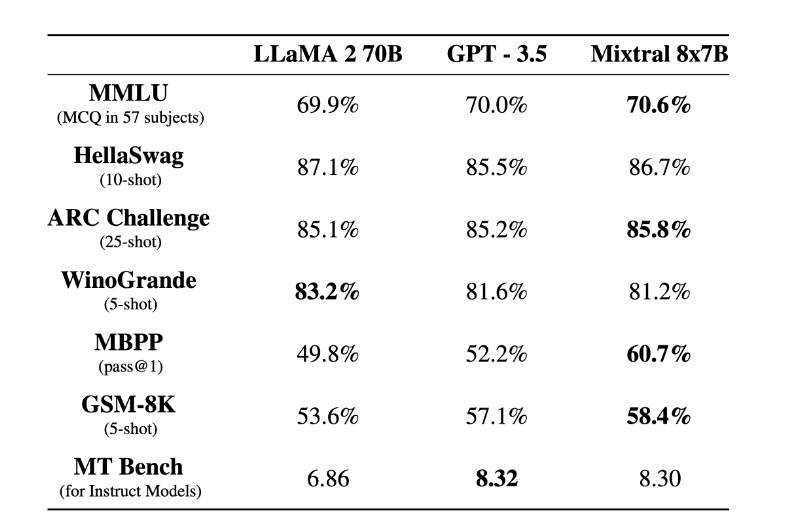
So: how can we easily test state of the art LLM models against OpenAI models?
The answer is: together.ai and its compatible API integration. Here’s a step by step guide and everything you need to know to get you started.

Disclamer: I found another platform offering a similar approach at an even cheaper price:
I haven’t tested them yet though. So feel free to try them and let me know ;)
What is Together.ai?
Together.ai is a startup focused on developing open source generative AI and AI model development infrastructure.
It recently closed a $102.5 million Series A funding round, led by Kleiner Perkins with participation from Nvidia and Emergence Capital.
The company’s platform enables developers to
- build on both open and custom AI models,
- offering a cloud platform for running,
- training, and fine-tuning models
with scalable compute at competitive prices!
OpenAI Compatibility with Together.ai Endpoint
CODE
You can test the code here: Colab Notebook
OpenAI Chat Completion Code
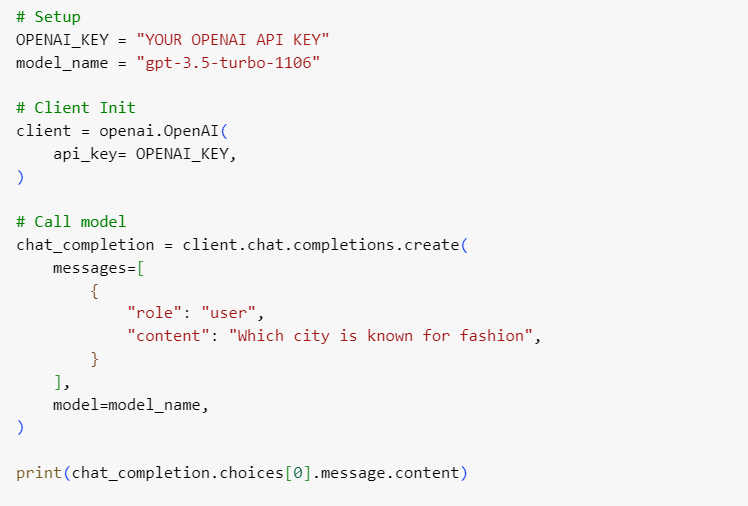
With these few lines, you are ready to start leveraging OpenAI models. Add your OpenAI Key and hit run!
In this case,
- the prompt simply asks “which city is known for fashion”
- the model tested in the latest GPT-3.5 model (aka 1106, released on Nov 6th 2023)
- the answer of the model was : “The city known for high fashion is Paris, France. It is considered one of the fashion capitals of the world, along with Milan, New York, and London. Paris is renowned for its haute couture, luxury fashion houses, and influential designers.”
Mistral MoE Chat Completion Code
We’ll use together.ai APIs to run the same prompt.
To do so, you simply need to change the code as follows.
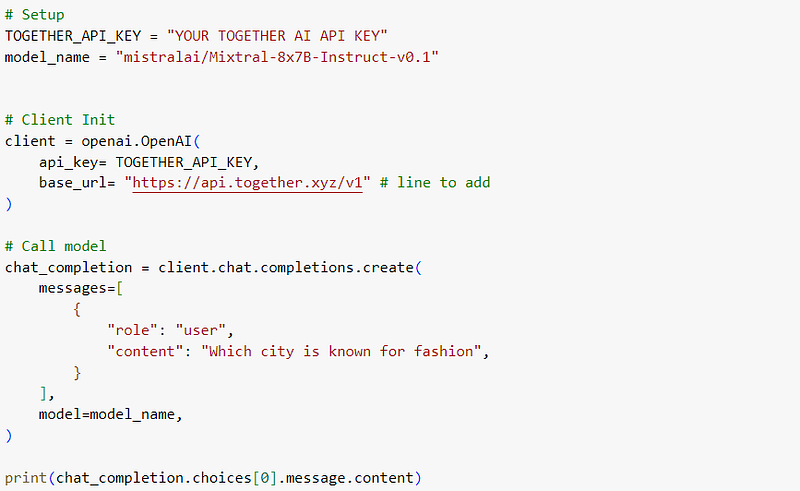
You don’t need to install anything new. It works with OpenAI library. You simply need to indicate the base_url that serves as your Model endpoints.
In this case the setup is the following:
- The base_url is together.ai’s api endpoint: https://api.together.xyz/v1.
- API key: You’ll of course need to create an account and get an API key: https://api.together.xyz/settings/api-keys
And then, we’ll run the same experiment:
- the prompt simply asks “which city is known for fashion”
- the model tested in the latest Mixtral-8x7B-Instruct-v0.1
And the output of the model was:
There are several cities around the world that are known for fashion, but some of the most famous include:
- 1. Paris, France: Paris is often considered the fashion capital of the world, and is home to many famous fashion designers and houses, including Chanel, Dior, and Yves Saint Laurent.
- 2. New York, USA: New York is a major fashion hub, with many well-known designers and brands based in the city, and is home to fashion week events and the famous fashion institute, FIT.
- 3. Milan, Italy: Milan is another major fashion capital, known for its high-end designers and brands, such as Gucci, Prada, and Versace.
- 4. London, UK: London is known for its edgy, avant-garde fashion scene, and is home to many up-and-coming designers and brands.
- 5. Tokyo, Japan: Tokyo is known for its unique and eclectic street fashion, and is home to many independent designers and boutiques.
These are just a few examples, and there are many other cities around the world that are known for their fashion scenes.
What do you think about the result? I’ll let you be the judge!
Other LLM Models & Pricing?
This is merely an example. If your relying on LLMs for data extraction or classification for instance, you’ll be able with this simple change to compare objectively the performance of your prod model with other LLMs available on together.ai platform.
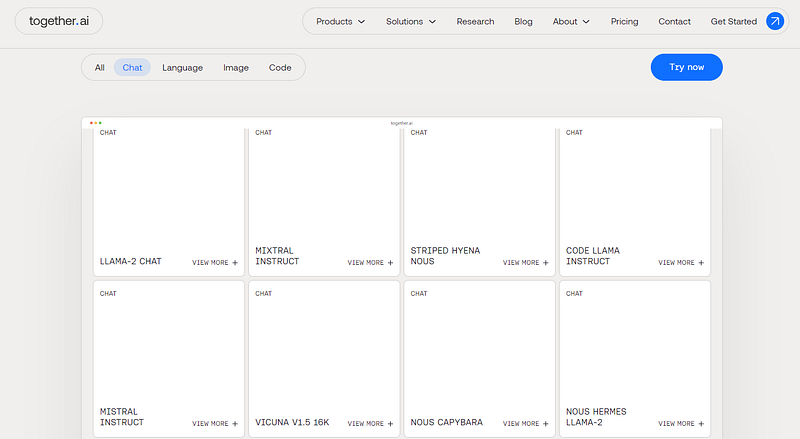
The list of models can be found here: https://www.together.ai/ with about 100 models available already (e.g., Mistral, LLaMA2, Falcon, etc.).
You’ll simply need to change the name of the model in the code and you are all set!
Pricing, Credits, Rate Limits and Throughput
Credits: Together.ai offers $25 to new users. That should be enough test all available models and features of the platform with no commitment.
Pricing: you can find the pricing for each model here. From what I gathered so far, the pricing is rather competitive. E.g., Mistral MoE is a viable alternative to GPT3.5, yet it only costs, $0.0006, whereas
- GPT-3.5-turbo-0613 costs $0.0015 (60% discount if you switch to Mistral)
- GPT-3.5-turbo-1106 costs $0.001 (40% discount if you switch to Mistral)
Rate limits: “For a free user, the limit is 60 queries per minute. For a paid user, the limit is 6000 queries per minute”.
Throughput: One limiting factor can be the API’s throughput, i.e., how fast can it deliver it’s response. It’s usually evaluated in terms of tokens per second. To the best of my knowledge, Mistral MoE running on together.ai is faster than GPT3.5 today with about 100 tokens per seconds (compared to ~50 tokens per second for GPT3.5 turbo)!
Conclusion
That’s it, you have everything you need to get started, including the colab code! Just grab your API Keys and have Fun!


