
Collaborate Better with Data Versioning
How to keep your data up-to-date

Imagine you load incremental data into a Data Lake or a Data Warehouse and you do not version it — chaos would follow. Data versioning is important for Data Analysis. It is the only way to verify that the data is correct.
In this article, I will show you how to implement such versioning on a technical basis and provide some theoretical background. My technology stack is Google BigQuery (a Data Warehouse technology), which is based on SQL and can also be implemented in other technologies. I chose that stack because newer technologies such as this are getting more and more common.
Versioning in Your Data Integration Process
Data versioning usually takes place either directly in the data integration process or within the Data Warehouse.
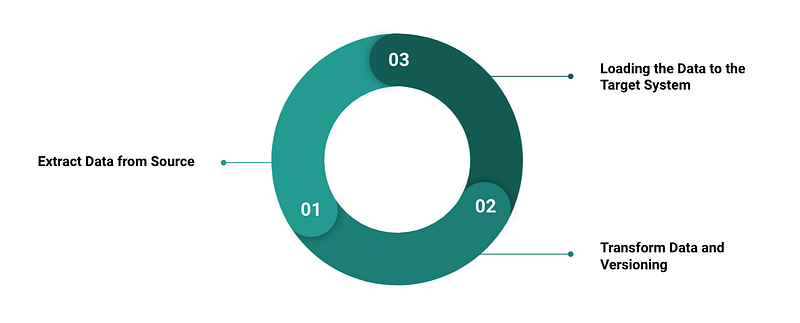
In traditional systems, the versioning of master data is realized by checking each data for changes and thus creating a new version. Depending on whether a relational or a dimensional data model is used for the core, there are different variants of the versioning of master data.
Newer cloud-based and SaaS-based technologies also load data from source systems via CDC or messaging services over an ETL or ELT process into the target system. But one doesn’t work with classical relational or cube-based systems anymore. In this relation, NoSQL or hybrid and denormalized systems are in use.
So you will end up loading every updated record from the source system. The solution here is to add metadata to guarantee data versioning.
See the example below:
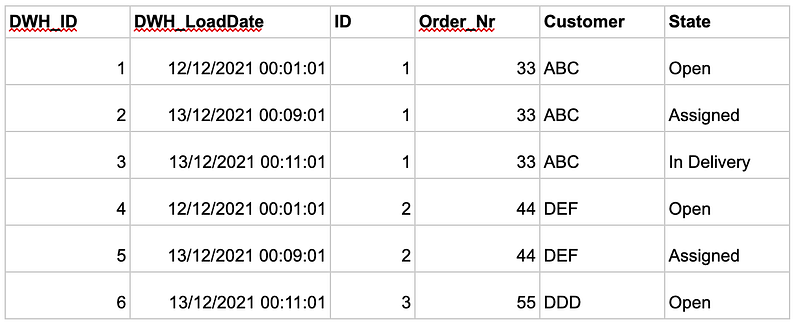
I make sure to always reload every record completely into the system. However, the question of unnecessary costs and storage memory immediately arises. Furthermore, one might then ask whether it is not a data jumble. The answer to this question is no, since memory storage facilities are often super cheap in these technologies and, additionally, changes are good to recognize over data sets.
The challenge here is to add meaningful metadata. I tried achieving that by using a DWH_ID and a DWH_LoadDate. If we assume that the ID comes from the source system and is unique, I can use the DWH_ID or the DWH_Timestamp to create views of the core data later, which I can then use to give the business and the analysts’ different perspectives on the data.
Let’s say that the internal revision receives a view. It shows that all data records over a period where more operational units have an overview only show the current status. The nice thing here is that I am not only dependent on cubes. I can always get the basic data directly from the data lake and quickly and easily adapt it for my analyses.
Using the Versioning in the Analytics Process
Now that we have understood the basic technical principle of enabling data versioning, I would like to show you how to use it as a business user or data analyst. With the following SQL statement, we can query the data and guarantee that only the current state of the data record is shown:
SELECT AS VALUE ARRAY_AGG(t ORDER BY string_field_1 DESC LIMIT 1)[OFFSET(0)]FROM `triple-silo-282319.Data.Test` tGROUP BY string_field_2And here we go. Thanks to our data versioning and some basic logic realized with SQL, we have the desired output:
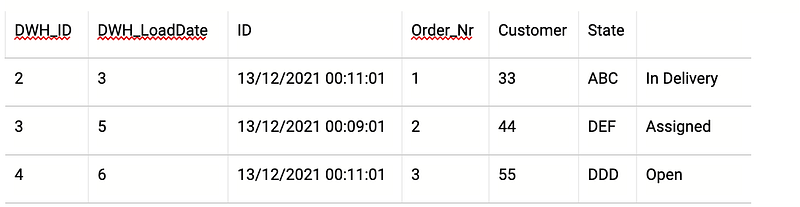
Only the valid and newest records are displayed. There are no duplicates. The nice thing here is, we can still analyze them if necessary because they are in another view or, at least, in our core Data Warehouse. So the controller is able to analyze operational document data, and an internal auditor might analyze the same records at a different point in time.
Versioning of Additional and External Resources
We have learned the two basic layers of versioning. The technical one, which is indispensable in a Data Warehouse or Data Lake and must be implemented in the technical data integration process, and the data analyst layer, which takes place inside the Data Warehouse or in the data analysis process. Last but not least, there is another layer, the self-service analysis layer.
For example, modern business intelligence tools can easily integrate external data via CSV, Excel, or Google Sheets. These data sources must also be visioned. To stay with my technology stack, there are options like Google’s Data Studio or Google Sheets, which have a versioning function by default. So you can easily create dashboards and share them with your team. Of course, it is important that the team also knows if and when something changes in the report and what the change is.
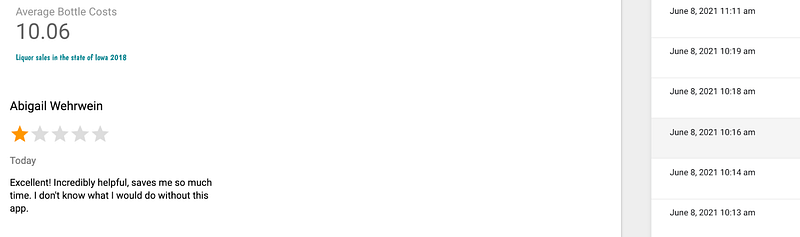
In the above image, you can see a dashboard that I built via the self-service-BI tool, Google Data Studio. And on the right, you see the different versions, which were automatically generated.
Summary
In conclusion, the process of data versioning is essential for correctly processed data sets. This article has given you an overview of how and within what frameworks data can be versioned. As an outcome, one can say that data should be versioned directly in the data process so you can easily use it for data analysis.
Data versioning also plays an important role in the field of analytics since it allows for different departments to analyze the same data for their own needs and through their own perspectives.