
Colab Pro: Is it Worth the Money?
How much difference does $10 make? We did the tests. You do the reading.
Google Colab has been out for a while now, but recently we’ve got an option to upgrade to the Pro version, which supposedly gives you access to faster GPUs, longer runtimes, and more RAM. But how significant is the difference? Is it worth $10/month? Let’s find out.

We’ve already written about Google Colab (free version), so check that article if you haven’t:
To perform the tests we’ve used both Free and Pro version of the service, performing deep learning tasks on the Pneumonia dataset. The dataset is made of around 5,000 lung X-Ray images, perfectly suited for this type of task.
The article is structured as follows:
- General differences
- GPU comparison
- RAM comparison
- Case: Model training time comparison
- The verdict
So without much ado, let’s get started!
General differences
The goal of this section is to discuss general differences between Free and Pro versions of the service — like CPU, available disk space, and runtime. I don’t think these 3 should influence your purchase decision much (except maybe the last one), because I haven’t had issues with them in the free version.
With that being said, here’s the comparison between the CPUs:
- Colab (Free) — Intel(R) Xeon(R) CPU @ 2.20GHz
- Colab (Pro) — Intel(R) Xeon(R) CPU @ 2.30GHz
So not much of a difference here — but once again, you’re probably not using Colab for its CPU, so this part really isn’t that important.
With regards to the disk size, I’m getting the same 34GB of available memory on both — which is kind of strange — but then again this will be enough for 99.99% of the users. The runtime duration might surprise you. Here’s an official statement from Google:
With Colab Pro your notebooks can stay connected for up to 24 hours, and idle timeouts are relatively lenient. Durations are not guaranteed, though, and idle timeouts may sometimes vary.[1]
With the free version we had 12 hours of runtime at most, and the idle timeouts were stricter. There are ways to avoid this though, a possible solution is described in this article.
Okay, we are now aware of some basic differences. In the next sections, we’ll explore how RAM and GPU differ, and after that, we’ll also compare the training duration on a real dataset.
GPU comparison
The single most important aspect of Google Colab is the GPU. It doesn’t matter how powerful is your laptop, you’ll get access to modern and powerful GPU. Down below are the GPUs you can expect on both Free and Pro tier:
- Colab (Free) — Tesla K80
- Colab (Pro) — Tesla P100-PCIE-16GB
It’s okay if you don’t know how these GPUs differ from one another. That’s why we’ve prepared a chart comparing the available GPU memory:
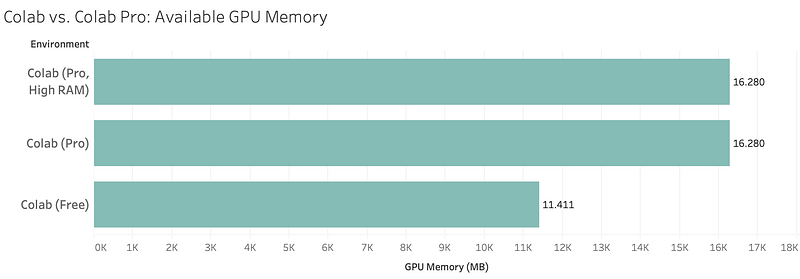
Don’t worry about the High RAM runtime, it will be discussed in the next section. Just from this, you can see that with the Pro tier you get roughly 5GB more of GPU memory, which in theory means that the neural network training process should be faster (we’ll see about that).
RAM comparison
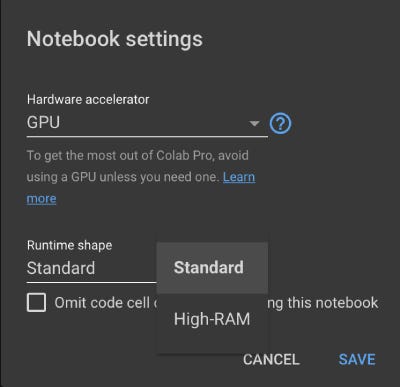
The Pro version of Colab will give you access to a High-RAM runtime environment. In theory, this runtime should give us more RAM, in case the standard 12GB isn’t enough. Most of my deep learning work was on “toy” examples, where datasets are only a couple of GB in size, so I never had an issue with RAM.
If you need more work memory, you can change the runtime by going to Runtime — Change Runtime Type:
But does the Pro version give you more RAM by default?
I’m glad you’ve asked. Let’s see in the next visualization:
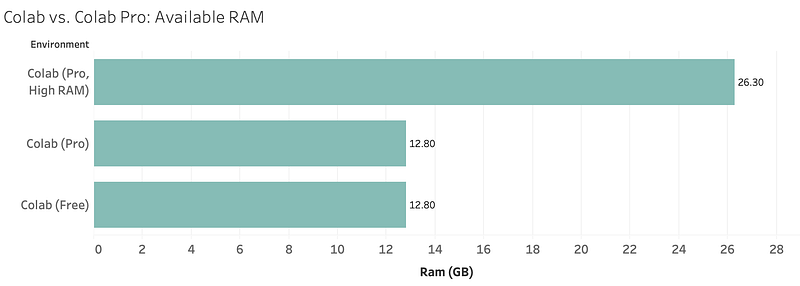
Both Pro and Free versions are exactly the same until the High RAM environment is enabled. Keep that in mind for your projects, but I’ve found 12.8GB to be just fine for most of the cases.
Case: Model training time comparison
Now comes the part you’ve been waiting for. Here we’ll finally compare the differences in training time for Free and Pro tiers of Google Colab. As mentioned earlier, the model is trained on the Pneumonia dataset.
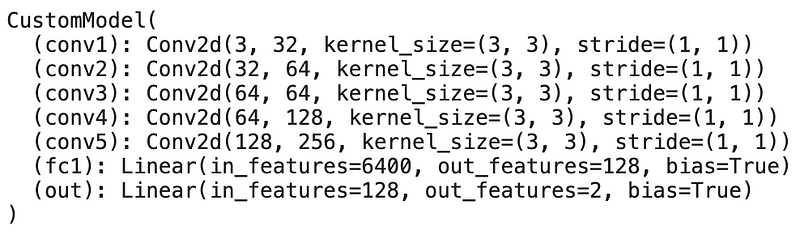
Two architectures were prepared for the same dataset, with the first being a custom CNN architecture, and the second one being DenseNet201 pre-trained network, with the last layer modified to output two classes. You can see the custom architecture below:
Furthermore, here are some additional specifications you might find useful:
- Image size: 224x224
- Batch size: 32
- Learning rate: 0.001
- Epochs: 20
- Optimizer: Adam
- Criterion: CrossEntropyLoss
So everything is pretty much standard here, but I’ve wanted to share this info in case you want to replicate the results.
During training, I’ve taken note of training duration, and that information is presented in the following chart:
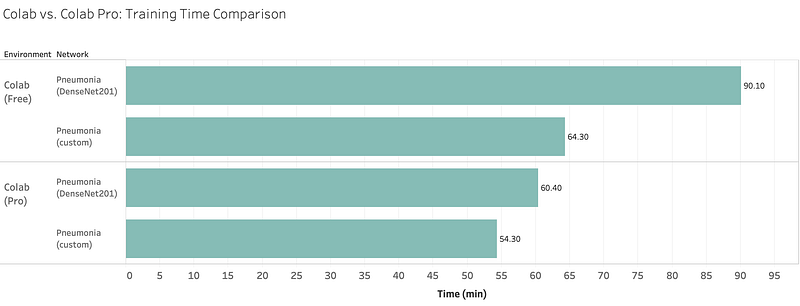
As you can see, the training process on the DenseNet201 architecture lasted 50% longer on the Free version, whilst the decrease in training time for a custom architecture isn’t that significant. Keep this in mind, as you’ll be using pre-trained architectures most of the time.
I think now you have all the information needed to make your decision. Let me tell you my opinion in the next section.
The verdict
We saw that the training process on a prebuilt architecture lasted 50% longer on the Free version. But is that actually significant to you?
Remember, you are limited to the 24-hour runtime at best, even with the Pro version. 24 hours still isn’t enough for some businesses, where the training process lasts for days/weeks.
If you are an individual who is still learning data science and deep learning, then I see no actual benefit from the Pro version — as the Free version will handle all dataset you’ll encounter. The Pro version will provide speed improvements, but not as significant for most users.
In case you absolutely need the speed improvement then just go for it — it’s only $10/month. If not, save the money for something else — you’re not missing out on anything special.
What are your thoughts? Is the Pro version faster in your country? Let me know.
Loved the article? Become a Medium member to continue learning without limits. I’ll receive a portion of your membership fee if you use the following link, with no extra cost to you.


