
How to Input a Coding Prompt on ChatGPT
Seems Confusing, but trust me, it isn’t.
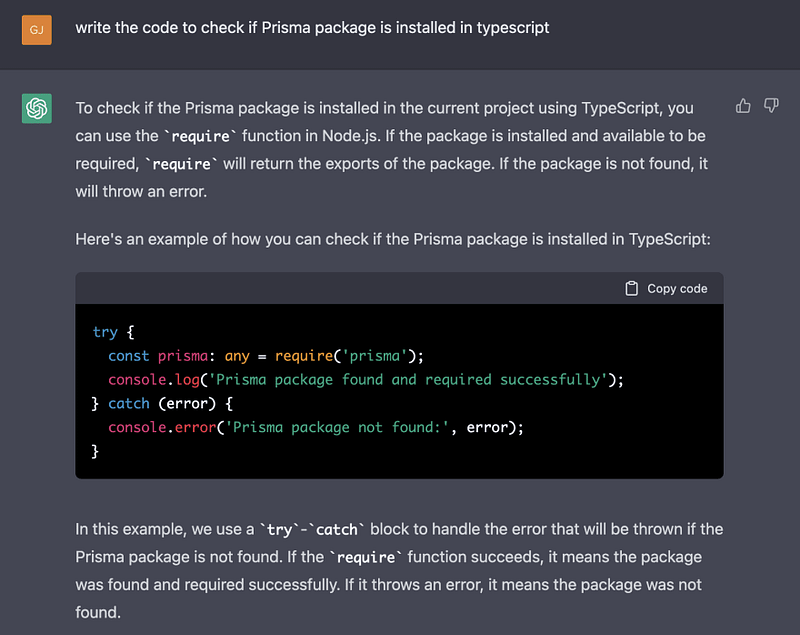
ChatGPT is a powerful language generation model that can be used to generate code for various programming languages. Giving a prompt to ChatGPT for code generation is a simple process that can be done in a few steps.
Define the programming language:
Before giving a prompt to ChatGPT, you need to specify the programming language you want the code to be generated. This can include popular languages such as Python, Java, and C++.
Write the prompt:
The prompt should be a clear and concise description of what you want the code to do. For example, “Write a Python function to sort a list of integers.”
Input the prompt into ChatGPT:
Once you have written the prompt, input it into ChatGPT and let the model generate the code.
This step is crucial as the code generated by ChatGPT may not always be perfect and may require some editing.
For example, if you give ChatGPT the prompt "Write a Python function to sort a list of integers," the generated code might look something like this:
def sort_list(lst):
  lst.sort()
  return lst
The generated code is a simple function that sorts the input list of integers and returns it. However, this function does not take into account duplicate values, and it sorts the list in ascending order by default.
To improve this code, we can add some modifications, such as adding a parameter to specify the sorting order and handling duplicate values. Here is an example of how the code might look after editing:
def sort_list(lst, reverse=False):
    lst = list(dict.fromkeys(lst)) # remove duplicate values
    lst.sort(reverse=reverse)
    return lst
Now the function takes an additional parameter "reverse" which allows the user to specify if the list should be sorted in ascending or descending order, and it removes duplicate values from the input list before sorting it.
It's important to keep in mind that the output generated by ChatGPT is based on the prompt given to it and the dataset it was trained on, so the generated code might require some tweaking and modifications to make it work according to your requirements. Review and edit the generated code: Review the generated code to ensure it meets your specifications and make any necessary edits. It’s important to note that the code generated by ChatGPT may not always be perfect and may require some editing.
Test the code:
Test the generated code to ensure it runs correctly and meets your requirements.
It’s important to keep in mind that the output generated by ChatGPT is based on the prompt given to it and the dataset it was trained on, so the more specific and clear the prompt is, the better the output will be.
In summary, giving a prompt to ChatGPT for code generation is a simple process that can be done in a few steps. By defining the programming language, writing a clear and concise prompt, inputting the prompt into ChatGPT, reviewing and editing the generated code, and testing the code, you can use ChatGPT to generate code for various programming languages.
Become a Member, this will help me keep blogging in the future, Thanks!


