
Coding a Convolutional Neural Network (CNN) Using Keras Sequential API
Neural Networks and Deep Learning Course: Part 24
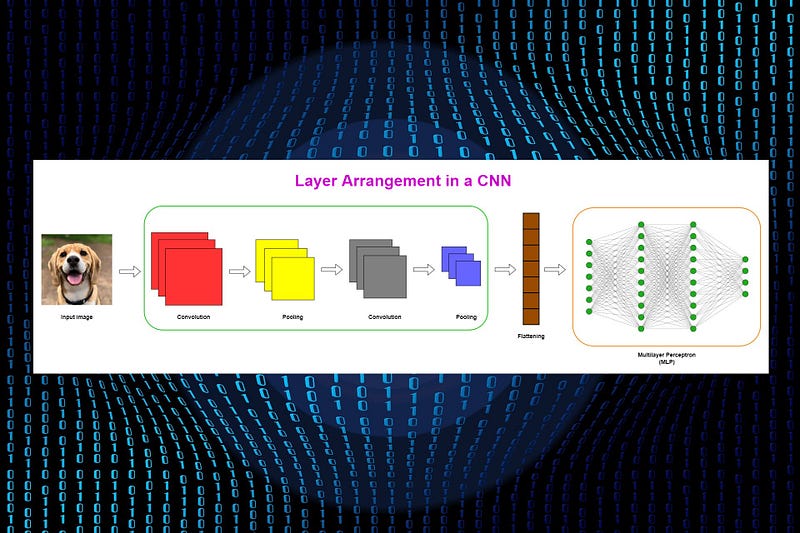
Prerequisite: Convolutional Neural Network (CNN) Architecture Explained in Plain English Using Simple Diagrams (Highly recommended)
In Part 23, I discussed the layers and operations in a Convolutional Neural Network (CNN) in detail. If you have read that one, now you understand how CNNs work behind the scenes.
Today, we’ll discuss how to build a CNN using Keras Sequential API. We’ll discuss, in detail, how to instantiate a sequential model using the Sequential()class, how to add convolutional, pooling and dense layers using the add()method, how to use Conv2D(), MaxPooling2D()and Dense()classes to build convolutional, pooling and dense layers.
Finally, we’ll get the summary of the entire CNN architecture using the summary()method and count the number of total parameters in the network. This information can be used to compare a CNN with an equivalent MLP in terms of “parameter efficiency”.
Keras Sequential API
There are two types of APIs in Keras: Sequential and Functional. Today, we’ll use the Sequential API to build a CNN. In the Sequential API, we add layers to the model one by one (hence the name Sequential). It is easy to work with the sequential API. However, the Sequential API is not much flexible for branching layers and it does not allow multiple inputs and outputs in the network.
The Sequential model
In Keras, a Sequential model can be built by using the Sequential()class. Here, we sequentially add layers to the model using the add()method. According to the Keras documentation,
A
Sequentialmodel is appropriate for a plain stack of layers where each layer has exactly one input tensor and one output tensor — Source: https://keras.io/guides/sequential_model/
A CNN can be instantiated as a Sequential model because each layer has exactly one input and output and is stacked together to form the entire network.
from tensorflow.keras.models import SequentialCNN = Sequential()In Part 16, we created a Multilayer Perceptron (MLP) using the same Sequential()class. Each layer in an MLP has exactly one input and output and is stacked together to form the entire network. Therefore, an MLP can be instantiated as a Sequential model.
Layer arrangement in a CNN
Before we discuss CNN layers, it will be useful to summarize layer arrangement in a CNN. More details can be found here.
Typically, layers in a CNN are stacked as,
Convolutional-Pooling pair → Convolutional-Pooling pair → A flattened layer → Multiple dense layers

Keras Conv2D class
Each convolutional layer in a CNN is created using the Conv2D()class that simply performs the convolution operation in a two-dimensional space. In other words, the movement of the kernel (filter) happens on the input image across a two-dimensional space.
In Keras, a convolutional layer is referred to as a Conv2D layer.
from tensorflow.keras.layers import Conv2DConv2D(filters, kernel_size,
strides, padding,
activation, input_shape)Important parameters in Conv2D
- filters: The number of filters (kernels). This is also referred to as the depth of the feature map. Accept an integer. We usually increase the number of filters in each convolutional layer as 16, 32, 64, 128, and so on.
- kernel_size: Specify the height and width of the kernel (convolution) window. This takes an integer or a tuple of two integers like (3, 3). In most cases, the window is a square with the same height and width. The size of a square window can be specified as an integer, for example, 3 for (3, 3) window.
- strides: The number of steps (pixels) that we move the filter over the input image. This takes a tuple for the strides along the height and width. If the height and width are the same, we can use an integer. The default is set to (1, 1).
- padding: There are two options:
"valid"or"same". “Valid” means no padding. “Same” results in padding with zeros in a way that the size of the feature map is the same as the size of the input whenstrides=1. - activation: The type of activation function to use in the convolutional layer. The default is no activation that is equivalent to the linear or identity activation. We usually use the
'relu'activation function in each convolutional layer. - input_shape: Specify the height, width and depth of the input as a tuple of integers. In other words, this is the size of the input image. It is mandatory to specify this argument in the first convolutional layer if it is the first layer in the model immediately after the input layer. This argument is not included in other intermediate convolutional layers.
When the
input_shapeis passed to the first convolutional layer, Keras adds an input layer for the model behind the scene and we do not need to specify the input layer explicitly.
Keras MaxPooling2D class
After creating the convolutional layer, the next step is to create the pooling layer. Convolution and pooling layers are used together as pairs. There are two types of pooling operations: Max pooling and Average pooling. Here, we use Max pooling.
Each pooling layer in a CNN is created using the MaxPooling2D()class that simply performs the Max pooling operation in a two-dimensional space.
In Keras, a Max pooling layer is referred to as a MaxPooling2D layer.
from tensorflow.keras.layers import MaxPooling2DMaxPooling2D(pool_size, strides, padding)Important parameters in MaxPooling2D
- pool_size: The size of the pooling window. The default is (2, 2). This takes an integer or a tuple. The same window length will be used for both dimensions if we use an integer.
- strides: The number of steps (pixels) that we move the pooling window over the feature map for each pooling step. This takes a tuple for the strides along the height and width. If the height and width are the same, we can use an integer. The default is set to
Nonethat takes the value ofpool_size. - padding: There are two options:
"valid"or"same". “Valid” means no padding. “Same” results in padding with zeros in a way that the size of the pooled feature map is the same as the size of the input.
Keras Dense class
The final layers in a CNN are fully (densely) connected layers. In Keras, these layers are created using the Dense()class.
The Multilayer Perceptron (MLP) part in a CNN is created using multiple fully connected layers.
In Keras, a fully connected layer is referred to as a Dense layer.
from tensorflow.keras.layers import DenseDense(units, activation, input_shape)Important parameters in Dense
- units: The number of nodes (units) in the layer. This is a required argument and takes a positive integer.
- activation: The type of activation function to use in the layer. The default is
Nonewhich means no activation (i. e. linear or identity activation). - input_shape: We do not need to include this argument as any of the dense layers is not the first layer in a CNN.
Keras Flatten class
In a CNN, there is a flattened layer between the final pooling layer and the first dense layer. The flattened layer is a single column that holds the input data for the MLP part in a CNN.
In Keras, the flattening process is done by using the flatten()class.
Designing a CNN architecture
We’ll build a CNN using the above types of layers for the following scenario.
Imagine that we have the MNIST dataset which contains a large number of grayscale images of handwritten digits under 10 categories (0 to 9). We need to create a CNN that should be able to classify those images accurately. The size of each grayscale (single-channel) image is 28 x 28. So, the input shape is (28, 28, 1).
We define the architecture of the CNN as follows.
- Number of convolutional layers: Two, 16 filters for the first layer and 32 filters for the second one, ReLU activation in each layer
- Number of pooling layers: Two, Max pooling is used
- Flatten layer: Between the final pooling layer and the first dense layer
- Number of dense layers: Three, 64 units for the first layer, 32 units for the second layer and 10 units for the last layer, ReLU activation in the first two layers and Softmax activation in the last layer
The following code block can be used to define the above CNN architecture in Keras.
Reading the output
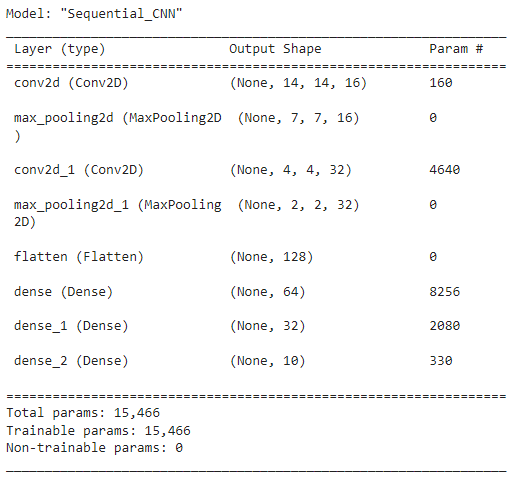
The summary()method of the Sequential()class gives you the output summary which contains very useful information on the neural network architecture.
In the above output, the layer information is listed on the left side in the order of first to last. The first layer is at the top and the last layer is at the bottom. Note that the input layer is not shown here.
In the middle column, you can see the output shape of each layer. For example, the first Conv2D layer has the output of (None, 14, 14, 16) which indicates the dimensions of the feature map after performing the first convolution operation. The size of the feature map is 14 x 14 and the depth is 16 because 16 filters are used. The first value in the tuple is None which denotes the number of training instances (batch size). The exact value for this will be determined once the input data is fed to the model. For now, it is bound to None.
The right column includes the number of parameters involved in each layer. Note that pooling and flattened layers have no parameters!
The shape of the flattened layer is (None, 128). That means the input layer shape of the MLP part is (128, ).
The bottom part of the output shows the number of total parameters in the network.
Comparing the models
- In Part 16, we created a Multilayer Perceptron (MLP) model to classify the MNIST handwritten digits. There, we got 269,322 parameters which is a huge number for that type of small classification task. MLPs are not parameter efficient when working with image data.
- As a solution to that problem, in Part 17, we applied Principal Component Analysis (PCA) to the image data and built the same MLP model. There, we only got 8,874 parameters. We were able to reduce the number of parameters by 30x times while still getting even better performance.
- Today, we used a different neural network architecture (CNN) instead of MLP. We only got 15,466 parameters! So, CNNs are parameter efficient.
Which model do you prefer?
MLP with PCA model or CNN model? My answer is CNN. A CNN is the best option over MLP when working with image data. This is because,
- It can reduce the number of parameters while keeping the spatial information (relationships between the nearby pixels) of images. The spatial information is required to keep certain patterns in the image.
- You will get a very large number of parameters if you use an MLP with RGB images. Moreover, it is complicated to apply PCA to RGB images and it is not very practical.
This is the end of today’s post.
Please let me know if you’ve any questions or feedback.
I hope you enjoyed reading this article. If you’d like to support me as a writer, kindly consider signing up for a membership to get unlimited access to Medium. It only costs $5 per month and I will receive a portion of your membership fee.
Thank you so much for your continuous support! See you in the next article. Happy learning to everyone!
Read next (Recommended)
Read all other articles in my Neural Network and Deep Learning Course.

Rukshan Pramoditha 2022–06–27


