
Cocoapod vs SPM in Swift
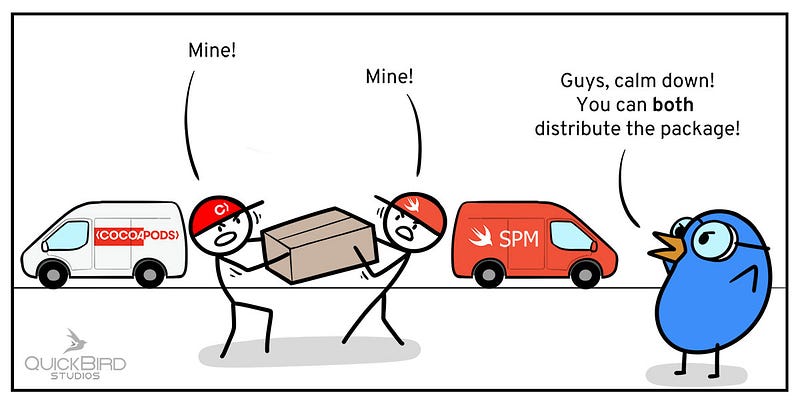
Apple has created an official package manager called Swift Package Manager (AKA SPM or SwiftPM) that helps us manage dependencies with the release of Swift 3.0.
CocoaPods is another alternative package managersavailable.
You’ll learn about the advantages and disadvantages of each package manager, as well as how to utilize them to incorporate frameworks into your codebase, in this article.
To learn about each integration, you will use EasyToDo, a simple to-do app. The backend of this software allows users to sync all of their to-do lists.
Why should I bother with it?
“Can’t I just transfer the source code into my app project and use that?” you might wonder. Yes, but what will you do if a major update becomes available? You’ll have to manually check for updated versions and follow the repository’s release updates. Doesn’t sound like a lot of fun, does it? You’ve come to the right place! You can easily ensure that your code is always up to date by utilizing a package management.
What is the function of a package manager?
What a great question! A package manager is a software or, in this example, an app that simplifies the process of installing, upgrading, configuring, and deleting software.
But what exactly does that imply? Consider the situation where you need to handle network requests within your app but don’t want to reinvent the wheel. You just want to employ a framework that is solid, dependable, well-crafted, and well-tested.
You can simply manage dependencies inside your software with a package manager, such as Kingfisher, which can help you better image download inside your to-do app.
Cocoapods
Cocoapod is an Objective-C and Swift package dependency management for XCode projects. These programming languages are used to create apps for iOS, macOS, watchOS, and tvOS. Cocoapods also serves as a coding center, allowing you to share your work with others. As a result, we as a coding community won’t have to “reinvent the wheel” to solve problems that have already been solved.
- Installing Cocoapods
Cocoapods is built on top of Ruby, so you would need to install that in your system before using Cocoapods.
Then, you can install using this command:
sudo gem install cocoapods
- Using Cocoapods
Open Terminal and go to your XCode project directory.
Afterwards, run this command:
pod init
Then a Podfile is generated, configure the file, like so:
platform :ios, '9.0'
use_frameworks!
target 'AppName' do
 pod 'Kingfisher', '~> 2.6'
end
Where ‘AppName’ refers to your application project, and ‘pod’ refers to the libraries you want to use! On the right side of the settings, you can adjust the version of those libraries you want to use.
- Cocoapods updating
You can use the command pod update to keep up to speed with the codes shared in cocoapods. To find out which libraries you wish to use, go to https://cocoapods.org/ and do a search there!
- Supported Platforms
All Apple platforms, iOS, tvOS, watchOS, and macOS. CocoaPods command line tool only works on a Mac.
So, what is result of configuration of Cocoapods?
- The specifications source repository was specified by you. You can use this feature to add an external repository, such as a private one.
- You stated that your program is an iOS app that requires iOS 9 or later to run. You can choose whatever version you like.
- You told CocoaPods to use Dynamic Frameworks instead of Static Libraries to integrate your dependencies. You can utilize Static Libraries for Swift starting with Xcode 9, Swift 4, and CocoaPods 1.5.0.
- As the target, you specified the name of your app. For each target in your project, such as a macOS app, you can define distinct dependencies.
- Finally, this is where you are reliant. You’re simply adding Kingfisher in this example. You can also specify which version of pod you want to use on this line. Versions such as major, minor, and patch are examples.
Advantages of Cocoapods.
- On the official CocoaPods website, you can look for a dependency.
- Both dynamic frameworks and static libraries are supported (since version 1.5.0).
- Manage the dependencies of a dependence automatically. CocoaPods will take care of any dependencies that are dependent on each other.
- Your app’s dependencies are easily visible to everybody.
- If the dependency supports it, you can use the command pod try Alamofire to test it before integrating it into your project.
- Has a dedicated Mac program for managing app dependencies.
- CocoaPods are supported by almost every framework.
Disadvantages of Cocoapods.
- The first time you install your dependencies, even if it’s just one, you’ll have to wait a long time because CocoaPods will have to download the main Specs repository to your Mac. When you use then ‘pod update’ command to update your dependencies, this will also happen.
- Your primary project will be changed so that all of your dependencies can be used. It’s also true that you may use the command ‘pod deintegrate ’to remove the CocoaPods integration.
- All of your dependencies will be built every time you build your project, resulting in longer build times.
Swift Package Manager
Apple’s Swift package manager is a dependency manager designed to make the development process easier. Its integration into Xcode 11 marked a watershed moment in the realm of Swift dependency managers. It functions as a user-friendly, fast-working iOS package manager without the need to install other software tools.
We’ll look at how the Fastlane tool may be used for job automation and continuous integration service in the sections below.
- How To Add A New Package With SPM?
New packages can be added to your project via user interface of Xcode in the following steps:
- Go To Menu Bar And Select File -> Swift Packages -> Add Package Dependency
- Enter Repository Link, Select A Version And Choose Target and Next.
You can use imported framework in your classes.
Advantages of SPM
- It’s Apple’s new standard for creating Swift apps.
- Manage the dependencies of a dependence automatically. Swift Package
- Manager will take care of any dependencies that are dependent on each other.Anyone working on the project will be able to tell you the dependencies your program relies on.
- It’s compatible with Linux.
Disadvantages of SPM
- Not all platforms, such as iOS, watchOS, and tvOS, are currently supported.
- A precise folder structure must be followed.
- On the Foundation corelib, some features are unimplemented. The current status can be found here.
- Unit testing on Linux is not as simple as it is on MacOS. You’ll also need to perform some extra turnaround.
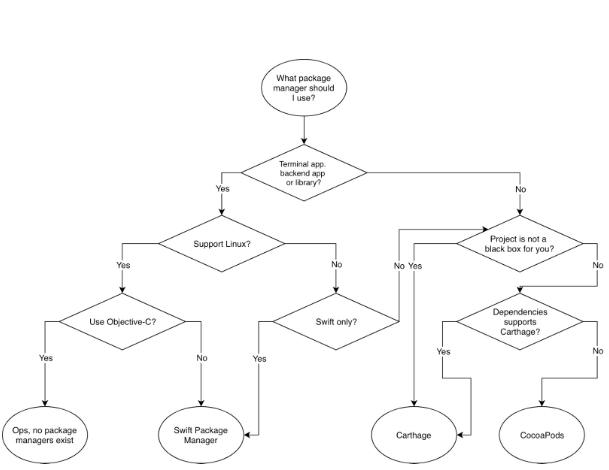
What Package Manager should we use?
Answer is explained by below shown image.
Summary
Apple has created an official package manager called Swift Package Manager (AKA SPM or SwiftPM) that helps us manage dependencies with the release of Swift 3.0. Cocoapods also serves as a coding center, allowing you to share your work with others. It works on all Apple platforms, iOS, tvOS, watchOS, and macOS. Both dynamic and static libraries are supported (since version 1.5.0). Apple’s Swift package manager is designed to make the development process easier.
Its integration into Xcode 11 marked a watershed moment in the realm of Swift dependency managers. It functions as a user-friendly, fast-working iOS package manager without the need to install other software tools.
Thanks
Much grateful to you for following me and my stories. Happy to have you here, and would like to make it worth your time.


