
Cocktail Recipe Mobile App with Ionic and Vue 3
Part 1 — App Setup and Random Cocktail Tab

A few weeks ago, the team at Ionic announced that they had completed their integration with VueJs. If you’re not familiar with Ionic, it's a framework that allows you to write mobile applications with your favorite Javascript framework/library (Angular, React, or Vue). Now it's not a native mobile application, but it does allow you to access native features like GPS, camera, contacts, etc.
Ionic does all this by wrapping your app in a web view. While it provides many benefits to writing cross platforms app quickly, it is not as performant as native or other cross-platform alternatives (React Native and Flutter). With that said, unless you are creating a cutting-edge app that does significantly more than CRUD operations or has a lot of animations, this is more than enough.
Demo
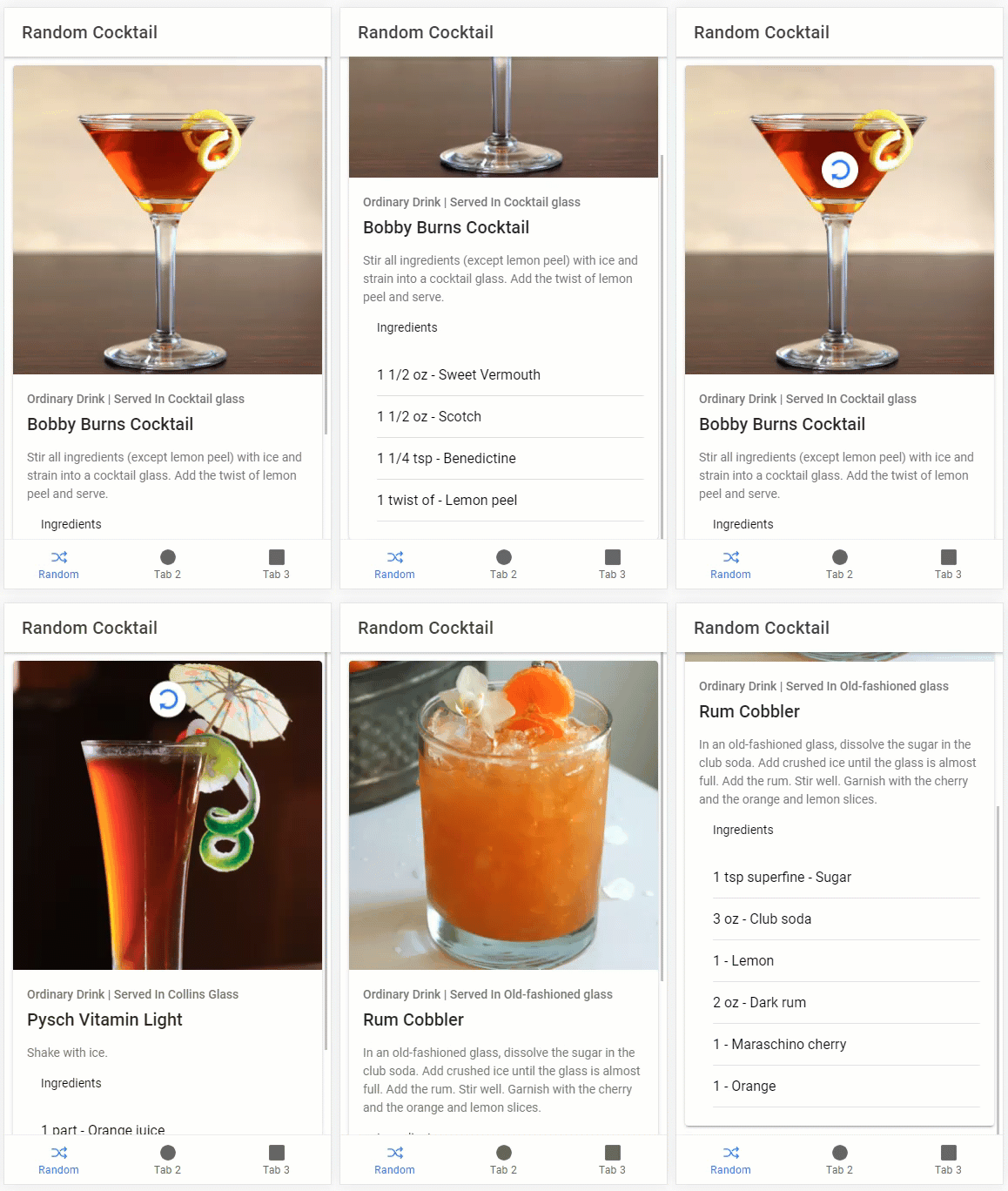
Before we get down to it, let's take a look at a demo of part 1.
Project Setup
Installing the Ionic CLI
The first thing we’re going to do is install the Ionic CLI. To do so, open a terminal and run the following command:
npm install -g @ionic/cliCreating the App
Now that we have the CLI installed, we can create our app. We’ll be using a built-in tabs template by running the following command:
ionic start ionic_cocktails_app tabsThen choose the following:
- Framework: Vue
- Create free Ionic account?: Up to you
Launching the App
Now that we have our app created, open it in your favorite code editor (I’ll be using VS Code). Then open a terminal in the root directory (In VS Code: Terminal => New terminal) and run the following command:
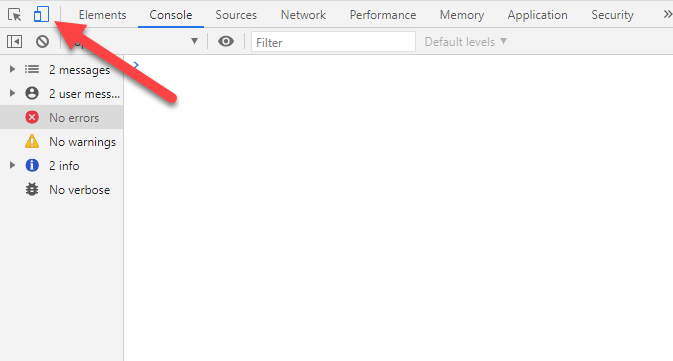
ionic serveThis will launch a new browser window (I’m using chrome). To make the browser look like a phone, hit F12 to launch the dev tools and click on the device toggle button.
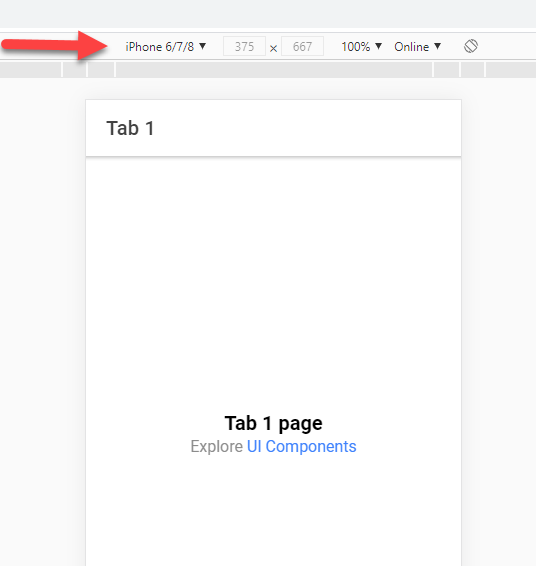
At the top of the browser, select the phone of your choice. I’ll be using iPhone 6/7/8 but you can use whatever you’d like. You can also click edit to add screen sizes of other devices.
API

To get the cocktails into our app we’ll be using TheCocktailDB API. This is a free API with some really useful endpoints. When the user launches the app, we’ll call the random cocktail endpoint. We’ll also have a tab that allows the user to search for a cocktail by name using the search endpoint and another tab to browse by ingredient using the search by ingredient endpoint.
Coding the App
Tab 1 — Random Cocktail
Tab Icon As stated above, the landing page of our app will display a random cocktail to the user. The first thing we’ll do is update the icon and title at the bottom of the first tab. To do so, open src/views/Tabs.vue. In the first tab, we’ll replace the icon with a shuffle icon and the title to Random.
First, we’ll need to import it from ionicons/icons. Since we won't be using the triangle any longer we’ll replace that with shuffle:
import { ellipse, square, shuffle } from 'ionicons/icons';Then replace triangle it in the setup call:
setup() {
 return {
  ellipse,
  square,
  shuffle,
 }
}
Lastly, replace the icon and change the title on the tab itself:
<ion-tab-button tab="tab1" href="/tabs/tab1">
 <ion-icon :icon="shuffle"></ion-icon>
 <ion-label>Random</ion-label>
</ion-tab-button>
Random Cocktail Methods Now we can start on the view. To hold our state, we’ll import reactive from Vue and create a state object. Inside of the state object, we’ll hold a prop for loading and another for our random cocktail.
//top of script tag
import { reactive } from "vue";//in setup
const state = reactive({
randomCocktail: {},
loading: false,
});In order to make calls to the API, we’ll be using Axios. To install it, open a new terminal, and run the following command:
npm install axiosNow that we have Axios installed we can create a new method called fetchRandomCocktail. Since we’ll show a loader on the initial page load and not for refreshes, we’ll pass a Boolean to the method to control that. In the setup method add the following:
//top of script tag
import { axios } from "axios";//in setup
const fetchRandomCocktail = async (displayLoaderPage: boolean) => {
if (displayLoaderPage) {
state.loading = true;
} const res = await axios.get(
"https://www.thecocktaildb.com/api/json/v1/1/random.php"
); if (res.data) {
state.randomCocktail = res.data?.drinks[0];
} state.loading = false;
};Now that we have our fetchRandomCocktail method, let's create another method called doRefresh for when we pull to refresh. There is a Typescript error even though I took the code from the docs, so I just suppressed it.
const doRefresh = (event: CustomEvent) => {
 fetchRandomCocktail(false);
 // eslint-disable-next-line @typescript-eslint/ban-ts-ignore
 //@ts-ignore
 event.target?.complete();
};
The last thing we’ll do in setup is call fetchRandomCocktail(true) and return our setup data for the template.
Template In the template tag, we’ll display all of the drink data in a card. We’ll have an image of the drink, title, and category. Below all of that, we’ll display the instructions and ingredients.
*Note: You’ll see that the API returns 15 drink ingredients and measurements regardless if it's null. So, I opted to add a v-if on those in the template. This does bloat the template, but I felt that looping through all the properties was a little hacky. Let me know what think about it.
In order to display everything, we’ll be importing and using a lot of Ionic components. I could describe every little thing we’ll be doing in the template, but I’ll let the code speak for itself. In the end, your finished file should look like this:
Video Tutorial
Conclusion
So to recap, we have our App all set up for development and we’ve developed our random cocktail page that the user will land on. In part 2, we’re going to wire up our search by cocktail name and search by cocktail ingredient pages. Let me know if you have any questions, comments, or concerns below. And, until next time, Happy Coding!