
Cloud Network Architecture and Naming Conventions
ACM.41 Resources that span applications, projects, and departments
~~~~~~~~~~~~~~~~~~~~~~~~~~~~~~~~~~~~~~~~~~~~~~~~~~~~~~~~~
⚙️ Check out my series on Automating Cybersecurity Metrics. The Code.
🔒 Related Stories: AWS Security | Cloud Security Architecture | Network Security
💻 Free Content on Jobs in Cybersecurity | ✉️ Sign up for the Email List
~~~~~~~~~~~~~~~~~~~~~~~~~~~~~~~~~~~~~~~~~~~~~~~~~~~~~~~~~
In the last post we took a look at our overall naming conventions in AWS.
In this post, well look more specifically at the types of networking resources that exist and how we might want to identify them with a naming convention.
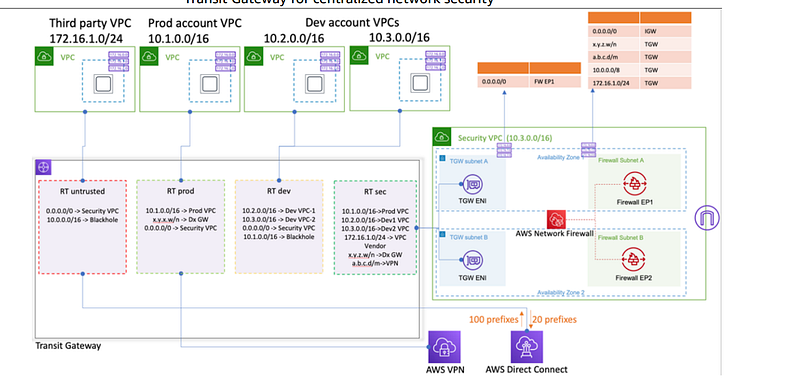
In my last post I wrote about cloud resource naming conventions, but I realized I failed to address a few issues about networking naming conventions. They will likely depend somewhat on your network architecture. Not all networking infrastructure is or should be tied to a specific resource, project, team, or department. Sometimes it might be, sometimes not.
I was on the original Capital One cloud engineering team and at some point I landed on the cloud networking team. We had to implement the networking for 11,000 developers anxiously awaiting to move their applications to the cloud. Let’s just say that was not an easy feat and I often provide IANS clients tips when it comes to cloud networking on consulting calls.
I wasn’t there at the time of the Capital One breach, nor would I have been involved in the decisions that led up to it. I wrote about it here and I’m looking forward to someone who’s thinking about writing a more detailed account of what happened.
Although Capital One had that breach I think that the initial networking was very well thought out. We did make some mistakes along the way but we had a more secure networking layout than I see in some other environments. The people who designed the network were networking professionals, not developers. Security people were involved to help make decisions at the start.
There’s always room for improvement and some unwanted networking constructs appeared in some environments which we were trying to get fixed when I left. There were also revisions to network architecture decisions along the way which caused some disruption. But for the most part, we tried to implement zero trust and three-tier networking for applications as much as possible when I was there. Capital One also made a feature request which led to the existence of VPC endpoints (S3 endpoints at the time). I know this because I managed the feature list.
The one thing that was really lacking while I was there was automation, and that’s what I’m hoping to help people with in this blog series. Automation would have helped prevent mistakes, deploy networks faster, and ensure our failover environment was always up to date with the correct networking. I addressed those issues at the organization I went to next.
Later Capital One moved me to the security team to help with networking, but another company recruited away to work on an interesting project at a firewall vendor. There, I was able to compare and contrast the physical networking space with cloud constructs using that vendor’s particular device. I have since gone on to test a few other physical networking devices and have written about that on this blog.
There is not a one-to-one translation between on-premises networking and cloud networking, though I try to provide a mapping of the concepts in my cloud security classes using the OSI model. Even with the differences, the concepts and purpose of networking carry over from on-premises to cloud.
People who say identity takes the place of networking in the cloud don’t really understand the purpose and benefits of networking. They may also have missed the statistic that most cloud breaches involve stolen or abused credentials or permissions.
Aim for defense in depth. Networking is an incredibly powerful security control, when networks are properly designed. And it’s not just about blocking bad traffic. It has to do with identifying a breach and limiting the blast radius of a security incident. That’s mentioned in my book and too much to cover right now.
Your security architecture impacts your naming conventions
Networking naming conventions may vary depending on your application and architecture. One of the mistakes we made at Capital One initially was putting every application into its own subnet. You can do that and it wasn’t a terrible idea. It’s just that Capital One was a large organization and that design was not efficient for use of IP address space.
There are different solutions for that problem of IP exhaustion today, but generally you’ll probably use subnets for groups of applications and resources that share common network rules and Internet access requirements. Often subnets will provide broad-based rules due to the limitation in number of rules you can create. Subnets will define rules between networks.
That said, you may have a critical application that, if breached, may have devastating consequences. You may opt to give that resource a completely different VPC and subnets. For example, when I designed the network for the bastion host (jump host) at Capital One, I put it in its own subnet because not only was it a critical resource, it had different networking rules than other resources. I often put deployment systems in their own networks. Security appliances may be in their own networks.
Security groups, on the other hand, are generally zero-trust and associated with a specific resource. Think of a security group on AWS as a host-based firewall, except it resides outside the host. The benefit of those rules existing outside the host is that malware on the host cannot turn them off without access to the cloud APIs that manage those rules.
Security can be more specific in cases where they apply to a particular application or host. They can define specific host to host communication. For example, a specific application server can talk to a specific database based on security group rules while the subnet NACL may allow all the application servers to communicate with all the databases.
Differences between on-premises and cloud networking
When I started working for the firewall vendor, I toyed with creating a with a physical version of the network constructs you can use in the cloud. I don’t know how that product works now, but at the time you couldn’t replicate the zero-trust per device networking rules that you can create with AWS security groups— with any physical networking product I have used.
That’s because these network products didn’t have the concept of creating a group of host-specific rules to apply to any resource on your network. The cloud networking solutions are pushing on-premises networking products in terms of how they implement networking to support zero-trust models like you can implement in the cloud with AWS security groups. Azure and GCP work a bit differently, but there are aspects of zero-trust networking capabilities on all three.
But in the end, resources in the cloud are all software-based and exist on a software platform. That platform can control the networking around each resource deployed on it and track those resources using software.
Physical devices exist in the physical world and are much more challenging to provide a single set of rules to across an on-premises network. Someone could simply unplug a cable and plug that device into another jack in the wall that connects to a different network. They might disconnect from private Wi-Fi or a VPN and connect to the network at a coffee shop. There’s just a lot less ability to control networking on devices that roam and exist outside of a software platform like some clouds can provide*.
* Note that I'm talking about IAAS cloud platforms where you control the networking infrastructure and rules within your account, not SAAS or PAAS. Those concepts are covered in my book if you're not familiar.Networking is not for accounting or organizational hierarchy— it’s for security
The purpose of networking is to restrict access to and from different resources on your network. Some organizations I’ve worked with made the mistake of trying to name and create network architectures based on their organizational hierarchy or who needs to get the bill. That is not the purpose of networking. In fact, those things I just mentioned often change when companies are restructured. Will you restructure your networking and rename everything when that happens?
When considering network design, you start with your entire network, and then you decide which resources on that network should not be able to connect to each other. You design your network architecture based off of that, not off of teams, departments, or accounting needs. It may be that those boundaries align in some organizations but often they do not.
A typical on-premises network will have a DMZ (demilitarized zone) which consists of things that are allowed to connect to the Internet or other untrusted networks. With the use cloud services, your DMZ may span many vendors and services and include users on home networks, but it’s still the concept of all the things that are allowed to connect to the untrusted networks, wherever they exist.
Then you have things that need to be exist private networks that cannot connect directly to untrusted networks such as the Internet. These are the devices that you don’t want attackers to get to — unless they break through something that is allowed to connect to the Internet. Private networks have private as opposed to public IPs. It may be easier to spot malicious traffic on your private network — depending on how it is designed and what protocols you allow.
Private networks may be air gapped — meaning no network access other than to things in that network. That’s pretty much impossible to do in a cloud environment because somehow you have to connect to those resources, you can’t just walk up to a computer and login. However, you can get close if you have tight security in terms of remote access and good security controls on the systems used for remote access. Essentially, you air gap the cloud network plus the machines that access it. (And of course you need to understand all the connections at the cloud provider based on which services you use there and how they are configured.)
You may want to further segregate your resources in a private network. Networks on-premises are generally divided up into smaller segments by firewalls, subnets, or VLANs. These constructs are used to further restrict which devices on the network can connect to one another within your own network. Similar constructs exist by way of AWS VPCs, subnets, and route tables.
Host based firewalls run on an operating system to allow or deny traffic in case network controls fail. You can still use host-based firewalls in the cloud but you can also use security groups. Security groups allow you to create resource specific rules that block traffic but the security groups do not reside on the resource. These rules are enforced by the cloud platform.
Networking Architecture and Design on AWS
When we’re talking about AWS, you have the option to create VPCs (virtual private clouds) which are like your overall networks and subnets which can divide your resources up based on what needs to connect to what on the network and what needs to be private or public. Security groups are associated with a resource but a security group can also be associated with multiple resources, or multiple security groups can be associated with a single resource.
When you’re designing networks you will have limitations on how many rules you can create with some types of networking constructs. For example, subnets are limited to 20 inbound and 20 outbound rules and security groups can have up to 60 rules (it used to be 50 when I was working at Capital One). You can apply up to 5 security groups to a resource but not go beyond the 1000 rule limit for all 5 groups. Generally the quotas apply separately to IPV4 and IPV6. This information can change at any time so refer to the documentation for the most accurate information.
Due to prior limitations on security group rules in the past I had to change my desired networking design. In a very complex Active Directory environment with a lot of forests and different Active Directory servers, it turned out that I needed more than 250 rules which was the limit at the time. When you’re approaching that number of rules, it begs the question as to whether the overall architecture design needs some changes, but the point is that I had to get creative with combination of subnet network access control lists and security group rules to make the design work. That means my general rules above didn’t really apply in this case.
Now the network rule limits are higher and some that could not be increased at the time can be. Perhaps I would not have the same problem now, but the point is that every situation is different and there’s not a single solution when it comes to networking. People always as for a “reference implementation” and although some exist, your network design is really dependent on your application architecture, organizational security requirements, and existing network connections that the network needs to continue to support.
Network Naming Conventions
There’s really no way to cover everything about networking here but the point is that the networking is not completely aligned to a resource, nor is it completely aligned to your accounting or organizational hierarchy. It’s really about what things on your network need to connect to what other things. The constructs you use may span multiple resources and projects or be aligned with a particular resource. That’s why I can’t completely tell you how I’m going to name the network resources for this particular architecture yet.
However, it appears that networking is a more global infrastructure like IAM, so perhaps it will be a good idea to name network resources starting with the prefix “network”. We don’t yet have a VPC except for the one I’m using to connect to a VM to run my scripts. Let’s say that I’m just starting out in the cloud and this is a test environment to come up with our proposed architecture in the future. Perhaps I will call this a Sandbox. Let’s say I have two developers testing things out in my sandbox and each is working from home with a separate source IP address. My network naming convention might look like this:
network-sandbox-vpc
network-sandbox-subnet
network-sandbox-securitygroup-Developer1
network-sandbox-securitygroup-Developer2
Now let’s say I require the developers to connect to a VPN before they can connect to the sandbox. Now my network might look like this:
network-vpn-vpc
network-vpn-subnet
network-vpn-securitygroup-clientnetwork-sandbox-vpc
network-sandbox-subnet
network-sandbox-securitygroup-vpnLet’s say I want to start deploying two web applications. I recommend a three-tier network in many cases. I could use separate VPCs or separate subnets for my tiers. I decide I’m going to use three subnets for my three tier network. My network naming conventions might look like this:
network-webapp-vpc
network-webapp-subnet-WebTier
network-webapp-subnet-APITier
network-webapp-subnet-DataTier
network-webapp-securitygroup-App1
network-webapp-securitygroup-App2
Maybe you use your own DNS server and you need all resources to connect to it. You consider creating a common DNS security group. You also have other shared services that must connect to every host like a security scanning appliance. You decide to create a VPC and subnets for shared services and separate security groups for the servers (the things hosted in the shared services VPC) and the clients (the hosts that need to access or be accessed by the shared services). You might have names like this:
network-sharedservices-vpc
network-sharedservices-subnet
network-sharedservices-secruitygroup-server
network-sharedservices-secruitygroup-client
If you want to know why you should create a separate security group if you have rules shared by multiple hosts that would require you to add the same rule over and over again in every security group, read this post in my series on secure software and the DRY (Do Not Repeat Yourself) principle. But don’t start adding rules to a common security group unless every host to which that group is applied needs all the rules in that group. Otherwise you’re exposing hosts to things they don’t need to access or vice versa.
Often organizations will have separate groups of people who develop and test applications and then they get deployed to a production environment. You can create separate networking for each group or create separate accounts. You might also have a large organization with multiple lines of business that each have their own development, test, and production environments. Some organizations might opt to use a shared VPC because they can more easily manage the networking across all these groups.
There’s one other thing I’m thinking about and that is how to leverage my naming conventions in IAM policies. I might change the naming convention to the following as a result:
network-[region]-[resourcetype]-[CamelCaseName]Keep reading this series for more information on why I’m thinking about doing that — I’m still testing a few things out.
As you can see there’s no one right answer for network naming conventions and will depend on your network architecture as I mentioned earlier. Networking is very complex and I generally recommend a separate networking team who specializes in networking for the same reasons I recommend a separate IAM team if your organization is large enough.
Of course there are other types of networking resources besides those mentioned in this post. I would likely name any network related appliance, gateway, route table or other infrastructure which will have similar naming considerations.
In this series, I’m not yet sure what the networking will look like. We’ll define the names for our networking resources when we get there but they will start with the prefix “network-”. Additionally, we aren’t using a traditional architecture in this case. We’re using serverless resources. The networking for serverless is the same in some ways, different in others. I’ll explain that in future posts.
Follow for updates.
Teri Radichel | © 2nd Sight Lab 2022
About Teri Radichel:
~~~~~~~~~~~~~~~~~~~~
⭐️ Author: Cybersecurity Books
⭐️ Presentations: Presentations by Teri Radichel
⭐️ Recognition: SANS Award, AWS Security Hero, IANS Faculty
⭐️ Certifications: SANS ~ GSE 240
⭐️ Education: BA Business, Master of Software Engineering, Master of Infosec
⭐️ Company: Penetration Tests, Assessments, Phone Consulting ~ 2nd Sight Lab
Need Help With Cybersecurity, Cloud, or Application Security?
~~~~~~~~~~~~~~~~~~~~~~~~~~~~~~~~~~~~~~~~~~~~~~~~~~~~~~~~~~~~~
🔒 Request a penetration test or security assessment
🔒 Schedule a consulting call
🔒 Cybersecurity Speaker for PresentationFollow for more stories like this:
~~~~~~~~~~~~~~~~~~~~~~~~~~~~~~~~~~~~~~~~~~~~~~~~~~~~~~~~~~~~~
❤️ Sign Up my Medium Email List
❤️ Twitter: @teriradichel
❤️ LinkedIn: https://www.linkedin.com/in/teriradichel
❤️ Mastodon: @teriradichel@infosec.exchange
❤️ Facebook: 2nd Sight Lab
❤️ YouTube: @2ndsightlab


