avatarAakif Shaikh, CISSP, CEH, CHFI, CISA, GWAPT

Free AI web copilot to create summaries, insights and extended knowledge, download it at here

9705

Abstract

/span> <span class="hljs-bullet">-</span> <span class="hljs-attr">type:</span> <span class="hljs-string">password-policy</span> <span class="hljs-attr">key:</span> <span class="hljs-string">RequireSymbols</span> <span class="hljs-attr">value:</span> <span class="hljs-literal">false</span> <span class="hljs-bullet">-</span> <span class="hljs-attr">type:</span> <span class="hljs-string">password-policy</span> <span class="hljs-attr">key:</span> <span class="hljs-string">RequireNumbers</span> <span class="hljs-attr">value:</span> <span class="hljs-literal">false</span> <span class="hljs-bullet">-</span> <span class="hljs-attr">type:</span> <span class="hljs-string">password-policy</span> <span class="hljs-attr">key:</span> <span class="hljs-string">MinimumPasswordLength</span> <span class="hljs-attr">value:</span> <span class="hljs-number">14</span> <span class="hljs-attr">op:</span> <span class="hljs-string">lt</span> <span class="hljs-bullet">-</span> <span class="hljs-attr">type:</span> <span class="hljs-string">password-policy</span> <span class="hljs-attr">key:</span> <span class="hljs-string">PasswordReuserPrevention</span> <span class="hljs-attr">value:</span> <span class="hljs-number">24</span> <span class="hljs-attr">op:</span> <span class="hljs-string">lt</span> <span class="hljs-bullet">-</span> <span class="hljs-attr">type:</span> <span class="hljs-string">password-policy</span> <span class="hljs-attr">key:</span> <span class="hljs-string">MaxPasswordAge</span> <span class="hljs-attr">value:</span> <span class="hljs-number">90</span> <span class="hljs-attr">op:</span> <span class="hljs-string">lt</span> <span class="hljs-attr">mode:</span> <span class="hljs-attr">schedule:</span> <span class="hljs-string">"rate(24 hours)"</span> <span class="hljs-attr">type:</span> <span class="hljs-string">periodic</span> <span class="hljs-attr">execution-options:</span> <span class="hljs-attr">output_dir:</span> <span class="hljs-string">s3://s3bucket/path/{account_id}/</span> <span class="hljs-attr">runtime:</span> <span class="hljs-string">python3.8</span></pre></div><p id="d104">1.10 Ensure multi-factor authentication (MFA) is enabled for all IAM users that have a console password (Automated)</p><div id="d36d"><pre><span class="hljs-attr">policies:</span> <span class="hljs-bullet">-</span> <span class="hljs-attr">name:</span> <span class="hljs-string">cis-iam-user-needs-mfa</span> <span class="hljs-attr">resource:</span> <span class="hljs-string">aws.iam-user</span> <span class="hljs-attr">comment:</span> <span class="hljs-string">| CIS AWS Foundations v1.4.0 (1.10) Multi-factor Authentication (MFA) adds an extra layer of authentication assurance beyond traditional credentials. With MFA enabled, when a user signs in to the AWS console, they will be prompted for their username and password as well as for an authentication code from their physical or virtual MFA device. It is highly recommended that MFA be enabled for all accounts that have a console password. </span> <span class="hljs-attr">filters:</span> <span class="hljs-bullet">-</span> <span class="hljs-attr">type:</span> <span class="hljs-string">credential</span> <span class="hljs-attr">key:</span> <span class="hljs-string">password_enabled</span> <span class="hljs-attr">value:</span> <span class="hljs-literal">true</span> <span class="hljs-bullet">-</span> <span class="hljs-attr">type:</span> <span class="hljs-string">credential</span> <span class="hljs-attr">key:</span> <span class="hljs-string">mfa_active</span> <span class="hljs-attr">value:</span> <span class="hljs-literal">false</span> <span class="hljs-attr">mode:</span> <span class="hljs-attr">schedule:</span> <span class="hljs-string">"rate(24 hours)"</span> <span class="hljs-attr">type:</span> <span class="hljs-string">periodic</span> <span class="hljs-attr">execution-options:</span> <span class="hljs-attr">output_dir:</span> <span class="hljs-string">s3://s3bucket/path/{account_id}/</span> <span class="hljs-attr">runtime:</span> <span class="hljs-string">python3.8</span></pre></div><p id="11f3">1.11 Do not set up access keys during initial user setup for all IAM users that have a console password (Manual)</p><div id="abbd"><pre><span class="hljs-attr">policies:</span> <span class="hljs-bullet">-</span> <span class="hljs-attr">name:</span> <span class="hljs-string">cis-iam-user-with-unused-access-keys</span> <span class="hljs-attr">resource:</span> <span class="hljs-string">aws.iam-user</span> <span class="hljs-attr">comment:</span> <span class="hljs-string">| CIS AWS Foundations v1.4.0 (1.11) </span> <span class="hljs-attr">filters:</span> <span class="hljs-bullet">-</span> <span class="hljs-attr">type:</span> <span class="hljs-string">credential</span> <span class="hljs-attr">key:</span> <span class="hljs-string">password_enabled</span> <span class="hljs-attr">value:</span> <span class="hljs-literal">true</span> <span class="hljs-bullet">-</span> <span class="hljs-attr">type:</span> <span class="hljs-string">credential</span> <span class="hljs-attr">key:</span> <span class="hljs-string">access_keys.active</span> <span class="hljs-attr">value:</span> <span class="hljs-literal">true</span> <span class="hljs-bullet">-</span> <span class="hljs-attr">type:</span> <span class="hljs-string">credential</span> <span class="hljs-attr">key:</span> <span class="hljs-string">access_keys.last_used_date</span> <span class="hljs-attr">value:</span> <span class="hljs-string">absent</span> <span class="hljs-attr">mode:</span> <span class="hljs-attr">schedule:</span> <span class="hljs-string">"rate(24 hours)"</span> <span class="hljs-attr">type:</span> <span class="hljs-string">periodic</span> <span class="hljs-attr">execution-options:</span> <span class="hljs-attr">output_dir:</span> <span class="hljs-string">s3://s3bucket/path/{account_id}/</span> <span class="hljs-attr">runtime:</span> <span class="hljs-string">python3.8</span></pre></div><p id="2d6d">1.12 Ensure credentials unused for 45 days or greater are disabled (Automated)</p><div id="f1c9"><pre><span class="hljs-attr">policies:</span> <span class="hljs-bullet">-</span> <span class="hljs-attr">name:</span> <span class="hljs-string">cis-iam-stale-credentials</span> <span class="hljs-attr">resource:</span> <span class="hljs-string">aws.iam-user</span> <span class="hljs-attr">comment:</span> <span class="hljs-string">| CIS AWS Foundations v1.4.0 (1.12) AWS IAM users can access AWS resources using different types of credentials such as passwords or access keys. It is recommended
that all credentials that have been unused in 45 or greater days be deactivated or removed. </span> <span class="hljs-attr">filters:</span> <span class="hljs-bullet">-</span> <span class="hljs-attr">or:</span> <span class="hljs-bullet">-</span> <span class="hljs-attr">and:</span> <span class="hljs-bullet">-</span> <span class="hljs-attr">type:</span> <span class="hljs-string">credential</span> <span class="hljs-attr">key:</span> <span class="hljs-string">password_enabled</span> <span class="hljs-attr">value:</span> <span class="hljs-literal">true</span> <span class="hljs-bullet">-</span> <span class="hljs-attr">type:</span> <span class="hljs-string">credential</span> <span class="hljs-attr">key:</span> <span class="hljs-string">password_last_used</span> <span class="hljs-attr">value:</span> <span class="hljs-number">45</span> <span class="hljs-attr">op:</span> <span class="hljs-string">gt</span> <span class="hljs-attr">value_type:</span> <span class="hljs-string">age</span> <span class="hljs-bullet">-</span> <span class="hljs-attr">and:</span> <span class="hljs-bullet">-</span> <span class="hljs-attr">type:</span> <span class="hljs-string">credential</span> <span class="hljs-attr">key:</span> <span class="hljs-string">access_keys.active</span> <span class="hljs-attr">value:</span> <span class="hljs-literal">true</span> <span class="hljs-bullet">-</span> <span class="hljs-attr">type:</span> <span class="hljs-string">credential</span> <span class="hljs-attr">key:</span> <span class="hljs-string">access_keys.last_used_date</span> <span class="hljs-attr">value:</span> <span class="hljs-number">45</span> <span class="hljs-attr">op:</span> <span class="hljs-string">gt</span> <span class="hljs-attr">value_type:</span> <span class="hljs-string">age</span> <span class="hljs-attr">mode:</span> <span class="hljs-attr">schedule:</span> <span class="hljs-string">"rate(24 hours)"</span> <span class="hljs-attr">type:</span> <span class="hljs-string">periodic</span> <span class="hljs-attr">execution-options:</span> <span class="hljs-attr">output_dir:</span> <span class="hljs-string">s3://s3bucket/path/{account_id}/</span> <span class="hljs-attr">runtime:</span> <span class="hljs-string">python3.8</span></pre></div><p id="4b23">1.13 Ensure there is only one active access key available for any single IAM user — Level 1 (Automated)</p><div id="f9bd"><pre>policies:

  • name: cis-iam-user-with-active-<span class="hljs-built_in">keys</span> resource: aws.iam-user comment: | CIS AWS Foundations v1.<span class="hljs-number">4.0</span> (<span class="hljs-number">1.

Options

13</span>) Access <span class="hljs-built_in">keys</span> are long-term credentials <span class="hljs-keyword">for</span> <span class="hljs-keyword">an</span> IAM user <span class="hljs-built_in">or</span> the AWS account root user. You can use access <span class="hljs-built_in">keys</span> <span class="hljs-keyword">to</span> <span class="hljs-keyword">sign</span> programmatic
requests <span class="hljs-keyword">to</span> the AWS CLI <span class="hljs-built_in">or</span> AWS API. One of the best ways <span class="hljs-keyword">to</span> protect your account <span class="hljs-keyword">is</span> <span class="hljs-keyword">to</span> not allow users <span class="hljs-keyword">to</span> have multiple access <span class="hljs-built_in">keys</span>. This policy provides <span class="hljs-keyword">all</span> the <span class="hljs-built_in">keys</span> that are activated <span class="hljs-keyword">for</span> the IAM user <span class="hljs-keyword">for</span> investigation. filters: - <span class="hljs-built_in">type</span>: access-key key: Status value: Active <span class="hljs-keyword">mode</span>: schedule: <span class="hljs-string">"rate(24 hours)"</span> <span class="hljs-built_in">type</span>: periodic execution-<span class="hljs-keyword">options</span>: output_dir: s3://s3bucket/path/{account_id}/ <span class="hljs-keyword">runtime</span>: <span class="hljs-keyword">python3</span>.<span class="hljs-number">8</span></pre></div><p id="7e88">1.14 Ensure access keys are rotated every 90 days or less — Level 1 (Automated)</p><div id="d7f0"><pre><span class="hljs-attr">policies:</span> <span class="hljs-bullet">-</span> <span class="hljs-attr">name:</span> <span class="hljs-string">cis-iam-user-key-rotation</span> <span class="hljs-attr">resource:</span> <span class="hljs-string">aws.iam-user</span> <span class="hljs-attr">comment:</span> <span class="hljs-string">| CIS AWS Foundations v1.4.0 (1.14). Access keys should be rotated to ensure that data cannot be
accessed with an old key which might have been lost, cracked, or stolen. Rotating access keys will reduce that window of opportunity for an access key that is associated with a
compromised or terminated account to be used. </span> <span class="hljs-attr">filters:</span> <span class="hljs-bullet">-</span> <span class="hljs-attr">type:</span> <span class="hljs-string">credential</span> <span class="hljs-attr">key:</span> <span class="hljs-string">access_keys.active</span> <span class="hljs-attr">value:</span> <span class="hljs-literal">true</span> <span class="hljs-bullet">-</span> <span class="hljs-attr">type:</span> <span class="hljs-string">credential</span> <span class="hljs-attr">key:</span> <span class="hljs-string">access_keys.last_rotated</span> <span class="hljs-attr">value:</span> <span class="hljs-number">90</span> <span class="hljs-attr">op:</span> <span class="hljs-string">gt</span> <span class="hljs-attr">value_type:</span> <span class="hljs-string">age</span> <span class="hljs-attr">mode:</span> <span class="hljs-attr">schedule:</span> <span class="hljs-string">"rate(24 hours)"</span> <span class="hljs-attr">type:</span> <span class="hljs-string">periodic</span> <span class="hljs-attr">execution-options:</span> <span class="hljs-attr">output_dir:</span> <span class="hljs-string">s3://s3bucket/path/{account_id}/</span> <span class="hljs-attr">runtime:</span> <span class="hljs-string">python3.8</span></pre></div><p id="2941">1.15 Ensure IAM Users Receive Permissions Only Through Groups (Automated)</p><div id="7ba6"><pre><span class="hljs-attr">policies:</span> <span class="hljs-bullet">-</span> <span class="hljs-attr">name:</span> <span class="hljs-string">cis-iam-user-has-inline-or-direct-policy-attached</span> <span class="hljs-attr">resource:</span> <span class="hljs-string">aws.iam-user</span> <span class="hljs-attr">comment:</span> <span class="hljs-string">| CIS AWS Foundations v1.4.0 (1.15). Identifies IAM user if any policies are attached to it (either
in-line or directly attached). </span><span class="hljs-attr">filters:</span> <span class="hljs-bullet">-</span> <span class="hljs-attr">or:</span> <span class="hljs-bullet">-</span> <span class="hljs-attr">has-inline-policy:</span> <span class="hljs-literal">true</span> <span class="hljs-bullet">-</span> <span class="hljs-attr">type:</span> <span class="hljs-string">policy</span> <span class="hljs-attr">key:</span> <span class="hljs-string">PolicyName</span> <span class="hljs-attr">value:</span> <span class="hljs-string">not-null</span> <span class="hljs-attr">mode:</span> <span class="hljs-attr">schedule:</span> <span class="hljs-string">"rate(24 hours)"</span> <span class="hljs-attr">type:</span> <span class="hljs-string">periodic</span> <span class="hljs-attr">execution-options:</span> <span class="hljs-attr">output_dir:</span> <span class="hljs-string">s3://s3bucket/path/{account_id}/</span> <span class="hljs-attr">runtime:</span> <span class="hljs-string">python3.8</span></pre></div><p id="09f4">1.16 Ensure IAM policies that allow full “:” administrative privileges are not attached (Automated)</p><div id="9497"><pre>policies:

  • name: cis-iam-<span class="hljs-keyword">no</span>-used-<span class="hljs-keyword">all</span>-<span class="hljs-keyword">all</span>-policy resource: aws.iam-policy comment: | CIS AWS Foundations v1.<span class="hljs-number">4.0</span> (<span class="hljs-number">1.16</span>). Providing full administrative privileges instead of restricting <span class="hljs-keyword">to</span> the minimum <span class="hljs-keyword">set</span> of permissions that the user <span class="hljs-keyword">is</span> required <span class="hljs-keyword">to</span> <span class="hljs-keyword">do</span> exposes the resources <span class="hljs-keyword">to</span> potentially unwanted actions. filters:
    • <span class="hljs-built_in">type</span>: used
    • <span class="hljs-built_in">type</span>: <span class="hljs-built_in">has</span>-allow-<span class="hljs-keyword">all</span> <span class="hljs-keyword">mode</span>: schedule: <span class="hljs-string">"rate(24 hours)"</span> <span class="hljs-built_in">type</span>: periodic execution-<span class="hljs-keyword">options</span>: output_dir: s3://s3bucket/path/{account_id}/ <span class="hljs-keyword">runtime</span>: <span class="hljs-keyword">python3</span>.<span class="hljs-number">8</span></pre></div><p id="1961">1.17 Ensure a support role has been created to manage incidents with AWS Support — Level 1 (Automated)</p><div id="61bb"><pre><span class="hljs-attr">policies:</span> <span class="hljs-bullet">-</span> <span class="hljs-attr">name:</span> <span class="hljs-string">cis-iam-policy-for-support-is-used</span> <span class="hljs-attr">resource:</span> <span class="hljs-string">aws.iam-policy</span> <span class="hljs-attr">comment:</span> <span class="hljs-string">| CIS AWS Foundations v1.4.0 (1.17). By implementing least privilege for access control, an IAM role will require an appropriate IAM Policy to allow support center access in order to manage incidents with AWS support. </span> <span class="hljs-attr">filters:</span> <span class="hljs-bullet">-</span> <span class="hljs-attr">type:</span> <span class="hljs-string">unused</span> <span class="hljs-bullet">-</span> <span class="hljs-attr">type:</span> <span class="hljs-string">value</span> <span class="hljs-attr">key:</span> <span class="hljs-string">'PolicyName'</span> <span class="hljs-attr">value:</span> <span class="hljs-string">AWSSupportAccess</span> <span class="hljs-attr">mode:</span> <span class="hljs-attr">schedule:</span> <span class="hljs-string">"rate(24 hours)"</span> <span class="hljs-attr">type:</span> <span class="hljs-string">periodic</span> <span class="hljs-attr">execution-options:</span> <span class="hljs-attr">output_dir:</span> <span class="hljs-string">s3://s3bucket/path/{account_id}/</span> <span class="hljs-attr">runtime:</span> <span class="hljs-string">python3.8</span></pre></div><p id="0097">The remaining policies have been continued in <a href="https://ismsguy.medium.com/cloud-custodian-policies-for-cis-aws-foundations-benchmark-part-2-6101148cebb7">Part — 2</a>. We have also written other stories related to Cloud Custodian-</p><p id="5c8e"><a href="https://ismsguy.medium.com/what-is-a-cloud-custodian-c33b37b6060?sk=abdf0ee30e5ea4fe2cd15a346005ac16">What is a Cloud Custodian?</a></p><p id="852a"><a href="https://ismsguy.medium.com/treating-the-mishmash-of-missing-tag-resources-in-aws-using-the-cloud-custodian-part-1-63ca506f12f2?source=your_stories_page-------------------------------------">Treating the Mishmash of Missing Tag Resources in AWS using the Cloud Custodian (Part 1)</a></p><p id="62ac"><a href="https://ismsguy.medium.com/tried-replacing-the-cloud-custodian-with-something-else-1ffcf9c76dc8?source=your_stories_page-------------------------------------">Tried replacing the Cloud Custodian with Something else…</a></p><p id="06b8">Policies related to Azure- <a href="https://ismsguy.medium.com/cloud-custodian-policies-for-azure-webapp-57d38428fe1b">WebApp</a> and <a href="https://ismsguy.medium.com/cloud-custodian-policies-for-sql-database-and-sql-server-3f01b0e4fa21">SQLDatabase</a></p><p id="010f"><a href="https://ismsguy.medium.com/membership">https://ismsguy.medium.com/membership</a></p></article></body>

Cloud Custodian Policies for CIS AWS Foundations Benchmark (Part 1)

Version 1.4.0–05–28–2021

Center for Internet Security (CIS) Benchmarks is a huge community effort at a greater scale from volunteers, developers, subject matter experts, technology vendors, cloud providers, private, and public companies. It defines the best practices for secure configuring your public cloud resources. It is widely accepted by government, business, industry, and academia. The benchmark guidelines are specific to vendor products. They would recommend specific settings in the vendor product i.e., where to check for that configuration setting and how to modify it to make it secure.

CIS Benchmark has worked with the community to publish a benchmark for various cloud providers like Alibaba, AWS, Google Cloud, IBM Cloud, Azure, Oracle Cloud, and others. In this story, we will discuss how to write the Cloud Custodian policies to do those recommendation checks. Download the free copy of CIS AWS Foundation Benchmark from cisecurity.org
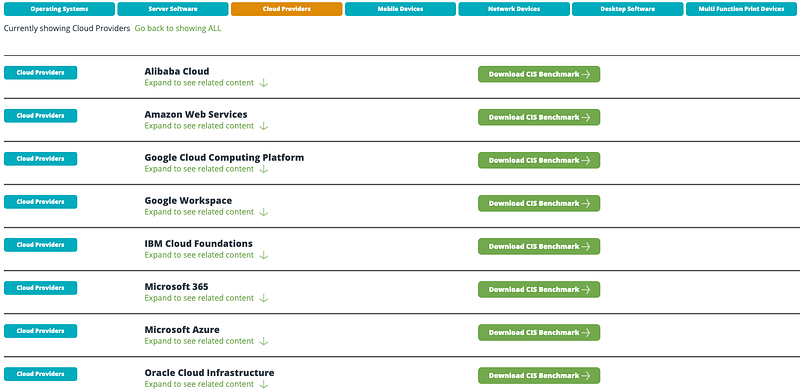
Screenshot from CIS Benchmark — Cloud Providers

CIS Amazon Web Services Foundations Benchmark v1.4.0 has two profile levels- Level 1 and Level 2. The level 1 items are defined to reduce the attack surface without making major changes to the business functionality. The level 2 item extends the level 1 profile and is considered to be layered defense and intended where security is serious business.
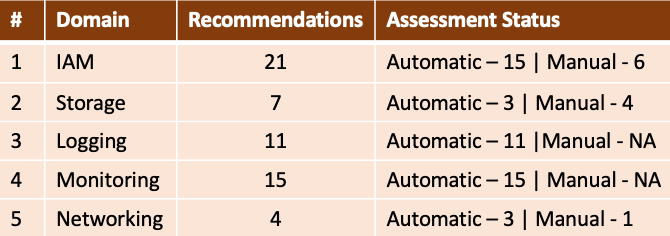
Organizations can use the Cloud Custodian to check on the security configurations for their public cloud resources to meet the CIS Benchmark recommendations. You can define the cloud custodian to either notify or take actions to perform the auto-remediation. Check my other stories where I have explained the Cloud Custodian and how to write the YAML policies.

Cloud Custodian is an Awesome Gift from the Open Source Community.

CIS AWS Foundation Benchmark Cloud Custodian Policies

1.4 Ensure no root user account access key exists — Level 1 (Automated)

policies:
- name: cis-no-root-access-keys
  resource: aws.account
  comment: |
    CIS AWS Foundations v1.4.0 (1.4)
    The root user account is the most privileged user in AWS.
    AWS access keys provide programmatic access to a given AWS        
    account. It is recommended that all access keys associated with 
    the root account be removed. 
  filters:
    - type: iam-summary
      key: AccountAccessKeysPresent
      op: eq
      value: true
      value_type: swap
  mode:
    schedule: "rate(24 hours)"
    type: periodic
    execution-options:
      output_dir: s3://s3bucket/path/{account_id}/
    runtime: python3.8

1.5 Ensure MFA is enabled for the “root user” account (Automated)

policies:
- name: cis-root-must-use-mfa
  resource: aws.account
  comment: |
    CIS AWS Foundations v1.4.0 (1.5)
    The root user account is the most privileged user in AWS.
    Multi-factor Authentication (MFA) adds an extra layer of 
    protection on top of a username and password. With MFA enabled, 
    when a user signs in to an AWS website, they will be prompted 
    for their username and password as well as for an authentication 
    code from their AWS MFA device.
  filters:
    - type: iam-summary
      key: AccountMFAEnabled
      op: eq
      value: false
      value_type: swap
  mode:
    schedule: "rate(24 hours)"
    type: periodic
    execution-options:
      output_dir: s3://s3bucket/path/{account_id}/
    runtime: python3.8

1.7 Eliminate use of the root user for administrative and daily tasks (Automated)

policies:
- name: cis-iam-user-for-daily-tasks
  resource: aws.iam-user
  comment: |
    CIS AWS Foundations v1.4.0 (1.7)
    With the creation of an AWS account, a root user is created that 
    cannot be disabled ot deleted. That user has unrestricted access 
    to and control over all resources in the AWS account. It is 
    highly recommended that the use of this account be avoided for 
    everyday tasks.
  filters:
    - type: credential
      key: password_last_used
      op: lt
      value: 7
      value_type: age
    - type: credential
      key: access_keys.last_used_date
      op: lt
      value: 7
      value_type: age  
  mode:
    schedule: "rate(24 hours)"
    type: periodic
    execution-options:
      output_dir: s3://s3bucket/path/{account_id}/
    runtime: python3.8

1.8 Ensure IAM password policy requires a minimum length of 14 or greater (Automated)

1.9 Ensure IAM password policy prevents password reuse (Automated)

policies:
- name: cis-password-policy
  resource: aws.iam-user
  comment: |
    CIS AWS Foundations v1.4.0 (1.8 and 1.9)
    Check on your password policy- for lowercase, uppercase, 
    numbers, symbols, minimum length, password re-use prevention,     
    and maximum age.
  filters:
    - or:
      - type: password-policy
        key: RequireLowercaseCharacters
        value: false
      - type: password-policy
        key: RequireUppercaseCharacters
        value: false
      - type: password-policy
        key: RequireSymbols
        value: false
      - type: password-policy
        key: RequireNumbers
        value: false
      - type: password-policy
        key: MinimumPasswordLength
        value: 14
        op: lt
      - type: password-policy
        key: PasswordReuserPrevention
        value: 24
        op: lt
      - type: password-policy
        key: MaxPasswordAge
        value: 90
        op: lt
  mode:
    schedule: "rate(24 hours)"
    type: periodic
    execution-options:
      output_dir: s3://s3bucket/path/{account_id}/
    runtime: python3.8

1.10 Ensure multi-factor authentication (MFA) is enabled for all IAM users that have a console password (Automated)

policies:
- name: cis-iam-user-needs-mfa
  resource: aws.iam-user
  comment: |
    CIS AWS Foundations v1.4.0 (1.10)
    Multi-factor Authentication (MFA) adds an extra layer of 
    authentication assurance beyond traditional credentials. With 
    MFA enabled, when a user signs in to the AWS console, they will 
    be prompted for their username and password as well as for an 
    authentication code from their physical or virtual MFA device. 
    It is highly recommended that MFA be enabled for all accounts 
    that have a console password.
  filters:
    - type: credential
      key: password_enabled
      value: true
    - type: credential
      key: mfa_active
      value: false
  mode:
    schedule: "rate(24 hours)"
    type: periodic
    execution-options:
      output_dir: s3://s3bucket/path/{account_id}/
    runtime: python3.8

1.11 Do not set up access keys during initial user setup for all IAM users that have a console password (Manual)

policies:
- name: cis-iam-user-with-unused-access-keys
  resource: aws.iam-user
  comment: |
    CIS AWS Foundations v1.4.0 (1.11)
  filters:
    - type: credential
      key: password_enabled
      value: true
    - type: credential
      key: access_keys.active
      value: true
    - type: credential
      key: access_keys.last_used_date
      value: absent
  mode:
    schedule: "rate(24 hours)"
    type: periodic
    execution-options:
      output_dir: s3://s3bucket/path/{account_id}/
    runtime: python3.8

1.12 Ensure credentials unused for 45 days or greater are disabled (Automated)

policies:
- name: cis-iam-stale-credentials
  resource: aws.iam-user
  comment: |
    CIS AWS Foundations v1.4.0 (1.12)
    AWS IAM users can access AWS resources using different types of 
    credentials such as passwords or access keys. It is recommended  
    that all credentials that have been unused in 45 or greater days 
    be deactivated or removed.
  filters:
    - or:
      - and: 
        - type: credential
          key: password_enabled
          value: true
        - type: credential
          key: password_last_used
          value: 45
          op: gt
          value_type: age
      - and:
        - type: credential
          key: access_keys.active
          value: true
        - type: credential
          key: access_keys.last_used_date
          value: 45
          op: gt
          value_type: age
  mode:
    schedule: "rate(24 hours)"
    type: periodic
    execution-options:
      output_dir: s3://s3bucket/path/{account_id}/
    runtime: python3.8

1.13 Ensure there is only one active access key available for any single IAM user — Level 1 (Automated)

policies:
- name: cis-iam-user-with-active-keys
  resource: aws.iam-user
  comment: |
    CIS AWS Foundations v1.4.0 (1.13)
    Access keys are long-term credentials for an IAM user or the AWS 
    account root user. You can use access keys to sign programmatic  
    requests to the AWS CLI or AWS API. One of the best ways to 
    protect your account is to not allow users to have multiple 
    access keys. This policy provides all the keys that are 
    activated for the IAM user for investigation.
  filters:
    - type: access-key
      key: Status
      value: Active
  mode:
    schedule: "rate(24 hours)"
    type: periodic
    execution-options:
      output_dir: s3://s3bucket/path/{account_id}/
    runtime: python3.8

1.14 Ensure access keys are rotated every 90 days or less — Level 1 (Automated)

policies:
- name: cis-iam-user-key-rotation
  resource: aws.iam-user
  comment: |
    CIS AWS Foundations v1.4.0 (1.14).
    Access keys should be rotated to ensure that data cannot be  
    accessed with an old key which might have been lost, cracked, or 
    stolen. Rotating access keys will reduce that window of 
    opportunity for an access key that is associated with a    
    compromised or terminated account to be used.
  filters:
    - type: credential
      key: access_keys.active
      value: true
    - type: credential
      key: access_keys.last_rotated
      value: 90
      op: gt
      value_type: age
  mode:
    schedule: "rate(24 hours)"
    type: periodic
    execution-options:
      output_dir: s3://s3bucket/path/{account_id}/
    runtime: python3.8

1.15 Ensure IAM Users Receive Permissions Only Through Groups (Automated)

policies:
- name: cis-iam-user-has-inline-or-direct-policy-attached
  resource: aws.iam-user
  comment: |
    CIS AWS Foundations v1.4.0 (1.15).
    Identifies IAM user if any policies are attached to it (either   
    in-line or directly attached).
filters:
    - or: 
      - has-inline-policy: true 
      - type: policy
        key: PolicyName
        value: not-null
  mode:
    schedule: "rate(24 hours)"
    type: periodic
    execution-options:
      output_dir: s3://s3bucket/path/{account_id}/
    runtime: python3.8

1.16 Ensure IAM policies that allow full “*:*” administrative privileges are not attached (Automated)

policies:
- name: cis-iam-no-used-all-all-policy
  resource: aws.iam-policy
  comment: |
    CIS AWS Foundations v1.4.0 (1.16).
    Providing full administrative privileges instead of restricting 
    to the minimum set of permissions that the user is required to 
    do exposes the resources to potentially unwanted actions.
  filters:
    - type: used
    - type: has-allow-all
  mode:
    schedule: "rate(24 hours)"
    type: periodic
    execution-options:
      output_dir: s3://s3bucket/path/{account_id}/
    runtime: python3.8

1.17 Ensure a support role has been created to manage incidents with AWS Support — Level 1 (Automated)

policies:
- name: cis-iam-policy-for-support-is-used
  resource: aws.iam-policy
  comment: |
    CIS AWS Foundations v1.4.0 (1.17).
    By implementing least privilege for access control, an IAM role 
    will require an appropriate IAM Policy to allow support center 
    access in order to manage incidents with AWS support.
  filters:
    - type: unused
    - type: value
      key: 'PolicyName'
      value: AWSSupportAccess
  mode:
    schedule: "rate(24 hours)"
    type: periodic
    execution-options:
      output_dir: s3://s3bucket/path/{account_id}/
    runtime: python3.8

The remaining policies have been continued in Part — 2. We have also written other stories related to Cloud Custodian-

What is a Cloud Custodian?

Treating the Mishmash of Missing Tag Resources in AWS using the Cloud Custodian (Part 1)

Tried replacing the Cloud Custodian with Something else…

Policies related to Azure- WebApp and SQLDatabase

https://ismsguy.medium.com/membership

Cloud Custodian
AWS
Cis Benchmarks
Aws Cis Benchmark
Benchmark
Recommended from ReadMedium