avatarDaniel Lempesis

Free AI web copilot to create summaries, insights and extended knowledge, download it at here

3945

Abstract

s="hljs-number">14</span>,<span class="hljs-number">15</span>,<span class="hljs-number">16</span>,<span class="hljs-number">17</span>]; <span class="hljs-keyword">const</span> primes = [];</pre></div><div id="6a8f"><pre> <span class="hljs-keyword">function</span> <span class="hljs-title function_">isPrime</span>(<span class="hljs-params">number</span>) { <span class="hljs-comment">//this is our closure.</span> <span class="hljs-keyword">if</span> (<span class="hljs-built_in">number</span> < <span class="hljs-number">2</span>) <span class="hljs-keyword">return</span> <span class="hljs-literal">false</span>; <span class="hljs-keyword">else</span> <span class="hljs-keyword">if</span> (<span class="hljs-built_in">number</span> === <span class="hljs-number">2</span>) <span class="hljs-keyword">return</span> <span class="hljs-literal">true</span>;</pre></div><div id="8ccf"><pre> let divisor <span class="hljs-operator">=</span> <span class="hljs-number">2</span><span class="hljs-comment">;</span></pre></div><div id="8040"><pre> <span class="hljs-keyword">while</span> (divisor < <span class="hljs-built_in">number</span>) { <span class="hljs-keyword">if</span> (<span class="hljs-built_in">number</span>%divisor === <span class="hljs-number">0</span>) <span class="hljs-built_in"> return</span> <span class="hljs-literal">false</span>; <span class="hljs-keyword">else</span> divisor += <span class="hljs-number">1</span> }; <span class="hljs-built_in"> return</span> <span class="hljs-literal">true</span> };</pre></div><div id="c81c"><pre> numbers.forEach(<span class="hljs-function"><span class="hljs-params">number</span>=></span> { <span class="hljs-keyword">if</span> (isPrime(<span class="hljs-built_in">number</span>)) <span class="hljs-comment">//isPrime() closure is being called here</span> primes.<span class="hljs-built_in">push</span>(<span class="hljs-built_in">number</span>) }); <span class="hljs-keyword">return</span> primes };</pre></div><div id="f0a9"><pre><span class="hljs-comment">//returns [2, 3, 5, 7, 11, 13, 17]</span></pre></div><p id="2f1a">In the above example, <code>isPrime()</code> is a closure housed within its parent function, <code>primesUpToSeventeen().</code> Its parent doesn’t know or care what’s happening inside of <code>isPrime()</code>; it doesn’t know anything about its internal variables, what functions (closures!) it may contain (in this case, it doesn’t have any), or even if there are variables declared inside <code>isPrime()</code> which share names with variables in <code>primesUpToSeventeen()</code>'s own scope. All it knows is what <code>isPrime()</code> tells it when it completes its work; in this case,<code>isPrime()</code> is going to return either <code>true</code> or <code>false</code>. That’s all its parent function really knows.<b>*</b></p><p id="e446">So, so far so good; we’re getting somewhere. But the above function is actually a pretty unhelpful example. We could move <code>isPrime()</code> out of <code>primesUpToSeventeen()</code> like this:</p><div id="a08c"><pre><span class="hljs-keyword">function</span> <span class="hljs-title">primesUpToSeventeen</span>() { //primesUpToSeventeen() <span class="hljs-keyword">with</span><span class="hljs-keyword">out</span> isPrime() code here }</pre></div><div id="3cab"><pre><span class="hljs-keyword">function</span> <span class="hljs-title">isPrime</span>(number) { //<span class="hljs-keyword">is</span>Prime code here }</pre></div><p id="e3f0">…and it would behave identically.</p><p id="c87b">Let’s do just that, and then add another step to demonstrate one of the concepts we’ve covered so far: that a closure has access to any variable in any of the functions it’s nested in. Here, we’ll only return numbers if a.) they’re prime, and b.) the result of adding 6 to them is also prime. This is a bit contrived for

Options

the sake of keeping it simple and illustrating this concept, so just pretend our addition is some highly complicated function doing interesting work on the numbers it receives.</p><div id="5dd8"><pre><span class="hljs-variable">function</span> <span class="hljs-title function_">isPrime</span>(<span class="hljs-params">number</span>) { <span class="hljs-comment">//exists in global scope; not a closure</span> <span class="hljs-comment">//...code here</span> };</pre></div><div id="8cc5"><pre><span class="hljs-keyword">function</span> <span class="hljs-title function_">plusSixPrimesUpToSeventeen</span><span class="hljs-params">()</span> { <span class="hljs-comment">//our outer function</span> <span class="hljs-keyword">const</span> numbers = [<span class="hljs-number">2</span>,<span class="hljs-number">3</span>,<span class="hljs-number">4</span>,<span class="hljs-number">5</span>,<span class="hljs-number">6</span>,<span class="hljs-number">7</span>,<span class="hljs-number">8</span>,<span class="hljs-number">9</span>,<span class="hljs-number">10</span>,<span class="hljs-number">11</span>,<span class="hljs-number">12</span>,<span class="hljs-number">13</span>,<span class="hljs-number">14</span>,<span class="hljs-number">15</span>,<span class="hljs-number">16</span>,<span class="hljs-number">17</span>]; <span class="hljs-keyword">const</span> primes = [];</pre></div><div id="9529"><pre> numbers.forEach(number=> { //add primes we find to primes<span class="hljs-built_in"> array </span> <span class="hljs-built_in"> if </span>(isPrime(number)) primes.push(number) });</pre></div><div id="4fbc"><pre> <span class="hljs-keyword">function</span> <span class="hljs-title function_">findPlusSixPrimes</span><span class="hljs-params">()</span> { <span class="hljs-comment">//this is our closure</span> <span class="hljs-keyword">const</span> plusSixPrimes = [];</pre></div><div id="41d2"><pre> primes.forEach(<span class="hljs-function"><span class="hljs-params">prime</span>=></span> { const primePlusSix = prime + <span class="hljs-number">6</span></pre></div><div id="5ae6"><pre> if (isPrime(primePlusSix)) { plusSixPrimes.push(prime) }<span class="hljs-comment">;</span> })<span class="hljs-comment">;</span> return plusSixPrimes }<span class="hljs-comment">;</span></pre></div><div id="7aa8"><pre> <span class="hljs-keyword">return</span> findPlusSixPrimes() <span class="hljs-comment">//we call our closure here</span> };</pre></div><div id="1444"><pre>//returns <span class="hljs-comment">[5, 7, 11, 13, 17]</span> because 11, 13, 17, 19 and 23 <span class="hljs-keyword">are</span> prime</pre></div><p id="04f7">Notice we didn’t pass any variables to our closure. We didn’t have to; <code>isPrime()</code> exists in the global scope, so our closure can use it whenever it wants, and the <code>primes</code> array we populated earlier at the top of our main (“outer”) function (<code>plusSixPrimesUpToSeventeen()</code>) exists in the same space (scope) our closure does.</p><p id="3b97">And that’s pretty much it! Closures have many uses not covered here, but you now understand what they are and how they work.</p><p id="3d20"><b>*</b>Note that this does <i>not</i> hold true for reassignment; declaring a variable within a closure, even a variable with a name already used outside of the closure will not result in any namespace issues; however, reassigning or mutating a variable (e.g. <code>numbers = []</code> or <code>numbers.length = 0</code>) <i>will </i>modify that outer variable. In this particular case, numbers can’t be reassigned anyway as it’s a constant, and even if it weren’t, I used a <code>forEach</code> loop, so reassigning <code>numbers</code> wouldn’t actually affect the function’s output. But it’s important to remember that closures absolutely can modify any variable it has access to (which is a good thing!).</p></article></body>

Closures Explained, Simply

The basics
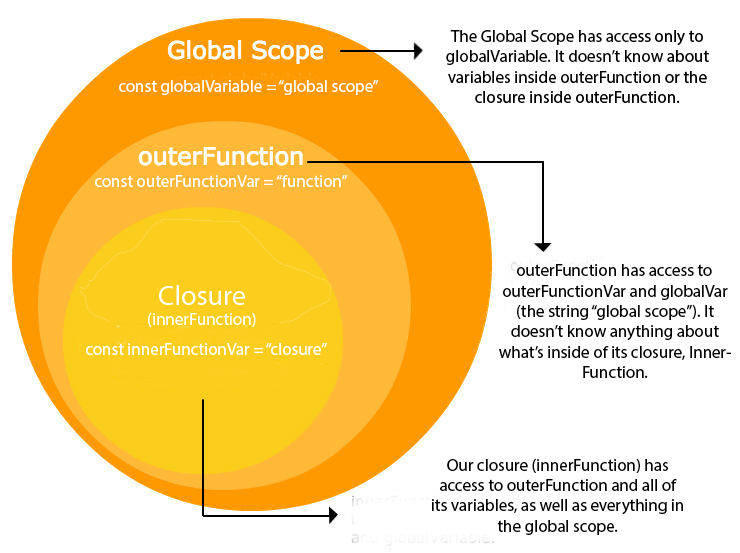
One of the most widely-covered, important topics in JavaScript is the concept of closures. You certainly hear about them a lot. You may have even been asked to explain what they are in an interview. Of all the explanations I’ve read, though, none have been newbie-friendly, and many have been downright confusing.

I’ll be honest: When I first tried learning about closures, I had absolutely no idea what the explanations I was reading were trying to say. Many seem to be riddled with unclear pronoun references and suffer from gross overuse of the word “function”. I realized only much later I’d been using them for months; closures just seemed like a logical extension of what I’d already been doing, and I hadn’t given it a single thought, much less known there was a special name for what I’d been doing.

Diving In

Closures are actually an incredibly simple concept. If you already have a basic understanding of how JavaScript’s scope works, it’s going to be a breeze. If not, it will be a little more complicated, but still not too hard.

I like to use the word “enclosure” when explaining closures, because in a sense a closure both exists in an enclosure (its parent function) and is an enclosure itself: Housing its own variables and potentially its own closures, everything inside of it is invisible to the rest of your application.

A JavaScript closure is, very simply, any function that exists inside another function. It looks like any other function, and requires no special steps to ‘turn it into’ a closure, except that it must exist within another function. It may be declared with function, or with const, or if you’re feeling nostalgic, with var. (It even works with new Function if you so desire.)

A closure has, perhaps unsurprisingly, full access to any variables declared within itself. It also has, due to the nature of JavaScript’s scope, access to any variable or function which exists in either the global scope, or in the hierarchy of functions within which it is nested. Conversely, all variables and any functions inside the closure (this would make them closures as well) are inaccessible to any function the closure is inside of, in addition to being inaccessible to anything in the global scope.

Below is a non-generic example of a closure, finding all the prime numbers between 2 and 17; the closure itself is in bold.

Note that to keep things as simple as possible so brand new coders (or those coming from languages like Python or Ruby) can easily follow, I’m implementing the simplest (and slowest) prime solver I know how to, declaring the numbers 1–17 as an array, and using a while loop with more Python/Ruby-like syntax. This implementation is in no way recommended :)

function primesUpToSeventeen() {
  const numbers = [2,3,4,5,6,7,8,9,10,11,12,13,14,15,16,17];
  const primes  = [];
  function isPrime(number) { //this is our closure.
    if (number < 2) 
      return false;
    else if (number === 2) 
      return true;
    let divisor = 2;
    while (divisor < number) {
      if (number%divisor === 0) 
         return false;
      else
        divisor += 1
    };
    return true
  };
  numbers.forEach(number=> {
    if (isPrime(number)) //isPrime() closure is being called here
      primes.push(number)
  });
  return primes
};
//returns [2, 3, 5, 7, 11, 13, 17]

In the above example, isPrime() is a closure housed within its parent function, primesUpToSeventeen(). Its parent doesn’t know or care what’s happening inside of isPrime(); it doesn’t know anything about its internal variables, what functions (closures!) it may contain (in this case, it doesn’t have any), or even if there are variables declared inside isPrime() which share names with variables in primesUpToSeventeen()'s own scope. All it knows is what isPrime() tells it when it completes its work; in this case,isPrime() is going to return either true or false. That’s all its parent function really knows.*

So, so far so good; we’re getting somewhere. But the above function is actually a pretty unhelpful example. We could move isPrime() out of primesUpToSeventeen() like this:

function primesUpToSeventeen() {
  //primesUpToSeventeen() without isPrime() code here
}
function isPrime(number) {
  //isPrime code here
}

…and it would behave identically.

Let’s do just that, and then add another step to demonstrate one of the concepts we’ve covered so far: that a closure has access to any variable in any of the functions it’s nested in. Here, we’ll only return numbers if a.) they’re prime, and b.) the result of adding 6 to them is also prime. This is a bit contrived for the sake of keeping it simple and illustrating this concept, so just pretend our addition is some highly complicated function doing interesting work on the numbers it receives.

function isPrime(number) { //exists in global scope; not a closure
  //...code here
};
function plusSixPrimesUpToSeventeen() { //our outer function
  const numbers = [2,3,4,5,6,7,8,9,10,11,12,13,14,15,16,17];
  const primes  = [];
  numbers.forEach(number=> { //add primes we find to primes array
    if (isPrime(number))
      primes.push(number)
  });
  function findPlusSixPrimes() { //this is our closure
    const plusSixPrimes = [];
    primes.forEach(prime=> {
      const primePlusSix = prime + 6
      if (isPrime(primePlusSix)) {
        plusSixPrimes.push(prime)
      };
    });
    return plusSixPrimes
  };
  return findPlusSixPrimes() //we call our closure here
};
//returns [5, 7, 11, 13, 17] because 11, 13, 17, 19 and 23 are prime

Notice we didn’t pass any variables to our closure. We didn’t have to; isPrime() exists in the global scope, so our closure can use it whenever it wants, and the primes array we populated earlier at the top of our main (“outer”) function (plusSixPrimesUpToSeventeen()) exists in the same space (scope) our closure does.

And that’s pretty much it! Closures have many uses not covered here, but you now understand what they are and how they work.

*Note that this does not hold true for reassignment; declaring a variable within a closure, even a variable with a name already used outside of the closure will not result in any namespace issues; however, reassigning or mutating a variable (e.g. numbers = [] or numbers.length = 0) will modify that outer variable. In this particular case, numbers can’t be reassigned anyway as it’s a constant, and even if it weren’t, I used a forEach loop, so reassigning numbers wouldn’t actually affect the function’s output. But it’s important to remember that closures absolutely can modify any variable it has access to (which is a good thing!).

JavaScript
Guides And Tutorials
Explanation
Programming
Closure
Recommended from ReadMedium