
ClickHouse Sharding and Replication. How it works.

Introduction
ClickHouse nodes actually very good at utilizing the underlying hardware at the theoretical limits and quite often there’s no need for the horizontal scaling. Simply replacing the machine, that runs ClickHouse, with something more powerful might be enough. But only until a certain point, after which clusters come into play. At the end of the day, ClickHouse is the MPP (massively parallel processing) system that can parallelize read/write queries across many hosts. This functionality can be enabled through the sharding and replication, which is the focus of this article.
Clusters introduce horizontal scaling: instead of enhancing one machine, we’ll split data into pieces and spread it out across multiple machines with some replication for data availability.

Shards are disjoint subsets of data and replicas are the copies of them. The main purpose of shards is to increase your cluster’s storage capacity and improve the write query performance as the host can receive the limited number of inserts at a time. Replicas, in turn, improve read IOPs of the cluster, which is basically the ability to have more people reading the data. Plus, replicas provide HA (High Availability) mechanism.
Different sharding and replication patters:

- All Sharded option at first glance can seem to be useless, as it doesn’t introduce any HA, but it might be useful when we want to run queries across system tables, where each host has its own copy.
- All Replicated is for the small tables that need to be available on each machine for fast query execution (joins).
- Sharded and Replicated is the most common pattern for big fact tables.
Replication
When we think about sharding and replication in ClickHouse, we think about it on the table level. We don’t replicate databases or entire server.
MergeTree table engine has a lot of variants like SummingMergeTree and AggregationMergeTree, etc. They all have a replicated sibling, that’s, in addition to what MergeTree already does, also automatically replicates any data it receives to other table.
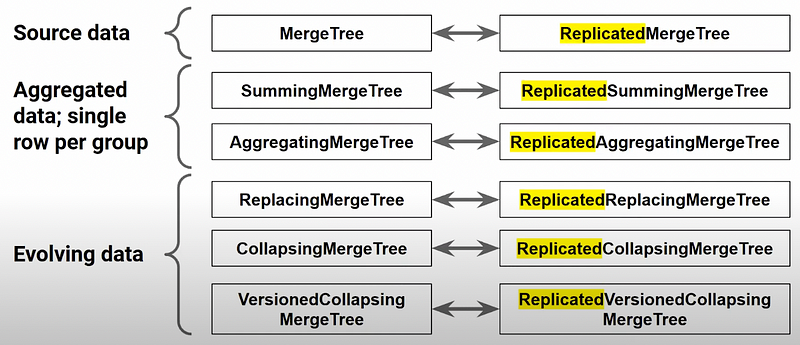
How Replication works
To make replication work, we need a separate ZooKeeper cluster to coordinate our replicated tables. When we insert data into our replicated table on Node 1, it’ll generate data parts that eventually will be replicated to Node 2 replica. Every replicated table knows how to connect to ZooKeeper (ClickHouse Keeper). Within ZooKeeper there’s a list of tables as well as the contents of those tables (not actual data parts, but their names at least). Node 1 stores the receiving part, but also makes a note in ZooKeeper with information to identify it. Meanwhile, Node 2 is constantly scanning ZooKeeper and, as soon as something comes up, it just grabs missing data parts through the default port 9009 and copies them onto its local copy.
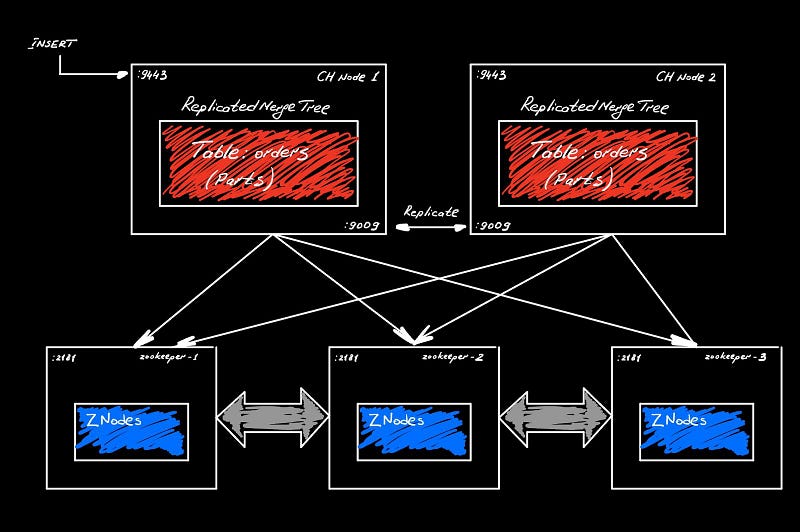
Replication is asynchronous, but sequential. ZooKeeper maintains replication queue that everyone agrees on. As we insert, new parts will be mentioned in this queue and stored in order of fetching for other replicas. ZooKeeper guarantees the synchronization of the queue across its cluster.

We can check the history and the current state of this queue through the handy system table:
SELECT * FROM system.replication_queue LIMIT 1 format Vertical
What’s exactly replicated?
Basically, anything that changes the data gets replicated:
- INSERT statement
- ALTER TABLE DELETE/UPDATE
- TRUNCATE
- OPTIMIZE statement (as it forces the merge of the parts that generates new part)
DDL statements don’t get replicated automatically, but we can force it, as we’ll see later.
Building distributed table

In the example above, we store data in the replicated table called orders_local. If we want to run the queries across the entire set of shards, we run it across the distributed table. It has no data, but knows where the underlying shards and replicas are located and can send queries to them.
First, we create the sharded and replicated table that will store the actual data:
CREAATE TABLE IF NOT EXISTS orders_local(
  `Year` UInt16 CODEC(DoubleDelta, ZSTD(1)),
  `Quarter` UInt8,
  `Month` UInt8 ...
) Engine = ReplicatedMergeTree(
'/clickhouse/{cluster}/tables/{shard}/{database}/orders_local',
'{replica}')
PARTITION BY toYYYMM(OrderDate)
ORDER BY (OrderDate, ShopName)
Important thing in the DDL above is the path that we pass as the parameter to ReplicatedMergeTree engine. It’s the path in ZooKeeper that it follows to enable it to communicate and learn about parts that it needs to replicate. Each ClickHouse server has a /etc/clickhouse-server/config.d/macros.xml file that stores these macrose’s values that it uses to replace in this path. {replica} is the unique name across all shards and replicas.
Second, we create the distributed table to find data through the SELECT across all shards. This is an umbrella table that knows about the cluster we’re using. It specifies the sharding key to distribute data evenly across all shards, when we run INSERTs.
CREATE TABLE IF NOT EXISTS orders AS orders_local
Engine = Distributed(
'{cluster}', currentDatabase(), orders_local, rand()
)
For fully replicated dimension tables we have the same ReplicatedMergeTree, but the path doesn’t differentiate between replicas (instead of {shard} we have all). That’s just one path all replicas communicate through.
CREATE TABLE IF NOT EXISTS shops (
...
)Engine=ReplicatedMergeTree(
'/clickhouse/{cluster}/tables/all/{database}/shops',
'{replica}'
)
PARTITION BY tuple() -- way to tell CH not to split the data into any partitions
PRIMARY KEY ShopID
ORDER BY ShopID
Macros help create table ON CLUSTER
ClickHouse uses macros you define in the required xml file for replication and sharding:
/etc/clickhouse-server/config.d/macros.xml

<clickhouse>
  <macros>
    <cluster>demo</cluster>
    <shard>0</shard>
    <replica>clickhouse-main-0</replica>
  </macros>
</clickhouse>

SELECT * FROM system.macros
Even though DDL statements don’t get replicated automatically, we can specify it with the ON CLUSTER part:
CREATE TABLE IF NOT EXISTS orders ON CLUSTER my_cluster_name

DROP TABLE IF EXISTS orders ON CLUSTER my_cluster_name

ALTER TABLE orders ON CLUSTER ...
ON CLUSTER will execute your command on each node, by simply sending it there. It knows where to send your query by looking into the file /etc/clickhouse-server/config.d/remote_servers.xml
This tells CH where shards and replicas are

<clickhouse>
  <remote_servers>
    <demo> <-- cluster name
    <secret>top_secret</secret> <-- for secure communication between nodes
      <shard>
        <replica><host>10.0.0.71</host><port>9000</port></replica>
        <replica><host>10.0.0.72</host><port>9000</port></replica>
        <internal_replication>true</internal_replication>
      </shard>
      <shard>
      </shard>
    </demo>
  </remote_servers>
</clickhouse>
You can verify this layout by querying system.cluster table:
SELECT cluster,
       groupArray(concat(host_name, ':', toString(port))) AS hosts
FROM system.cluster
GROUP BY cluster
ORDER BY cluster
At first glance, this setup might seem complex and it’s easy to make a typo on one of the servers’ configuration so that the distributed queries don’t fully work. Kubernetes Operator helps avoid that, by eliminating the need to set this up manually.
Data Loading
When you want to insert something to the distributed table, you have 2 options:
- INSERT to the table with Distributed engine, that knows where the underlying local copies are. This approach puts more load on the ClickHouse, but simplifies the application code.
- INSERT directly to the local copies. This approach offloads the ClickHouse server, but requires the application logic to be more intelligent on INSERTs. It should know how shards are arranged.
- CHProxy — sits in from of CH and distributes transactions across nodes (only works with HTTP connections)
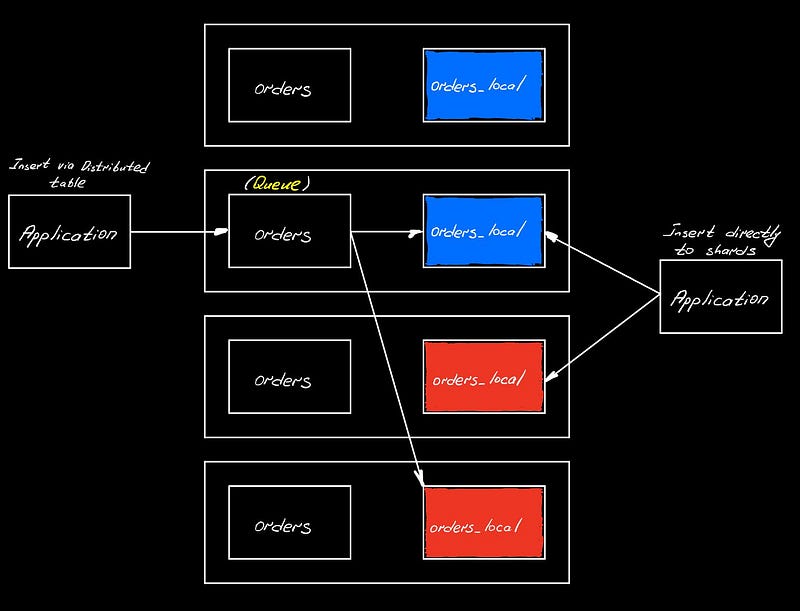
INSERT statement itself will be almost identical (just the name of the table). Local INSERT is simple and once part is written, it can be queried. Distributed INSERT will be split into blocks depending on the specified sharding key, then we put them in the queue, which is directory in the storage folder on the disk of the node, that received the distributed query. There’s a thread pool that will take those blocks and propagate to the local copies. By default, when ClickHouse tells us that it got the data, it actually means that it’s in the queue, but not yet in the table (this can be changed via insert_distributed_sync setting).

Distributed SELECT
Server that receives the query is the initiator node. It breaks up the query and sends it up to the local copies. If the query is doing the aggregation, then the initiator needs to merge AggregateStates from local copies and do ORDER BY if asked.

JOIN in the SELECT
If you have a JOIN in your SELECT, then ClickHouse pushes down it by default. So, the trick here is to use subquery in the left table to compute aggregates before the actual JOIN happens. Thus, only the subquery will be sent to remote servers and the actual join will happen on the initiator node on a way smaller set of data.
SELECT ...
FROM default.orders
JOIN default.shops USING (shopID)
GROUP BY ...

// translates to the local copy

SELECT ...
FROM default.orders_local
ALL INNER JOIN default.shops USING (shopID)
GROUP BY ...

// we want left side query to be a subquery so that only that is sent to remote servers

SELECT ...
FROM (
  SELECT ... FROM default.orders
  GROUP BY ...
) subq
JOIN default.shops USING (shopID)
ClickHouse doesn’t have any distributed query optimizers. Instead it’s rule based optimization, hence, it looks into the way we structure our query and acts accordingly.
If we want to join 2 tables that don’t fit to one shard, it gets more complicated, because in this case ClickHouse have to deal with 2 distributed tables in the JOIN.
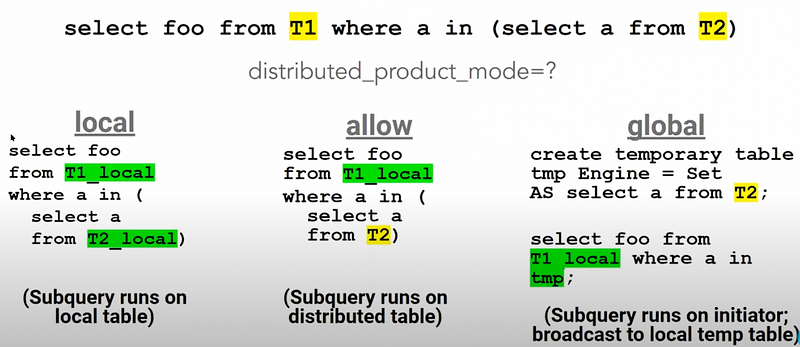
ClickHouse doesn’t know if whether the data is correctly organized in the local copies, so that this join can take place. By default, if you run this query, it’ll return an error. We can avoid that with the distributed_product_mode setting.


