
CLAHE and Thresholding in Python
Contrast Limited Adaptive Histogram Equalization and Thresholding using OpenCV in Python
Introduction
In this article, let’s talk about histogram equalization and image thresholding. Histogram equalization is one of the tools we have for image pre-processing and it makes image thresholding or segmentation tasks easier.
The reason we need histogram equalization is that when we collect images that are washed out or images with low contrast, we can stretch the histogram to span the entire range.
Let’s look at an example, Image is collected using an electron microscope.

In the above image, we can see the separation but it is not clear as it could be. So let's look at the histogram and use the equalization to stretch the histogram to threshold it.
import cv2
import numpy as np
from matplotlib import pyplot as plt
img = cv2.imread("test.jpg", 0)
equ = cv2.equalizeHist(img)First I’ve read my image as grayscale and assigned it to the variable img. To perform histogram equalization we can run cv2.equalizeHist(img).
Let’s look at our test image’s histogram. And you can see it is skewed to the right side.
plt.hist(img.flat, bins=100, range=(0, 255))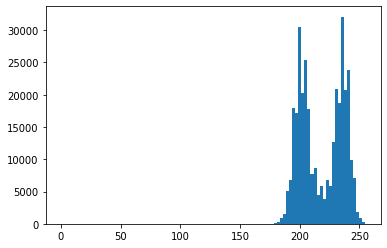
Let’s look at the equalized image’s histogram. And you can see the histogram is stretched all the way to 255.
plt.hist(equ.flat, bins=100, range=(0, 255))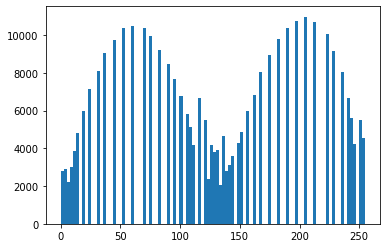
Below is the result of the histogram equalized image,
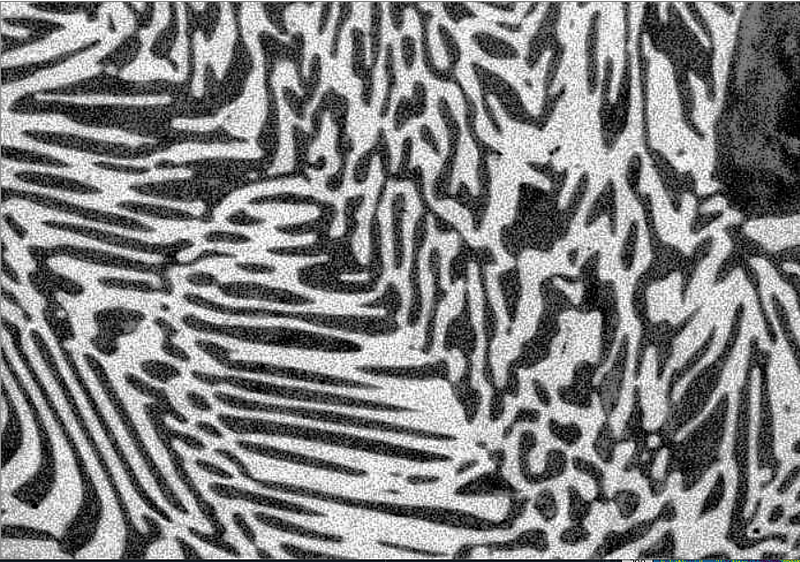
As you can see there is a lot of noise in the above image, because it considers the global contrast of the image, not just the local contrast. Therefore performing the global equalization might not work very well on your image, In those cases, we can use Adaptive Histogram Equalization or also know as CLAHE (Contrast Limiting Adaptive Histogram Equalization).
Contrast Limiting Adaptive Histogram Equalization (CLAHE)
Contrast Limited AHE (CLAHE) is a variant of adaptive histogram equalization in which the contrast amplification is limited, so as to reduce this problem of noise amplification. In simple words, CLAHE does histogram equalization in small patches or in small tiles with high accuracy and contrast limiting.
Now we know what CLAHE is, let’s see how to set it up.
clahe = cv2.createCLAHE(clipLimit =2.0, tileGridSize=(8,8))
cl_img = clahe.apply(img)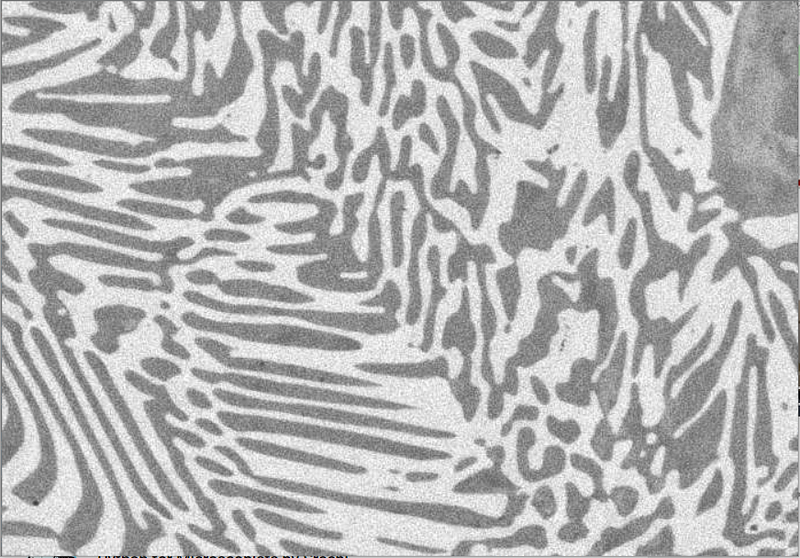
As you can see from the image above CLAHE gives a much better result compare to the normal equalized image. But it still has a lot of noise, Let’s see how thresholding works out to get better results.
To get a better result on images use
.tifffile format rather than.jpegfile format
Before getting started on thresholding we need to look at the histogram of the CLAHE image.
plt.hist(cl_img.flat, bins=100, range=(100, 255))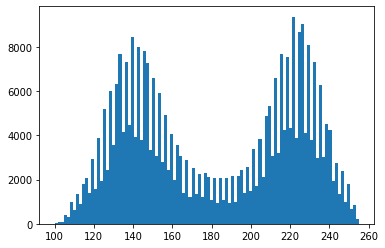
As you can see from the above histogram there is a dip between 160–200 and we can decide on a close number to separate those two peaks. After we decide on a close number we can use it to do the thresholding (I’ve selected 190)
ret, thresh1 = cv2.threshold(cl_img, 190, 150, cv2.THRESH_BINARY)
ret, thresh2 = cv2.threshold(cl_img, 190, 255, cv2.THRESH_BINARY_INV)
Ignore the first argument ret, We can get the thresholded image to the variablethresh1 and thresh2. In the above code part, the first argument is the image, secondly the threshold value we selected, thirdly, we need to give a value to all the pixels that are thresholded, and lastly, we need to give a method. I have given the THRESH_BINARY and THRESH_BINARY_INV to separate variables.
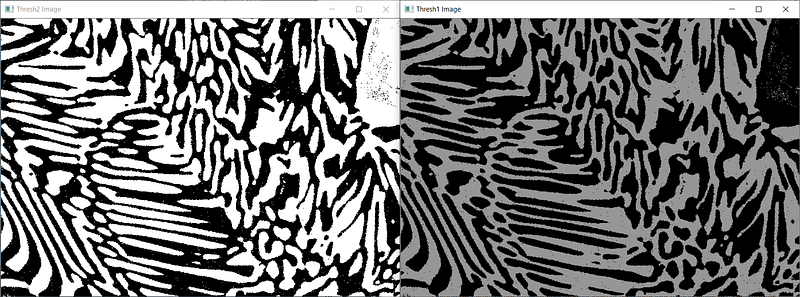
In the first threshold image (thresh1) has the gray level of value 150 and the second threshold image (thresh2) has a value of 255. This is nothing but histogram-based thresholding.
In the above example, we found the value 190 is the optimal value by referring to the histogram. But there is an easier way to find the optimal value using OTSU.
ret, thresh3 = cv2.threshold(cl_img, 0, 255, cv2.THRESH_BINARY + cv2.THRESH_OTSU)
Using OTSU we can automatically segment it.
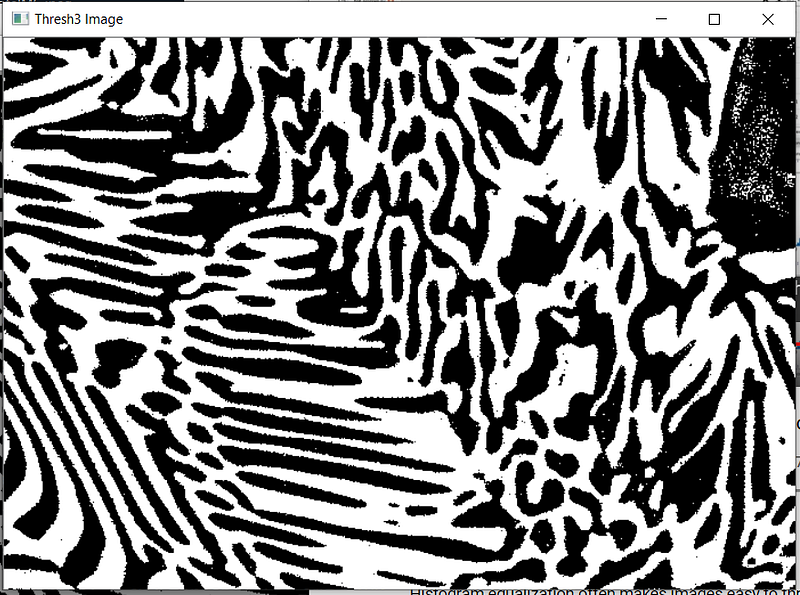
OTSU is the best way to find the optimal value if you are using binary threshold. You can even use K-means if necessary.
That is it for the article. If your image is noisy, do not forget to denoise it first. Then you can do all of these exercises.
Conclusion
Summary fo this is that CLAHE works great in most situations. Then you can use the histogram to segment your image into these two phases but if you do not want to plot the histogram to identify the separation then you can use OTSU.


