
CKA (Certified Kubernetes Administrator) Cheat Sheet
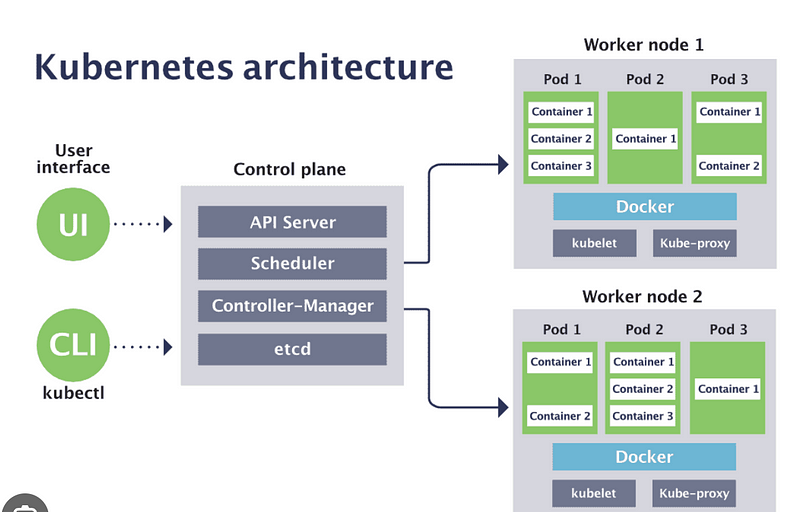
1. Understanding Kubernetes Cluster Architecture — Master node components: API server, etcd, scheduler, controller manager. — Worker node components: kubelet, kube-proxy, container runtime.
2. Kubernetes Objects and Workloads — Pods, Deployments, StatefulSets, DaemonSets, Jobs, CronJobs. — Understand how to create, update, and maintain these workloads.
3. Networking in Kubernetes — Pod networking concepts, CNI. — Services and their types (ClusterIP, NodePort, LoadBalancer, ExternalName). — Ingress controllers and Ingress resources.
4. Storage in Kubernetes — Understand Persistent Volumes (PV), Persistent Volume Claims (PVC), StorageClasses. — ConfigMaps, Secrets for configuration and sensitive data.
5. Security in Kubernetes — RBAC (Role-Based Access Control) — Roles, ClusterRoles, RoleBindings, ClusterRoleBindings. — Network Policies. — Pod Security Policies.
6. Cluster Maintenance — Cluster upgrade process. — Backup and restore methodologies for Kubernetes and etcd.
7. Monitoring and Logging — Basics of cluster-level logging and monitoring. — Familiarize with tools like Prometheus and Grafana, ELK stack.
8. Troubleshooting — Troubleshoot application failure. — Troubleshoot control plane failure. — Troubleshoot worker node failure. — Troubleshoot networking.
Key kubectl Commands:
- `kubectl get pods/deployments/services -n namespace` — List resources in a namespace. - `kubectl describe pod/deployment <name> -n namespace` — Get detailed info about a resource. - `kubectl create -f config.yaml` — Create resource from a YAML file. - `kubectl apply -f config.yaml` — Apply changes from a YAML file. - `kubectl delete pod/deployment <name>` — Delete a resource. - `kubectl exec -it <pod_name> — /bin/bash` — Execute an interactive bash shell in the pod. - `kubectl logs <pod_name>` — Get logs from a pod. - `kubectl port-forward pod/<pod_name> 8080:80` — Port forward a local port to a pod. - `kubectl drain <node_name>` — Prepare a node for maintenance. - `kubectl cordon/uncordon <node_name>` — Mark node as unschedulable/schedulable. - `kubectl top node/pod` — Display resource (CPU/Memory) usage.
Kubernetes Commands and Syntax for CKA Exam
General Management
kubectl get [resource]: List resources. For example,kubectl get pods.kubectl describe [resource] [name]: Show detailed information about a resource. For example,kubectl describe pod my-pod.
Creating and Managing Resources
kubectl create -f [file.yaml]: Create a resource from a YAML file.kubectl apply -f [file.yaml]: Apply a configuration to a resource from a YAML file.kubectl delete [resource] [name]: Delete a resource. For example,kubectl delete pod my-pod.kubectl edit [resource] [name]: Edit the configuration of a resource.
Namespaces
kubectl get namespaces: List all namespaces.kubectl create namespace [name]: Create a new namespace.
Pods
kubectl run [name] --image=[image]: Run a pod with a specific image.kubectl exec -it [pod-name] -- [command]: Execute a command in a running pod.
Deployments and Replicas
kubectl scale deployment [deployment-name] --replicas=[number]: Scale a deployment to the specified number of replicas.kubectl rollout status deployment/[deployment-name]: Get the rollout status of a deployment.kubectl rollout undo deployment/[deployment-name]: Rollback to the previous deployment.
Services
kubectl expose deployment [deployment-name] --type=[type] --port=[port]: Expose a deployment as a new Kubernetes service.
Logs and Debugging
kubectl logs [pod-name]: Fetch the logs of a pod.kubectl logs -f [pod-name]: Stream the logs of a pod.
Node Management
kubectl get nodes: List all nodes in the cluster.kubectl cordon [node-name]: Mark node as unschedulable.kubectl drain [node-name]: Drain node in preparation for maintenance.
Resource Inspection
kubectl top pod: Display metrics for pods.kubectl top node: Display metrics for nodes.
Configuration
kubectl config view: View Kubernetes configuration.kubectl config use-context [context-name]: Switch to a different cluster context.
kubectl Cheat Sheet
- Kubernetes has an official
kubectlcheat sheet which is an invaluable resource: https://kubernetes.io/docs/reference/kubectl/cheatsheet/
Tips for Using kubectl Commands
- Understand Contexts: Know how to switch contexts if you’re working with multiple clusters.
- Use YAML Files for Complex Configurations: While imperative commands are useful, declarative configurations using YAML are more consistent and repeatable.
- Explore kubectl Autocomplete: It can significantly speed up command entry.
- Remember Selectors: They are powerful for filtering results, especially with
getcommands.
Exam Tips
- Read and understand the exam curriculum thoroughly. - Practice with hands-on labs and real-world scenarios. - Time management is crucial during the exam. - Familiarize yourself with the Kubernetes documentation, which is accessible during the exam.
This cheat sheet covers the fundamental concepts and commands that are essential for the CKA exam and day-to-day Kubernetes administration. Remember, hands-on practice and familiarity with the official Kubernetes documentation are key to success in the CKA exam.


