
Choosing the Right Image Format for Your Application: SVG vs. PNG vs. JPG
Introduction
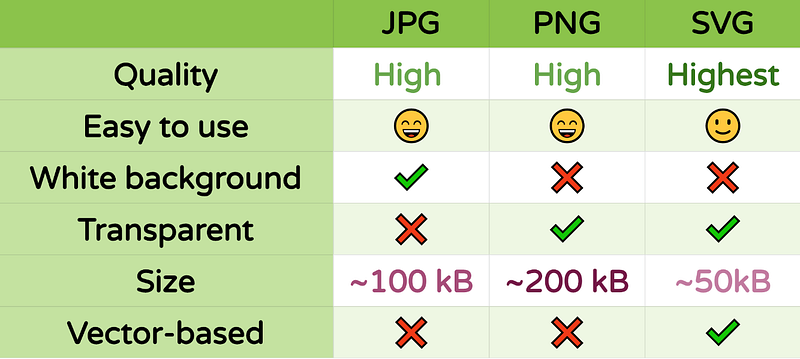
Images are an essential part of modern web and application development. When it comes to selecting the right image format for your project, you need to consider factors like image quality, file size, and scalability. In this blog post, we will explore three popular image formats: SVG, PNG, and JPG, and discuss the pros and cons of each with examples to help you make an informed decision.
SVG (Scalable Vector Graphics)
Pros:
- Scalability: SVGs are vector-based, meaning they can be scaled up or down without loss of quality. This makes them perfect for responsive design.
- Small File Size: SVG files are typically smaller in size compared to raster formats like PNG or JPG, making them ideal for reducing page load times.
- Perfect for Icons and Logos: SVGs are widely used for icons, logos, and illustrations. They maintain sharpness regardless of screen size or resolution.
Cons:
- Complexity: SVGs can become complex for intricate designs, potentially leading to larger file sizes and rendering issues on some devices.
- Limited for Photographs: SVGs are not suitable for photographs or images with complex gradients and shading.
Example:
Consider an SVG icon of a heart. You can easily scale it without losing quality:
<svg width="100" height="100" xmlns="http://www.w3.org/2000/svg">
  <path d="M50 15
           C50 10, 42 10, 42 15
           C42 22, 50 35, 50 35
           C50 35, 58 22, 58 15
           C58 10, 50 10, 50 15
           Z"
        fill="red"/>
</svg>
PNG (Portable Network Graphics)
Pros:
- Transparency: PNGs support transparent backgrounds, making them suitable for images with irregular shapes.
- Lossless Compression: PNGs use lossless compression, preserving image quality while reducing file size.
- Wide Browser Support: PNGs are well-supported across all major web browsers.
Cons:
- File Size: PNGs can have larger file sizes compared to JPGs, making them less suitable for large images.
- Complexity: Like SVGs, PNGs can become large and complex for intricate designs, affecting load times.
Example:
Consider a PNG image with transparency, like a logo with a transparent background:
JPG (Joint Photographic Experts Group)
Pros:
- High Compression: JPGs use lossy compression, which is highly efficient for photographs and images with gradients and shading. This results in smaller file sizes.
- Photographic Quality: JPGs excel at maintaining the visual quality of photographs.
- Wide Compatibility: JPGs are compatible with nearly all web browsers and image editing software.
Cons:
- Lossy Compression: JPGs are not suitable for images with sharp lines or text, as they can introduce artifacts.
- No Transparency: JPGs do not support transparency; they always have a solid background.
Example:
Consider a high-resolution photograph that needs to maintain its quality while minimizing file size:
Choosing the Right Format
In summary, the choice of image format depends on your specific use case:
- SVG: Use SVGs for icons, logos, and simple graphics that need to scale without quality loss.
- PNG: Choose PNGs for images with transparency and situations where lossless quality is essential, but be mindful of file size.
- JPG: Opt for JPGs for photographs and complex images with gradients, as they offer the best compression for such content.
Remember that you can use a combination of these formats within your application to optimize performance and visual quality. Ultimately, the right format will ensure that your images look great, load quickly, and enhance the user experience.


