
Choosing the Right Git Branching Strategy for Your Team
Analysis of Multiple Branching Strategies with a Flowchart
Git is the most popular version control and source code management tool currently available in the market. It has revolutionised the way we looked at version control with its distributed repository structure that helps developers detach and work on their local repo and attach back to push changes to the remote repo. Git maintains the same version control within the local repo as it keeps in the remote, as the local repo is just a clone of the remote.
Every organisation using Git have some form of Branching Strategy if they work in a team and deliver useful software. There is no right branching strategy, and it has always been a point of contention between developers and industry experts about which one is the best.
Though you are free to implement a custom branching strategy according to your need, however, there are a few that are widely accepted and utilised. Let’s dig down into some of the most popular branching strategies and understand what suits best to what kind of teams.
GitFlow
Vincent Driessen created GitFlow, and it is one of the most popular branching strategy adopted by most enterprises that have many teams delivering a single software with multiple stakeholders pushing multiple requirements and feature requests.
- GitFlow’s feature branches allow multiple developers to work on different features in parallel.
- They merge feature branches into a develop branch when unit tested and ready.
- The develop branch then branches into multiple release branches that make up a point in time release. Once you deploy a particular Release, it merges back to the master branch and tagged with the Release version.
- It also allows for hotfixes using the hotfix branches that merge directly into master.
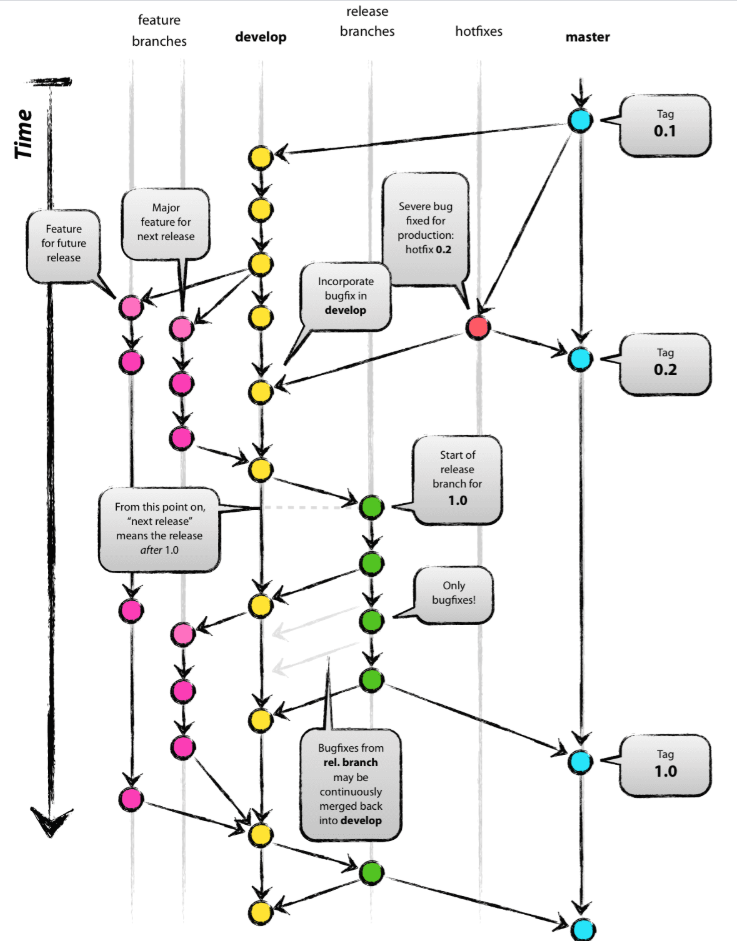
Not to mention that developers raise a pull-request for merging the code to the develop branch. That is necessary as you want another pair of eyes looking at your code before you merge it with a stable branch. Some teams also utilise static code analysis tools like SonarQube in their CI process to ensure this is taken care of automatically.
When to use GitFlow
The GitFlow proposition sounds good if you are developing a monolithic application which a tightly coupled code base, that cannot be separated and simplified into smaller parts (like in a microservices-based architecture). It does not mean that you should always use GitFlow for monolithic applications, as there are other ways of doing it. Because of the complexity of GitFlow, you should use it only when your use case requires it.
If you have
- A large code monolithic codebase
- Multiple feature requests worked upon by various developers
- Multiple point-in-time releases targeted for the future with static release windows
- The time-gap between Development and Release range from Weeks to Months
Then GitFlow is more suitable for you.
GitHub Flow
For the Geeks who think they should be releasing software more often into Production and want to avoid all the complicated mumbo-jumbo and governance over the release process, you might already be using Github flow. GitHub flow is one of the simplest ways of collaboration between your developers and used by most open-source projects with rapid development, testing and deployment frequency.
GitHub Flow was popularised by (yes you guessed it right) GitHub and have the following process:
- You branch out of master and create a feature branch, work on the feature, and test it.
- Once your testing is complete and you want to deploy to Production, you raise a pull request to merge your code in the master.
- Once your pull request is approved, you can merge your code into the master branch which can then be tagged and deployed to Production.
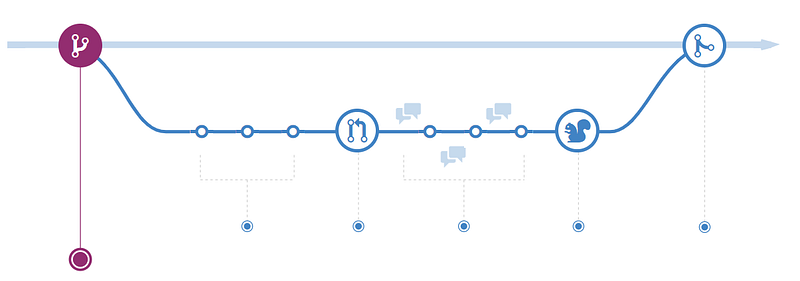
That’s it! The master branch always contains clean, deployable and reviewed code ready to deploy to Production. You can build a continuous delivery pipeline that watches your master branch and deploys to Production when it detects a merge.
When to use GitHub Flow
The process sounds simple, and many organisations are using it quite effectively, but this strategy is not suitable for everyone.
If you have
- Multiple smaller repositories that are targeting only a particular component of an application (such as in a microservices architecture) OR
- Release frequently into Production (cycle time between development to release is days to a couple of weeks).
- Do not need to worry about releases. You always deploy the latest code to Production.
- Want to have a pure CI/CD approach for deployment
Then GitHub flow is suitable for you.
Modified GitHub flow — The Middle Ground
Well, I have talked about two extremes, and most organisations somewhere fall in the middle. You do want to release when ready but also want to maintain a separate codebase that reflects code deployed to Production. GitHub flow does not preserve a different code base for Production, and you don’t need to as you deploy things as soon as you merge to the master.
However, most organisations need a branch where they can stage their deployments for integration testing before merging the code finally into Production. That would allow your QA team to test on a stable code base while your developers are working on features and delivering to the test environment by merging the feature branches into the QA branch.
For that, you can use a modified GitHub flow.
- Developers develop on feature branches and test on it.
- They then merge the feature branches to the master branch for QA testing through a pull request. That is where the CI process kicks in and deploys the code to the QA environments. The testers run their integration tests here.
- Once the tests are complete, and you are ready to release, you can deploy the code to Production and merge it with the production branch.

The production branch always reflects the production code, and it allows for the operations team to do hotfixes by branching out of the production branch into a hotfix branch, test the code and merge it back to Production without messing it with the delivery of features.
When to use the Modified GitHub flow
I would agree that it fits most use cases and one of the most pragmatic ways of looking at software delivery. It isn’t ambitious like the GitHub flow, and it isn’t overkilling like the GitFlow. I am not saying that GitFlow isn’t right — It has its use cases and user base, but seriously only use GitFlow if you need it.
If you have
- Smaller release cycles (cycle time between Dev to Production is days to a few weeks)
- Want to release in specific maintenance windows
- Have a CI/CD friendly environment
- Do not worry about multiple releases or don’t have a sizeable monolithic codebase.
Then Modified GitHub flow is more suitable for you.
Summary
Let us summarise the branching strategies into a helpful flowchart below
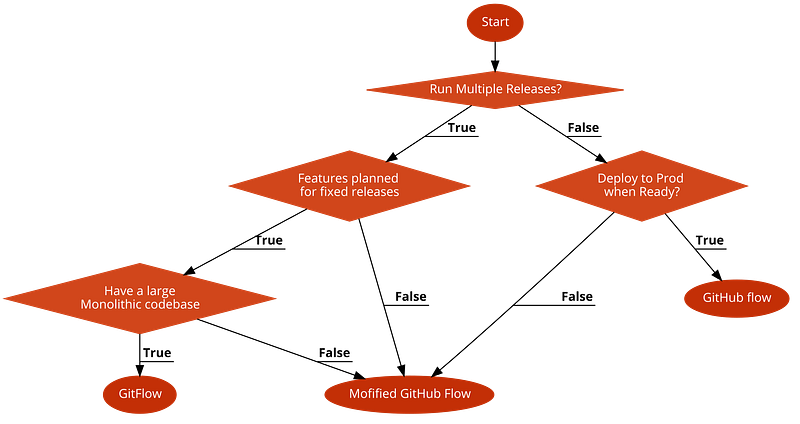
These are just guidelines based on experience, and you might have your innovative ways to solve your problems. It depends upon your team structure and ways of working, and like I said no one size fits all, so keep experimenting and improving.
Thanks for reading! I hope you enjoyed the article.


