
Unleashing the ChatGPT Tokenizer
Hands-On! How ChatGPT Manages Tokens?
Have you ever wondered which are the key components behind ChatGPT?
We all have been told the same: ChatGPT predicts the next word. But actually, there is a bit of a lie in this statement. It does not predict the next word, ChatGPT predicts the next token.
Token? Yes, a token is the unit of text for Large Language Models (LLMs).
Indeed one of the first steps that ChatGPT does when processing any prompt is splitting the user input into tokens. And that is the job of the so-called tokenizer.
In this article, we will uncover how the ChatGPT tokenizer works with hands-on practice with the original library used by OpenAI, the tiktoken library.
TikTok-en… Funny enough :)
Let’s dive deep and comprehend the actual steps performed by the tokenizer, and how its behavior really impacts the quality of the ChatGPT output.
How the Tokenizer Works
In the article Mastering ChatGPT: Effective Summarization with LLMs we already saw some of the mysteries behind the ChatGPT tokenizer, but let’s start from scratch.
The tokenizer appears at the first step in the process of text generation. It is responsible for breaking down the piece of text that we input to ChatGPT into individual elements, the tokens, which are then processed by the language model to generate new text.
When the tokenizer breaks down a piece of text into tokens, it does so based on a set of rules that are designed to identify the meaningful units of the target language.
For example, when the words that appear in a given sentence are fairly common words, chances are that each token corresponds to one word. But if we use a prompt with less frequently used words, like in the sentence “Prompting as powerful developer tool”, we might not get a one-to-one mapping. In this case, the word prompting is still not that common in the English language, so it is actually broken down to three tokens: “‘prom”, “pt”, and “ing” because those three are commonly occurring sequences of letters.
Let’s see another example!
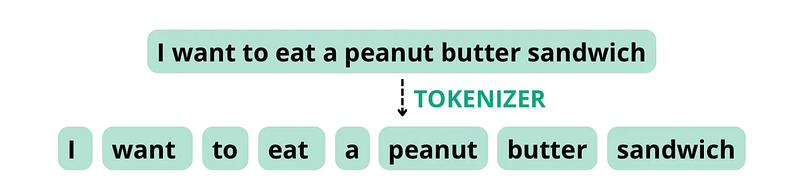
Consider the following sentence: “I want to eat a peanut butter sandwich”. If the tokenizer is configured to split tokens based on spaces and punctuation, it may break this sentence down into the following tokens with a total word count of 8, equal to the token count.
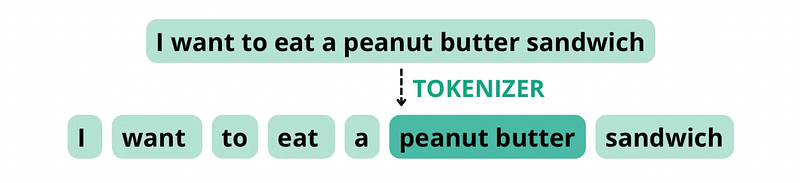
However, if the tokenizer treats “peanut butter” as a compound word due to the fact that the components appear together quite often, it may break the sentence down into the following tokens, with a total word count of 8, but a token count of 7.
In the context of ChatGPT and the management of tokens, the terms encoding and decoding refer to the processes of converting text into tokens that the model can understand (encoding) and converting the model’s completion back into human-readable text (decoding).
Tiktoken Library
Knowing the theory behind the ChatGPT tokenizer is necessary, but in this article, I would like to focus on some hands-on revelations too.
The ChatGPT implementation uses the tiktoken library for managing tokens. We can get it up a running like any other Python library:
pip install --upgrade tiktokenOnce it is installed, it is very simple to get the same encoding model that ChatGPT uses since there is a encoding_for_model() method. As inferred by the name, this method automatically loads the correct encoding for a given model name.
The first time it runs for a given model, it requires an internet connection to download the encoding model. Later runs won’t need internet since the encoding is already pre-cached.
For the widely used gpt-3.5-turbo model, we can simply run:
import tiktoken
encoding = tiktoken.encoding_for_model("gpt-3.5-turbo")
The output encoding is a tokenizer object that we can use to visualize how ChatGPT actually sees our prompt.
More specifically, the tiktoken.encoding_for_model function initializes a tokenization pipeline specifically for the gpt-3.5-turbo model. This pipeline handles the tokenization and encoding of the text, preparing it for the model’s consumption.
One important aspect to consider is that the tokens are numerical representations. In our “Prompting as powerful developer tool” example, the tokens associated with the word prompting were “‘prom”, “pt”, and “ing”, but what the model actually receives is the numerical representation of those sequences.
No worries! We will see what this looks like in the hands-on section.
Encoding types
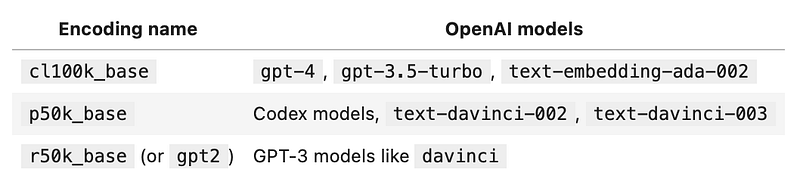
The tiktoken library supports multiple encoding types. In fact, different gpt models use different encodings. Here is a table with the most common ones:
Encoding — Hands-On!
Let’s move forward and try to encode our first prompt. Given the prompt “tiktoken is great!” and the already loaded encoding, we can use the method encoding.encode to split the prompt into tokens and visualize their numerical representation:
prompt = "tiktoken is great!"
encoded_prompt = encoding.encode(prompt)
print(encoded_prompt)
# Output: [83, 1609, 5963, 374, 2294, 0]
Yes, that is true. The output [83, 1609, 5963, 374, 2294, 0] does not seem very meaningful. But actually, there is something one can guess at first glance.
Got it?
The length! We can quickly see that our prompt “tiktoken is great!” is split into 6 tokens. In this case, ChatGPT is not splitting this sample prompt based on blank spaces, but on the most frequent sequences of letters.
In our example, each coordinate in the output list corresponds to a specific token in the tokenized sequence, the so-called token IDs. The token IDs are integers that uniquely identify each token according to the vocabulary used by the model. IDs are typically mapped to words or subword units in the vocabulary.
Let’s just decode the list of coordinates back to double check it corresponds to our original prompt:
encoding.decode(encoded_prompt)
# Output: 'tiktoken is great!'
The .decode() method converts a list of token integers to a string. Although the .decode() method can be applied to single tokens, be aware that it can be lossy for tokens that aren’t on utf-8 boundaries.
And now you might wonder, is there a way to see the individual tokens?
Let’s go for it!
For single tokens, the .decode_single_token_bytes() method safely converts a single integer token to the bytes it represents. For our sample prompt:
[encoding.decode_single_token_bytes(token) for token in encoded_prompt]
# Output: [b't', b'ik', b'token', b' is', b' great', b'!']
Note that the b in front of the strings indicates that the strings are byte strings. For the English language, one token roughly on average, corresponds to about four characters or about three-quarters of a word.
Knowing how the text is split into tokens is useful because GPT models see text in the form of tokens. Knowing how many tokens are in a text string can give you useful information like whether the string is too long for a text model to process, or how much an OpenAI API call will cost as usage is priced by token, among others.
Comparing Encoding Models
As we have seen, different models use different encodings types. Sometimes, there can be a huge difference in the token management between models.
Different encodings vary in how they split words, group spaces, and handle non-English characters. Using the methods above, we can compare different encodings for the different gpt models available on a few example strings.
Let’s compare the encodings of the table above (gpt2, p50k_base, and cl100k_base). To do so, we can use the following function that contains all the bits and pieces we have seen so far:
The compare_encodings function takes an example_string as input and compares the encodings of that string using three different encoding schemes: gpt2, p50k_base, and cl100k_base. Finally, it prints various information about the encodings, including the number of tokens, the token integers, and the token bytes.
Let’s try some examples!
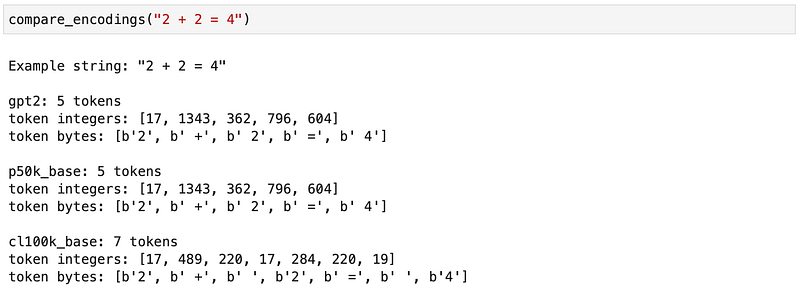
In this first example, although the gpt2 and p50k_base models agree on the encoding by merging together the math symbols with the blank spaces, the cl100k_base encoding considers them separate entities.
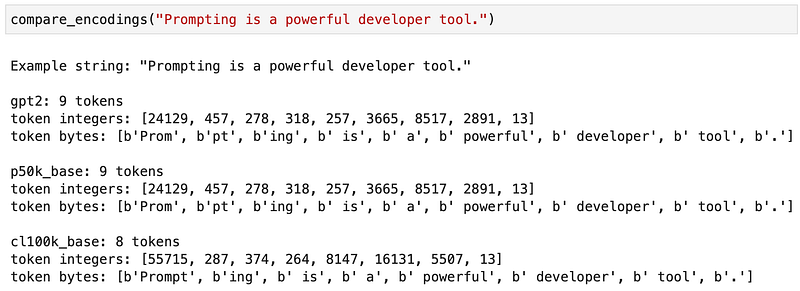
In this example, the way of tokenizing the word Prompting also depends on the selected encoding.
Tokenizer Limitations
This way of tokenizing the input prompts is sometimes the cause of some ChatGPT completion errors. For example, if we ask ChatGPT to write the word lollipop in reversed order, it does it wrong!
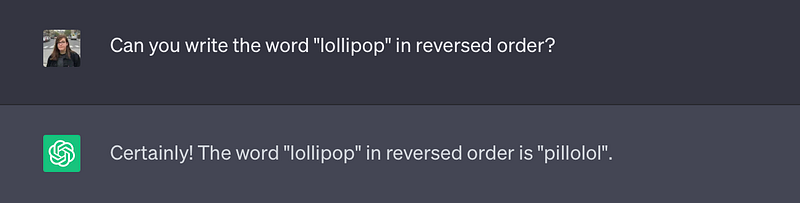
What is happening here is that the tokenizer actually breaks the given word down into three tokens: “l” ,“oll” and “ipop”. Therefore, ChatGPT does not see the individual letters, instead it sees these three tokens making it more difficult to print out individual letters in reverse order correctly.
Being aware of the limitations can make you find workarounds to avoid them. In this case, if we add dashes to the word between the individual letters, we can force the tokenizer to split the text based on those symbols. By slightly modifying the input prompt, it actually does a much better job:
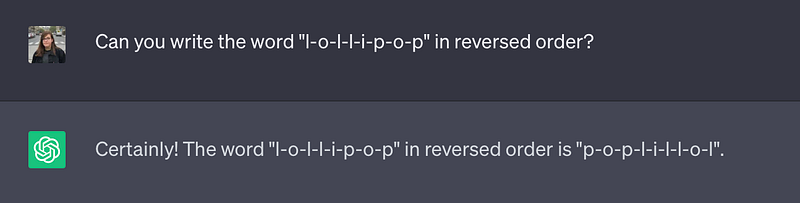
By using dashes, it is easier for the model to see the individual letters and print them out in reverse order. So keep that in mind: If you ever want to use ChatGPT to play a word game, like Word or Scrabble, or build an application around those principles, this nifty trick helps it to better see the individual letters of the words.
This is just a simple example where the ChatGPT tokenizer causes the model to fail in a very simple task. Have you encountered any other similar cases?
Summary
In this article, we have explored how ChatGPT sees user prompts and processes them to generate a completion output based on statistical patterns learned from vast amounts of language data during its training.
By using the tiktoken library, we are now able to evaluate any prompt before feeding it into ChatGPT. This can help us to debug ChatGPT errors since it can happen that by slightly modifying our prompt, we can make ChatGPT better complete the task.
There is also an extra take-home message: Some design decisions made can turn into technical debts in the future. As we have seen in the simple lollipop example, while the model succeeds in mind-blowing tasks, it cannot complete simple exercises. And the reason behind this is not on the model capabilities, but on the first tokenization step!
That is all! Many thanks for reading!
I hope this article helps you when builiding ChatGPT applications!
You can also subscribe to my Newsletter to stay tuned for new content. Especially, if you are interested in articles about ChatGPT:
Feel free to forward any questions you may have to [email protected] :)


